
 Amazon.com
Cisco WUSB600N Dual-Band Wireless-N USB Adapter Price comparison


- All prices mentioned above are in United States dollar.
- At amazon.com you can purchase Cisco-Linksys WUSB600N Dual-Band Wireless-N USB Network Adapter for only
- The lowest price of Cisco-Linksys WUSB600N Dual-Band Wireless-N USB Network Adapter was obtained on September 24, 2025 03:51.
Cisco WUSB600N Dual-Band Wireless-N USB Adapter Price History
Cisco WUSB600N Dual-Band Wireless-N USB Adapter Description
The Cisco WUSB600N Dual-Band Wireless-N USB Adapter: Speed and Versatility
The Cisco WUSB600N Dual-Band Wireless-N USB Adapter delivers exceptional wireless connectivity for your desktop or laptop. Perfect for streaming HD content, online gaming, and fast data transfers, this adapter ensures you stay connected without frustration. Explore the numerous advantages it brings to your home or office network.
Key Features of the Cisco WUSB600N
- Dual-Band Support: Operates on both 2.4 GHz and 5 GHz frequencies, offering flexibility and reducing interference.
- Wireless-N Technology: Achieves speeds up to 300 Mbps, ensuring faster download and upload rates.
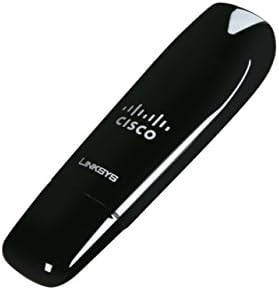
- Compact Design: Measuring just 2 x 9 x 6 inches and weighing 5.6 ounces, it’s easy to carry and install.
- Easy Setup: The plug-and-play feature allows for a hassle-free installation process.
- Secure Connection: Supports WEP and WPA/WPA2 encryption for a more secure wireless experience.
Why Choose the Cisco WUSB600N?
Investing in the Cisco WUSB600N means choosing reliability and speed. This adapter provides high-speed internet access to your devices, making it suitable for various online activities. Whether you’re streaming your favorite shows or participating in video calls, the Cisco WUSB600N ensures you enjoy a seamless experience.
Price Comparison Across Suppliers
Comparing prices for the Cisco WUSB600N reveals competitive options across various suppliers. Users can expect to find prices ranging from $20 to $35, depending on promotional offers and stock levels. This range provides flexibility, allowing customers to choose according to their budget.
Notable Trends in Price History
Examining the 6-month price history chart for the Cisco WUSB600N shows interesting trends. The price has fluctuated between $22 and $30, with occasional promotions dropping prices as low as $20. Such patterns indicate favorable buying periods, particularly during sales events.
Customer Reviews Overview
Customer feedback on the Cisco WUSB600N has largely been positive, highlighting its ease of use and reliable performance. Users adore its ability to connect quickly and its strong signal strength. Many have reported impressive performance gains over older wireless adapters.
However, some reviews noted occasional connectivity issues with specific router models, suggesting that compatibility may vary based on the equipment used.
Related Unboxing and Review Videos
For a deeper understanding of the Cisco WUSB600N, many customers recommend checking out unboxing and review videos available on YouTube. These visuals provide a comprehensive look at its setup, performance, and user experience, giving potential buyers clarity before investing.
In conclusion, the Cisco WUSB600N Dual-Band Wireless-N USB Adapter stands out as an excellent choice for those looking to upgrade their wireless connectivity. With its versatile features, compact design, and competitive pricing, it simplifies your online activities while keeping you connected seamlessly. Don’t miss out on this essential tool for your internet needs.
Compare prices now!
Cisco WUSB600N Dual-Band Wireless-N USB Adapter Specification
Specification: Cisco WUSB600N Dual-Band Wireless-N USB Adapter
|
Cisco WUSB600N Dual-Band Wireless-N USB Adapter Reviews (3)
3 reviews for Cisco WUSB600N Dual-Band Wireless-N USB Adapter
Only logged in customers who have purchased this product may leave a review.






Frank C. –
I purchased this Linksys N adapter to replace a historic Microsoft MN-510 802.11b adapter on one Windows XP desktop computer to take advantage of a new Linkys WRT400N router on my home network.
The adapter works flawlessly, allowing me to connect to either the mixed 2.4GHz or pure-N 5GHz radio on the WRT400N. Signal strength, as expected, is better over distance for the 2.4GHz band. But it’s still good for 5GHz. At 30+ feet on the same floor with two walls in between, the 5GHz radio routinely showing a connection at 160-240Mbps (although at 2.4GHz at the same distance, it’s routinely at 270-300Mbps).
The desktop stand for the USB-form factor adapter is solid and appreciated, as it makes it easy to position the adapter for a desktop computer. The stand and adapter are glossy black, with a blinking blue light showing operation.
The major flakiness (and what cost this adapter a star) is the installation wizard software.
I removed the old wireless adapter and followed the Linksys adapter instructions as written. When it came to confirming that the adapter was installed correctly, the installation software displayed an error message saying it may not be. I hit Retry (as the wizard suggested), and after a couple of minutes got the same message. However, the Wireless Network Connection icon in Windows XP showed a working connection throughout. I exited the so-called “wizard” and finished configuration manually with no problems.
But it appears Linksys simply can’t do decent installation software. I had similar problems with the WRT400N router install, which I also had to complete manually. I have to wonder if the Linksys software only assumes a new install without previous wireless equipment and a network, and fails when it finds any existing wireless network that’s being upgraded.
(One tip, by the way, that applies to Windows XP: If you get an error when connecting stating, “Windows was unable to find a certificate to log you onto the network,” you’ll need to go into the Properties for that particular wireless network connection in Windows and uncheck the box “Enable IEEE 802.1x authentication for this network.”)
All in all, a good piece of N adapter hardware with flexible 5GHz and 2.4GHz operation. A poor piece of installation software that should be avoided. Either use the CD, as others have suggested, just to install the needed drivers when prompted after plugging in the adapter, or try the installation software and be prepared to complete the configuration manually if you have problems.
Michael Sandman –
The 600N goes into a USB port. If you’re planning to use on a laptop, note that it’s thicker than a normal USB connector and may it block adjacent ports. It comes with a normal USB cable connected to a small stand so the thickness is not a problem for a desktop — just plug the cable in, put the adapter into the stand, put it on a convenient surface.
And the USB adapter pulls in the signal from a municipal wi-fi point attached to a phone pole across a very wide main street from my wife’s office. The signal is solid enough so that she could cancel the Verizon DSL service she’s been using and save about thirty dollars a month. The installation software worked as adverstised, in contrast to some other Linksys installation software I’ve used. The adapter’s performance is a nice contrast to the crummy results from a Linksys WRG 310N router, which turned out to have less range than my G + MIO router — and useless installation software.
The ability to link to the municipal wi-fi signal shows that the N protocol for wi-fi is reasonably mature, so the WUSB600N USB adapter is worth considering even if you’re connecting to something other than a Linksys wireless router.
A. Goldberg –
I got this for use with a new D-Link Wireless N router, but I haven’t installed the router yet, so I’ve just been using it with my current Wireless G router. I’ll update my review if I experience any problems with the N connection.
I installed this adapter on the back of my new desktop Windows XP machine (the wired cradle is helpful, too, should you need to position the receiver for better reception). I opted for a wireless network, rather than running cable through the walls, and I think it was a good decision. I ran the installation disk to get the drivers, and when I plugged in the adapter, it picked up the signal immediately. It has its own wireless configuration utility, and it makes it easy to identify and connect to any nearby networks. I’m in a small condo complex, and I’m pulling in more network signals with this little guy than my girlfriend’s Mac notebook. So, it seems to be a good choice if you’re in a crowded building, or if you need extended range out of your Wi-Fi receiver.
The wireless connection has so far been rock-solid. I’m only connected over G (Netgear WGR-614v8 from a broadband Cable modem), and I haven’t even noticed that I’m wireless. I am one floor above the router, and I have full-bars signal all day. I get remarkable and reliable download and uploads speeds, and I haven’t experienced any disconnects that I’ve noticed. I can fly around Google Earth seamlessly.
I’ll report back if my opinion changes once I hook up with the Wireless N router. My only complaint might be the price. It’s not the cheapest USB-N adapter out there, but I went with the good reviews. I’d imagine the prices on all of the N equipment will drop very soon, once the standard becomes official.
A final update: I’ve been using the adapter with a D-Link wireless-N router for a few months now. It has worked perfectly. It is one floor up, directly above the router, so the connection is no problem. The speed is unquestionably fast. I’ve seen some really quick transfer rates from my cable modem. The effect is exactly what I wanted–as if it were a wired connection.