
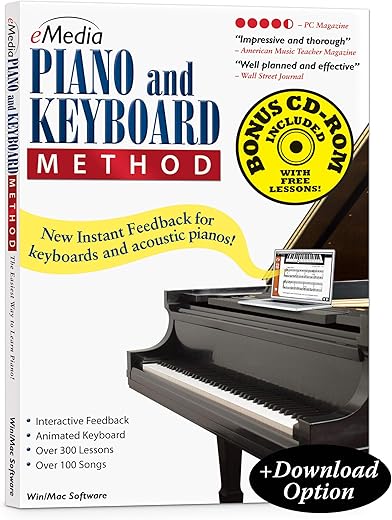
eMedia Piano & Keyboard Method V 3.0 Edition
 Walmart.com
  Reverb.com
  Fullcompass.com
$59.95
eMedia Piano & Keyboard Method V 3.0 Edition Price comparison



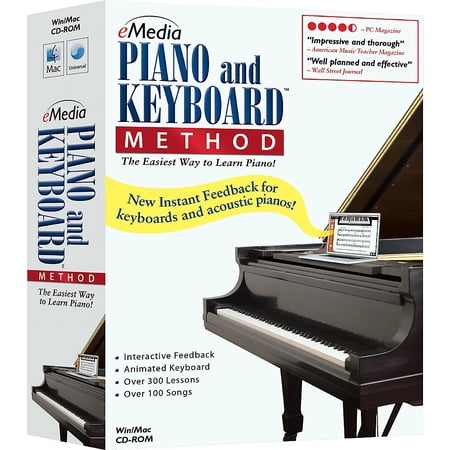

![eMedia Piano Deluxe Piano Keyboard Method Deluxe [download] - WIN](https://www.fullcompass.com/common/products/original/332777.jpg)


- All prices mentioned above are in United States dollar.
- This product is available at Walmart.com.
- At walmart.com you can purchase eMedia Piano and Keyboard Method Version 3.0 for only $49.95
- The lowest price of eMedia Piano and Keyboard Method 20 Station Lab Pack (20 Computers/120 Students) was obtained on October 9, 2026 02:13.
eMedia Piano & Keyboard Method V 3.0 Edition Price History
eMedia Piano & Keyboard Method V 3.0 Edition Description
eMedia Piano & Keyboard Method V 3.0 Edition – Your Ultimate Piano Learning Tool
Discover the eMedia Piano & Keyboard Method V 3.0 Edition, a comprehensive and engaging way to learn to play the piano. Designed for ages 8 and up, this learning method combines innovative technology and expert instruction to make learning the piano accessible and enjoyable. Whether you’re a beginner or looking to brush up on your skills, this method will elevate your piano journey.
Key Features and Benefits
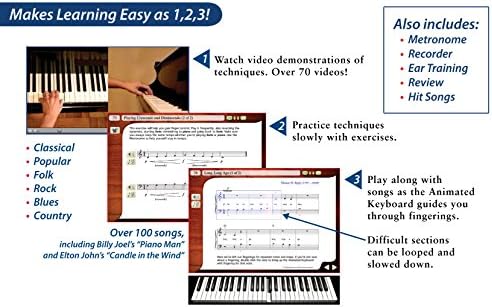
- Interactive Lessons: The eMedia method offers step-by-step lessons that guide you through the fundamentals of playing the piano. Each session is designed to build on the last, ensuring progressive learning.
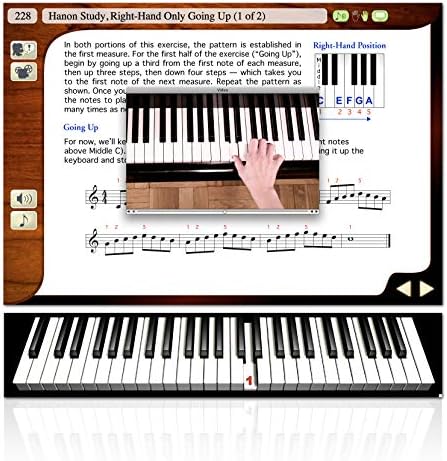
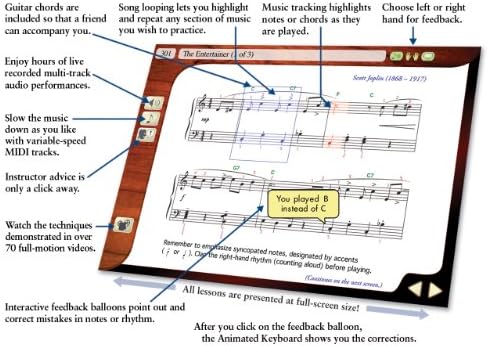
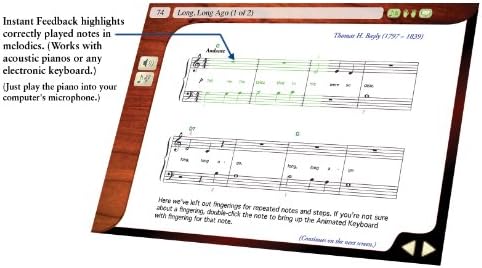
- Visual Learning Tools: The program features animated keyboard displays and music notation, making it easy to follow along. These visual aids enhance understanding and retention of musical concepts.
- Audio Examples: Listen to professional performances of every exercise and song. Hearing how the music should sound enhances your learning experience and helps you develop a keen ear.
- Song Variations: Enjoy playing popular songs in various styles, keeping your practice fresh and exciting. This feature encourages consistent practice while exploring different musical genres.
- Progress Tracking: Monitor your learning progress with built-in assessments. This feature motivates you by showcasing how far you’ve come in your musical journey.
- Platform Compatibility: Compatible with both PC and Mac, this software adapts to your technology and learning environment, making it convenient to practice anytime, anywhere.
Pricing Comparison Across Suppliers
The eMedia Piano & Keyboard Method V 3.0 Edition is competitively priced. Across different e-commerce platforms, prices may vary slightly. Currently, you can find this piano learning tool ranging from $39.99 to $49.99. Be sure to compare prices now to secure the best deal for your musical education!
6-Month Price History Trends
The 6-month price history chart indicates a steady decrease in price, making it a great time to invest in your piano skills. Price fluctuations reflect seasonal promotions, with drops occurring around holiday sales. Keeping an eye on these trends allows you to make informed purchase decisions.
Customer Reviews Summary
Customer reviews offer valuable insights into the eMedia Piano & Keyboard Method V 3.0 Edition. Users frequently praise the program for its user-friendly interface and engaging content. Many parents appreciate the educational value, noting significant improvements in their children’s piano playing abilities. The interactive lessons keep learners motivated and encourage daily practice.
However, some customers have pointed out that initial lessons may feel too basic for those with prior musical experience. This feedback suggests that while the program is perfect for beginners, more advanced learners may need to seek additional resources to challenge themselves further.
Explore Unboxing and Review Videos
The eMedia Piano & Keyboard Method V 3.0 Edition is not just a product; it’s a way to start your musical journey. You can watch unboxing and review videos on platforms like YouTube. These videos showcase the features of the method and how users are experiencing their learning process. Exploring these visuals can provide further context about what to expect and enhance your understanding of the product.
In summary, the eMedia Piano & Keyboard Method V 3.0 Edition combines innovative technology with user-friendly features, making it a valuable tool for aspiring pianists. With its engaging lessons and interactive resources, learning the piano has never been easier or more enjoyable. Don’t miss out on the chance to utilize this method for your piano education. Compare prices now and start your musical journey today!
eMedia Piano & Keyboard Method V 3.0 Edition Specification
Specification: eMedia Piano & Keyboard Method V 3.0 Edition
|
eMedia Piano & Keyboard Method V 3.0 Edition Reviews (8)
8 reviews for eMedia Piano & Keyboard Method V 3.0 Edition
Only logged in customers who have purchased this product may leave a review.
Amy –
The media could not be loaded.
After buying the Casio LK-S250 bundle which included the eMedia Instructional Software Starter kit, I got a taste of how the software is designed so I decided to buy this full beginner package.
The software is designed for users of all ages and of all experiences. For someone like myself, a middle aged man who played alto sax in high school and never learned piano, some of this was review. But there was also a lot which was new to me. For example I know treble clef but not bass clef, or I know the notes and pitches but not the keys on the keyboard. If you don’t know any of this, don’t worry. The lessons start off assuming you know NOTHING, starts you with the basic fundamentals and works you up from there. Keep reviewing it every day and you’ll pick it up.
If you use a keyboard with a MIDI cable connecting to your PC (I recommend this), then as you play on the keyboard the software colors in the notes on the screen as you play them correctly showing your progress. At the end of the song it provides a percentage to show how much you got right and what was wrong. If you need, each lesson has video tutorials or a play-thru with the keyboard and sound to give you an idea of what to expect. Very nicely put together.
The music selection is designed for learning. I know another review had stated that this is not modern music, but the software is not intended for you to become an entertainer for your friends and family. There are a few light sampling’s of a Billy Joel or an Elton John song, but overall it’s mostly compiled with classical tunes that most people are familiar with and is designed for your success when you reach the right lesson at the right time.
The attached video will give you one example of two lessons with the same song. The first part of the video shows lesson 44, Alouette. A very common tune that a lot of people know. I played this my second week and recorded it and then a month and a half later I recorded lesson 157, Alouette with accompaniment (starts at 53 seconds). You’ll see that with continued practice this software builds you up to be able to play better over time.
Do I have to run the software from the CD-ROM drive? Absolutely not. Just make sure when you install it, you install it to your PC directly and then you don’t need the CD.
Can I install on multiple PC’s? No. This is license copy designed for 1 PC. For most folks this shouldn’t be an issue.
The only negative aspect I can really think of is the internal metronome which the software provides. Running this while playing the piano caused delays in the software to keep up with my playing (this isn’t a fault of the software, just how technology works in PC Operating Systems). What I would recommend is to download a separate metronome software (for Windows users, just go to the Microsoft Store and search for a metronome – there’s free software out there which will do the trick).
Overall, I highly recommend this software for kids or adults to begin their journey. The key is going to be PRACTICE, PRACTICE, PRACTICE. I’m up to around the lesson 175 out of 314 learning after a month and a half of daily practice and I repeat the last 40-50 lessons each time. And if I start off having issues, then I go back even farther.
Joe –
It was gift for my wife….she loves it…
JPSALANT –
Utilizo éste método para aprender a tocar el teclado.
Bradley –
Description says workss with MacOS X, which is misleading. This software has not supported MacOS releases since 2019, with the release of MacOS 10.15 (catalina). Since then MacOS Big Sur and MacOS Monterey have been released and this eMEdia Piano and Keyboard method won’t run on them. Why? Because it’s not 64 bit.
Mike B –
Very basic intro with a tiny bit of interactivity, not worth anywhere close to $60.
This is 1990s-era CD-ROM software.
CD-ROM DRM makes it useless. you have to keep the cd-rom in drive to run it, and can only run it on one machine.
steve –
keep getting error messages “not responding” due to adobe projector not working. Keep having to restart program
Rob –
I took piano lessons years ago and I am using this software to brush up. I find it more convenient than “in person” lessons because you can start anytime and anywhere. Combined with a small USB midi keyboard, it does an excellent job of teaching wherever you are. The software is not going to make you a virtuoso performer, but it is going to teach you how to play correctly so that becoming a virtuoso becomes an option later. Also, you will immensely enrich your pleasure in listening if you learn to play an instrument yourself. I had a customer service question about the product in the beginning, and they exceeded my expectations in responding. Be aware that you will receive a newer version of the “introductory course” and an older version of the “intermediate course.” The “bonus course” you receive from Amazon is the “introductory course.” No matter what version they are, both are very good.
William M. –
I HAVE HAD THE SOFTWARE ABOUT A MONTH. I HAVE PROGRESSED TO LESSON 60. I AM AT THE
BEGINNER LEVEL. WHAT I LIKE IS I CAN MOVE ON WHEN I FEEL COMFORTABLE.
WHAT HELPED ME MOST WAS THE THROUGHNESS IN MY LEFT-HAND TRAINING. LEARNING NOTES,
THE RIGHT HAND WENT SMOOTHLY, WHILE THE LEFT HAND NEVER SEEMED TO CATCH ON
THE SOFTWARE REPATITON PRACTICE HAS SIGNIFICANTLY IMPROVED MY LEFTHAND NOTE
READING AND PLAYING.