
Phomemo M250 3-Inch Thermal Label Maker
 Shein.com
  Amazon.com
  Bestbuy.com
  Walmart.com
  Woot.com
$64.99
Phomemo M250 3-Inch Thermal Label Maker Price comparison








- All prices mentioned above are in United States dollar.
- This product is available at SHEIN, Walmart.com, Bestbuy, Amazon.com.
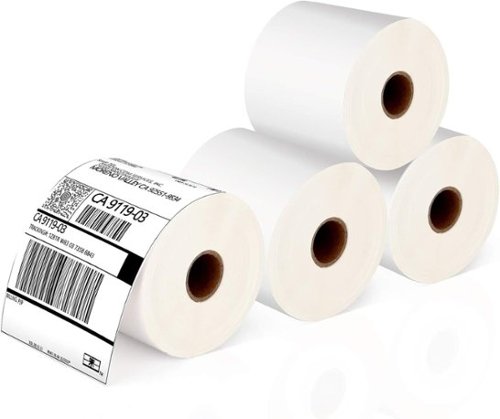
- At shein.com you can purchase Phomemo 1pc Thermal Label Paper Roll, White Square Label, 2.75" X 3.14" (70 * 80mm), 100Labels/Roll,Phomemo M220/M250/M200/M221/M260 Thermal Label,Mul for only $8.80 , which is 96% less than the cost in Bestbuy ($239.99).
- The lowest price of Brother - QL-820NWB Professional Thermal Label Printer with Multiple Connectivity Options - White/Black was obtained on October 9, 2026 20:25.
Phomemo M250 3-Inch Thermal Label Maker Price History
Phomemo M250 3-Inch Thermal Label Maker Description
Optimize Your Organization with the Phomemo M250 3-Inch Thermal Label Maker
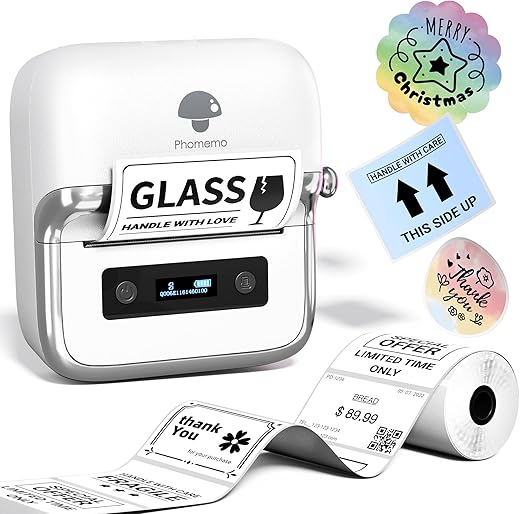
The Phomemo M250 3-Inch Thermal Label Maker is the ultimate tool for anyone looking to streamline labeling tasks at home or in the office. This portable label maker combines style with functionality, making it easier than ever to produce high-quality labels. With seamless connectivity options and a user-friendly interface, the M250 provides a reliable solution for all your labeling needs. Discover why the Phomemo M250 is the go-to choice for effective organization today!
Key Features and Benefits of the Phomemo M250
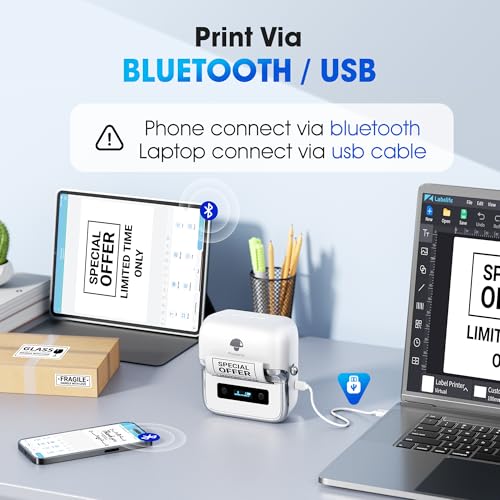
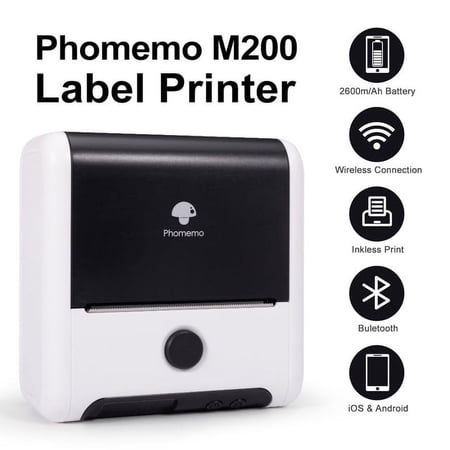
- Connectivity Technology: Bluetooth and USB Type-C capabilities for convenient connections with smartphones, tablets, and laptops.
- Compact and Lightweight Design: Weighing only 390.3 grams, this portable label maker is easy to carry and fits comfortably in your bag.
- High-Speed Printing: With a maximum print speed of 30 monochrome pages per minute (ppm), you can create labels quickly and efficiently.
- Thermal Printing Technology: No ink is required! The thermal printing method ensures crisp and clear labels with every print.
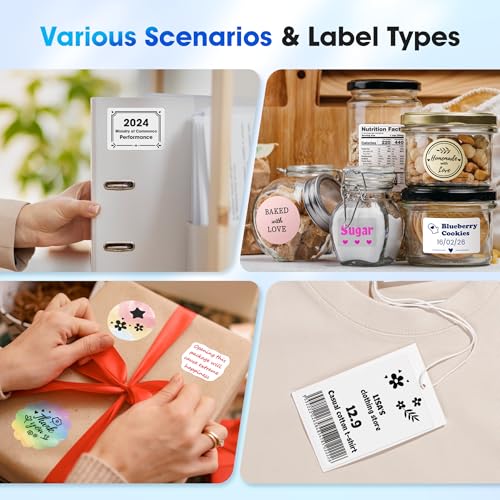
- Versatile Labeling: Capable of printing labels, barcodes, QR codes, and more, the M250 meets various labeling needs for organization and identification.
- Included Components: Comes with 100 sheets of 1.57” x 1.18” thermal labels, a user manual, a Phomemo M250 label maker, and a USB Type-C data cable—everything you need to get started right out of the box.
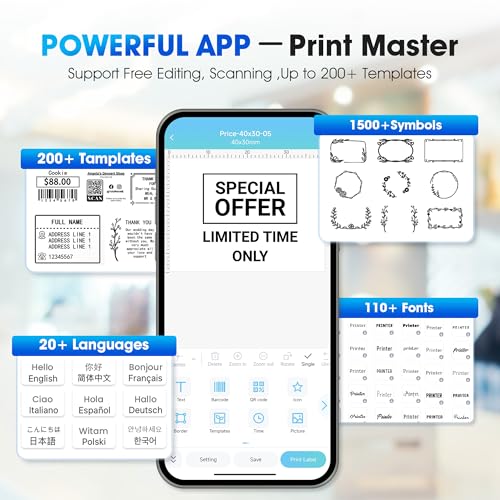
- Mobile App Control: Easily manage your labeling tasks through the Phomemo app, compatible with both iOS and Android devices.
- Memory Storage: With a storage capacity of 64MB, store multiple label designs for quick access when needed.
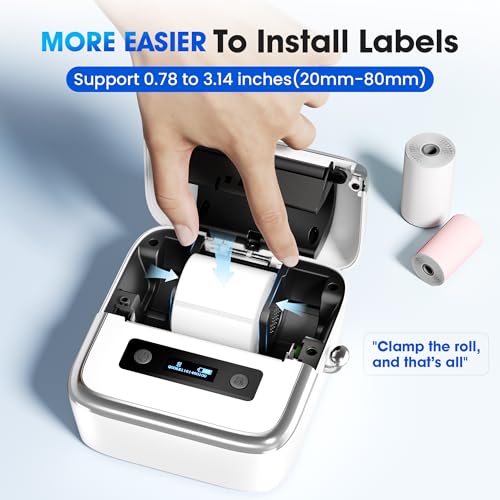
- Multiple Media Size Options: The printer can handle label sizes from 20mm to 80mm, providing flexibility in design and application.
Price Comparison Across Suppliers
When it comes to finding the best deals on the Phomemo M250 3-Inch Thermal Label Maker, our price comparison tool showcases competitive pricing from various suppliers. Prices may vary, so it’s essential to check across platforms to secure the best offer. Recent trends indicate a steady price point, but being informed about special promotions can help you save more. Explore our 6-month price history chart to analyze pricing fluctuations and make a smart buying decision.
Insights from Customer Reviews
Customer satisfaction is vital when choosing the right product, and the Phomemo M250 has garnered a mix of positive reviews and constructive feedback. Users appreciate its compactness and portability, making it an excellent choice for both personal and professional use. The app’s user interface and easy setup have been highlighted as notable advantages, allowing quick access to various label designs.
However, some users noted that the initial learning curve with the app could be challenging. Additionally, a few customers mentioned occasional difficulty in connecting via Bluetooth. Overall, the extensive functionality and efficiency of the Phomemo M250 generally outweigh the minor drawbacks.
Unboxing and Review Videos
For a visual perspective on the Phomemo M250, we encourage you to check out several unboxing and review videos available on YouTube. These videos demonstrate the label maker’s features, ease of use, and setup process, giving potential buyers a closer look at the product in action. Additionally, hearing from other users will provide invaluable insights to help you make an informed decision.
The Perfect Solution for Labeling Needs
Whether you are involved in home organization, running a small business, or working within a larger enterprise, the Phomemo M250 offers powerful capabilities in a compact design. Its lightweight, portable feature allows you to carry it anywhere, while its wireless connectivity options make it user-friendly and efficient. The ability to print a wide variety of labels—from address tags to food labels—makes this device a must-have for anyone wanting to ensure their items are well-marked and easily identified.
Why Choose the Phomemo M250?
In summary, the Phomemo M250 3-Inch Thermal Label Maker represents an ideal blend of modern technology and practical application. Its Bluetooth and USB connectivity simplify use across devices, while the thermal printing technology ensures high-quality output without the hassle of ink cartridges. It’s perfect for anyone seeking clarity and organization in their life or business. Explore various suppliers and compare prices to find the best deal on the Phomemo M250 today!
Compare prices now!
Phomemo M250 3-Inch Thermal Label Maker Specification
Specification: Phomemo M250 3-Inch Thermal Label Maker
|
Phomemo M250 3-Inch Thermal Label Maker Reviews (13)
13 reviews for Phomemo M250 3-Inch Thermal Label Maker
Only logged in customers who have purchased this product may leave a review.
K. Hornberger –
I got this for my girlfriend who likes to keep things organized, and for me who never knows where to put things. Now, she can label things, and I don’t have to guess on where things are supposed to go. Seriously though, this thing is great! Very easy to use and connects with her Apple phone.
Data –
This label maker is easy to set up and easy to use. This label maker is versatile in the source of creating labels. You can use the Print Master app on your phone and Bluetooth to create and print labels. Or you can download the app on your PC/laptop and create labels there and print using the wired approach. The labels that come with it are not very big. Using labels I have that are bigger and the PC I was able to create somewhat bigger labels listing contents of boxes. The printer is quick and the print is very legible. There are so many things you can do with this label maker.
DISCLAIMER: This item was provided free of charge for review through the Amazon Vine Program.
It is rechargeable through a USB C cable, included.
Gina McDaniel –
Fun machine. Charged it first. You have to download the app. Machine doesn’t work without the app. Once the app is downloaded and you hook your machine to it. You can do all kinds of cool stuff. You do have to pick from the choices they give you, I didn’t see a drawing tool or something where you can alter the items being offered on what’s being printed. But there are many designs, fonts, sizes, boarders, pictures that you can choose from. Easy to load the roll of paper, you just open the hatch and drop the roll in and close the hatch. Only prints in black. Very cool little gadget, you can even make QR codes. I don’t know anything about QR codes, so I can’t give an opinion about those, but the machine makes them. I uploaded some screenshots of the choices you will have in the app.
Chris –
Ein Herzliches Hallo,
Phomemo M250 Mobiler Etikettendrucker…
Verarbeitung ist hier gut inkl. der verwendeten Materialien.
Ein Mobiler Etikettendrucker M250 von Phomemo,
dies ist nicht mein Erster Etikettendrucker, da ich schon einen Andern Erfolgreich im Einsatz habe, nur hat meiner Schriftbänder und keine Rollen wie dieser hier von Phomemo.
Beide Etikettendrucker haben Ihr Einsatzgebiet & ich hatte Damals Überlegt ob ich Schriftband oder Rolle nehmen soll, nun habe ich Beide.
Dieser Etikettendrucker M250 von Phomemo hat eine gute Verarbeitung und ist Kinderleicht in seiner Bedienung.
Das Design ist hier schlicht in Weiß & Crome gehalten, ich finde es gut.
Auch gibt es hier die Unterschiedlichen Rollen dazu Käuflich zu erwerben auch hier bei Amazon!
Eine Kleine Rolle Weiß wird bereit mitgeliefert, wie auch ein Kabel USB-C zu USB-A & Bedienungsanleitung.
Die Bedienungsanleitung habe ich nicht gebraucht, da die Bedienung sehr Einfach gehalten ist:
Wenn dieser Kleine M250 Etikettendrucker vor einen steht, ist an der Rechten Seite ein Kleiner Silberner Hebel, diesen Drückt man Vorsichtig nach Unten und schon geht das Einlegefach auf.
In diesen Einlegefach befindet sich bereit ein Kleine Weiße Rolle und somit kann man gleich sehen, wie Rollen Eingelegt werden.
Eine Anleitung/Beschriftung befindet sich auch noch extra zur Ansicht, wenn das Einlegefach geöffnet ist!
Im Einlegefach kann man die Verschiedensten Etiketten/Rollen Einlegen (Siehe bitte Beschreibung, Danke!), es befindet sich zur Arretierung der Rollen 2X PVC Halterungen auf einer Schiene die nach Innen/Aussen Verschoben werden können.
Einfach Etiketten/Rolle bitte Richtig Einlegen und mit der PVC-Halterung Anpassen/Irritieren, Deckel zu und schon kann es los gehen!
Der Kleine Etikettendrucker hat ein Kleines Display wo Diverse Dinge (Siehe bitte Beschreibung, Danke!) zu sehen sind.
Links ist ein Kleiner PowerBaten zum Einschalten des Etikettendrucker, bitte min. 3 Sekunden diesen Baten gedrückt halten, sonst wird der Etikettendrucker nicht Eingeschaltet!
Wenn der Etikettendrucker nun Eingeschaltet wurde, kann man mit seiner Einrichtung beginnen!
Dafür nur 1X kurz auf den PowerBaten Drücken um die Sprache Einzustellen, dafür einfach den Drucker-Baten nur 1X kurz Drücken um die Sprache zu Ändern, in meinen Fall war diese bereits auf DE Eingestellt!
Ist die Sprache Eingestellt, Drückt man erneut nur 1X kurz den Power-Baten um die Dichte Einzustellen!
Ist die Dichte Eingestellt, Drückt man erneut nur 1X kurz den Power-Baten um den Abstand Einzustellen!
Ist der Abstand Eingestellt, Drückt man erneut nur 1X kurz den Power-Baten um Automatisches Abschalten Einzustellen!
Ist die Auto-Abschaltung Eingestellt, Drückt man erneut nur 1X kurz den Power-Baten um ein Reset durchzuführen, der Etikettendrucker wird auf Werkseinstellung zurückgesetzt!
Drückt man erneut nur 1X kurz den Power-Baten wird die Firmwareversion Angezeigt!
Drückt man erneut nur 1X kurz den Power-Baten wird die Adresse des Etikettendrucker Angezeigt!
Drückt man erneut nur 1X kurz den Power-Baten kann man eine Testseite Drucken!
Drückt man wieder min. 3 Sekunden auf den PowerBaten, wird der Etikettendrucker Ausgeschaltet!
Auf den Display wird auch der AkkuZustand Angezeigt mit einen BatterieSymbol & Verbindungen, für weitere Details, Siehe bitte Beschreibung, Danke!
Es gibt auch eine Webseite von Phomemo im www zu finden, da können dann auch Treiber für macOS, Win. usw. Kostenlos geladen werden. Es ist keine Registrierung Notwendig.
Auf dieser Webseite sind auch Anleitungen und Software zu finden!
Getestet habe ich diesen M250 Etikettendrucker mit macOS Sequoia, Treiber für macOS geladen von der Webseite des Herstellers und Er Funktioniert zu 100% auch über USB-C.
Natürlich kann man diesen Kleinen Mobiler Etikettendrucker M250 von Phomemo auch per App Bedienen/Benutzen.
Getestet habe ich Ihn mit IOS iPhone 15 Pro Max, Funktioniert zu 100% über Bluetooth.
Bilder und Beschreibung stimmen hier überein!
Preis/Leistung ist sehr gut!
Ein Kleiner aber sehr guter Etikettendrucker von der Firma Phomemo bekommt man hier.
Ich persönlich finde diesen Kleinen Etikettendrucker M250 von Phomemo sehr gut gelungen, Er ist per Rechner oder App zu Bedienen/Nutzen und erledigt seine Aufgabe sehr gut!
Mit netten Gruß
Sven H.
James A. Woolsey –
Phomemo M250 Label Maker Machine with Tape, 3 Inch Thermal Label Maker, 2024 Upgrade Portable Barcode Label Printer for Business, Home, Logo Label, Sticker Printer for Phones & PC, with 1 Roll Label
This is super cool. I remember having an old punch letter style label maker in the early 90s and they’ve changed a lot! You do have to download an app on your phone, but it makes the process so smooth.
You can adjust the label size and type and there are a lot of preloaded templates and designs to choose from.
I’m about to be so super organized 😂
Data –
Quick charge and easy to connect with the app. Label printing is so simple. The app has multiple template options. Labels have a good composition and stick to surfaces without causing damage. 10/10 would buy again.
D Renee –
This is small but mighty indeed!! It was extremely easy to learn and print stickers from! It’s not just a label printer, but you can print off any type of sticker, too!! It is fun and easy to use as well! It connected easily to my ipad & iPhone and the format is so easy to use. I was able to print my first sticker before even reading the instructions! I LOVE IT!!! I own a small business, so it’s perfect for printing any type of message or sticker to include on my shipping boxes as well! Grab one, you’ll love it too!
Gina McDaniel –
This has replaced my Nelko (see review https://www.amazon.com/review/review-your-purchases/edit?_encoding=UTF8&asin=B0D1TPSNYN&channel=YAcc-wr).
It does not feel light weight. It does not have the label wasting bug of the Nelko. I like the lever to open it also, good solid feel.
The labels center pretty well. I am using the Labellife software for Windows PC, which seems to be missing one small feature compared to the other Nelko used software Labelnize_PC. The aspect ratio of art (like borders) I import is locked and I cannot stretch images to fit the label exactly.
Other than that the softwares are both good.
I haven’t tried out the Bluetooth software for Android. I don’t find typing or designing on a phone nearly as easy as on a PC keyboard.
The Nelko would lose battery charge and first labels were spotty. Not this Phomemo. When I turn it on it does not eject and waste one label calibrating itself.
R. Heydrich –
Der Versand war schnell und die Verpackung prima.
Der Etikettendrucker kommt in einem kleinen Karton.
Enthalten ist der Drucker selbst, ein Ladekabel (USB C), eine Rolle Etiketten und eine Betriebsanleitung.
Die App lässt sich schnell und unkompliziert aufs Handy runterladen und die Kommunikation zwischen den Geräten verläuft einwandfrei.
Ich nutze ihn für den Haushalt/Küche, meine Tochter nutzt ihn für Schule und Freizeit.
Es lassen sich die unterschiedlichsten Motive ausdrucken, egal ob Schrift oder Bild. Jedoch sollte man darauf achten, dass das Bild vom Hintergrund her nicht zu dunkel ist. Sonst ist es einfach nur schwarz und man kann nur erahnen was das sein soll.
Der Austausch der Etikettenrolle funktioniert Kinderleicht und auch die Handhabung ist für Technikdeppen wie ich einer bin, sehr einfach.
Der Drucker ist von seiner Größe eher klein und passt auch mal eben schnell in den Schulrucksack oder die Arbeitstasche. Hierfür habe ich eine kleine Tasche geholt, so ohne Schutz würde ich ihn jetzt nicht lassen (dem Display zuliebe).
Wer einen kleinen Alltagshelfer sucht, hat ihn hier gefunden.
Prime user Lloyd –
This is my second Phomemo device, and I’m absolutely in love with this brand and their label makers. I’ve used a smaller Phomemo for years but needed a new one for larger labels, and the Phomemo M250 has been a fantastic upgrade. The labels themselves are a bit pricey, but they’re high quality. Just keep in mind that the thermal “ink” does bleach out over the years from light exposure, so it’s not the most permanent option.
One of the things I love about Phomemo is that they offer a lot of accessories, including colorful labels and carrying bags. The label app is constantly being updated with new features, like different fonts, pictures, and motifs, which makes it really versatile. I used my older Phomemo for creating barcodes for work and was eyeing this larger model for home use. Now, thanks to the Vine program, I can label everything in my home and kitchen.
The device charges quite fast, and the battery lasts for ages, which is a huge bonus. So far, I’ve only used it via Bluetooth to connect to my phone, but I plan to install the app on my laptop soon to create new labels for my kitchen.
One important tip: I highly recommend getting a protective bag for these devices. They can be fragile, and my first one broke after falling on the floor. Ever since I got a bag for my replacement device, I haven’t had any issues.
This label maker is also a great tool for small business owners. A friend of mine liked my device so much that I recommended this exact model to her, and now she uses it for her shop to create product labels. You can save your label designs, so you don’t need to recreate them every time, which is a huge time saver.
Overall, I’m really happy with this label maker, and I highly recommend it for both home use and small business needs.
I received this item for free through the Amazon Vine program. My reviews are honest and unbiased, based on my own experience.
Marc A. –
In meiner Wahrnehmung ist Phomemo durchaus eine ernstzunehmende Konkurrenz für bisherige Platzhirsche in Sachen Etikettendruck und mit einer Vielzahl unterschiedlichster Geräte auf Amazon vertreten.
Testen durfte ich den Phomemo M250 Etikettendrucker, welcher tintenfrei im Thermodruck arbeitet, via App angesteuert wird und vielseitige Optionen zum Druck von Papieretiketten bietet.
Optisch erinnert das Gerät an eine Miniatur einer Schreibmaschine. In der vorderen Hälfte des Gerätes ist die Technik verbaut und oben auf ein kleines Display, welches einen schnellen Überblick zum Verbindungsstatus (Bluetooth), dem Akkustand und via Optionsmenü (Einschalttaste im eingeschalteten Zustand drücken) zu den Einstellungen wie Sprache oder automatischer Abschaltung liefert.
Im Hinteren Teil des Gerätes werden die Rollen mit den zum Modell passenden Etikettenrollen eingelegt.
Eine Gebrauchsanweisung in deutscher Sprache liegt dem Gerät bei. Vor der ersten Verwendung sollte der Akku geladen werden. Hierzu liefert Phomemo ein USB-C-Ladekabel (ohne Adapter) direkt mit.
Das Aufladen dauerte ca. 1-1,5 Stunden. Dank der Abschaltautomatik, welche ich auf 5 Minuten eingestellt habe, versetzt sich das Gerät selbstständig in einen Stand-by-Modus und schont so den Akku gegen unnötige Entladung.
Im zweiten Schritt sollte man sich die dazugehörige App “Print Master” aus dem entsprechenden Store herunterladen. Die Installation der App geht sehr schnell und es wird kein Nutzerkonto, eine Anmeldekennung (wie E-Mail) oder Passwörter verlangt, was die Hürde zur Verwendung der App deutlich herabsetzen sollte. Die Sprache in der App war bei mir automatisch auf deutsch eingestellt. Die Navigation ist sehr intuitiv und die Einrichtung wird geführt. Zunächst muss man seinen neuen Etikettendrucker via Bluetooth mit dem Handy verbinden, was auf Anhieb problemlos funktionierte. Danach kann es bereits losgehen. Die App bietet sehr viele Gestaltungsoptionen für individuelle Etiketten. Ob allein Text für bspw. Brieflabel, oder Aufkleber für die Vorratshaltung, welche zusätzlich mit Piktogrammen versehen werden können, bis hin zu Barcodes oder QR-Codes – es ist an fast alle Bedürfnisse für den Heimbedarf und auch für kleine Unternehmen gedacht.
Für mich war die Anschaffung eines Etikettendruckers lange Zeit eine Frage von Kosten und Nutzen und ob ich die Dinge, für welche ich meine ein Etikett zu benötigen, nicht einfach auch anders beschriften kann. Natürlich geht es immer auch irgendwie anders. Aber mit einem einheitlichen Label, bekommt eure Vorratshaltung in etwa einen ordentlichen, gut lesbaren und individuellen Lock. Briefkuverts ohne Sichtfenster erhalten in Windeseile einen gut leserlichen Adressaufkleber, oder wenn ihr Unternehmer seid, erstellt ihr ganz unkompliziert Preisschilder mit EAN oder verseht eure Ware mit einem QR-Code, welcher den Käufer wieder zurück auf eure Internetseite führt.
Im Lieferumfang ist eine Rolle mit 100 Etiketten in den Maßen 40x30mm enthalten. Diese und andere Etiketten (Maße) bekommt ihr zum Nachkauf natürlich auch auf Amazon und wie ich finde ab 5Cent pro Etikett zu erschwinglichen Preisen.
Zugegeben, hat ein Papieretikett und Thermodruck auch Nachteile, welche man bei der Beschaffung eines Etikettendruckers berücksichtigen sollte. Lange Exposition gegenüber Licht/Sonne ist immer schlecht für Thermodruck-Etiketten. Da es sich um Papieretiketten handelt, sind sie natürlich nicht Feuchtigkeitsresistenz. So schnell wie das Aufkleben funktioniert, so beschwerlich könnte das spätere Ablösen sein. Als Tipp: Etiketten zum Beispiel auf Vorratsdosen nicht zu fest andrücken, dann können sie noch eine ganze Weile einfach wieder abgezogen werden. Ältere Etiketten am besten durch Einweichen ablösen.
Zusammengefasst kann der tragbare Etikettendrucker M250 genau die richtige Wahl sein, wenn ihr auf der Suche nach einem handlichen, optisch ansprechenden und multioptionalen Etikettendrucker seid. Ggf. tun es aber auch “kleinere Modelle” von Phomemo, welche es ebenfalls hier bei Amazon gibt. Die Bedienung ist nahezu intuitiv und leicht verständlich, die Etiketten sind schnell erstellt und können für unterschiedlichste Verwendungszwecke eingesetzt werden. Der Nachkauf von Etiketten ist gewährleistet und neben dem Standard-Etikett 40x30mm bietet Phomemo auch andere Maße, Formen und Farben, welche mittels QR-Code vom Gerät erkannt und die Druckoptionen automatisch auf das neue Maß eingestellt werden.
Ich bin ziemlich begeistert und auch schon fleißig am Drucken.
Chris –
Ich habe einen Phomemo M250 Etikettendrucker im Zuge des Vine-Programmes zur Verfügung gestellt bekommen.
Man bekommt ihn in einem relativ großen weißen Karton, auf dem das Gerät als “Multifunctional Portable LABEL MAKER” bezeichnet wird. Dinge wie CE- oder FCC-Zeichen sind auf einem Etikett nachträglich angebracht.
Schnell stellt man fest, dass nicht nur der Karton, sondern auch der darin enthaltene Drucker größer ausfällt als erwartet. Neben dem Drucker bekommt man ein USB-Kabel und 3 Anleitungsfaltblätter. Der deutsche Part wirkt ausführlich und recht gelungen, die Schriftgröße könnte jedoch größer sein.
Qualitativ wirkt der (trotz allem recht kompakte) Etikettendrucker nicht schlecht. Er besteht aus einem in seidenmattem weiß eingefärbten Kunststoff.
Rund um das kleine Display ist eine chromfarbene Umrandung angebracht. Der Öffnungsmechanismus für das Etikettenrollenfach ist in Form eines kleinen Ärmchens ausgeführt. Eine ungewöhnliche Variante. die aber gut funktioniert.
2 Taster sind in das Gehäuse eingelassen. Einer dient zum ein- und ausschalten, der 2. dient dem Papiervorschub.
Daten zum Drucker und die notwendigen Kennzeichnungen befinden sich auf der Unterseite.
Eine relativ schmale Etikettenrolle ist bereits in den Drucker eingelegt. Bis 8cm Breite sind möglich, beigelegt ist eine mit 4cm.
Beim Einschalten wird man vom kleinen gut ablesbaren Display mit einem “Wilkommen” (auf Deutsch!) begrüßt.
Für den Betrieb am Handy wird die “Print Master”-App benötigt, die man in den üblichen App-Stores findet.
Diese erfasst (wenn man dem Anbieter Glauben schenken darf) Daten, welche wohl vorwiegend für die Nutzung erforderlich sind. Für die Kontoverwaltung wird die Mail-Adresse abgefragt, alles andere dient wohl der (Fehler?)Analyse.
Die App ist dabei halbwegs übersichtlich gestaltet. Die Verbindung zum Drucker geht in aller Regel schnell und problemlos.
Das eingelegte Etikettenpapier kann hinterlegt werden bzw. wurde schon korrekt vorgeblendet.
Selbstredend gibt es einen In-App-Shop, den man meiner Meinung nach aber ignorieren kann.
PDFs lassen sich drucken sowie auch komplett eigene Etiketten erstellen. Dabei kann man Texte, Barcodes, QR-Codes, Rahmen, Bilder und noch einiges andere erstellen.
Die Druckqualität ist durchaus sehr ordentlich, wenngleich man den Fotodruck nur bedingt empfehlen kann.
In der Rubrik “Icons” findet sich eine Reihe einfach gestaltete Schwarzweiss-Piktogramme. Die Übersetzungen sind allerdings nicht alle wirklich gelungen. So wurde die Rubrik “Comic” mit “Komisch” übersetzt.
Neben dem Handy ist auch ein Betrieb am PC möglich. Treiber für Windows und Mac findet man auf der Phomemo-Homepage. (Die Windows-Version, welche ab Windows 7 funktionsfähig ist, wird von Virus Total am 26.09.24 als unbedenklich eingestuft.)
Die Einstellungen des Treibers sind nicht sehr vielfältig, bieten aber unter anderem eine einstellbare Druckdichte oder ein paar wenige Dithering-Optionen.
Auch am PC kann man nicht viel an der Druckqualität aussetzen, wenn man sich auf einfachere Elemente beschränkt. Auch hier gilt natürlich, für Fotos ist das Gerät nicht ernsthaft gemacht.
Mir gefällt der Drucker gut. Für Dinge wie Versandetiketten ist er natürlich zu klein, aber um Gegenstände zu beschriften oder kleine Aufkleber zu gestalten, eignet er sich gut.
Dazu ist die Kompatibilität zu Smartphone und PC ein weiterer Pluspunkt.
Ein dicker Minuspunkt ist, dass der Akkus sich nicht Tauschen lässt. Einen Grund, dafür nicht eine kleine Klappe in den Drucker zu dängeln, kann ich nicht erkennen.
Da es sich um einen Thermodrucker handelt, benötigt man weder Tinte oder Toner, auf der anderen Seite ist Thermopapier aber auch alles, nur nicht umweltfreundlich oder günstig. Aber irgendwas ist ja immer 😉.
In Summe gebe ich gute 4 Sterne, auch wenn die Sache mit dem Akku schon schwer wiegt.
D Renee –
This is a nice little portable label maker. Setting it up in the app was simple and everything was up and running in no time. The app is feature packed. Has the ability to make barcodes, QR codes, and many other designs. There are also templates that you can print out like expiration labels, price tags, info labels, contact info labels… You can even print images (I’d suggest using single color images) and they look pretty decent too!
This is a feature packed label maker machine and I highly recommend it.