
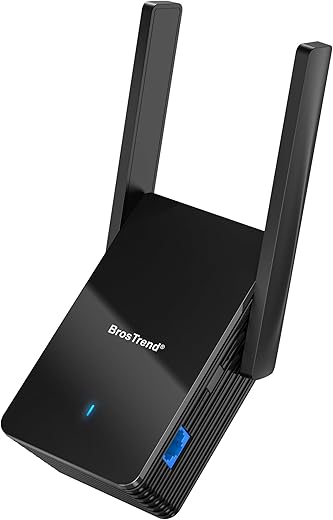
BrosTrend WiFi 6 AX3000 Ethernet Adapter
 Amazon.com
Original price was: $79.99.$69.99Current price is: $69.99.
BrosTrend WiFi 6 AX3000 Ethernet Adapter Price comparison


- All prices mentioned above are in United States dollar.
- This product is available at Amazon.com.
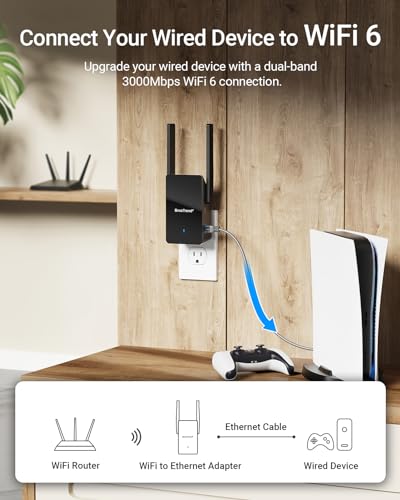
- At amazon.com you can purchase BrosTrend WiFi 6 AX3000 WiFi to Ethernet Adapter with RJ45 Gigabit Port, Dual Band Wireless Bridge for PC, Smart TV, Xbox, PlayStation, Printer, Blu-Ray Player, DVR etc. WiFi to Wired Ethernet Adapter for only $69.99
- The lowest price of BrosTrend WiFi 6 AX3000 WiFi to Ethernet Adapter with RJ45 Gigabit Port, Dual Band Wireless Bridge for PC, Smart TV, Xbox, PlayStation, Printer, Blu-Ray Player, DVR etc. WiFi to Wired Ethernet Adapter was obtained on September 24, 2025 03:58.
BrosTrend WiFi 6 AX3000 Ethernet Adapter Price History
BrosTrend WiFi 6 AX3000 Ethernet Adapter Description
BrosTrend WiFi 6 AX3000 Ethernet Adapter: Unlock High-Speed Connectivity
The **BrosTrend WiFi 6 AX3000 Ethernet Adapter** revolutionizes your online experience with lightning-fast internet speeds and robust connectivity. Ideal for both casual users and gaming enthusiasts, this adapter ensures you stay connected without interruptions. If you’re looking for top performance in your devices, this is the adapter you need.
Key Features and Benefits of BrosTrend WiFi 6 AX3000
- High-Speed Access: Enjoy exceptional speeds up to 3000 Mbps, making it perfect for streaming, gaming, and large downloads.
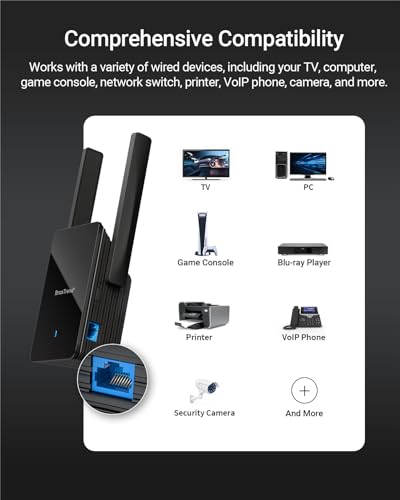
- Versatile Compatibility: Compatible with various wired devices such as TVs, computers, game consoles, network switches, printers, and VoIP phones. The flexibility ensures seamless integration into your home setup.
- Multiple Frequency Bands: Supports both 5GHz and 2.4GHz bands, allowing optimal connectivity based on your needs. The 5GHz band is great for high-speed activities, while the 2.4GHz band is perfect for longer range connectivity.
- Quick Installation: Comes with a 5-foot Ethernet cable, quick installation guide, and user-friendly setup to get you connected in minutes.
- Compact and Sleek Design: Measures 2.6″ D x 3.5″ W x 8.4″ H and weighs just 8.8 ounces, making it easy to fit in your workspace without taking much room.
Price Comparison: Find the Best Deal
When considering the **BrosTrend WiFi 6 AX3000 Ethernet Adapter** price, it’s essential to compare across different suppliers. Our price comparison tool offers real-time updates to help you identify the best deals available. Prices among retailers typically range depending on offers and shipping options. With over 50,000 trending products featured, our platform ensures you get the best value for your money.
6-Month Price History: Notable Trends
An analysis of the 6-month price history chart for the **BrosTrend WiFi 6 AX3000** reveals some interesting trends:
– The price has remained relatively stable since its launch on July 17, 2023, indicating consistent demand.
– Occasional sales and discounts have provided opportunities for savvy shoppers to take home this high-speed adapter at an even better price.
Customer Reviews: Feedback Highlights
Customers rave about the exceptional performance of the **BrosTrend AX3000 Ethernet Adapter**. Here’s a summary of what users are saying:
**Positive Aspects:**
– Users appreciate the incredible speed and reliability, especially during video streaming and gaming sessions. The low latency in heavy-use environments has received particular praise.
– The ease of installation is frequently highlighted, with many users expressing how quickly they were able to set it up and start using it.
**Drawbacks:**
– A few customers noted occasional compatibility issues with less common devices but found that most standard devices connected effortlessly.
– Some users have reported that the compact size makes it a bit easy to misplace if not secured.
For a deeper understanding of how the **BrosTrend WiFi 6 AX3000 Ethernet Adapter** performs in practical scenarios, check out the engaging unboxing and review videos available online. These videos demonstrate step-by-step setups and real-time performance evaluations, offering an authentic perspective on its capabilities.
Why Choose BrosTrend WiFi 6 AX3000?
The **BrosTrend WiFi 6 AX3000 Ethernet Adapter** stands out in a crowded market for its blend of speed, compatibility, and ease of use. With its robust performance and reliable connectivity, this adapter is essential for anyone looking to enhance their wired network experience. Whether you’re a gamer needing low latency for competitive play or a streamer demanding high bandwidth, this adapter meets all needs seamlessly.
In summary, if you’re in the market for a high-quality Ethernet adapter that combines performance with exceptional versatility, the **BrosTrend WiFi 6 AX3000** is your go-to choice. The favorable price range, combined with its praised features, makes this a worthwhile investment for anyone serious about their internet connectivity.
Get Started Today!
Don’t miss the opportunity to elevate your internet experience. Compare prices now and find the best deal for the **BrosTrend WiFi 6 AX3000 Ethernet Adapter**! With superior performance on the table, seize the chance to enhance your setup today!
BrosTrend WiFi 6 AX3000 Ethernet Adapter Specification
Specification: BrosTrend WiFi 6 AX3000 Ethernet Adapter
|
BrosTrend WiFi 6 AX3000 Ethernet Adapter Reviews (13)
13 reviews for BrosTrend WiFi 6 AX3000 Ethernet Adapter
Only logged in customers who have purchased this product may leave a review.





Amazon Customer –
Easy to follow setup directions and worked straight away. However, it completely trashed my Wifi network throughput, not just on the extended network but on my original Wifi network as well. I can normally get ~400Mbps on Wifi to my laptop, once I installed this those speeds dropped to under 100Mbps. Unplugged it after a few hours, speeds immediately went back up to 400Mbps.
Jeffh –
I am in a remote setting and have a Starlink internet connection that only offers WiFi connectivity, and I needed a wired Ethernet connection. Starlink is suppose to offer a wired connection using their Starlink Ethernet Adapter, but I went through 3 Starlink adapters, and all were dead. The BrosTrend AX3000 WiFi 6 Universal WiFi to Ethernet Adapter solved my problem. I installed it beside the Starlink Router and it provided the wired Ethernet connection to Starlink that I desperately needed. Setup was easy, mainly just providing the Starlink SSID and password, and that was it. I would recommend this product for anyone who requires a wired Ethernet connection in a setting where there is only WiFi connectivity.
Brad Ray –
1.
This dvice is NOT a wireless to ethernet adapter. It is a wireless extender with an additional RJ45 port. You CAN NOT disable the extension of your wireless signal, In other words, if you use this device for wireless to ethernet, the whole neighborhood will get your signal broadcast to them.
2.
For additional security, I use MAC filtering on my wireless router. However, this device ONLY works if MAC fitering is OFF on my router. Which means that if I use this device, I have to make my home network more open for hackers.
3.
SO not only does this devicec broadcast your signal to the entore neighborhood, it also forces you to make your router less secure.
NO THANK YOU – will be returning this week.
sam –
Product worked as described. Easy to set up. Quality design.
Good signal strength and great value.
Torsten Busch –
Simple to setup that a mobile device can be used instead of a laptop or PC.
BrosTrend WiFi 6 AX3000 WiFi to Ethernet Adapter, Universal Wireless Ethernet WiFi Adapter
Arrived in its display box and protected from damaged with a cardboard shaped holder. Also supplied in the box is a network cable but I didn’t use this.
Instructions are supplied on long sheet that cover how to configure the device. Using a mobile device and configured it as option 1 – Wifi Extender. This was easy to do with a mobile and picked up the house Wifi with ease for both the 2.4 and 5 signals.
Kept the same name with the _EXT but I did change the password for something slightly easier as I will only be using this for the garden and when I’m in the garden or having people over for a BBQ.
Once it was all setup and ready to use, switched it off and moved it to the wall closest to the garden inside the house. Switched it on and when I walked out into the garden, was able to see the wifi with _EXT and connected with no issues. Started a few music songs and could stream them with no bufferring. Switch the externder off and waited an hour and switched back on. Wifi came on and extended into the garden as before.
I have now used the extender quite a few times with no issues and even left it switched off for 2 days and then switched it on. Wifi_EXT was seen straight away and reconnected the laptop first time. Able to connect to works online systems with no buffering or warning of networks speeds. Fast responses on websites was seen.
Fully recommend this as working from home via online websites is no issue with this extender.
Dom –
The BrosTrend WiFi 6 AX3000 gives you three options: WiFi Extender, WiFi to Ethernet adapter, or an Access Point using WiFi 6. The AX3000 comes with very good documentation describing how to configure each option. There is not an option to use the AX3000 as a router.
I set up the BrosTrend WiFi 6 AX3000 as an Access Point. Configuring the AX3000 was very easy. All I had to do was plug the Ethernet cable into the 1 Gigabit port on the AX3000 from the switch and plug it into an available outlet. You can then access the web interface to configure the AX3000 as an Access Point. Once configured you can then access the web interface from any browser on the network.
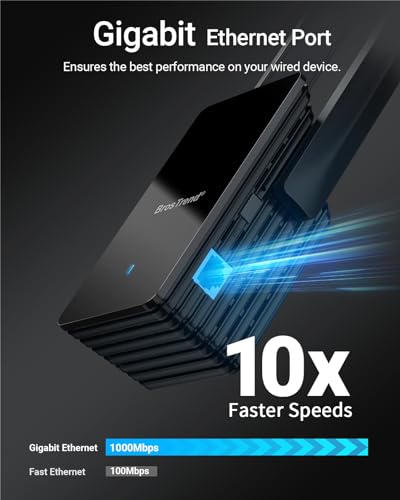
I love that the Ethernet port it on the side of the BrosTrend WiFi 6 AX3000. This way the Ethernet cable does not interfere with the outlet below like others I have seen where the Ethernet port is on the bottom. The AX3000 only consumes one outlet. I have seen others where the size alone interferes with using the other outlet. The AX3000 is a very nice size.
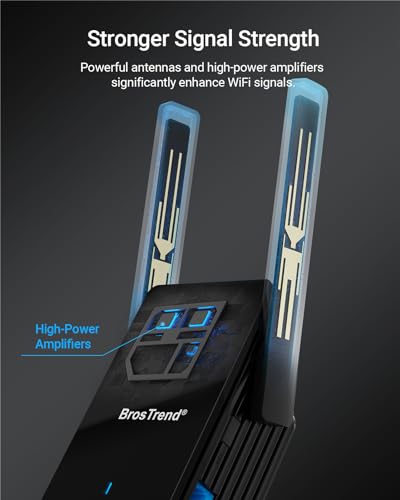
The BrosTrend WiFi 6 AX3000 puts out a very strong signal and seems to penetrate walls and other obstacles very nicely. You should have solid WiFi in a good sized radius.
I took away a star due to the minimal web interface used to interact with the AX3000. There are lots of features missing from the web interface including the ability to configure the width and channel of the WiFi. It does automatically select the band and channel it uses. No firewall. No parental controls. The web interface gives very minimal options. Hopefully the firmware will be updated to give more control of the settings.
At the time of this review the BrosTrend WiFi 6 AX3000 was selling for $79.99 with a 10% Coupon which brings the price down to $71.99. I normally don’t say much about prices, but this cost is a little steep in my humble opinion. It does perform very well, gives you lots of installation options, and seems to be built very well. As mentioned, the web interface provides very minimal setting adjustments. But it does seem to do very well determining the best settings or settings that will work. So if you are someone who just wants something to plug in with very minimal configuration, the AX3000 would for sure be a great choice.
Alastair G. –
Ich nutze das Gerät als WIFI-Brücke zu einem Gigabit-Switch, den es mit 150 mbit Glasfaser-Internet versorgt. Das funktioniert wunderbar. Konfiguriert über ein Web-Interface. 2.4G und 5G lassen sich getrennt voneinander ein- und ausschalten. Bei mir hat die Konfiguration vom Auspacken bis zum Betrieb keine 15 Minuten gedauert und war dank des Web-Interfaces, das an passender Stelle mit aufschlussreichen Piktogrammen aufwartet, sehr einfach. Klare Empfehlung.
Delboy –
Installazione e configurazione semplicissima e rapida , ma per la velocità dichiarata 2402 Mbps a 5GHZ non ci siamo, confrontato con router Fritz 2400 e installato sullo stesso punto il Fritz raggiunge i 1938 Mbps 5Ghz e 292 Mbps a 2,4 Ghz ,mentre AX3000 resta sui 1005 – 1201 a 5GHZ e 223 a 2,4GHz, ovviamente spostandosi per le varie stanze la velocità si abbassa sui 850-900 Mbps. Il Fritz resta costante su tutte le stanze.
Effettuato il reso
rick31 –
Hits 800mbps going to my xbox series x, hardwired through a gigabit switch. Better than xboxs built in wifi. Works great, recommend. Better than tearing up my walls and running wire. Easy to setup, no way of disabling the wifi extender, hid network so I don’t see the extended wifi network.
Midwest Student –
I needed a wired WIFI to ethernet (wireless bridge) for a VOIP phone. DOWNLOAD the instructions! I had to use the #3 option to set up, but, more importantly, had to look at FAQ question 4 for reset. Once done, worked perfectly!
Jonathan Peters –
Not so easy to set up with a phone but I figured it out then it saw a breeze
Works very well for my needs
Delboy –
Installation très simple. Il capte vraiment tous les réseaux wifi aux alentours que même mon téléphone ne captent pas… Débit à saturation de mon disque dur (650 Mbps).
Installation en 2 minutes chrono. Ca va m’éviter de tirer un câble de 60m
Brad Ray –
Setup:
This product was easy to setup and works great. I was using this as a wireless bridge to be able to plug a network switch into a space that didn’t have a network drop. The process was to plug the device in, connect to the wireless network that it created, go to this devices website, select the operating mode, then select my existing wireless network and provide the password. It was also convenient that they provided a network cable.
Use case:
We had our tech bench setup on an island in the middle of our office space that didn’t have a network drop, but did have power. Instead of running a cable across the floor or a power pole from the ceiling, this product allowed us to connect to our wireless network and provide a cabled connection to our tech bench switch, allowing us to plug in various computers and other network devices on the tech bench without needing wireless. This can be used to allow any devices with a network cable connection port (RJ-45) to connect to a wireless network.
I also like that it didn’t need a power brick, but the whole device plugs directly into the power strip, which reduced the clutter.
This device can also be used as a wireless extender, creating an additional wireless network you can connect to for devices that are too far away. I didn’t want to use the device for this function, so I like that they provided an option to hide this additional wireless network (SSID).