
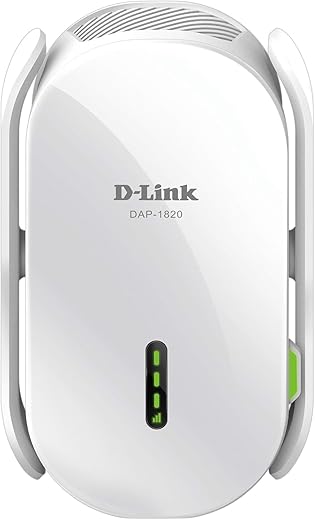
D-Link AC2000 Mesh WiFi Range Extender DAP-1820-US
Original price was: $89.99.$42.72Current price is: $42.72.
D-Link AC2000 Mesh WiFi Range Extender DAP-1820-US Price comparison

- All prices mentioned above are in United States dollar.
- This product is available at Amazon.com.
- At amazon.com you can purchase D-Link WiFi Range Extender, AC2000 Mesh Plug In Wall Signal Booster, Cover up to 2600 sq.ft. Dual Band Wireless Repeater Access Point for Smart Home (DAP-1820-US) for only $49.99
- The lowest price of D-Link WiFi Range Extender, AC2000 Mesh Plug In Wall Signal Booster, Cover up to 2600 sq.ft. Dual Band Wireless Repeater Access Point for Smart Home (DAP-1820-US) was obtained on September 11, 2026 09:08.
D-Link AC2000 Mesh WiFi Range Extender DAP-1820-US Price History
D-Link AC2000 Mesh WiFi Range Extender DAP-1820-US Description
D-Link AC2000 Mesh WiFi Range Extender DAP-1820-US
The D-Link AC2000 Mesh WiFi Range Extender DAP-1820-US is an essential device for anyone seeking to eliminate dead zones and enhance their WiFi coverage. This innovative dual-band extender offers superb performance and seamless connectivity for all your smart devices. Experience faster internet speeds and improved coverage throughout your home or office with this efficient range extender.
Key Features and Benefits of the D-Link AC2000 Mesh WiFi Range Extender
- Dual-Band Technology: With speeds of up to 2000 Mbps (AC2000), the DAP-1820-US operates on both 2.4GHz and 5GHz bands, ensuring optimal performance while managing multiple devices simultaneously.
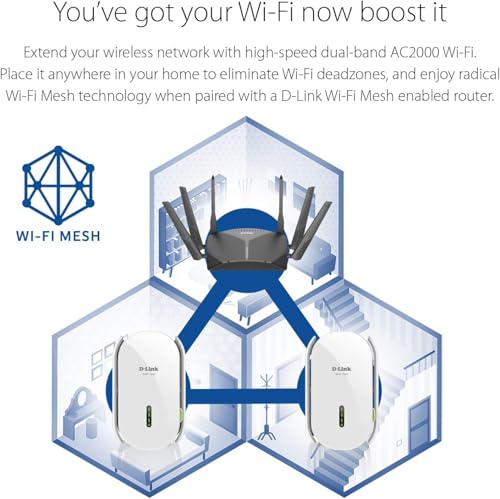
- Mesh WiFi Capability: When paired with compatible D-Link routers, this range extender creates a unified mesh network. Enjoy seamless roaming and uninterrupted connections as you move throughout your space.
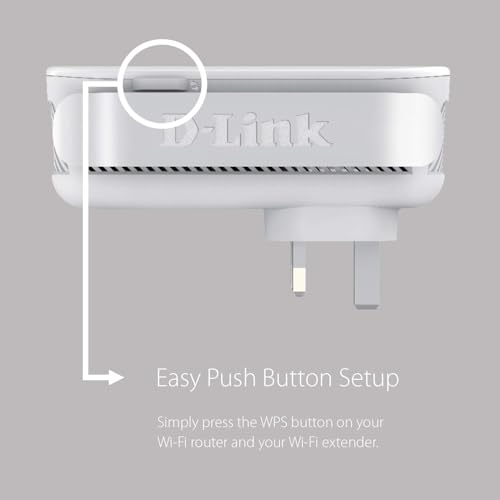
- Easy Setup: The intuitive web interface along with the D-Link WiFi App simplifies the installation process. Get connected quickly with minimal hassle.
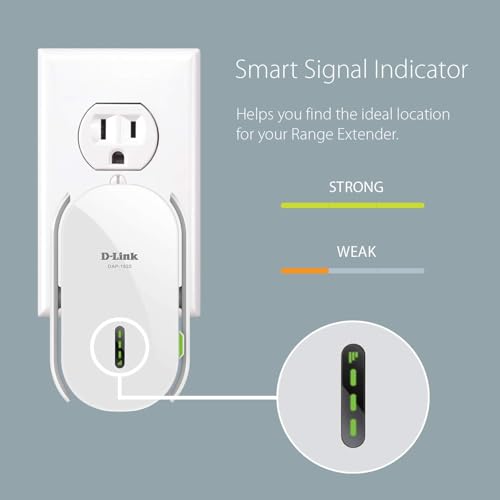
- Smart Signal Indicator: The built-in LED indicators show the strength of the signal, allowing users to find the best location for maximum coverage.
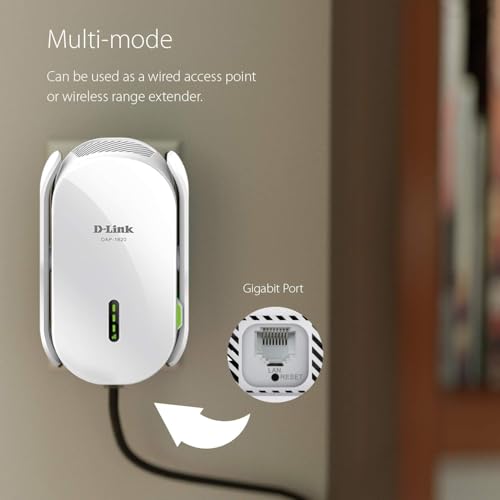
- Multiple Ethernet Ports: Equipped with an Ethernet port for wired connections, the DAP-1820-US allows you to connect devices like gaming consoles and Smart TVs directly for faster speeds.
Price Comparison Across Multiple Suppliers
Checking prices across various suppliers shows that the D-Link AC2000 Mesh WiFi Range Extender DAP-1820-US is competitively priced. With several online stores offering the product, prices can vary but typically range from $79.99 to $99.99. By comparing prices, you can find the best deal while still ensuring you’re purchasing from a reputable retailer.
Trends in the 6-Month Price History
The 6-month price history for the D-Link AC2000 indicates a trend of slight fluctuations, with the price peaking during holiday seasons. Analyzing this chart may suggest that waiting for seasonal sales could yield better deals, especially on significant shopping days. Keep in mind that prices might drop in the off-peak months, making it an opportune time to purchase.
Customer Reviews of D-Link AC2000
Customer reviews for the D-Link AC2000 mesh extender reflect a generally positive consensus. Users appreciate the seamless connectivity and extended range it provides, making it ideal for large homes or offices. Many reviews highlight the easy setup process, which eliminates the frustration commonly associated with technology installations.
However, some customers have noted drawbacks, such as occasional connectivity drops. These instances seem to be rare and can often be resolved with simple troubleshooting tips found in the user manual. Overall, the reliability and performance of the DAP-1820-US generally outweigh these concerns.
Unboxing and Review Videos
To further assist in your decision-making process, there are several unboxing and review videos available on YouTube. These provide a visual insight into the unboxing experience, setup, and performance of the D-Link AC2000 Mesh WiFi Range Extender DAP-1820-US. Watching these videos can offer additional clarity on how well this device can fit your specific internet needs.
Conclusion – Get Connected with D-Link AC2000
The D-Link AC2000 Mesh WiFi Range Extender DAP-1820-US is a versatile solution for enhancing your home or office WiFi coverage. With its robust dual-band performance, smart features, and easy setup, it’s a product designed to meet the needs of the modern tech user. Don’t let dead zones affect your connectivity—compare prices now to snag the best deal on this indispensable device!
D-Link AC2000 Mesh WiFi Range Extender DAP-1820-US Reviews (10)
10 reviews for D-Link AC2000 Mesh WiFi Range Extender DAP-1820-US
Only logged in customers who have purchased this product may leave a review.






neal s. –
Had an issue with the extender but the seller provided brilliant customer service. Thankyou for your help.
Samuel –
O aparelho é compatível com a tecnologia mesh para estender uma rede Wi-Fi, porém tem limitação de range de canais para funcionar, na 5G precisa trabalhar só com canais com numeração mais baixa, o que dificultou muito a instalação até eu descobrir esse detalhe. E o aparelho trava praticamente uma vez por dia, o que precisa tirar e colocar ele novamente na tomada. No mais atende ao esperado.
María Laura Zamora –
No se pudo conectar nunca hice lo posible de hacerlo la aplicación me dejo llegar hasta el nombre de red y después no permitió nada porque la red del equipo no tenía internet por lo que nunca pude ponerlo en línea
Frank Gourley –
Easy and seamless setup. Small, compact, aesthetic design. Our house is very long and has several walls between our router and the other end of the house. This extended the range of our wireless network all the way across the house. Would recommend to anyone who wants an easy reliable way to extend their wireless network. INDOOR ONLY. For outdoor extension get one made for that environment.
Tony –
No Australian plug so can be used. Unhappy
Ned Simon –
Setup was simple, quick and straightforward. Has remained online with no issues. Was bought to allow SimpliSafe doorbell camera to get a sufficient Wi-Fi signal, and has performed without issues.
Mike –
It will work with any router but setup may be complex. First off the app did not work could not get past the requirement I turn off cellular data. I dont have that option. Put it in airplane mode but that didnt work. Tried WPS it connected and was working so I upgraded. It cleared all the settings and I was unable to get WPS to work a second time. Connected it direct to my 24 port switch. It got a IP but the dlinkao.local didnt work had to scan my lan to find its IP. Then was able to connect to the UI and set up the device. However it kept changing its IP. Unplugged it from the lan rebooted it rescanned for the IP and was able to go into advanced network settings and set the IP to static. Setting the IP to static is the first thing you should do. Then I tried the app and it found the device I logged in but the APP has a bug under clients it will show devices on the lan and connected devices you cant tell whats connected to it. The Gui doesnt have this problem and has a wifi logo for connected devices even tells which are 5g. Recomend using the GUI and not the app. I have all green bars and its working however it takes longer to connect than normal. Perhaps this is the auto 5g switching. Likely will buy more. I suspect those that could not get pasr the orang blinking light were to far from there router. Im using the fling app to scan my lan.
Update ordered a second one.
Setup changed the password on my first one requiring me to reset it up also. The setup app is the worst. I had to manually go to the web setup to turn off the Smart Connect because it turns the 2.5 wifi on and off trying to force a 5g connection this the entire 2.5 devices on the connection. And I had to change the routers wifi name so they would not try to connect to each other. I found that direct wiring them works better so one is direct one is an extender. The signal lights are blank on direct connect and it would have been nice if they stayed on to show a connection.
claudio carvalho –
Resolveu!
Tonybrowntown –
First the good.
I bought two extenders for some dead spots in my house. Set up was super easy using WPS to my Dlink AC3000 router. Tip: Only set up one at a time or the extenders may pair to each other rather than the router. I had this happen to one extender and it caused some issue in setup until I figured out what I did. I work for a cable company and we had a mesh system that would sometimes have this happen as well. Just set up one at a time and you’re good. Hand shake between devices works pretty well although sometimes it takes my phone a minute to let go of my router upstairs with weaker signal and switch to the extender I’m closest to but overall works very well. Ive had no issues after install.
The Bad:
These will not do Gig. I have gig service and get 1020 down and 50 up hardwired to my main router. My Imac is capable of getting 960 down and 50 up over wifi to my router. My Phone will do 620 down and 50 up over wifi on router. When on the mesh extenders speed tops out at 220-250 down and 50 up. Hardwired to an extender I get the same speed.
Overall:
If you have 200 internet or less go for it. Honestly most people dont need more than this; most issues I find with customers are connection or device issues (crappy built in apps in smart tv’s or old out of date streaming devices), not speed issues. With the cheap availability of Wifi 6 routers, I’d get one of those if you’re starting from scratch.
Rachel Greenfield –
This product wasted 3 hours of my time. Let’s start with the ease of installation. Part 1 Words can’t describe. I found one of the most important pieces of information to be in the 88-page instruction manual (NOT PROVIDED), which I could not find on the website. The setup wizard is awfully slow, and I hit a massive roadblock when it said to get the device to blink orange. After 15 minutes of fiddling with it, I got it orange, and when I googled the video instruction guide, the menu guides were totally different from what it looked like on the phone. I have a 140 IQ and am excellent at puzzles, and it was being awful. Then later it said to connect to wifi scan the QR code. Which was on the phone screen, so I used my computer to take a picture of the QR code and then take a picture of the QR code on the computer with my phone when it said already connected….. Apparently, the QR code connected me to my home wifi which I was already connected to, and it was the end of the road, and I was stuck. So then I read through the 88-page manual the second time and decided to try a new approach. I went to the web-based configuration utility tool, and it said to enter password. So I unplugged it out of the wall and entered the 10-ish character password on the back, and it didn’t work; then I tried to plug in my router’s password, and it didn’t work. apparently, on the back sticker is said password:abcde12345 and then right under it password:password. So I typed in the “password” and it worked. Who makes their Password password? I realised at that moment the first password was for the device and the second password was for my account, which I had to log into on Google (which was not in the booklet) to create my account—still trying to understand. So then I looked at the graphic on the computer, which was a series of checkmarks and lines and compared it to the manual, which said to be fully connected, It had to match the sequence of lines, which it did, and the extender had to match the sequence of colours which it didn’t. So the computer is saying everything is complete, and the router extender is like Sike. So I delete the app and get it back and immediately get a popup which I didn’t get at the beginning saying allow local network in settings, so I press the button that says go to settings. I kid you not, In settings, it was turned on, so I go back, and the popup hasn’t left the screen. Still tells me to turn it on, so I turn it off and go back to the app, and the popup is gone. Disappeared out of thin air. So I delete the app, and that same popup appears, and then I get a phone call… GONE. Again. So I deleted the app and get again, and this time I clicked go to settings and then I turned it on, and the popup led me to the next stage where I was now still on the landing page. And I swear, out of the corner of my eye, all three LEDS turned green for a millisecond. Then I spent the next hour reading, googling, searching, resetting, rebooting, and exploring everything in the menu till I got to something. I did a full reset on everything, resetting to factory settings and retrying the setup wizard. Attempt two: everything is the same. Attempt three: Somehow, something is different, and then it gives me a new screen I’ve never seen before, telling me I now get to pick the wifi I want to connect it to instead of it choosing it for me and finally, some progress. I enter my password, then create a new password, then allow automatic updates, then wait for the green light… NO green light. That green light was just like my win at the weekly Chess arena kings. Non-existent. So I try to tap the troubleshooting button, but I misclick and click next, and It said I frakin kid you not: “Congratulations!” with confetti. LIKE I Just completed a game. I turn around, and the light was red. I lost my ever-given mind. The little piece left of me in my heart that I didn’t know existed was stolen from me. At that moment, I wanted to hunt the CEO down. Not any average human can withstand the pressure of D link. If anybody can hunt this man down, it’s the man that survived the D-link. Too bad the CEO is dead. Very sketchy I can’t find anything on this CEO even though the company is worth over a third of a billion. Another thing is that this company is worth so much and still managed not to have 24-hour customer service. SMH
Part two: Sketchy stuff. If you investigate further, the business name is JMBO sales which is a method where random people who decide to adopt this voodoo drop ship model put a bunch of random letters together to get their application to the US Copyright Office to move faster. The business address is some random dude in Hickory Hills, Illinois. I could continue investigating, but it’s not worth my time.
Part three: DO NOT BUY THIS PRODUCT!!!!!!!!!!!!!!!!!