Best Lenovo Tablets for Productivity in 2026
The Lenovo Yoga Tab Plus Gen 2 is the best Lenovo tablet for productivity in 2026. It combines Snapdragon 8 Elite performance, up to 16GB of memory, a 13-inch 4K 144Hz display, microSD expansion, pen support and an optional clamshell keyboard in Lenovo’s most capable Android productivity tablet.
It is not the best choice for every buyer. The lighter Yoga Tab Gen 2 makes more sense for portable creative work, while the Idea Tab Pro Gen 2 provides much of the large-screen productivity experience at a lower price. Business users should look at the rugged ThinkTab X11, Google Workspace users have a compelling detachable option in the Chromebook Duet Gen 9, and the Idea Tab Plus is the more affordable choice for studying, documents and everyday office tasks.
Lenovo’s tablet lineup now covers very different workflows, so choosing the right model is less about buying the fastest tablet and more about matching the operating system, screen size, keyboard, stylus and durability to the way you actually work.
Quick Answer: Best Lenovo Tablets for Productivity
Best Overall: Lenovo Yoga Tab Plus Gen 2 — Lenovo’s strongest current Android tablet for demanding multitasking, creative work and keyboard-based productivity.
Best Portable Premium Pick: Lenovo Yoga Tab Gen 2 — a lighter 11.1-inch design with a 4K-class 144Hz display, pen support and optional detachable keyboard.
Best Value: Lenovo Idea Tab Pro Gen 2 — a 13-inch productivity tablet with Snapdragon 8s Gen 4, pen support and strong multitasking performance.
Best for Business: Lenovo ThinkTab X11 — rugged IP68 construction, an optional 5G configuration, removable battery and business-focused connectivity.
Best 2-in-1: Lenovo Chromebook Duet Gen 9 — ChromeOS, a detachable keyboard and dual USB-C ports make it well suited to Google Workspace and browser-based work.
Best Affordable Pick: Lenovo Idea Tab Plus — a 12.1-inch tablet with keyboard and pen support for schoolwork, documents and everyday productivity.
How We Chose the Best Lenovo Tablets
We evaluated Lenovo’s current tablet lineup around productivity rather than raw specifications alone. The most important factors were processor performance, memory and storage, multitasking, keyboard and stylus support, display quality, battery capacity, portability, ports, wireless connectivity, software support and overall value.
We also considered different definitions of productivity. A digital artist benefits from a high-resolution display and responsive pen. A student may care more about note-taking, battery life and price. Frontline business users need durability and connectivity, while someone working primarily in Google Docs and Chrome may prefer a detachable Chromebook rather than an Android tablet.
Discompare did not perform hands-on laboratory testing for this guide. Recommendations combine Lenovo’s current specifications and product positioning with recent independent testing where available.
Lenovo Tablet Lines Explained
Yoga Tablets
Yoga is Lenovo’s premium tablet family for creators and demanding productivity users. The newest Yoga Tab Plus Gen 2 and Yoga Tab Gen 2 emphasize high-resolution displays, advanced pen input, Android 17, modern wireless connectivity and optional keyboards.
Idea Tab
Idea Tab models target students and mainstream users. They generally trade some flagship-level performance for lower prices while retaining useful productivity features such as large displays, pen input, Smart Connect and keyboard support.
ThinkTab
ThinkTab is aimed at commercial and frontline environments. The ThinkTab X11 prioritizes rugged construction, 5G availability, removable-battery serviceability and business use rather than maximum consumer performance.
Chromebook Duet
The Chromebook Duet runs ChromeOS rather than Android as its primary desktop environment. It is especially attractive for Google Workspace, browser-first work and users who prefer a detachable keyboard to a conventional tablet interface.
Best Lenovo Tablets Compared
| Tablet | Best For | Display | Processor | Memory | Pen | Keyboard | OS | Main Trade-Off |
|---|---|---|---|---|---|---|---|---|
| Yoga Tab Plus Gen 2 | Premium productivity | 13-inch 3840×2560, up to 144Hz | Snapdragon 8 Elite | 12GB / 16GB | Tab Pen Pro 2 | Clamshell keyboard support | Android 17 | Premium price |
| Yoga Tab Gen 2 | Portable creative work | 11.1-inch 3840×2560, up to 144Hz | Dimensity 9500s | 8GB / 12GB | Tab Pen Pro 2 | Detachable 2-in-1 keyboard | Android 17 | Expensive for an 11-inch Android tablet |
| Idea Tab Pro Gen 2 | Best value | 13-inch 3.5K | Snapdragon 8s Gen 4 | Up to 12GB | Pen support | Optional 2-in-1 keyboard | Android 16 | Shorter update commitment than new Yoga models |
| ThinkTab X11 | Business and field work | 10.95-inch 2560×1600, 90Hz | Snapdragon 7s Gen 3 | 8GB | Tab Pen XE support | Accessory dependent | Android 16+ | Heavier and slower than Yoga models |
| Chromebook Duet Gen 9 | Google Workspace | 10.95-inch 1920×1200 | MediaTek Kompanio 838 | 8GB | USI Pen 2 on selected configuration | Detachable keyboard | ChromeOS | Limited performance for heavy creative work |
| Idea Tab Plus | Affordable productivity | 12.1-inch 2560×1600 | MediaTek D6400 | 8GB | Lenovo Tab Pen included on current U.S. listing | Folio keyboard support | Android 15 | Entry-level performance |
Compare Current Lenovo Tablet Prices
Lenovo frequently changes direct-sale pricing, bundles and student or business discounts. The editorial ranking below is based on capability and use case rather than temporary promotions, so check live offers before choosing a model.


1. Lenovo Yoga Tab Plus Gen 2 — Best Overall
Best for: demanding productivity, digital art, large-screen multitasking and users who want Lenovo’s most capable current Android tablet.
The Yoga Tab Plus Gen 2 is Lenovo’s strongest productivity tablet because it combines flagship-class mobile hardware with a display and accessory ecosystem designed around real work. Its Snapdragon 8 Elite processor is paired with 12GB or 16GB of LPDDR5X memory and up to 512GB of UFS 4.0 internal storage, while the microSD slot supports expansion up to 2TB.
The 13-inch 3840×2560 PureSight Pro display uses a productivity-friendly 3:2 aspect ratio and supports refresh rates up to 144Hz. That gives users considerably more vertical workspace than a widescreen entertainment tablet while remaining useful for drawing, documents and side-by-side apps.
Lenovo also gives the Plus Gen 2 a 12,700mAh battery, Wi-Fi 7, Bluetooth 6 and a six-speaker Harman Kardon audio system. The USB-C port supports display output, making the device more flexible when working from a desk.
Pen input is central to the product rather than an afterthought. The Tab Pen Pro 2 supports pressure sensitivity, tilt detection and palm rejection, while the optional one-step magnetic clamshell keyboard converts the tablet into a more conventional typing setup.
Software longevity is another important improvement. Lenovo says the new Yoga tablets launch with Android 17 and are planned for seven operating-system upgrades through Android 24, plus security support through 2033.
Pros
✅ Snapdragon 8 Elite performance
✅ Up to 16GB LPDDR5X memory
✅ 13-inch 4K-class 144Hz display
✅ microSD expansion up to 2TB
✅ Tab Pen Pro 2 and keyboard support
✅ Seven planned Android version upgrades
Cons
❌ Premium pricing
❌ Large 13-inch size is less convenient for handheld reading
❌ Android still cannot replace every desktop application workflow
Who should skip it: buyers who only need documents, browsing and streaming, or professionals whose workflow requires full desktop Windows or macOS software.
Alternative: Idea Tab Pro Gen 2 provides a large-screen productivity experience at a lower price, while Yoga Tab Gen 2 is easier to carry.
Ready to upgrade your tablet experience?
Grab the Lenovo Tab Plus 2nd Gen in Celestial White — a 12.1" 2.5K HDR10 + Dolby Vision display, MediaTek Dimensity 7400 power, 8 GB RAM and 128 GB storage, plus JBL 9‑unit Pro speakers tuned by Dolby Atmos for cinematic sound.
With a versatile 360° rotating kickstand 2.0 and included clear bumper case, it’s built for streaming, gaming, and on‑the‑go productivity — buy now and elevate every moment.
2. Lenovo Yoga Tab Gen 2 — Best Portable Premium Pick
Best for: mobile professionals, students and creators who want high-end pen and display features without carrying a 13-inch tablet.
The standard Yoga Tab Gen 2 shares much of the new Yoga family’s productivity philosophy but packages it into an 11.1-inch design weighing about 480g. That makes it substantially more manageable for note-taking while standing, reading during a commute or moving between classrooms and meetings.
The 3840×2560 display keeps the 3:2 aspect ratio and supports refresh rates up to 144Hz. Lenovo pairs it with the MediaTek Dimensity 9500s, up to 12GB of memory and up to 256GB of internal storage, with microSD expansion available for larger local libraries.
The Tab Pen Pro 2 supports the same pen-first features used across Lenovo’s new Yoga tablet generation, while the optional detachable 2-in-1 keyboard provides a stand and physical typing surface when desk work takes priority.
Battery capacity is 11,000mAh, and connectivity includes Wi-Fi 7 and Bluetooth 6. Lenovo also gives it the same Android 17 starting point and long update commitment as the Plus model.
The main question is value. It is a premium Android tablet, so buyers who do not care about its high-resolution display, pen experience or extended software support may find the Idea Tab range more economical.
Pros
✅ Compact 11.1-inch premium design
✅ 4K-class 144Hz display
✅ Approximately 480g tablet weight
✅ Tab Pen Pro 2 support
✅ Optional detachable keyboard
✅ Wi-Fi 7 and long software-support plan
Cons
❌ Premium price for an 11-inch Android tablet
❌ Lower performance ceiling than the Snapdragon 8 Elite Plus model
❌ No cellular configuration in the current core specification
Who should skip it: buyers who want the largest screen possible or who mainly need inexpensive note-taking and web apps.
Alternative: Yoga Tab Plus Gen 2 for maximum performance or Idea Tab Plus for a lower-cost portable workflow.

Meet the Lenovo Yoga Tab 11.1 — 12GB / 256GB with Keyboard + Pen: native AI that anticipates your needs, responsive touch and voice controls, and the tools to turn ideas into finished work. Experience a smarter creative flow that adapts to you—sketch, edit, and multitask with confidence.
Order yours today and unlock a more intuitive way to create.
3. Lenovo Idea Tab Pro Gen 2 — Best Value
Best for: students, hybrid workers and buyers who want a large display and strong Android performance without moving into flagship Yoga pricing.
Idea Tab Pro Gen 2 offers one of the strongest productivity-to-price combinations in Lenovo’s range. Its Snapdragon 8s Gen 4 is a major upgrade over the previous generation and gives the tablet enough performance for demanding multitasking, games and larger Android applications.
The 13-inch 3.5K display provides a generous workspace for documents and split-screen applications, while configurations reach up to 12GB of LPDDR5X memory and 512GB of storage. Higher-capacity versions use faster UFS 4.0 storage, and microSD expansion provides additional flexibility.
Lenovo’s current North American product information lists the pen and folio case as included, while the 2-in-1 keyboard pack is sold separately. That makes the base package particularly attractive for students who want to annotate PDFs or take handwritten notes.
Battery capacity is 10,200mAh with support for 45W charging. Notebookcheck found the Gen 2 model substantially faster than its predecessor and praised its application performance, display and battery, although the publication also highlighted the relatively short software-update period as a weakness.
That software commitment is the main reason it ranks below the new Yoga tablets. Idea Tab Pro Gen 2 launches with Android 16, with Lenovo currently promising upgrades through Android 18 and security patches through 2030.
Pros
✅ Strong Snapdragon 8s Gen 4 performance
✅ Large 13-inch 3.5K display
✅ Up to 12GB of memory
✅ Pen and folio included on current U.S. configuration
✅ Excellent balance of work and entertainment capability
Cons
❌ Keyboard pack costs extra
❌ Shorter software-support commitment than the new Yoga Gen 2 tablets
❌ Large 13-inch size is less comfortable for one-handed use
Who should skip it: users who want Lenovo’s longest software-support plan or a very lightweight travel tablet.
Alternative: Yoga Tab Gen 2 for portability and longer support, or Idea Tab Plus for a lower price.
Meet the Lenovo IdeaTab Pro Gen2 — Snapdragon 8s Gen 4, 8GB / 256GB, 13" 3.5K 144Hz: power, color and speed in a single sleek tablet. With Wi‑Fi 7, a 10200 mAh battery, and the included keyboard and stylus, it’s built for creators and power users who need pro-level performance on the go. Order yours now and upgrade your mobile workspace — shop today while stocks last!
4. Lenovo ThinkTab X11 — Best for Business & Field Work
Best for: companies, frontline employees, field technicians and mobile workers who prioritize ruggedness, connectivity and serviceability over consumer-style performance.
ThinkTab X11 is fundamentally different from Lenovo’s Yoga and Idea products. It extends Lenovo’s Think brand into rugged Android tablets and is designed for logistics, manufacturing, construction, transportation and other frontline environments.
The tablet uses Snapdragon 7s Gen 3 with 8GB of LPDDR5 memory and up to 256GB of UFS storage. A microSD card can add up to 2TB, and selected models support 5G Sub-6 connectivity in addition to Wi-Fi 6E.
Durability is the main reason to choose it. Lenovo lists IP68 dust and water resistance and MIL-STD-810H testing, while the touchscreen supports glove and wet-touch operation. That makes it better suited to warehouses, outdoor sites and industrial environments than Lenovo’s consumer tablets.
The 10,200mAh battery is removable, which is unusually useful for business deployments where a worn battery can otherwise shorten the useful life of an entire device. Lenovo rates Wi-Fi configurations for up to 19 hours of web browsing under its internal test conditions.
Two USB-C ports, one with DisplayPort output, plus an optional 5G configuration, fingerprint reader and NFC support further reinforce the business positioning.
Pros
✅ IP68 protection
✅ MIL-STD-810H tested
✅ Removable 10,200mAh battery
✅ Optional 5G connectivity
✅ Two USB-C ports
✅ Glove and wet-touch support
Cons
❌ Considerably heavier than consumer Lenovo tablets
❌ Snapdragon 7s Gen 3 is not designed for high-end creative workloads
❌ Pen and accessories vary by configuration
Who should skip it: consumers who primarily want gaming, streaming or creative performance.
Alternative: Yoga Tab Plus Gen 2 for performance-focused office work or Chromebook Duet for lighter browser-based productivity.

Meet the Lenovo ThinkTab X11 — a rugged 11‑inch 2.5K Android tablet powered by Qualcomm Snapdragon 7s Gen 3 with 8 GB RAM and 128 GB storage.
Built for frontline work, it delivers long battery life, dual USB‑C ports, and MIL‑STD‑810H/IP68 durability on select models.
Get the reliability your team needs — order the ThinkTab X11 today and keep operations running smoothly on every shift.
5. Lenovo Chromebook Duet Gen 9 — Best 2-in-1 for Google Workspace
Best for: students, remote workers and anyone whose workflow lives primarily in Chrome, Gmail, Google Docs, Sheets, Drive and web applications.
Chromebook Duet Gen 9 takes a different approach to productivity by using ChromeOS instead of a conventional Android tablet interface. The detachable keyboard and rear stand turn the 10.95-inch tablet into a small Chromebook when typing is required, then detach when reading or media consumption becomes the priority.
The current U.S. configuration uses a MediaTek Kompanio 838 processor, 8GB of memory and 128GB of eMMC storage. That is considerably less performance than Yoga or Idea Tab Pro, but it is enough for browser-based work, communication and cloud documents.
Connectivity is unusually useful for such a small detachable. Two USB-C ports support charging, data and video output, including an external 4K display. Lenovo also lists Wi-Fi 6 and a headphone/microphone jack.
The 10.95-inch display reaches 400 nits, and the tablet itself starts at about 0.51kg. Lenovo also lists MIL-STD-810H testing and a spill-resistant chassis, useful for school and mobile work.
Selected configurations include Lenovo’s USI Pen 2. Buyers should verify the exact bundle because pen and accessory packaging can vary.
Pros
✅ ChromeOS desktop-style browser workflow
✅ Detachable keyboard design
✅ Dual USB-C ports
✅ External 4K display support
✅ Compact and easy to carry
Cons
❌ Much lower performance than Yoga and Idea Tab Pro
❌ 128GB eMMC storage is modest
❌ Not appropriate for demanding professional creative software
Who should skip it: video editors, heavy multitaskers and buyers who need high-performance native Android apps.
Alternative: Idea Tab Pro Gen 2 for much more processing power or a conventional laptop if your workflow depends on desktop applications.
For users considering a lightweight notebook instead of a detachable tablet, our MacBook Air alternatives guide covers several laptop-class options.
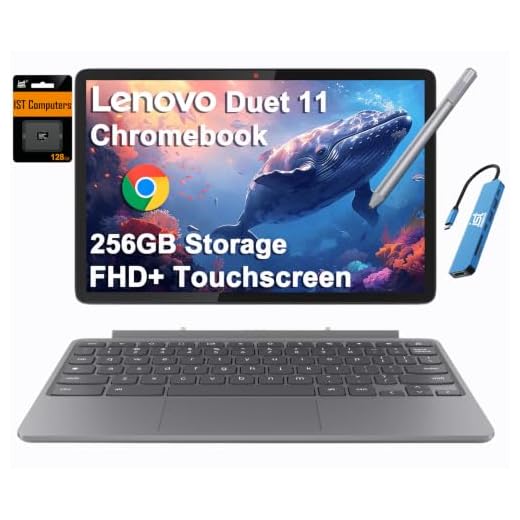
Lenovo Chromebook Duet 11-inch 2-in-1 (8GB, 256GB) — rugged, ultra‑portable, and ready for work or play with MIL‑STD‑810H durability, up to 12 hours of battery life, and a vivid WUXGA touchscreen. With AI-enhanced audio/video, Wi‑Fi 6, and expanded 256GB storage backed by a 3‑year warranty, it’s ideal for students, creators, and mobile pros. Order yours today and take portable productivity everywhere you go.
6. Lenovo Idea Tab Plus — Best Affordable Productivity Tablet
Best for: students and casual office users who want a larger screen, stylus support and keyboard compatibility without premium pricing.
The Idea Tab Plus focuses on the basics that matter for school and everyday work. Its 12.1-inch 2560×1600 display provides enough room for reading, note-taking and split-screen apps, while the 10,200mAh battery is designed for long study and media sessions.
The current U.S. configuration uses 8GB of memory and 128GB of storage, with a microSD slot for expansion. Lenovo includes its Tab Pen on the current listing, while a Folio Keyboard is supported as a separate accessory.
The MediaTek D6400 processor sits well below the Yoga and Idea Tab Pro tiers, so this is not the model to choose for advanced gaming, intensive editing or very heavy multitasking. It is better viewed as a large-screen study and office companion for web apps, documents, PDFs, video calls and streaming.
Lenovo lists Android 15 with upgrades through Android 17 and four years of security patches. That software commitment is acceptable for the price tier but considerably shorter than the newest Yoga tablets.
Pros
✅ Large 12.1-inch 2.5K display
✅ 8GB memory on current U.S. configuration
✅ Lenovo Tab Pen included on current listing
✅ Folio keyboard support
✅ Large 10,200mAh battery
Cons
❌ Entry-level performance compared with Yoga and Idea Tab Pro
❌ Wi-Fi 5 on the current U.S. specification
❌ Shorter software support than Yoga Gen 2 models
Who should skip it: demanding creators, gamers and users expecting laptop-class multitasking.
Alternative: Idea Tab Pro Gen 2 if performance matters enough to justify spending more.

Upgrade to the Lenovo Idea Tab Plus 12.1 (8GB RAM, 128GB storage) — a thin, lightweight tablet with a bright 12.1" display (800 nits, 96% DCI‑P3), AI-powered study tools, and the responsive Lenovo Tab Pen for effortless note-taking. Choose your color and make it personal — order yours today and start learning smarter.
Lenovo Tablets We Considered but Didn’t Pick
Original Yoga Tab Plus: The Snapdragon 8 Gen 3 model remains capable and may become attractive at clearance pricing, but Yoga Tab Plus Gen 2 is now the current flagship and provides a newer processor, larger 4K-class display, expandable storage and much longer software support.
Original Yoga Tab: Still a strong tablet where discounted, but the new Yoga Tab Gen 2 replaces it for current premium recommendations.
Idea Tab Pro Gen 1: Useful if heavily discounted, but the Snapdragon 8s Gen 4 in Gen 2 delivers a meaningful performance improvement and is the more relevant current model.
Lenovo Legion Tab: Its compact high-refresh display and gaming hardware are appealing, but its primary purpose is gaming rather than productivity. Including it in the main ranking would dilute the work-focused intent of this guide.
Lenovo Tab Plus / Tab Plus Gen 2: Lenovo’s entertainment-focused Tab Plus family is interesting for speakers and media, but productivity is not its primary strength.
Which Lenovo Tablet Is Best for Work?
The Yoga Tab Plus Gen 2 is Lenovo’s best general work tablet when you want Android, strong multitasking, a large display, pen input and an optional keyboard.
The ThinkTab X11 is the better choice for commercial deployments because its rugged construction, removable battery, optional 5G and wet-touch support are designed for field work rather than a conventional office desk.
If your job depends heavily on a full desktop operating system, a tablet may not be the most practical solution. Lenovo’s Android devices can handle browser apps, documents, meetings and creative work, but they do not replace every Windows or macOS application.
Which Lenovo Tablet Is Best for Students?
The Idea Tab Pro Gen 2 provides the best combination of screen size, performance and price for students who use a tablet for research, notes, PDF annotation, online classes and entertainment.
The Idea Tab Plus is the lower-cost choice when coursework is mostly web-based and performance demands are modest.
Students working mainly in Google Docs and Chrome should also consider the Chromebook Duet Gen 9, because ChromeOS and its detachable keyboard can feel more natural for browser-first schoolwork than Android.
Which Lenovo Tablet Is Best for Creators?
The Yoga Tab Plus Gen 2 is the clear Lenovo choice for creators. Its 13-inch 4K-class display, 3:2 aspect ratio, Snapdragon 8 Elite and Tab Pen Pro 2 support make it the strongest tablet here for illustration, annotation and more demanding visual workflows.
The Yoga Tab Gen 2 is more practical for artists who regularly work away from a desk. It gives up some processor performance and screen size but is substantially lighter.
Which Lenovo Tablet Is Best for Business?
The ThinkTab X11 is the most business-specific Lenovo tablet. IP68 protection, MIL-STD-810H testing, optional 5G, NFC, dual USB-C and a removable battery make it better suited to commercial deployments than Lenovo’s consumer Yoga or Idea tablets.
For conventional office users working mostly from desks, the Yoga Tab Plus Gen 2 is faster and more pleasant for media and creative applications. ThinkTab makes the most sense when durability and fleet management are part of the buying decision.
Lenovo Android Tablet vs Chromebook Duet
Choose an Android Lenovo tablet when touch-first apps, stylus use, media and mobile-app flexibility matter most. Yoga and Idea Tab models provide better native tablet experiences and more powerful hardware.
Choose the Chromebook Duet when Chrome, Docs, Sheets, Gmail and web applications dominate your workflow. ChromeOS behaves more like a lightweight desktop environment, and the detachable keyboard is central to the product rather than an optional tablet accessory.
Can a Lenovo Tablet Replace a Laptop?
For some users, yes. Yoga Tab Plus Gen 2 with a keyboard can handle communication, documents, research, presentations, video calls, note-taking and many creative applications. Chromebook Duet can replace a low-cost laptop for browser-based work.
A conventional laptop remains the safer choice for complex spreadsheets, specialist desktop applications, software development or workflows that rely on traditional window management and peripherals.
For a wider cross-brand comparison, see our best tablets for work and entertainment guide.
How Much RAM Do You Need in a Lenovo Tablet?
8GB is sufficient for everyday study, documents, browsing and moderate multitasking. That makes Idea Tab Plus, ThinkTab X11 and Chromebook Duet reasonable choices for standard productivity.
12GB is a better target for heavier Android multitasking and creative apps. Yoga Tab Gen 2 and Idea Tab Pro Gen 2 offer configurations in this range.
16GB makes the most sense for demanding users planning to keep a premium tablet for several years. Yoga Tab Plus Gen 2 is the main Lenovo option for that level of memory.
Do You Need a Keyboard?
A keyboard is worth adding if you regularly write long documents, answer email, work in spreadsheets or spend hours in browser-based applications.
The Yoga Tab Plus Gen 2 supports Lenovo’s magnetic clamshell keyboard, Yoga Tab Gen 2 has a detachable 2-in-1 keyboard pack, Idea Tab Pro Gen 2 supports its own keyboard accessory and Idea Tab Plus supports a Folio Keyboard.
Before buying accessories, compare the total tablet-and-keyboard price with a complete laptop. A premium tablet can become surprisingly expensive once a pen, keyboard and protective case are added.
Do You Need a Stylus?
A stylus is worthwhile for handwritten notes, annotations, sketching and creative work. The new Yoga models make pen input one of their main strengths, while Idea Tab models provide a more affordable route into note-taking.
Business buyers should verify the exact ThinkTab configuration because pen inclusion can vary. The Chromebook Duet also has configuration-dependent USI Pen 2 bundling.
Frequently Asked Questions
What is the best Lenovo tablet for productivity?
Yoga Tab Plus Gen 2 is the best overall Lenovo productivity tablet because it combines Snapdragon 8 Elite performance, up to 16GB of memory, a large 4K-class display, expandable storage, advanced pen input and keyboard support.
Which Lenovo tablet is best for work?
Yoga Tab Plus Gen 2 is best for general professional productivity. ThinkTab X11 is better for field work, rugged environments and business deployments where durability and optional cellular connectivity matter more.
Which Lenovo tablet is best for students?
Idea Tab Pro Gen 2 offers the best balance of performance, screen size and productivity features for most students. Idea Tab Plus is the more affordable option, while Chromebook Duet Gen 9 is ideal for Google Workspace users.
Is Lenovo Yoga Tab Plus Gen 2 worth it?
It is worth considering if you will use its Snapdragon 8 Elite performance, 13-inch high-resolution display, advanced pen features and long software-support plan. For basic documents and streaming, a cheaper Idea Tab provides better value.
Is Idea Tab Pro Gen 2 good for work?
Yes. Its Snapdragon 8s Gen 4 processor, large 13-inch display and up to 12GB of memory make it well suited to documents, research, communication and Android multitasking. Its main limitation is shorter software support than the new Yoga Gen 2 family.
Can a Lenovo tablet replace a laptop?
It can for browser work, documents, communication, presentations, note-taking and many creative apps. Users dependent on specialist Windows or macOS software should keep a conventional laptop or desktop.
Which Lenovo tablets support a pen?
Yoga Tab Plus Gen 2 and Yoga Tab Gen 2 support Lenovo Tab Pen Pro 2. Idea Tab Pro Gen 2 and Idea Tab Plus also support pen input, while ThinkTab X11 supports Tab Pen XE. Pen bundling varies by model and region.
Which Lenovo tablet is best for business?
ThinkTab X11 is Lenovo’s strongest business-specific tablet because it combines rugged IP68 and MIL-STD-810H construction with optional 5G, NFC, dual USB-C ports and a removable battery.
Final Verdict: Which Lenovo Tablet Should You Buy?
The Lenovo Yoga Tab Plus Gen 2 is the best Lenovo tablet for productivity in 2026. It has the strongest processor, the most memory headroom, a large high-resolution display, expandable storage and Lenovo’s newest pen and software platform.
The Yoga Tab Gen 2 is the better choice for users who value portability, while the Idea Tab Pro Gen 2 is the value winner for students and mainstream productivity. Business buyers should choose the ThinkTab X11 when ruggedness and cellular connectivity matter more than performance.
The Chromebook Duet Gen 9 makes the most sense for Google Workspace and browser-first work, while the Idea Tab Plus covers affordable studying and everyday office tasks without forcing buyers into premium pricing.
Best Overall: Lenovo Yoga Tab Plus Gen 2
Best Portable Premium Pick: Lenovo Yoga Tab Gen 2
Best Value: Lenovo Idea Tab Pro Gen 2
Best for Business: Lenovo ThinkTab X11
Best 2-in-1: Lenovo Chromebook Duet Gen 9
Best Affordable Pick: Lenovo Idea Tab Plus
Sources
- Lenovo StoryHub — New Yoga Tab Plus Gen 2 and Yoga Tab Gen 2 announcement
- Lenovo PSREF — Yoga Tab Plus Gen 2 product specifications
- Lenovo PSREF — ThinkTab X11 Gen 1 product specifications
- Lenovo — Idea Tab Pro Gen 2 product information
- Notebookcheck — Lenovo Idea Tab Pro Gen 2 review
Product Groups: Lenovo Yoga Tab Plus Gen 2, Lenovo Yoga Tab Gen 2, Lenovo Idea Tab Pro Gen 2, Lenovo ThinkTab X11, Lenovo Chromebook Duet Gen 9, Lenovo Idea Tab Plus