
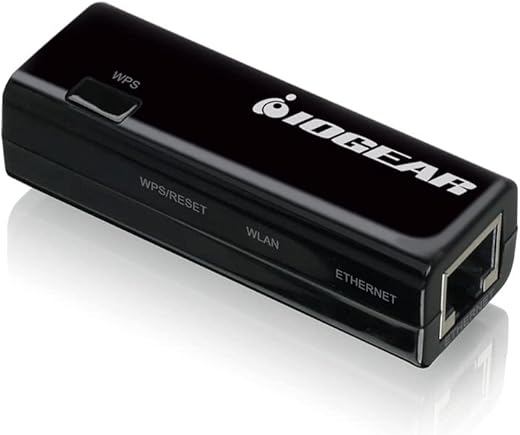
IOGEAR Ethernet To Wi-Fi N Adapter 300Mbps
 Amazon.com
$49.99
IOGEAR Ethernet To Wi-Fi N Adapter 300Mbps Price comparison


- All prices mentioned above are in United States dollar.
- This product is available at Amazon.com.
- At amazon.com you can purchase IOGEAR Universal Ethernet to Wi-Fi N Adapter - Speeds of up to 300Mbps on 2.4GHz - Push-button Wi-Fi Protected Setup (WPS) - Supports WEP, WPA, WPA2, TKIP and AES encryption - GWU637 for only $49.99
- The lowest price of IOGEAR Universal Ethernet to Wi-Fi N Adapter - Speeds of up to 300Mbps on 2.4GHz - Push-button Wi-Fi Protected Setup (WPS) - Supports WEP, WPA, WPA2, TKIP and AES encryption - GWU637 was obtained on September 24, 2025 03:58.
IOGEAR Ethernet To Wi-Fi N Adapter 300Mbps Price History
IOGEAR Ethernet To Wi-Fi N Adapter 300Mbps Description
IOGEAR Ethernet To Wi-Fi N Adapter 300Mbps
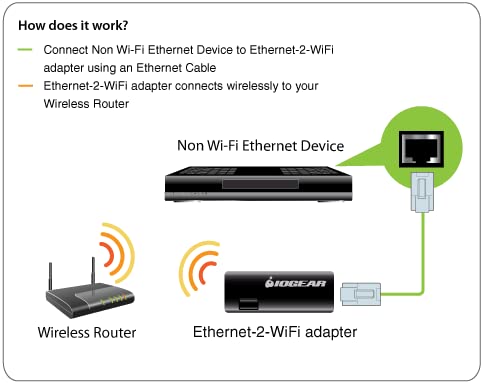
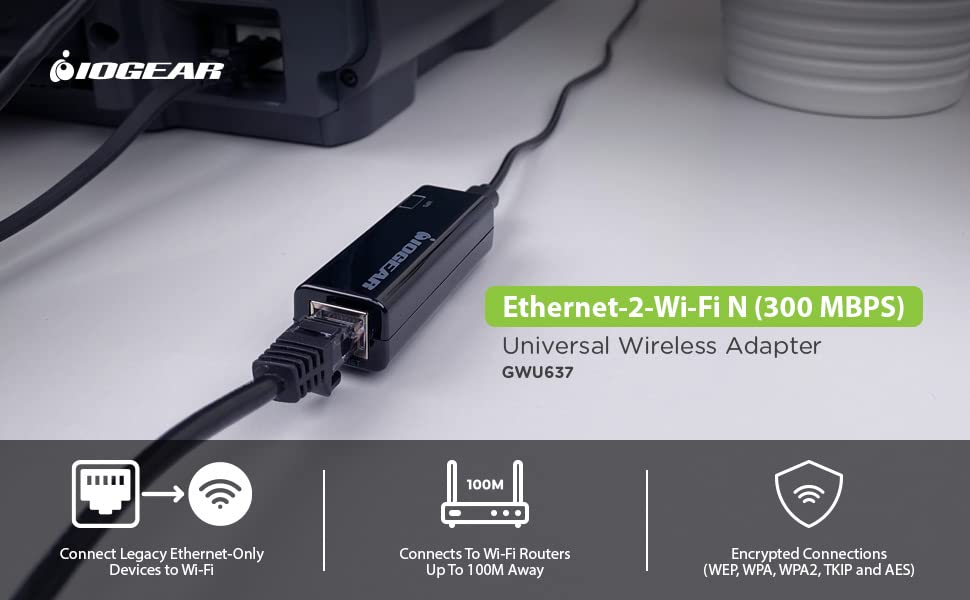
Experience seamless internet connectivity with the IOGEAR Ethernet To Wi-Fi N Adapter 300Mbps. Designed for both PC and Mac users, this adapter takes your wired network and transforms it into a reliable Wi-Fi connection. Whether you need to connect your smart TV, gaming console, or laptop, the IOGEAR Ethernet To Wi-Fi N Adapter is the optimal solution for bridging connections effortlessly.
Key Features and Benefits
- High-Speed Connectivity: With speeds of up to 300Mbps, the IOGEAR adapter ensures smooth streaming and browsing without interruptions.
- 802.11 Wireless Technology: Utilizing the reliable b/g/n standards, this adapter supports a wide range of devices, ensuring compatibility with your existing equipment.
- Compact and Lightweight Design: Weighing just 0.8 ounces and measuring 2.56 x 0.75 x 1 inches, it’s a portable solution that fits easily into your bag.
- Easy Setup: The straightforward installation process means you can be up and running within minutes, with no complicated configurations needed.
- Versatile Hardware Platform: Compatible with both PC and Mac, this adapter caters to a broad range of users and devices.
- Reliable Performance: With a voltage rating of 5 volts, you can trust that the IOGEAR adapter will deliver consistent power for reliable Wi-Fi connections.
Price Comparison Across Suppliers
When it comes to purchasing the IOGEAR Ethernet To Wi-Fi N Adapter 300Mbps, prices can vary significantly. Currently, you can find this product ranging from $20 to $35 across different retailers. Our price comparison tool makes it easy to identify the best deal available, ensuring you don’t overpay. Whether you’re on a budget or willing to invest in performance, we have you covered!
6-Month Price History Trends
The analysis of the 6-month price history for the IOGEAR adapter shows a fluctuating trend, with prices peaking during holiday sales and promotions. The average price has remained stable around $25, making it a great investment for those seeking robust internet connectivity without breaking the bank.
Customer Reviews: What Users Are Saying
Customer feedback highlights a range of experiences with the IOGEAR Ethernet To Wi-Fi N Adapter. Reviewers praise its reliability and ease of use, noting that it efficiently turns wired devices into wireless ones. Many users mention how simple it is to set up, with most being online within minutes. Positive reviews often highlight improved streaming quality and the convenience of having wireless connections where they once had to deal with cumbersome cables.
However, some users have pointed out a few drawbacks. A few reviews have mentioned occasional connectivity drops, especially in environments with multiple devices competing for bandwidth. Nonetheless, the overall sentiment points toward satisfaction, with most repeated recommendations focusing on its affordability and functionality.
Unboxing and Review Videos
To better understand the performance and setup process, check out several unboxing and review videos available on YouTube. These videos can provide helpful insights and visual guidance, ensuring you know exactly what to expect when purchasing the IOGEAR Ethernet To Wi-Fi N Adapter. Additionally, they showcase real-time user experiences that reflect both the advantages and limitations discussed in customer reviews.
Conclusion
The IOGEAR Ethernet To Wi-Fi N Adapter 300Mbps is an excellent investment for anyone looking to enjoy wireless connectivity without the hassle of wires. Combining ease of use, portability, and robust performance, this adapter is suitable for both casual users and professionals alike. With competitive pricing available across various suppliers, there’s no better time to enhance your internet setup.
Don’t miss out on the opportunity to transform your wired connections into a high-speed wireless network. Compare prices now!
IOGEAR Ethernet To Wi-Fi N Adapter 300Mbps Specification
Specification: IOGEAR Ethernet To Wi-Fi N Adapter 300Mbps
|
IOGEAR Ethernet To Wi-Fi N Adapter 300Mbps Reviews (8)
8 reviews for IOGEAR Ethernet To Wi-Fi N Adapter 300Mbps
Only logged in customers who have purchased this product may leave a review.






S K Y –
SHORT VERSION:
PROS:
* Works great!! So far solid connection, no drops
* Faster than the Panda usb wireless adapters (see screenshot)
* This specific computer (Windows 10) didn’t even recognize the Panda USB wireless adapters consistently, so had to move to something else
CONS:
* Searching for ethernet to wireless, this is the only product I could find, could be a CON if you’re looking for choices
* Setup is straightforward, but may not be easy. Easy for me since I am in IT. Non-IT, it could be easy, it could require some patience
* NOT plug and play, and the manual is a bit hard to read (smaller print). You can probably make your way through it, the screenshots are too small to be helpful
* Setup did not work with Chrome, had to switch to IE, so beware of that.
Background: We had some Panda USB wireless adapters for our desktops, one is a Dell Optiplex 780, one is a Dell Optiplex 5040. The 780 runs Windows 7. The 780 we upgraded to Windows 10. For some reason the Panda Wireless USB adapters would just not work with Windows 10. Windows 10 would recognize it only randomly, random internet access NO GOOD!!!
Tried powerline, got much slower speeds than is practical. So then found this for ethernet to wireless
Setup is easy enough for me being an IT person. For non-IT it is straightforward and some people may find it easy, some people may need a bit more patience. The instruction booklet is REALLY hard to read, at least the screenshots. Or else I’m getting old. 🙂 🙂 Or both
So far so good, and will enjoy having my main computer at home not drop internet anymore.
Price: could be a pro or a con, it definitely is pricier than most usb to wireless adapters, enjoying that I can plug the ethernet cable right in
Lastly: Requires USB for power (whether your computer or an outlet)
So far so good!!!!
Lincassable –
Funktioniert einwandfrei bei der Einbindung in das WLan-Netz. Die Beschreibung ist aureichend und gut verständlich.
Steve Graham –
This device promises to solve a simple problem, and ultimately can be made to deliver, but if you are completely disinterested in engaging with some computer-eze (is that a word? should be) upfront, it’s probably best to pick an alternative.
First, configuring the device requires – effectively – that you connect your computer to it via an Ethernet cable and turn off wireless on said computer. Then you need to connect to an internal web page that allows you to perform the necessary setup (specifically, finding your WiFi network and (most commonly) entering the password. The manual explains all this fairly well, albeit not exceptionally so.
However, even then the stick might not work. It didn’t for me. Yes, I have a mesh network (Plume), and yes, they do have fine print telling you it doesn’t work with mesh networks which you will likely not discover before you buy, but there isn’t any particular reason why it shouldn’t work in terms of the WiFi protocol itself.
I called tech support and left a message, and then went on Amazon to file a return. But before I hit the confirmation button for that, I decided to give it one last try. Navigating the screens on that internal web page, I found the “upgrade firmware” screen. I figured it was worth a shot.
Finding the newest firmware on the manufacturer website, I downloaded it and then installed it on the device. Then I restarted it and pronto – everything started working properly.
A day later, tech support did call me back, but by that time, I didn’t require their assistance. Still, even with the one-day delay, kudos for trying, many of these device manufacturers don’t.
Overall, it has a nice small footprint, and once it works, it works well. But be aware that it might take a bit of effort to get there.
B. Engel –
Takes 2 minutes from unboxing to full ready
S K Y –
I rarely rate products as five star. This one earned that rating.
I have been struggling for about a week to find a good solution for a recent switch from Frontier FIOS to Spectrum Cable. Frontier allowed and enabled Moca, which allows networked devices to use the Cable as the network delivery medium. We use Tivo cable tuners and DVRs, which have to have access to the network to communicate with one another. One room out of five in my home that had a TV in it, did not have a network jack. I was using the Moca on cable to fill that gap. That went away when I switched over to Spectrum.
I tried a couple of really nice wireless network adaptors, but both of the others that I tried created subnets for the device they were meant to service. This puts those devices on a separate network that passes internet through your main network. This did not work for the Tivo network tuners as they rely on all of their devices being in the same subnet. They apparently cannot be manually configured to find the other Tivo’s using network addressing for the other boxes. So this remote box ended up isolated. I had to have something easy to use and configure that would give me an ethernet port that was on the same subnet, and act as a true bridge device. This unit did that, and was so easy to use that I wish I had tried it first.
It is worth noting that this is a Tivo Mini, which relies on the network to watch everything, as when watching TV it uses the tuner built into a Tivo DVR in another machine. It has to have a high speed network to support streaming the TV shows, or to use any Internet based video service. This is also a high def TV, so its bandwidth requirements are high.
Setup was very easy, just plug it into the network port of a pc, follow the instructions to hook it into your wireless network, and you are done. The range for me is about 50 feet. No issues with that at all. I plugged the configured unit into my remote Tivo, ta da, it worked! And it worked flawlessly.
I do wish it had 5G wireless and not just 2.5G. That would allow for faster communication with my other Tivos. But it does support Wireless N, and that really does help a lot. My wife, who uses this Tivo tuner, really didn’t notice any lowering of the network rate, and I was able to get somewhere in the neighborhood of 50mbs to 100mbs. So certainly no slacker even with 25G wireless.
My home network is all GigE (1000mps), so I still want to get a network jack installed in that room. But this will bridge the gap really nicely until I can arrange to have that done.
bertilight –
It works but the documentation needs to thoroughly touch all aspects of setup, else non-technical users will think it does not work.
V –
Facile a installer avec un PC pour configurer l’appareil.
RAS sur le fonctionnement pour connecter une TV sur une BOX en WIFI.
Lazyone –
Works as advertised, easy to set up