
LIONWEI 15-in-1 Docking Station For MacBook
 Amazon.com
$135.99
LIONWEI 15-in-1 Docking Station For MacBook Price comparison


- All prices mentioned above are in United States dollar.
- This product is available at Amazon.com.
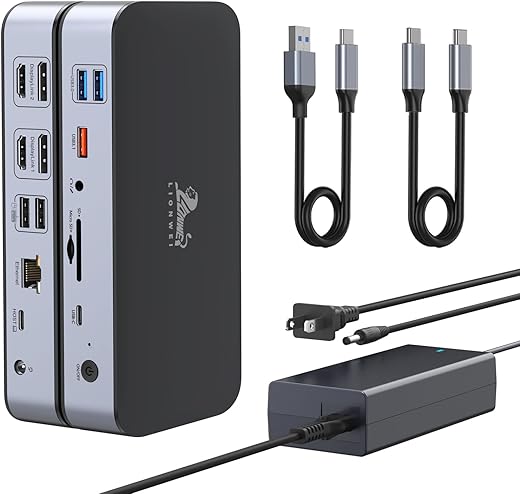
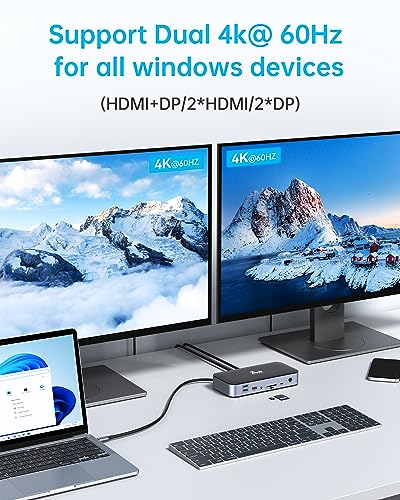
- At amazon.com you can purchase DisplayLink Docking Station,,15-in-1 DisplayLink Dock for MacBook M1/M1 and Windows ,2 HDMI Port ,2 DP Port, 120W DC Power Supply,6 USB Ports,2.5G Gigabit Ethernet, SD/Micro sd,Audio for only $135.99
- The lowest price of DisplayLink Docking Station,,15-in-1 DisplayLink Dock for MacBook M1/M1 and Windows ,2 HDMI Port ,2 DP Port, 120W DC Power Supply,6 USB Ports,2.5G Gigabit Ethernet, SD/Micro sd,Audio was obtained on September 24, 2025 06:53.
LIONWEI 15-in-1 Docking Station For MacBook Price History
LIONWEI 15-in-1 Docking Station For MacBook Description
LIONWEI 15-in-1 Docking Station For MacBook
The LIONWEI 15-in-1 Docking Station For MacBook is the ultimate solution for enhancing your MacBook’s connectivity. With its advanced features and versatility, this docking station is designed to meet the needs of professionals and tech enthusiasts alike. Discover how this device can revolutionize your workspace and streamline your workflow.
Key Features and Benefits of the LIONWEI 15-in-1 Docking Station
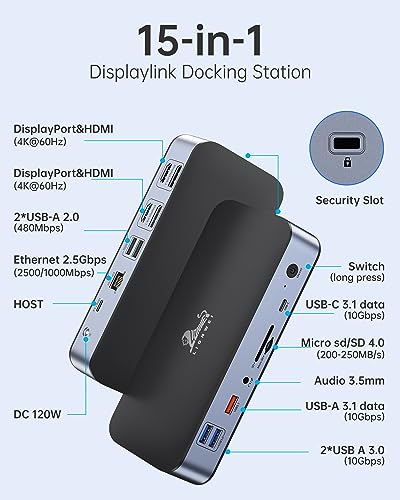
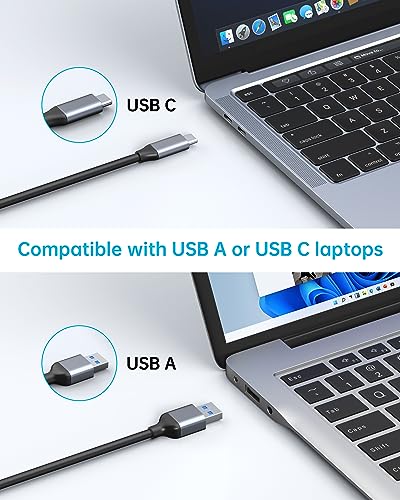
- Multiple Connectivity Options: 15 ports including HDMI, USB-C, USB-A, Ethernet, and SD card reader allow seamless connections to various devices.
- High-Speed Data Transfer: USB 3.0 ports offer transfer speeds of up to 5Gbps, ensuring that your work can be quick and efficient.
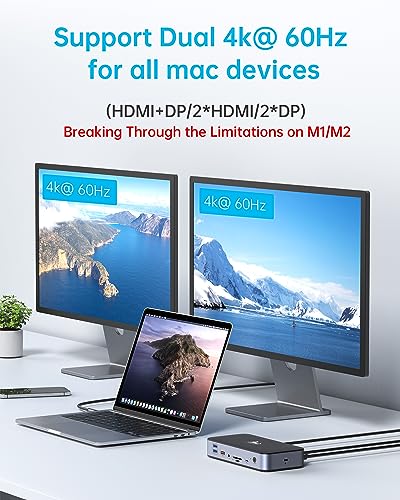
- 4K HDMI Output: Enjoy crystal-clear visuals with the built-in HDMI port that supports 4K resolution, ideal for presentations and media consumption.
- Compact and Portable: With dimensions of 8.39 x 5.43 x 3.43 inches and a lightweight design of just 2.33 pounds, it’s easy to take anywhere.
- Stable Ethernet Connection: Accelerate your Internet speed with a Gigabit Ethernet port for stable connectivity during important tasks.
- Built-In Memory Card Reader: Easily transfer files from SD and TF cards, perfect for photographers and videographers.
Price Comparison Across Suppliers
The LIONWEI 15-in-1 Docking Station has been competitively priced across various online retailers. As of now, prices typically range from $99.99 to $119.99. By comparing prices from leading suppliers, you can easily find the best deal for this versatile docking station. Check back often as prices may fluctuate, providing opportunities for savings.
Price Trends Over the Last 6 Months
Our 6-month price history chart shows a steady decline in price, indicating increased competition in the market. Initially priced at around $129.99, it has dropped significantly, now making it an attractive option for consumers seeking value. This trend highlights the growing demand for multi-port solutions for MacBooks and the LIONWEI docking station’s ability to meet this need effectively.
Customer Reviews: Pros and Cons
Customer feedback regarding the LIONWEI 15-in-1 Docking Station reflects its high functionality and versatility. Many users praise its sturdy build and multiple port options, which make it a valuable addition to any workspace. Users frequently mention:
- Positive Aspects: Excellent for multitasking, ability to connect multiple devices simultaneously, and sleek design that complements MacBook aesthetics.
- Noted Drawbacks: Some users report occasional connectivity issues with certain peripherals. A few have mentioned a need for better instructions for specific functionalities.
Explore Unboxing and Review Videos
If you want to see the LIONWEI 15-in-1 Docking Station in action, check out popular YouTube unboxing and review videos. Many tech reviewers showcase its features and functionalities, providing valuable insights into how it performs in real-world scenarios. Watching these videos can help you make an informed decision, ensuring that this docking station is the right choice for your needs.
Final Thoughts
The LIONWEI 15-in-1 Docking Station For MacBook offers an unparalleled combination of functionality, design, and competitive pricing. Whether you are a professional who relies on connectivity for your daily tasks or a casual user looking for convenience, this device provides everything you need. Don’t miss out on this essential accessory that enhances your MacBook experience.
Ready to take your productivity to the next level? Compare prices now!
LIONWEI 15-in-1 Docking Station For MacBook Specification
Specification: LIONWEI 15-in-1 Docking Station For MacBook
|
LIONWEI 15-in-1 Docking Station For MacBook Reviews (9)
9 reviews for LIONWEI 15-in-1 Docking Station For MacBook
Only logged in customers who have purchased this product may leave a review.






Amazon Customer –
Great device with always reliable connections and duel monitor support. I was able to really clean up my home workstation
Art Hansen –
Here are the pro/cons from my point of view.
Pros:
1. A Mac computer can get double monitors! Yes! I’ve got a 2023 15 inch Mac with M2 processor and it’s been a nightmare getting two monitors plus the Mac screen to each have their own view. This does it!!
2. It’s easy to use and there is insurance, BUY THE INSURANCE. You’ll see why in the cons.
Cons:
1. In 3 months I’m on my second one. It gets very very hot and they fail after a short time. I use mine for about 10 hours a day Monday – Friday. After about 60-90 days it fails. So GET THE INSURANCE for zero hassle returns. With insurance I can simply return and get another replacement fast!
2. It’s not a long term solution because it gets to hot and the internal element will fail sending a message to the computer with an error “not compatible”. Frustrating as hell.
3. Tonight #2 failed (70 days) and I’ll order #3.
So why do I keep buying this product? Because it works and I’ve rolled through 7 products that didn’t work. I am hunting for a better product long term. I’m desperate for multiple screens, I need something to just get through the work day.
Career Path High –
This docking station was exactly what I needed. My M1 chip MacBook Pro does not natively support to external monitors. This was just the solution I needed to be able to connect both of my displays to my laptop. It works flawlessly. It’s also great that there are so many additional ports on this dock, including multiple USB ports, headphone, jack, ethernet port, and SD and microSD ports. Everything works flawlessly, and I am so happy with this doc. It allows me to basically just plug in one cable into my MacBook and have it function as if it was a desktop PC. Highly recommend.
Big Boss –
Bought two of these, neither worked as they should. USB ports worked for about a day on both, then none of them worked. display ports worked on windows, but hdmi would only mirror each other on windows. M2 macbook sometimes had video out, but only mirrored at first. the software you have to install on mac to extend across two displays did not seem to work. I’ll be incredibly generous and say that was user error.
Device stays connected to my work computer. But then monitors starting going in and out after a few months. Then they were stable. I had to buy a separate usb hub, because again, the usb ports didn’t work on either one i bought. Ethernet sometimes works, and sometimes at 2.5gb speeds. No amount of troubleshooting or replacing cables changed anything. Unfortunately this all happened after the return window had closed, about 6 months, so I’m out all that money.
Avoid. Find a more reliable device.
luminalaluna –
This was incredibly easy to set up on my M1 MacBook Air. I was able to get it installed, and both monitors working as external displays, which is not “innate” to the MacBook Air with an M1 processor. From opening the box to getting it installed and turning the monitor on, I’d say I was able set it up in 20 minutes or under.
ImTheManWhoLovesYou –
This docking station has worked well for the most part except for the following:
1. After 6 months the cord that attaches to the computer started to short or the port itself on the dock is loose so I have to position it just so for it to connect.
2. If my computer is left plugged into the dock for too long during inactivity it freezes, and I have to restart my computer.
Other than these two issues, it has worked well, but the longevity of the device is limited as I’m finding with most docking stations in this price range. This one, however, takes the cake for time in use before having to seek support or replacement. Not even sure how to contact the seller.
Masai –
The dock worked well in the beginning, supporting multiple monitors for my M2 Macbook Air (the laptop can not support more than 1 external monitor w/o DisplayLink).
However, after 2 weeks the dock started to glitch out. It would randomly disconnect after 5 minutes or so and there seems to be no solution. Had to return it.
luminalaluna –
This USB-C dock is a pretty versatile option because it relies on DisplayLink, which means it can work with all sorts of devices, even older ones. That’s a big plus.
Overall, it does the job well. But here’s the thing that tripped me up: the pictures show two blue ports at the back, and I jumped to the conclusion that they were USB 3.0. Turns out, they’re actually USB 2.0. I totally missed that detail in the description. If I had known, I might have gone for something else because I wanted to connect a USB-C 3.0 hub at the back to avoid cable mess from the front to the back.
But here’s the good stuff: the front of the dock has three high-speed USB-A ports and one USB-C port that are super convenient. Plus, it comes with a stand, an SD card and micro SD card reader, and a headphone/mic jack. It’s a well-made dock with some nifty features, and it gets the job done nicely.
T. S. Mitchell –
Who says you can only have on external screen for a M1 IMAC.
Very satisfied, Art
PS. Before I bought this product I was using an Apple TV connection for the second external screen, but the DisplayLink Docking Station Dual Monitor, DisplayLink is a much more elegant solution.