
 Amazon.com
NETGEAR Powerline 200Mbps Nano Adapter XAVB2101 Price comparison


- All prices mentioned above are in United States dollar.
- At amazon.com you can purchase NETGEAR Powerline 200Mbps Nano Adapter - Starter Kit (XAVB2101) for only
- The lowest price of NETGEAR Powerline 200Mbps Nano Adapter - Starter Kit (XAVB2101) was obtained on September 24, 2025 03:59.
NETGEAR Powerline 200Mbps Nano Adapter XAVB2101 Price History
NETGEAR Powerline 200Mbps Nano Adapter XAVB2101 Description
NETGEAR Powerline 200Mbps Nano Adapter XAVB2101: Enhance Your Home Network
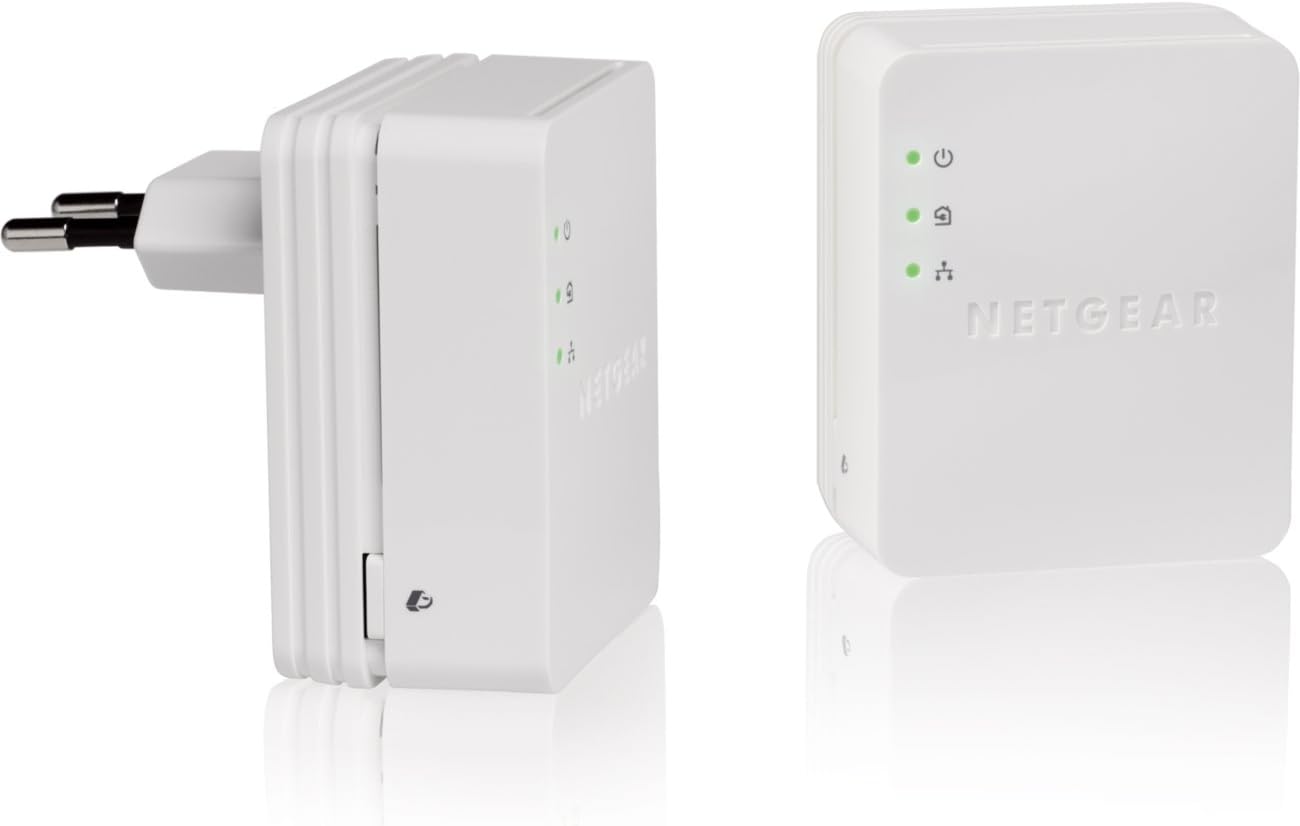
The **NETGEAR Powerline 200Mbps Nano Adapter XAVB2101** is your ultimate solution for enhancing home or office networking without the clutter of additional wiring. Ideal for streaming, gaming, and online work, this device lets you utilize your existing home electrical wiring to create a reliable network connection. With its compact design, you can connect your internet-enabled devices easily and quickly, tackling any connectivity issues you may have. Discover why it’s one of the top choices in price comparisons for network adapters today!
Key Features of the NETGEAR Powerline 200Mbps Nano Adapter
– **High-Speed Performance**: The NETGEAR XAVB2101 offers speeds up to 200Mbps, ensuring a seamless internet experience for streaming and gaming. Ideal for online gaming and HD video streaming, it minimizes buffering and lag.
– **Compact Design**: Measuring only 2.17 x 1.34 x 2.64 inches, this nano adapter is easy to fit into any space without obstructing nearby outlets. Its compact nature makes it suitable for use in any room without contributing to clutter.
– **Plug-and-Play Setup**: No complicated installation procedures are required. Simply plug the adapter into a power outlet and connect your device. This user-friendly setup makes it accessible, even for those who are not tech-savvy.
– **Compatibility**: Works seamlessly with Microsoft Windows 7, Vista, XP, and Mac OS X. No matter what operating system you use, this device is built to perform reliably.
– **Expansion Options**: With the ability to add multiple adapters within the same network, you can expand your coverage area easily. It’s a flexible solution that can grow with your needs.
– **Secure Connection**: Integrated encryption ensures that your data remains secure. With this feature, you can use your internet securely without worrying about unauthorized access.
Price Comparison Across Different Suppliers
When considering the purchase of the NETGEAR Powerline 200Mbps Nano Adapter XAVB2101, it’s essential to evaluate how prices vary among suppliers. This device can be found at competitive prices across various retailers. Our site showcases a comprehensive price comparison to help you find the best deal, highlighting any current sales or discounts available. You won’t miss an opportunity to save money while securing a reliable network upgrade for your home or office.
Insights from 6-Month Price History
The 6-month price history chart reveals a fluctuating trend in the prices of the NETGEAR Powerline 200Mbps Nano Adapter. Recently, you may have noticed a downward trend, suggesting that now is an excellent time to make your purchase. Historical data indicates seasonal promotions, so keep an eye out on our site for any upcoming discounts reminiscent of previous price drops. Analyzing these trends equips you with the knowledge to make a smarter buying decision.
Customer Reviews: What Users Are Saying
Customer feedback highlights the reliability and efficiency of the NETGEAR Powerline 200Mbps Nano Adapter. Many users praise its fast internet speeds and easy installation. Reviewers appreciate that it effectively eliminates dead zones in their homes. They particularly love its plug-and-play feature, requiring minimal effort to set up.
However, some reviews note that performance can be affected by the quality of your electrical wiring, which could disrupt the connection quality. A few users also mention occasional connectivity drops, although these instances seem to be exceptions rather than the rule. Overall, customer impressions support the idea that the XAVB2101 is a valuable investment for anyone seeking an efficient internet solution.
Explore Unboxing and Review Videos
To get a better understanding of the NETGEAR Powerline 200Mbps Nano Adapter XAVB2101, consider watching related unboxing and review videos available on platforms like YouTube. These visuals provide insights into the installation process and real-world performance demonstrations. Seeing the product in action can enhance your confidence in your purchasing decision and show you its practical use in everyday scenarios.
Conclusion: Upgrade Your Connectivity Today!
In conclusion, the **NETGEAR Powerline 200Mbps Nano Adapter XAVB2101** stands out as an efficient, cost-effective solution for those needing dependable internet connectivity. Its easy installation, high-speed capabilities, and compact design set it apart from other options available in the market. By taking advantage of our price comparison feature, you can ensure you secure the best deal on this trending device. Don’t wait any longer to enhance your home or office networking experience. **Compare prices now!**
NETGEAR Powerline 200Mbps Nano Adapter XAVB2101 Specification
Specification: NETGEAR Powerline 200Mbps Nano Adapter XAVB2101
|
NETGEAR Powerline 200Mbps Nano Adapter XAVB2101 Reviews (4)
4 reviews for NETGEAR Powerline 200Mbps Nano Adapter XAVB2101
Only logged in customers who have purchased this product may leave a review.






Christopher –
The powerline av 200 nano adapter kit performs on par with CAT. Extremely easy setup along with oustanding internet performace.
Gergan –
I received it well and on time.
It’s easy to install and it works as expected. I did not have any issues with it.
handy for reviews of various items –
After struggling for months with a very weak WiFi connection at the far end of the house from where my router is, I knew I had to take a new approach. With multiple plaster walls, plus an 8″ thick stone wall, separating the router and the intended destination, I had tried everything I knew how, including adding reflectors on the antennas at the sending and receiving end. I’m an electrical engineer, so I knew that would help, and it did, but it still wasn’t enough. The signal would make it – usually – but just barely, and would drop the network connection frequently.
The NETGEAR Powerline AV200 Wireless N extender kit (XAVNB2001) arrived today. With my existing NETGEAR router, setup was a snap, using Method B in the instruction booklet that came with the unit. Plugged the Extender unit (the bigger of the two units) into a wall socket near the router, then a push of the WPS button on the router and the Extender unit quickly configured automatically to the router, no cable hookup needed. Without a WPS router, you’d have to run the enclosed CD and manually enter some of the wireless settings you are using with your router, but that shouldn’t be too hard. Then I moved the Extender to the area of the house where the WiFi was weak, and connected it to the PC with one of the two included Ethernet cables that came with the unit. Then I plugged the Adapter into the wall socket where the Extender had been previously, used the second Ethernet cable to connect it to the router, and I was in business!
According to the LED indicator, the link rate was better than 80 Mbps. And that’s going through TWO circuit breaker boxes, separated by several hundred feet of wiring, one serving the portion of my home where the router is located, and a second breaker box serving the intended receiving PC.
Don’t forget you have to “enable” the Ethernet connection in the receiving PC, if you had been using a USB plug-in wireless connection previously, since you are now relying on a wired Ethernet connection. The directions that came with the unit also tell you to be sure to plug both the Extender and the Adapter directly into a wall socket, NOT into a power strip. I presume that is because the power strip may degrade the signal strength.
Note further that the units also transmit a WiFi signal, so you don’t have to use the wired Ethernet connection at the receiving end if you don’t want to. However, the best connection to the Adapter is via a wired Ethernet cable, if possible. That’s how I’m hooked up, since it was a desktop PC I was trying to get the signal to. But just for fun, I walked around my house with my iPad, to see what kind of WiFi signal I could now get in the (formerly) weak signal end of the house, and it was VERY good. An added bonus for when I want to roam the house with some WiFi unit such as an iPad!
Keep in mind, however, that the units are broadcasting WiFi WITHOUT encryption, as shipped from the factory. However, if you are interested, the detailed manual (available online via the enclosed CD) documents how to add WPA encryption (or whatever) to the Powerline Extender Kit if you desire. I’m out in the boonies, so that’s not an issue for me – I suspect the transformer out at the street degrades the signal sufficiently that it’s not going anywhere other than within my house and the immediate vicinity.
One other consideration, if you are intending to use the unit to connect via WiFi rather than Ethernet cable – you *may* have to assign a different SSID (wireless network name) to your router WiFi and the Extender Kit WiFi, lest your client devices switch back and forth between the two access points (your existing wireless router and the Extender Kit wireless) but I didn’t notice a problem with that in my setup, even though both wireless access points have the same SSID.
No more dropped connections! And it was a VERY easy setup, and the options are there if you WANT to beef up security on the unit.
C Huson –
I have a friend in a west suburb of Chicago who lives in a condo. The current connection to her internet (ATT U-verse) is a small wireless adapter. There are about fifty wireless access points accessible from the room where her computer is, and her router is two rooms and a closet away from the computer, so understandably she gets poor connection speed (about 10 mbps) and frequent drops.
I have been experimenting with this adapter kit before giving it to her, so I can understand its limitations. First, I synced the encryption by plugging both in to the same surge protector, and pressing the sync buttons. No problem there. Then, for fun I plugged my computer into one of the adapters, and plugged the other into my gigabit wired port to my cable modem. The connection light came up green, and I got the maximum rate on speedtest.net (for me it is 57 mbps.)
Then I took one of the adapters out and plugged it in to another surge protector near another wired outlet. I could not get the adapters to connect. So I learned my first lesson: these guys like to be plugged in directly to the outlet, no filtering.
I plugged both computer adapters into the wall outlet, and presto, connection, green light, 57mbps connection speed.
I have used the adapters on my main computer (I’m using them right now) for several weeks. Once in awhile I unplug my computer from the adapter to simulate turning it off, and then plug it back in to simulate turning it back on after varying times. The adapters work fine in this configuration.
I then changed the outlet the far adapter was plugged in to. I must have connected it to a circuit on a different phase, because I get an amber connection on my computer room adapter, and a green on the other one. (I didn’t know they could think they are communicating at different speeds.) I only get about 32 mbps when the light is amber. My explanation why it isn’t 50 mbps (the speed claimed for an “amber” connection) is there must be communication overhead in the wired protocol, though I haven’t researched that, it’s just “gut instinct.”
When the devices have had a problem (only once or twice over the month or so I’ve been playing with them), you just unplug them, plug them back in, and run “ipconfig /renew” to get a new IP address. Very easy.
I don’t know if these would work in every power line configuration, but it seems they work really well in a “normal house.” We also have your standard noise-producing equipment (refrigerators, heaters, fans) running here, and they don’t seem to cause problems. I would recommend them as an alternative for people with lots of wireless interference.
UPDATE 3/30/2014 – After all the good luck with the adapters I finally got the chance to take them to our friend and try them out. The first clue it wouldn’t be easy was when I looked for a place to plug the adapter in near the computer I found ANOTHER adapter in the outlet. I unplugged that adapter, put in the new adapter, “ipconfig /renew” and try Speedtest.net. I got 1.2 MBPS! That is, 1.2 megabits, not megabytes.
My friend had described some problem the AT&T installers had with finding a suitable outlet for the router, and had described the process they tried with the other power adapter, but it was impossible to figure just what she was talking about. It must be hard to convey info like that if you have no technical knowledge. I cannot fault her for that.
My brother and I talked about it, and I think we came up with a plausible explanation. Though we cannot be sure unless we take the outlets apart, but given the age of the building it is likely they used aluminum wiring. Aluminum is relatively safe once you get it all installed and working, but any change can cause bad junctions, heat and eventually fire.
The relevant property for us is what is called the “skin effect.” As AC gets higher in frequency, the current is carried by less and less of the wire. It starts flowing only on the surface of the wire, increasing the resistance. (That is why all the wiring you see in the US is made with multiple strands; more surface area for conduction.)
The frequencies used by power line adapters are much higher than 60Hz. (According to the Homeplug Powerline Alliance the PHY layer uses 2-28 MHz.) The skin effect, and thus the resistance, will be much higher for that frequency range.
I cannot fault these adapters for failing with an ancient wiring system. But unfortunately they didn’t work for my friend. Caveat emptor.