
 Amazon.com
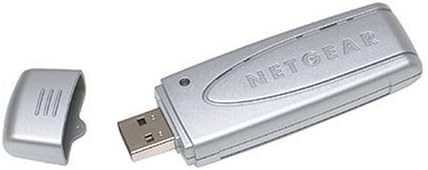
NETGEAR Super-G Wireless USB 2.0 Adapter Price comparison

- All prices mentioned above are in United States dollar.
- At amazon.com you can purchase NETGEAR WG111T Super-G Wireless USB 2.0 Adapter for only
- The lowest price of NETGEAR WG111T Super-G Wireless USB 2.0 Adapter was obtained on September 24, 2025 03:58.
NETGEAR Super-G Wireless USB 2.0 Adapter Price History
NETGEAR Super-G Wireless USB 2.0 Adapter Description
NETGEAR Super-G Wireless USB 2.0 Adapter: Your Key to Fast Wireless Connectivity
Experience seamless internet access with the NETGEAR Super-G Wireless USB 2.0 Adapter. This compact adapter is designed for anyone who needs reliable and efficient wireless connectivity for their computer or laptop. With its robust specifications and impressive performance, the NETGEAR adapter ensures you stay connected effortlessly, whether for work or play.
Key Features and Benefits of the NETGEAR Super-G Wireless USB 2.0 Adapter
- Compact and Lightweight Design: Measuring just 1.19 x 3.72 x 0.6 inches and weighing 1.12 ounces, this USB adapter is easy to carry, making it perfect for users on the go.
- Super-G Technology: This adapter uses Super-G technology for faster data transfer speeds, ensuring smoother streaming, gaming, and browsing experiences.
- Easy Installation: Plug-and-play compatibility simplifies installation, allowing you to connect to your network quickly without any hassle.
- Backwards Compatibility: The NETGEAR Super-G USB Adapter is compatible with earlier wireless standards, ensuring seamless connections with older networks.
- Wired Network Capability: If you require a stable connection, this adapter can easily bridge your wired and wireless networks efficiently.
Price Comparison Across Different Suppliers
When looking for the best deal on the NETGEAR Super-G Wireless USB 2.0 Adapter, price comparisons reveal significant savings across various suppliers. Prices can fluctuate, but our comparative analysis identifies the most budget-friendly options available, enabling you to purchase this essential product at the best possible rate.
Trends from the 6-Month Price History Chart
According to the 6-month price history chart, the NETGEAR Super-G USB adapter has shown a slight trend toward price stabilization, with occasional dips offering opportunities for great savings. Monitoring these patterns helps you decide the right time to buy this adapter without overspending.
Customer Reviews: Pros and Cons
With numerous customer reviews highlighting the NETGEAR Super-G Wireless USB 2.0 Adapter, users appreciate its performance and ease of use. Key positive aspects include:
- Reliable wireless connectivity with minimal dropouts.
- Fast data transfer speeds that enhance overall internet performance.
- Compact size, perfect for those who travel.
However, some users have noted minor drawbacks:
- Occasional software issues on certain operating systems.
- Range may not match more advanced adapters, especially in larger homes.
Explore Unboxing and Review Videos
For a deeper understanding of the NETGEAR Super-G Wireless USB 2.0 Adapter, check out various unboxing and review videos on platforms like YouTube. These videos provide visual insights into the product’s features, installation process, and real-time performance, further aiding your buying decision.
In summary, the NETGEAR Super-G Wireless USB 2.0 Adapter is a notable solution for anyone requiring fast and convenient wireless connectivity. With its compact design, reliable performance, and superior technology, this adapter is ideal for students, professionals, and casual users alike.
Don’t miss out on the opportunity to enhance your online experience. Compare prices now and get connected with the NETGEAR Super-G Wireless USB 2.0 Adapter!
NETGEAR Super-G Wireless USB 2.0 Adapter Specification
Specification: NETGEAR Super-G Wireless USB 2.0 Adapter
|
NETGEAR Super-G Wireless USB 2.0 Adapter Reviews (8)
8 reviews for NETGEAR Super-G Wireless USB 2.0 Adapter
Only logged in customers who have purchased this product may leave a review.





Cameo C. Massey –
I had this before but it was I guess an earlier version because it worked with my old Windows 7 operating system. This one works only with Windows Vista, XP and newer operating systems. Couldn’t even get through the install process on the CD
R. Martinez –
I’m amazed at how much the WG511T and the WG111T are so night and day from each other. Where the WG511T doesn’t work with Windows XP and laptop computers (yeah, I know. Hard to believe) the WG111T works right away and doesn’t let up even when it does heat up like other USB WiFi dongles. It’s even better than my old Linksys WUSB12 which just stopped working after a while (got so mad at it I opened it up and snapped the board in half. So much for any type of warranty if it was still in effect).
This is the way the WG511T should have worked, but problems with PCMCIA WiFi cards and Windows XP lead me to suggest this instead. And I wonder if it will work with USB 2.0 PCMCIA cards for those who have laptops without USB ports but with a PCMCIA card slot.
Martha S. Knapp –
The product was just what I wanted at a good price and works great with the Netgear router.
Kathy A. Dewitt –
Great product! I was happy to find this handy little gizmo. I wanted to set up a secondary computer on my home network, but didn’t want the hassle of an internal device. I didn’t know that such a device existed, but it was exactly what I wanted/needed and works flawlessly!
Thank you, Netgear (and Amazon)!
Heathcliff J. Miller –
This review is a little old. I had already purchased the netgear router and one wireless adapter in January’06. But i needed a second one as I now have three computers in the house feeding off the same DSL internet connection.
Performance is good. I live in a two storey concrete house , the laptop is at different locations around the house and the 2nd desktop is upstairs. Signal strength varies but generally both work well! installation was easy, no problems to date.
K. Parmalee –
This adapter was tested on two PCs – A Compaq Evo N610c (work-issued) and a Compaq SR1230NX (home), where both run XPSP2, and so far the following issues have come to light:
1) Full 108Mbps performance is possible only when I set my router (Netgear WGT624) to “108Mbps only” which precludes using other adapters. Auto-sensing the router drops the connection to 54Mbps tops. Since most of my traffic goes to the Internet through a cable modem, full 108 is not yet a necessity. Those who have a lot of traffic inside the LAN – such as pushing video files to various rooms – might want to shop for a more robust solution.
2) On the SR1230NX, connection is at best temporary when using any of the front USB 2.0 ports. The only usable connection is with the back USB ports, which I thought were also 2.0, but which the adapter (or XP) claims are not. The message in Windows states, “This device could perform faster…” – so far my research indicates a USB driver issue. Other devices such as memory sticks, gamepads, cameras (Panasonic camcorder, HP digital camera, and Logitech webcam), and Olympus audio recorder work fine on the front ports. The Evo laptop doesn’t have this problem.
3) On either system, regardless of the port used, connections die in minutes when using WPA-PSK. WEP works OK.
4) It doesn’t work consistently on the SR1230NX if plugged in hot. If plugged in with power off, it’s OK. This “feature” wasn’t tested on the Evo. The installation procedure specifies plugging in the adapter with the power off, so that will be the future MO.
5) So long as the above conditions are satisfied, the Smart Wizard works OK. If knowing your connections stats in real-time is important, Smart Wiz is superior to the standard XP Wireless Connection Wizard, which reports 108Mbps regardless of true connection speed. If you don’t need it or RAM is tight, the XP Wiz is fine.
Once I satisfy the above conditions, the WG111T runs as well as my wired 100M Ethernet connection, which I’ve disabled. The WG111T’s performance has convinced me that all of my future PC/console/media center installations will use wireless. Now it boils down to which stuff installs the easiest and works the most reliably.
Addendum 2007-01-30 –
I have since switched back to auto-sense speed on my router because I have other devices — namely a D-Link DCS-900W wireless webcam — that only runs at 54 Mbps. That of course drops the max speed of my WG111T to 54 Mbps. So far that hasn’t affected the performance of my online gaming relative to using a wired connection.
I decided not to update the USB drivers for my PC. I’m shopping for a new PC and my current one will probably become a home-grown DVR, so it will probably be rebuilt in Linux anyway.
About the only other observation worthy of note is that when the PC is powered down, along with the Belkin USB hub to which it is attached, the WG111T seems to remain energized. At least the blue LED keeps flashing. Detaching and reattaching the WG111T fixes the issue. I didn’t verify whether it was emitting RF in its’ “PC off” state.
Addendum 2007-09-14
The WG111T quit working about a month ago. I replaced it with an Ativa USB, the Office Depot store brand. I already had a good experience with it on another PC (my P4 gaming rig – the SR1230NX now serves as an auxiliary). Amazon carries some Ativa merch, but not the USB Wi-Fi adapter as of 9/14. The Ativa is cheap (about $25 retail) and so far it’s been the most reliable of all adapters tried. I have two complaints – it’s substantially bigger than any USB Wi-Fi adapter I’ve seen (so it may not be suitable for portables) and the connection manager is a CPU hog – the standard Windows network utility works much better.
Jamsales –
I had some installation problems w/ this. I called Netgear and was told that this model was produced in 2005 and they would not provide further support beyond my initial phone call. It works ok, but I have on going loss of signal and need to upgrade to the newer model. The seller refunded my money.
Anonymous –
It will work until you push it. So for example if you try copying files from one PC to another. It drops it’s connection and you have to unplug it from the USB and reconnect it. Then it will work until next time it encounters a lot of demand for bandwidth.
I’ve tried EVERY possible firmware and software update and configuration…it’s just a poor design. Check the netgear discussion forums…everyone is having this problem and there is no solution. The unit also overheats.
This is my first amazon review and I don’t do a lot of complaining.
But Neatgear shouldn’t even be selling this product and I don’t want to see more people get burned.