
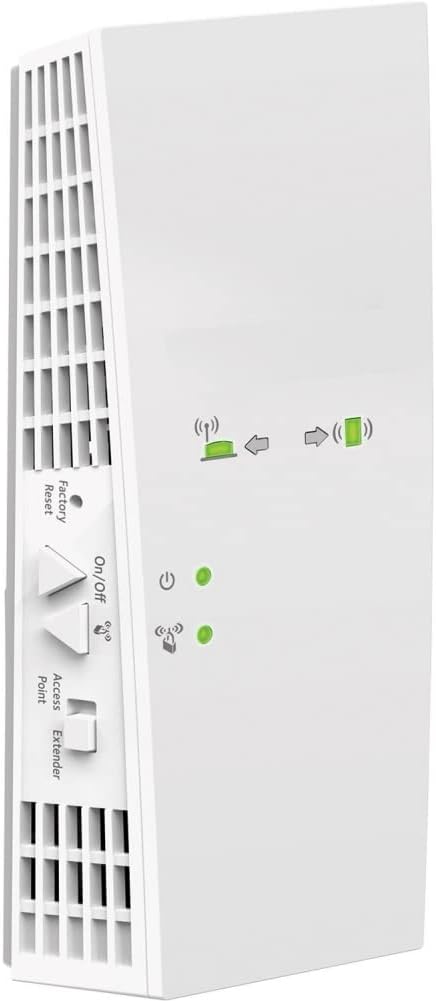
NETGEAR WiFi Mesh Range Extender EX7300
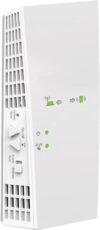
$169.99
NETGEAR WiFi Mesh Range Extender EX7300 Price comparison


- All prices mentioned above are in United States dollar.
- This product is available at Amazon.com.
- At amazon.com you can purchase NETGEAR WiFi Mesh Range Extender EX7300 - Coverage up to 2300 sq.ft. and 40 Devices with AC2200 Dual Band Wireless Signal Booster & Repeater (up to 2200Mbps Speed), Plus Mesh Smart Roaming for only $169.99
- The lowest price of NETGEAR WiFi Mesh Range Extender EX7300 - Coverage up to 2300 sq.ft. and 40 Devices with AC2200 Dual Band Wireless Signal Booster & Repeater (up to 2200Mbps Speed), Plus Mesh Smart Roaming was obtained on September 11, 2026 09:54.
NETGEAR WiFi Mesh Range Extender EX7300 Price History
NETGEAR WiFi Mesh Range Extender EX7300 Description
NETGEAR WiFi Mesh Range Extender EX7300: Boost Your WiFi Signal and Coverage
The NETGEAR WiFi Mesh Range Extender EX7300 is an advanced solution designed to expand your WiFi coverage, eliminate dead zones, and enhance your internet experience. Perfect for large homes or spaces with multiple floors, this powerful extender ensures seamless connectivity throughout your environment. With its impressive specifications and user-friendly features, the EX7300 has become a favorite among those looking to improve their WiFi network.
Key Features of the NETGEAR EX7300
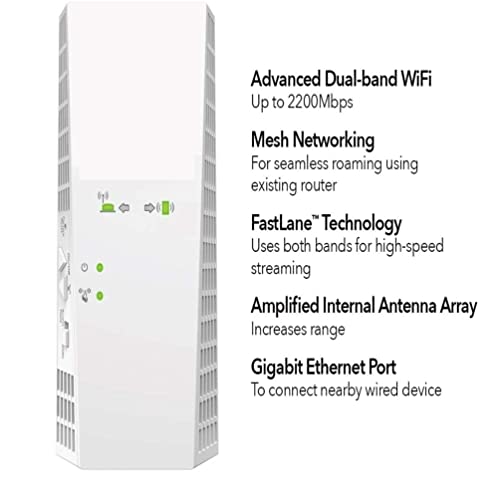
- High-Speed Internet Connectivity: The EX7300 supports dual-band speeds up to 2200 Mbps, allowing you to stream, game, and work without interruptions.
- Wide Coverage: It effectively extends WiFi coverage by up to 2000 square feet, reaching even the most distant corners of your home.
- Mesh Technology: With seamless mesh technology, the extender maintains a single WiFi name throughout your home, providing uninterrupted connectivity as you move from room to room.
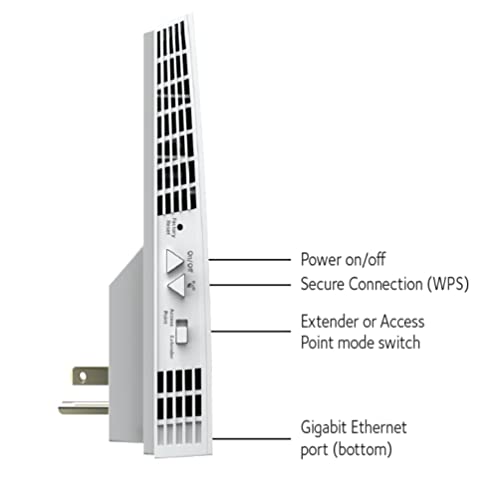
- Easy Setup: Using the Nighthawk app or the WPS button, you can easily set up the device and get connected in minutes.
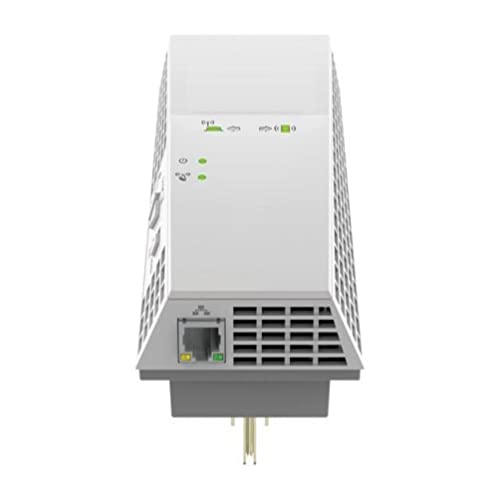
- 4 Ethernet Ports: Connect up to four wired devices directly to the extender, making it ideal for gaming consoles and smart TVs.
- Smart Roaming: The EX7300 automatically connects your devices to the strongest WiFi signal, ensuring optimal performance at all times.
Price Comparison Across Suppliers
The NETGEAR WiFi Mesh Range Extender EX7300 is competitively priced, offering excellent value for those seeking to improve internet connectivity. Prices can vary significantly across different retailers. As of now, you can find the EX7300 priced between $99.99 and $129.99, with occasional discounts available during sales events. Our price comparison tool allows you to easily identify the best deals from various suppliers to ensure you get the most affordable option for this popular extender.
6-Month Price History and Trends
Examining the 6-month price history chart for the EX7300 reveals some notable trends. The price has fluctuated slightly, with the average pricing hovering around $109.99. However, it has seen a significant drop during promotional periods, where discounts reached up to 20%, making it an ideal time to purchase if you’re considering an upgrade to your network setup.
Customer Reviews: What Users Are Saying
Customer feedback plays a crucial role in understanding the effectiveness of the NETGEAR WiFi Mesh Range Extender EX7300. Many users have praised the unit for its ease of installation and substantial improvement in WiFi coverage. The dual-band feature is particularly appreciated by gamers and streamers, as it facilitates uninterrupted connections even during high-demand usage.
Positive aspects highlighted in reviews include:
- Enhanced signal strength throughout the home.
- Quick installation process with helpful setup guides.
- Smart roaming feature ensures devices are connected to the optimal signal.
However, some users have experienced minor drawbacks, including:
- Occasional connectivity drops for particular devices.
- Initial setup issues for non-tech-savvy individuals.
Despite these concerns, the overall consensus remains that the NETGEAR EX7300 effectively serves its purpose, making it a highly recommendable choice for enhancing WiFi coverage.
Explore Unboxing and Review Videos
If you’re still on the fence about the NETGEAR EX7300, consider checking out various unboxing and review videos available on platforms like YouTube. These visual resources provide a firsthand look at the extender’s performance and features, giving you more confidence in your purchasing decision. See how effortlessly the EX7300 can improve your home’s WiFi network.
In conclusion, the NETGEAR WiFi Mesh Range Extender EX7300 is a powerful, efficient device designed to elevate your internet experience. With its robust features, excellent performance, and competitive pricing, it’s a top choice for anyone seeking reliable WiFi coverage. Don’t miss out on the chance to enhance your connectivity!
Compare prices now!
NETGEAR WiFi Mesh Range Extender EX7300 Reviews (10)
10 reviews for NETGEAR WiFi Mesh Range Extender EX7300
Only logged in customers who have purchased this product may leave a review.






TomatoLady –
I am only average tech savvy but I found good videos to help me familiarize myself with the setup and it went very quickly and smoothly. We got this to boost our existing Netgear WiFi. We have good signal in our small house but we wanted to be able to use the laptop in a nearby garage space. We located the booster about 100 feet from our WiFi base (75 feet of which is outdoor distance) and it picked up with no problems. I was a little hesitant at first because I have never been able to see a separate WiFi network nor asked to sign into the boosted signal. Yet our devices pick up the boosted signal seamlessly which is exactly what I wanted. If we need to move it to another outlet it reboot quickly and with no problems. We considered this option for a long time before we went ahead and spent the money and I am very glad we did.
Jessica Ward –
This is the only brand extender I have used. I am on my third one. All work well, but have to be replaced every three or four years.
RAUL ORTIZ –
El mejor repetidor que he comprado, no solo replica la señal, la potencializa!!
Henry Kluska –
Have a large house and had issues with the internet signal in the basement even with another Range extender. Another great feature is that I do not have to give the hub a different name. The login name is the same all over the house. The Extender will take over when required. Very convenient and save a lot of time.
Sarvin Warden –
Has made a world of a difference by installing this range extender.
Jemuel Franqui –
It was very easy to install and set up. Has a good range over my house
A. Craig –
We got this because our router is on the 2nd floor and when we watch streaming video in the downstairs living room, it would hang or pixilate. I’d previously gotten a WiFi extender from our Internet provider, and that didn’t work well at all. This does. I like that the lights on it tell you everything you need to know at a glance–the extender is close enough to the router, the extender is close enough to the devices trying to use it, and you have good signal. Installation was fairly easy once I got their free “Nighthawk” app and used it to install. I had first tried to install by pressing the WPS button on my router, and that was unsuccessful. but I think that is due to my router, as it seems like the same reason the other extender I’d previously tried didn’t work.
I was even able to get this at a discounted price on amazon, which was even better. Once I had it set up to “talk” to my router, I just took it downstairs, plugged it in to an outlet near the TV, and we are good to go. I also like that the Nighthawk app gives me good info on what devices are connected to it, and how well it’s working.
alex –
Compre este articulo por 2400 mxn COMO NUEVO, venia con el firmware corrompido pero es super facil reestablecerlo, vale la pena porque nuevo cuesta mas de 4000mnx.
Joe –
UPDATE JULY 3, 2021: I bought this device on April 20, 2020. It died on June 18, 2021. Since it’s more than 90 days from the date of purchase, Netgear won’t support it. I STRONGLY recommend against buying this product.
================
ORIGINAL REVIEW FROM 2020:
Installation Attempt #1: Set up the router where I wanted it and installed the app. The app wanted me to set up an account, wanted my location, wanted me to agree to giving up ALL of my personal information, all just to install a wireless extender. By the time I’d given it my spam email address and done my utmost to avoid giving it any further information, I was already pretty darned unhappy.
Then I ran the installer, it failed (my assumption is that I was too far away from my original router, and there was no way to recover.
Factory Reset #1.
OK. Moved closer. Followed all the steps exactly. It told me, “Congratulations! Your extender is all set up!”
Except… it somehow didn’t get the passwords correct, so while I could connect while close to the original router, I couldn’t connect while near the extender because it thought the password was wrong.
Again, no way to recover.
Factory Reset #2
I hate the app so much that my next attempt is going to be configuration via WPA, but at this point I’m ready to just throw the piece of junk back in the box and ship it back to Netgear.
I mean, seriously. “Give us your wifi name and password and we’ll configure our router to extend it.”
It’s not rocket science. I’ve written code to do exactly that before.
But even though I can code it, I apparently can’t get my Netgear router to DO it.
That’s pretty darned sad.
UPDATE: It took 4 factory resets, 4 different locations, and 3 installations of the app software, but it’s finally working, and once it works it’s doing quite well (27 Mbps down, 5 Mbps up, when my wired is 53 down 5 up). But it’s all about the “sweet spot”: If you’re too close OR too far when you run the app, it first disables its configuration network (NETGEAR_EXT), then fails to install, so you’re hosed and have to do a factory reset. Er, Netgear? How about coding it so that if the install fails for any reason it resets the configuration network WITHOUT my having to do a factory reset? And just plain get rid of the app remembering ANYTHING about a failed install?
LiLi on the Coast. –
Good product. Does what it’s designed to do.