Best Dell Laptops for Work & Study in 2026
Choosing between the best Dell laptops is more complicated than it used to be. Dell’s current lineup spans premium XPS notebooks, mainstream Dell models, business-focused Dell Pro systems and Dell Pro Precision workstations, and the most expensive option is not automatically the best choice for your workload.
A student who needs a dependable laptop for assignments, research and video calls has very different priorities from a business traveler managing corporate applications or an engineer running CAD and workstation software. Screen size, memory, ports, portability and business features can matter just as much as processor performance.
For most people, Dell XPS 14 is the strongest premium all-rounder, while Dell 14 Plus offers a more practical balance of price and everyday productivity. Dell Pro 14 Premium is better suited to business and remote-work environments, and Dell Pro Precision 5 Series 16S is reserved for demanding professional workloads that genuinely need workstation-class hardware.
Quick Answer: Best Dell Laptops by Use Case
Best Overall: Dell XPS 14 — a premium 14-inch laptop combining a high-quality 120Hz display, modern Core Ultra processors and strong portability for professional and advanced study use.
Best for Students & Value: Dell 14 Plus — a more affordable productivity-focused system with a 14-inch 2.5K display and configurations offering up to 32GB of memory and 1TB of SSD storage.
Best for Business & Remote Work: Dell Pro 14 Premium — a compact business laptop with vPro options, Windows 11 Pro, modern connectivity and display configurations aimed at mobile professionals.
Best 2-in-1: Dell 14 Plus 2-in-1 — a touchscreen convertible designed for people who genuinely benefit from tablet, presentation and flexible study modes.
Best Workstation: Dell Pro Precision 5 Series 16S — the specialized choice for engineering, CAD and workstation-class professional workloads.
How We Chose the Best Dell Laptops
We selected these Dell laptops by matching the current product families to real work and study requirements rather than simply ranking the most expensive configurations. We considered processor class, memory and storage options, display size and quality, portability, connectivity, business-management features, flexible form factors and whether the hardware provides useful value for its intended buyer.
We also separated ordinary productivity from specialist workloads. A student writing papers does not need the same system as an engineer working with professional applications, while a business traveler may benefit from security, manageability and connectivity features that add little value to a personal laptop.
The best Dell laptop is the one that matches your workload without making you pay for hardware or business features you will not use.
Best Dell Laptops at a Glance
| Laptop | Best For | Screen | RAM Target | Storage Target | Main Advantage | Main Trade-Off |
|---|---|---|---|---|---|---|
| Dell XPS 14 | Best Overall | 14-inch, up to 120Hz | 32GB preferred | 1TB | Premium balance of portability and productivity | Premium pricing |
| Dell 14 Plus | Students & Value | 14-inch 2.5K | 16–32GB | 512GB–1TB | Strong everyday value | Some displays are only 300 nits |
| Dell Pro 14 Premium | Business & Remote Work | 14-inch business display options | 16–32GB | 512GB–1TB | Business features and mobility | Expensive for ordinary students |
| Dell 14 Plus 2-in-1 | Flexible Study & Presentations | 14-inch 2K touchscreen | 16GB+ | 512GB+ | Convertible touchscreen design | Costs more if you do not need 2-in-1 modes |
| Dell Pro 16 Plus | Office Productivity | 16-inch | 16–32GB | 512GB–1TB | Large workspace for multitasking | Less portable than 14-inch models |
| Dell Pro Precision 5 Series 16S | Professional Workstation | 16-inch | 32GB+ | 1TB preferred | Specialized workstation platform | Overkill for ordinary work and study |
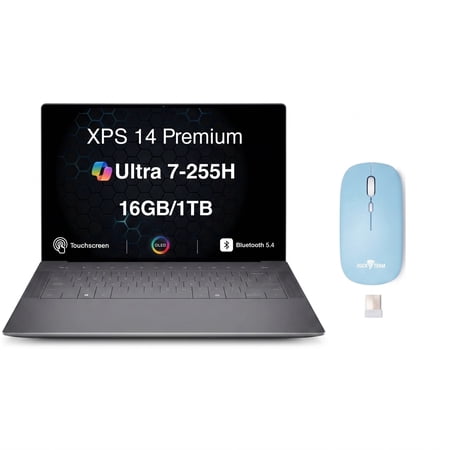
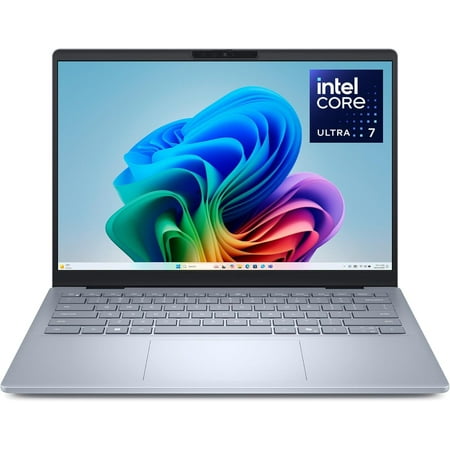
Prices and configurations can change considerably between retailers. The live listings below can help you compare current offers before deciding which Dell configuration gives you the best value.



Which Dell Laptop Line Is Right for You?
Dell’s current lineup becomes much easier to understand once you choose the product family that matches your workload before comparing individual processors.
Dell XPS
Start here if you want a premium personal or professional laptop with strong portability, higher-end display choices and a design aimed at buyers willing to pay more for refinement.
Dell / Dell Plus
The practical starting point for students, everyday productivity and value-focused buyers who do not need enterprise management or workstation hardware.
Dell Pro
Designed around business users, managed fleets and mobile professionals who value Windows Pro, vPro options, enterprise connectivity and support-oriented features.
Dell Pro Precision
Choose this family only when your software or workflow benefits from workstation-class hardware for engineering, CAD, professional 3D or other demanding technical workloads.
Alienware
Dell’s gaming-focused family. It makes more sense when frame rates and dedicated gaming hardware matter more than office portability or conventional student productivity.
Best Dell Laptops for Work & Study
1. Dell XPS 14 — Best Overall Dell Laptop
Dell XPS 14 is our best overall Dell laptop because it sits in the useful middle ground between portability and serious productivity without becoming a full workstation.
The current XPS 14 generation uses Intel Core Ultra Series 3 processors and offers a 14-inch chassis starting at roughly 3 pounds. Dell provides 120Hz display options, including a more efficient 2K-class panel and a higher-resolution OLED option on relevant configurations. Memory and storage choices extend well beyond what most students need, making the XPS 14 equally comfortable in professional multitasking environments.
The 2K display is likely the better value for many work-focused buyers because higher-resolution OLED panels usually add cost and power consumption. The OLED option makes more sense if display quality is part of your actual workload or you strongly value contrast and media quality.
For most professional buyers, 32GB of memory and a 1TB SSD provide a sensible long-term configuration. Students with lighter workloads can spend less, but XPS remains a premium purchase and is difficult to justify if basic productivity is the only requirement.
Best For
Professionals, advanced students and frequent travelers who want a premium 14-inch Dell without moving into workstation territory.
Pros
✅ Premium compact design
✅ 120Hz display options
✅ High-resolution OLED option available
✅ Strong memory and storage configuration range
✅ Excellent crossover between professional work and portability
Cons
❌ Costs considerably more than mainstream Dell models
❌ Premium display upgrades can reduce value for basic office work
❌ Many students simply do not need this level of hardware
Alternative: Choose Dell 14 Plus if you want a capable 14-inch work-and-study laptop without paying the XPS premium.
2. Dell 14 Plus — Best Dell Laptop for Students & Value
Dell 14 Plus is the Dell laptop we would start with for most students and value-focused professionals because its specifications are much easier to justify for everyday productivity.
Current configurations include Intel Core Ultra processors, Intel Arc integrated graphics, up to 32GB of LPDDR5X memory and up to 1TB of SSD storage. The 14-inch 2.5K IPS display gives documents, browser windows and productivity applications more usable resolution than a basic Full HD panel.
For normal study, office work, research, video calls and multitasking, a 16GB configuration with 512GB of storage is already practical. Moving to 32GB and 1TB makes sense if you expect to keep the laptop for several years, run development tools or regularly work with large files.
The main limitation is that some configurations use a 300-nit display. That is generally workable indoors but less attractive for people who frequently work outdoors or in very bright environments.
Best For
Students, home-office users and professionals who want a capable everyday Dell without paying for enterprise or premium XPS features.
Pros
✅ 14-inch 2.5K display
✅ Up to 32GB LPDDR5X memory
✅ Up to 1TB SSD storage
✅ Better value than premium XPS configurations
✅ Strong fit for study and everyday professional work
Cons
❌ Some 300-nit displays are less suitable for bright outdoor use
❌ Integrated graphics are not intended for serious gaming
❌ Premium materials and features are more limited than XPS
Alternative: Choose Dell 14 Plus 2-in-1 if handwriting, touchscreen interaction or presentation modes are important parts of your study routine.
3. Dell Pro 14 Premium — Best Dell Laptop for Business & Remote Work
Dell Pro 14 Premium is built for a different buyer than Dell 14 Plus. Its value comes from business-oriented mobility, manageability and connectivity rather than simply giving you more raw computing power.
Current configurations include Intel Core Ultra processors with vPro options, Windows 11 Pro, LPDDR5X memory and modern business connectivity. Relevant display configurations can provide 400-nit brightness and full sRGB coverage, while higher-end versions of the family can also offer premium OLED display technology.
The compact 14-inch format makes the Pro 14 Premium particularly suitable for remote professionals and frequent travelers who routinely move between an office, home workspace and meetings. Business users can also place more value on Dell’s enterprise support and management ecosystem than a personal buyer would.
Important: Dell Pro 14 Premium is not automatically a better laptop for a student simply because it belongs to Dell’s professional lineup. If you do not need business-management features, Dell 14 Plus or XPS 14 may offer better value for your money.
Best For
Business users, remote professionals and frequent travelers who benefit from enterprise-focused features and a highly portable 14-inch design.
Pros
✅ vPro configurations available
✅ Windows 11 Pro positioning
✅ Strong business connectivity options
✅ Portable 14-inch form factor
✅ Display options suited to professional use
Cons
❌ Expensive for personal or basic student use
❌ Business features add little value if you do not need them
❌ Integrated graphics are productivity-focused rather than gaming-focused

Alternative: Dell XPS 14 is the better premium choice if you want a personal professional laptop and do not need enterprise manageability.
4. Dell 14 Plus 2-in-1 — Best Dell 2-in-1 for Work & Study
Dell 14 Plus 2-in-1 is worth buying when the convertible design solves a real problem. Its touchscreen and flexible hinge allow the same device to work as a conventional laptop, presentation screen or touch-first device for reading and annotation.
A current 14-inch configuration combines an Intel Core Ultra processor with 16GB of LPDDR5X memory, a 512GB NVMe SSD and a 1920 × 1200 touchscreen. Those specifications are sufficient for typical student workloads, office applications, web research and remote collaboration.
The main buying decision is not whether a 2-in-1 looks more versatile. It is whether you will actually use the additional modes. Students who annotate documents, present frequently or prefer touch input can benefit from the design. People who spend almost all of their time typing at a desk will often get better value from the standard Dell 14 Plus.
Best For
Students, teachers, presenters and hybrid workers who regularly use touchscreen, tablet or presentation modes.
Pros
✅ Convertible touchscreen design
✅ 14-inch 1920 × 1200 display
✅ 16GB memory configurations suit mainstream multitasking
✅ Useful for notes, presentations and flexible study
✅ More versatile than a conventional clamshell
Cons
❌ Convertible hardware adds little value if you never use touch modes
❌ Standard Dell 14 Plus can be the better value for typing-first users
❌ Integrated graphics are not intended for gaming-heavy workloads
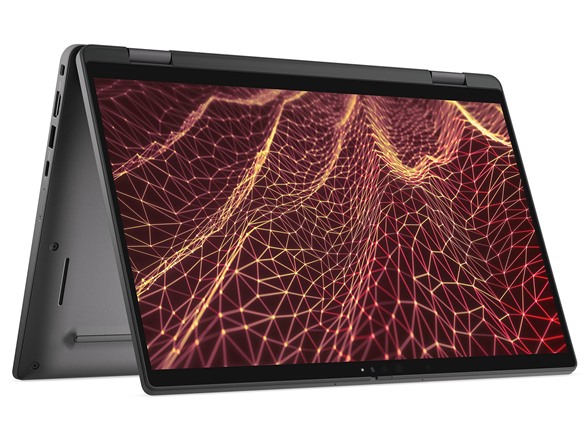
Alternative: Choose Dell 14 Plus if you want similar mainstream productivity capability without paying for a convertible form factor.
5. Dell Pro 16 Plus — Best Dell Laptop for Office Productivity
Dell Pro 16 Plus is the better choice when screen space matters more than carrying the smallest possible laptop. A 16-inch display gives spreadsheets, documents, dashboards and side-by-side applications more room, which can make a noticeable difference during a full working day.
Current configurations include Intel Core Ultra processors, Windows 11 Pro, LPDDR5X memory and SSD storage, with business-focused connectivity and camera options. A 16GB configuration is sufficient for mainstream office work, while 32GB is the better target for people who keep many applications, browser tabs and communication tools open simultaneously.
The larger chassis is especially appealing for finance, administration, data-heavy office work and home-office users who do not want to rely on an external monitor all the time.
The compromise is portability. A 16-inch machine occupies more desk and bag space than the Dell Pro 14 Premium or XPS 14, so frequent travelers should decide whether the additional workspace is worth carrying.
Best For
Office professionals, spreadsheet-heavy users and remote workers who prefer a larger display over maximum portability.
Pros
✅ Large 16-inch workspace
✅ Business-focused Windows 11 Pro configurations
✅ 16GB and higher memory options
✅ Comfortable for multitasking and spreadsheets
✅ Better desk-based productivity than smaller models
Cons
❌ Less portable than 14-inch Dell laptops
❌ Entry display configurations may prioritize business practicality over premium image quality
❌ Overkill for users who mostly work from basic documents and web apps

Alternative: Choose Dell Pro 14 Premium if you need similar business positioning in a more travel-friendly size.
6. Dell Pro Precision 5 Series 16S — Best Dell Workstation
Dell Pro Precision 5 Series 16S is the specialist choice in this guide. It is designed for professional workloads where certified software environments, higher memory capacity, workstation-oriented processors or professional graphics options matter more than portability and low price.
The current 16-inch platform is available with Intel and AMD professional processor options depending on configuration. Dell also offers configurations across the broader family with professional graphics capabilities, while memory and storage can be configured far beyond what a normal student or office user requires.
A 32GB memory target makes more sense here than 16GB when the machine is being purchased for engineering, development, CAD, data-intensive professional applications or similar workloads. Storage should also be selected around project size, with 1TB being a more practical starting point for many workstation buyers than the smallest base SSD.
Important: If your workload is primarily Microsoft Office, web browsing, research, video calls and ordinary coursework, you probably do not need a Precision workstation. Dell 14 Plus, XPS 14 or a Dell Pro model will usually provide better value and easier portability.
Best For
Engineers, technical professionals and workstation users running demanding applications that justify specialized hardware.
Pros
✅ Workstation-oriented platform
✅ High-memory configurations available
✅ Professional processor choices
✅ Suitable for demanding technical workloads
✅ Better fit for professional engineering software than consumer Dell models
Cons
❌ Significantly more expensive than ordinary productivity laptops
❌ Larger and heavier than ultraportable Dell models
❌ Most students and office users will never use its specialist capabilities
Alternative: Choose Dell Pro 16 Plus if you need a large professional laptop for office productivity but do not require a workstation.
Best Dell Laptops by Use Case
| Your Priority | Best Dell | Why |
|---|---|---|
| Premium Work & Portability | Dell XPS 14 | Premium 14-inch design with strong display and configuration options |
| Student / Everyday Value | Dell 14 Plus | Balanced specifications without business or workstation pricing |
| Business / Remote Work | Dell Pro 14 Premium | Enterprise-oriented mobility and management features |
| Touch & Flexible Study | Dell 14 Plus 2-in-1 | Convertible touchscreen format |
| Office Productivity | Dell Pro 16 Plus | Larger display for spreadsheets and multitasking |
| Engineering / Workstation | Dell Pro Precision 5 Series 16S | Specialized professional hardware platform |
Best Dell Laptops for Remote Work
The best Dell laptops for remote work depend on whether you prioritize enterprise features, premium mobility or affordability.
Dell Pro 14 Premium is the strongest business-focused choice because its 14-inch form factor, Windows 11 Pro positioning, vPro availability and professional connectivity are designed around mobile corporate work. It is especially appropriate when your employer or IT department values standardized business hardware.
Dell XPS 14 is better for independent professionals who want premium build quality and display options but do not need enterprise management. It fits consultants, creators and professionals who move frequently between locations but manage their own hardware.
Dell 14 Plus is the value option. For ordinary video calls, browser-based tools, Microsoft 365, research and general remote productivity, it can deliver everything many users actually need without the premium attached to XPS or Dell Pro.
Best Dell Laptops for Students
For most students, Dell 14 Plus is the most sensible Dell because it balances portability, memory, storage and display resolution without forcing you into premium business pricing.
Dell 14 Plus 2-in-1 becomes more attractive if your course involves handwritten notes, diagrams, reading in tablet mode or regular presentations. The convertible design should solve a real study need before you pay extra for it.
Dell XPS 14 is the premium student option for buyers with a larger budget, especially when the same machine will also be used for professional work after graduation.
If Dell is not a requirement, compare the wider student market in Best HP Laptops for Students 2026 before deciding which brand gives you the strongest configuration for your budget.
Dell XPS vs Inspiron: What Should You Buy Now?
The traditional Dell XPS vs Inspiron comparison is less straightforward today because Dell has changed how it names and organizes parts of its laptop lineup.
Historically, Inspiron represented mainstream consumer laptops while XPS represented Dell’s premium consumer range. That basic buying logic remains useful even when the current product names change: value-oriented shoppers should start with Dell’s mainstream models, while buyers who want premium materials, higher-end displays and a more refined compact design should start with XPS.
Do not choose an older Inspiron or an XPS solely because you recognize the family name. Compare the exact current configuration, price, memory, storage, display and ports against newer Dell alternatives before buying.
What Happened to Dell Latitude and Inspiron?
Dell has changed its laptop naming structure, which is why shoppers familiar with Latitude and Inspiron can encounter newer names such as Dell, Dell Plus and Dell Pro while researching current models.
Latitude historically served Dell’s business customers, while Inspiron covered mainstream consumer laptops. In the current portfolio, Dell Pro is the family business buyers should investigate first, while Dell and Dell Plus cover much of the everyday consumer and productivity territory.
Old Latitude buyer → Start with Dell Pro | Old Inspiron buyer → Start with Dell / Dell Plus | Premium buyer → Start with XPS
Older Latitude and Inspiron laptops can still appear in retailer inventories and search results, so seeing those names does not necessarily mean the product is current. Always check the exact generation and configuration before comparing it with Dell’s newer lineup.
How Much RAM and Storage Do You Need?
Memory and storage are often more important to long-term work-and-study usability than moving one step higher within a processor family.
| Workload | RAM Target | Storage Target |
|---|---|---|
| Basic Study / Office | 16GB | 512GB |
| Heavy Multitasking | 32GB | 1TB |
| Development / Creative Work | 32GB+ | 1TB+ |
| Professional Workstation | 32–64GB+ | 1TB+ |
16GB should be the baseline for a new Dell laptop intended for work or study. An 8GB machine can still handle basic tasks, but memory pressure becomes easier to encounter once browsers, communication software, office applications and background services are running together.
A 512GB SSD is adequate for mainstream productivity. Choose 1TB if you keep large project files locally, install development environments, work with media or simply want more headroom over several years.
Dell Laptop Buying Guide
Choose the Dell Family Before the Processor
Start with the job the laptop needs to perform. Dell 14 Plus suits mainstream productivity, XPS targets premium buyers, Dell Pro focuses on business environments and Dell Pro Precision is intended for workstation users.
Choosing the correct family first prevents you from paying extra for features that do not solve your problem.
Do Not Buy More Processor Than Your Workload Needs
Word processing, browsing, video calls and spreadsheets do not require the fastest available CPU. For these tasks, sufficient memory, a comfortable display and good battery behavior often affect daily usability more than a small processor upgrade.
Higher-end processors make more sense for software development, heavy multitasking, large data workloads, content creation and professional applications that can actually use the additional performance.
Start With 16GB of RAM
16GB is the safest starting point for a new work-and-study laptop. Choose 32GB if you frequently run many applications simultaneously, use development tools, work with large datasets or want additional long-term headroom.
Choose 14 Inches for Mobility and 16 Inches for Workspace
A 14-inch laptop is easier to carry between classes, offices and meetings. A 16-inch laptop provides more room for spreadsheets, side-by-side windows and desk-based productivity.
Travel frequently → 14-inch → Work mostly at a desk → 16-inch
Only Pay for a 2-in-1 If You Will Use It
Convertible laptops are useful for annotation, presentations and touch-first workflows. They are not automatically better than conventional laptops. If the computer will spend nearly all its time in normal laptop mode, put the money toward more memory, storage or a better display instead.
Business Features Matter Only to the Right Buyer
Features such as Windows 11 Pro, Intel vPro, enterprise manageability and business support are valuable in managed professional environments. They should not be treated as automatic upgrades for students or personal buyers who cannot benefit from them.
Do Not Turn a Work Laptop Into a Gaming Purchase by Accident
Most of the systems in this guide prioritize productivity and use integrated graphics. If modern PC gaming is one of your main requirements, compare dedicated-GPU machines in Budget Gaming Laptops 2026: Top Picks before choosing a productivity-focused Dell.
Performance-oriented shoppers who are also considering other manufacturers can compare Dell’s approach with the models covered in Best ASUS Gaming Laptops 2026.
Best Dell Laptops FAQ
What is the best Dell laptop overall?
Dell XPS 14 is our best overall choice because it combines portability, premium display options, modern processors and strong memory and storage configurations without moving into workstation territory.
Which Dell laptop is best for work?
Dell Pro 14 Premium is the strongest choice for business users who value enterprise-oriented features and mobility. Dell Pro 16 Plus is better for office users who prefer a larger display, while XPS 14 suits independent professionals seeking a premium personal laptop.
Which Dell laptop is best for students?
Dell 14 Plus is our preferred student choice because it offers a practical balance of portability, display resolution, memory, storage and price. Dell 14 Plus 2-in-1 is better when touchscreen and convertible modes are useful for coursework.
Is Dell XPS better than Inspiron?
XPS has traditionally been Dell’s premium consumer family, while Inspiron covered more mainstream and affordable laptops. XPS can offer better materials and displays, but the better purchase depends on the exact current configuration, price and workload.
What replaced Dell Latitude?
Dell Pro is now the product family business buyers should investigate first when looking for the role historically associated with Latitude. Older Latitude models can still remain available through retailers and organizational purchasing channels.
Is Dell Pro better than Dell XPS for business?
Dell Pro is generally the better fit for managed business environments because it emphasizes enterprise features, support and manageability. XPS can be the better choice for an individual professional who values premium design and display quality more than corporate management features.
How much RAM should a Dell laptop have?
16GB is the practical baseline for a new work-or-study Dell. Choose 32GB for heavy multitasking, software development or demanding professional workflows, and consider 64GB or more only when specialized workstation applications justify it.
Are Dell laptops good for remote work?
Yes. Dell offers suitable options across several price levels. Dell Pro 14 Premium is the business-focused choice, XPS 14 is the premium personal-professional option and Dell 14 Plus is the more affordable solution for ordinary remote productivity.
Final Verdict: Which Dell Laptop Should You Buy?
Dell XPS 14 is the strongest overall pick if you want a premium laptop that can move comfortably between professional work, travel and advanced study. It costs more than mainstream Dell models, but its combination of portability, display choices and higher-end configurations gives it the broadest appeal among Dell’s premium systems.
Dell 14 Plus is the more sensible purchase for many students and everyday professionals. It provides enough memory, storage and display resolution for mainstream productivity without making you pay for enterprise features you may never use.
Dell Pro 14 Premium is the business choice, while Dell Pro 16 Plus serves users who value a larger office workspace. Dell 14 Plus 2-in-1 makes sense when touch and convertible modes genuinely improve your workflow.
Dell Pro Precision 5 Series 16S belongs in a separate category: buy it when your professional software benefits from workstation-class hardware, not simply because you want the most powerful-looking Dell.
Best Overall: Dell XPS 14
Best for Students & Value: Dell 14 Plus
Best for Business & Remote Work: Dell Pro 14 Premium
Best 2-in-1: Dell 14 Plus 2-in-1
Best for Office Productivity: Dell Pro 16 Plus
Best Workstation: Dell Pro Precision 5 Series 16S
The easiest way to choose among the best Dell laptops is to start with your workload rather than the product name. Pick the right Dell family first, then compare memory, storage, screen size and current price to find the configuration that delivers the best value for the way you actually work or study.
Sources
- Dell — current XPS 14 specifications and product documentation.
- Dell — current Dell 14 Plus and Dell 14 Plus 2-in-1 specifications.
- Dell — current Dell Pro 14 Premium and Dell Pro 16 Plus specifications.
- Dell — current Dell Pro Precision 5 Series 16S specifications.
- RTINGS — current Dell laptop testing and lineup analysis.
- TechRadar — current Dell laptop recommendations and buyer guidance.
- PCMag — Dell laptop buying-guide research.
- Laptop Mag — Dell laptop testing and use-case comparisons.
Product Groups: Dell XPS 14, Dell 14 Plus, Dell Pro 14 Premium, Dell 14 Plus 2-in-1, Dell Pro 16 Plus, Dell Pro Precision 5 Series 16S