
Norwii Ergonomic Wireless Presenter Clicker N86s
$49.99
Norwii Ergonomic Wireless Presenter Clicker N86s Price comparison
- All prices mentioned above are in United States dollar.
- This product is available at Amazon.com.
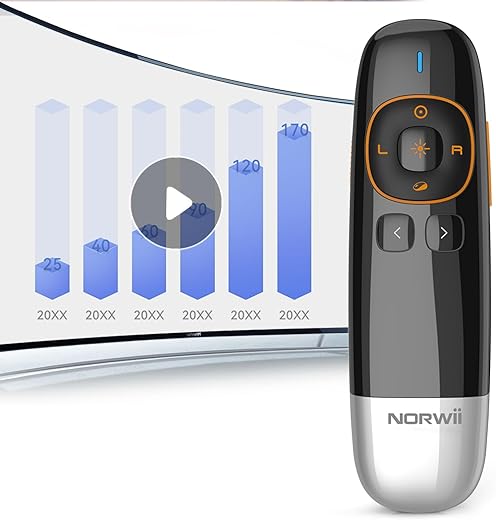
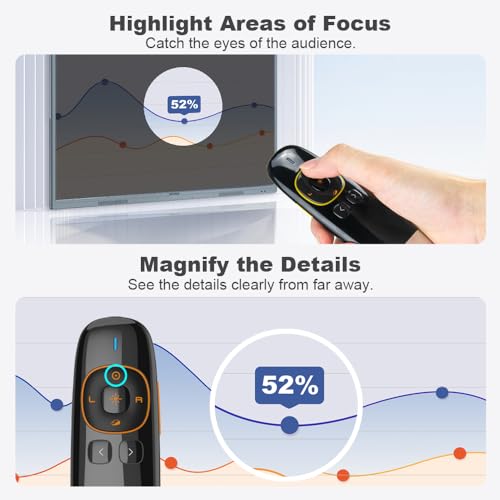
- At amazon.com you can purchase Norwii N86s Ergonomic Wireless Presenter Clicker for LED LCD TV Screen with Digital Pointer, Air Mouse Presentation Clicker for PowerPoint, Presenter clicker with Highlighting Magnify -50M for only $49.99
- The lowest price of Norwii N86s Ergonomic Wireless Presenter Clicker for LED LCD TV Screen with Digital Pointer, Air Mouse Presentation Clicker for PowerPoint, Presenter clicker with Highlighting Magnify -50M was obtained on September 24, 2025 02:33.
Norwii Ergonomic Wireless Presenter Clicker N86s Price History
Norwii Ergonomic Wireless Presenter Clicker N86s Description
Norwii Ergonomic Wireless Presenter Clicker N86s – Elevate Your Presentations
The Norwii Ergonomic Wireless Presenter Clicker N86s is designed for professionals and educators who demand excellence in their presentations. This wireless presenter is not just a tool; it’s your partner in delivering engaging and smooth presentations. With its ergonomic design and intuitive features, this clicker empowers you to connect with your audience effectively. Discover why the Norwii N86s is becoming the go-to choice for presenters everywhere.
Key Features of the Norwii Wireless Presenter Clicker
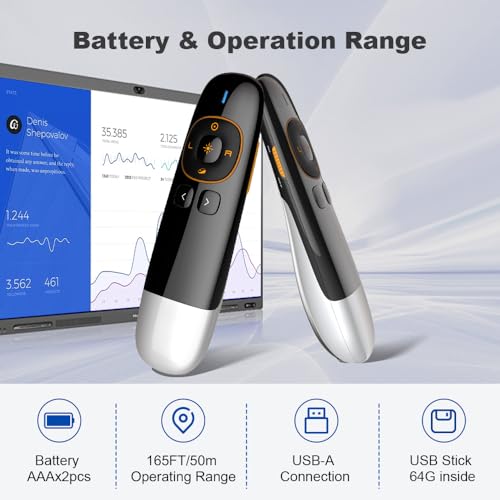
- Ergonomic Design: The N86s is sleek and easy to hold, ensuring comfort during extended presentations. Its size (5.65 x 1.06 x 1.6 inches) fits perfectly in your hand.
- Weight and Portability: Weighing just 2.89 ounces, this clicker is lightweight and compact, making it ideal for on-the-go professionals.
- Reliable Wireless Connection: Enjoy a stable connection with its wireless capabilities, allowing you to move freely around the room without being tethered to your laptop.
- Simple Setup: The Norwii N86s connects effortlessly to your devices. Just plug in the USB receiver, and you’re ready to present in seconds.
- Versatile Compatibility: Works seamlessly with major presentation software like PowerPoint and Keynote, enhancing flexibility for users across platforms.
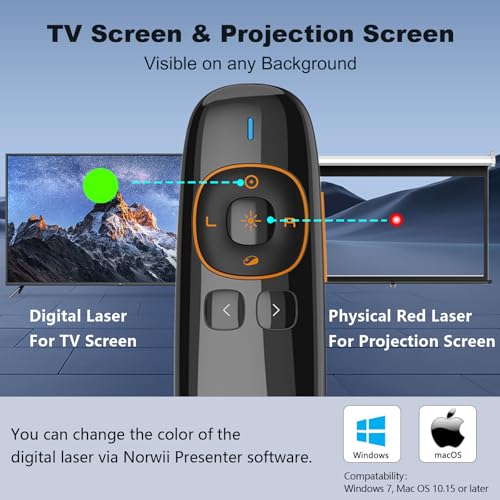
- Built-in Laser Pointer: This feature helps you highlight key points, making it easier for your audience to follow along with your presentation.
- Long Battery Life: With an extended battery life, you can rely on the N86s to last through your entire presentation without interruptions.
Compare Prices and Value Across Suppliers
When looking for the best price on the Norwii Ergonomic Wireless Presenter Clicker N86s, our price comparison tool provides real-time data to help you find the best deals across various suppliers. Prices may vary, reflecting competitive market trends. With our platform, you can easily compare and find the most affordable option suited to your needs.
6-Month Price History Trends
Our detailed 6-month price history chart reveals noteworthy trends. Over the past few months, the N86s has seen a consistent price point, indicating stable demand and popularity amongst users. The price fluctuations help buyers make informed purchasing decisions, ensuring you grab the clicker when prices are at their lowest.
Customer Reviews and Feedback
The Norwii N86s has garnered positive reviews from customers who appreciate its user-friendly features and ergonomic design. Many users praise its lightweight build, making it easy to carry during travels or commutes. The reliable wireless connectivity is often highlighted, enabling smooth presentations without hiccups.
Customers have also noted the effectiveness of the built-in laser pointer, which enhances their ability to convey messages during presentations. However, some users mentioned that the clicker can occasionally have range limitations, particularly in larger venues. Overall, the feedback emphasizes that the Norwii N86s is a solid investment for anyone looking to improve their presentation skills.
Explore Unboxing and Review Videos
To dive deeper into what the Norwii Ergonomic Wireless Presenter Clicker N86s has to offer, check out various unboxing and review videos available on YouTube. These videos provide hands-on insights, showcasing the clicker’s features in real-time and demonstrating its ease of use. Understanding the product better will aid in making a confident purchase decision.
Why Choose the Norwii Ergonomic Wireless Presenter Clicker N86s?
Choosing the Norwii N86s means opting for a device that combines functionality and comfort. Its ergonomic design and user-friendly features streamline your presentation process, allowing you to focus on what truly matters: engaging your audience. Whether you’re in a conference room or a classroom, this clicker is your key to delivering impressive and smooth presentations.
In summary, the Norwii Ergonomic Wireless Presenter Clicker N86s stands out in a crowded market for its combination of reliability, innovative features, and customer satisfaction. With competitive pricing insights, the latest trends in price history, and a wealth of positive reviews backing it, this presenter clicker is a must-have for anyone serious about their presentations.
Don’t miss out on elevating your presentation game! Compare prices now!
Norwii Ergonomic Wireless Presenter Clicker N86s Specification
Specification: Norwii Ergonomic Wireless Presenter Clicker N86s
|
Norwii Ergonomic Wireless Presenter Clicker N86s Reviews (13)
13 reviews for Norwii Ergonomic Wireless Presenter Clicker N86s
Only logged in customers who have purchased this product may leave a review.

David A Van Deman –
This is absolutely a great little presentation tool, I just wish the buttons were more obviously marked/better tactile feel. There is a very slightly raised up and down arrow on the buttons to move forward or back a slide, but you really can’t feel them while giving a presentation. Also, to my brain the buttons are backwards butbthat is easy enough to adjust to.
Otherwise…it’s awesome. Plug and play right out of the box and the green laser pointer is superb.
Valvanera –
Poco más que añadir respecto al título. Funciona bien, el láser se ve estupendamente y pasa las diapositivas sin problema, quizás el hecho de que la flecha que apunta hacia el usuario sea la de avanzar y la que apunta hacia fuera sea la de retroceder despiste un poco al principio, pero una vez se acostumbra uno no da problemas.
jmariner –
As advertised, the green laser pointer worked right out of the box, providing a bright light- point on any background, including my TV monitor. This feature is very much in its favor since my other green laser was rather weak and sometimes undependable. Testing it with Power Point for Mac and also with iWorks Keynote, on my MacBook Pro (10.14.3) was definitely not as advertised in that I was unable to get any response; i.e., no slide advancement at all (forward or back). Thus, if you have someone at the computer to advance slides, this aspect is no problem, and the pointer is useful to the presenter..
UPDATE on earlier review: It turned out that re-seating the USB receiver in the computer a couple of times resulted in proper functioning, and the presenter worked quite well with my PowerPoint and Keynote. Apologies to Knorvay.
joggingdog –
Très bon. Le laser vert est assez puissant et très visible. Compatible avec MAC et PC.
UpstateFarmgirl –
I like that it is USB rechargeable so I don’t have to deal with batteries and is very small and compact to hold. It’s a very manageable size and makes it easy seamlessly click from slide to slide during my presentations.
A.H. –
It is one of the few items that works with led and also has a laser pointer. I have not yet used it extensively to know about durability.
Diana –
Very easy to set up and use for my first official lecture. The on board storage for the USB port is a great feature. The green pointer was a nice alternative and easier to view than the traditional red. Highly recommend.
Chafik –
its not working with LED/LCD screen (red laser), but I was expecting a blue laser
Hanne Franke – Köster –
Nach der langfristigen Benutzung eines anderen Presenters mit einer sich unterscheidenden Anordnung der Bedientasten bedarf es einer zeit der Übung, um auch ohne Sichtkontrolle die Tasten wie gewohnt sicher zu bedienen – ist diese Hürde genommen: Ein sehr gutes Preis-Leistungsverhältnis.
Mr. Pequod –
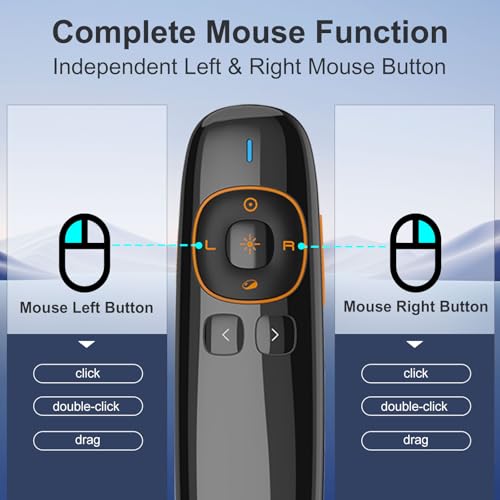
A very nice bright green laser pointer. I love the fact that it has two buttons, one that behaves as a standard laser pointer, another that clicks on and stays on.
Steven –
Ok admittedly, this is my fault for not reading close enough, but micro usb charging is not ok anymore, even when this product was first released in 2019 micro was the sign of a cheap product. Just be aware one more cable.
Dennis Clark –
We had purchased other presenters which claimed to be long distance; however, they did not perform as advertised. The Knorvay worked perfectly at longer distances. Our auditorium is about 70 feet long. The Knorvay easily handled that distance. The one drawback I have noticed is that the buttons are a little difficult to see and not well marked. They are difficult to see because they are the same color as the case. They are also flush with the case making them difficult to feel when not looking. There was a bit of a learning curve with the Knorvay, but, that is to be expected with any new device. I would highly recommend the product; particularly, if you are needing a presenter that is reliable over longer distances.
Massimo M. –
Il puntatore risponde pienamente alle mie aspettative. L’ho usato quasi quotidianamente per alcune settimane e ha sempre funzionato perfettamente. La luce verde del laser è molto intensa. La crica dura a lungo e la ricarica è veloce. Lo uso con un laptop MacBook e il controllo dell’avanzamento delle slide (con Powerpoint) e delle animazioni funziona bene