
 Walmart.com
  eBay
eBay 
XREAL Air AR Smart Glasses Price comparison




- All prices mentioned above are in United States dollar.
- This product is available at Amazon.com.
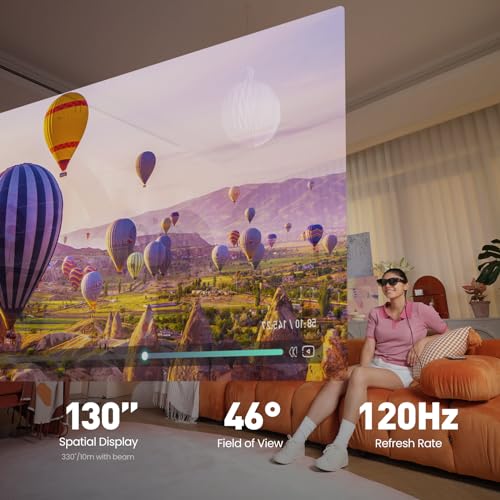
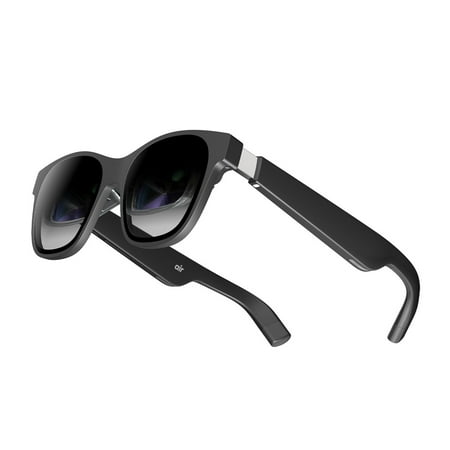
- At amazon.com you can purchase XREAL Air AR Glasses, Smart Glasses with Massive 201" Micro-OLED Virtual Theater, Augmented Reality Glasses, Watch, Stream, and Game on PC/Android/iOS–Consoles & Cloud Gaming Compatible for only $197.00
- The lowest price of XREAL Air AR Glasses, Smart Glasses with Massive 201" Micro-OLED Virtual Theater, Augmented Reality Glasses, Watch, Stream, and Game on PC/Android/iOS–Consoles & Cloud Gaming Compatible was obtained on September 22, 2025 16:10.
XREAL Air AR Smart Glasses Price History
XREAL Air AR Smart Glasses Description
XREAL Air AR Smart Glasses: Experience Augmented Reality Like Never Before
Introducing the XREAL Air AR Smart Glasses – a groundbreaking pair of smart glasses designed to make augmented reality accessible and exciting. With an ultra-lightweight design and high-performance features, these glasses are a top choice for tech enthusiasts and casual users alike. Whether you’re gaming, watching videos, or simply navigating your daily tasks, the XREAL Air AR Smart Glasses enhance reality in stunning clarity. Let’s dive into what makes this innovative product worth your attention and how it stands out in today’s competitive market.
Main Features of XREAL Air AR Smart Glasses
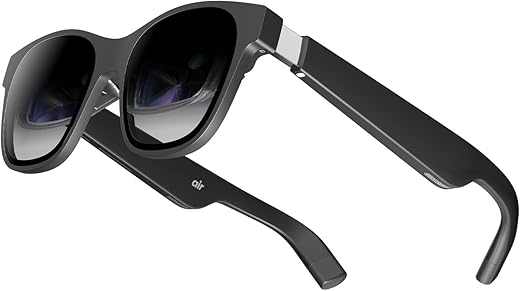
- Ultra-Lightweight Design: Weighing just 2.79 ounces, the XREAL Air Smart Glasses are designed for comfort. You can wear them for hours without fatigue, making them perfect for long gaming sessions or extended viewings.
- Compact Dimensions: Measuring 7.5 x 4.1 x 3.7 inches, these glasses are portable and stylish. They easily fit in your bag or pocket, ensuring you can take augmented reality experiences anywhere.
- High-Performance Technology: The XR-7100RGL model boasts cutting-edge AR capabilities, delivering immersive visuals that transform your environment. Perfect for entertainment, learning, and productivity tasks.
- Versatile Use: Whether you’re streaming your favorite content, playing AR games, or simply using smart applications, the XREAL Air Smart Glasses provide versatile functionality to satisfy various needs.
- Innovative User Interface: With intuitive controls and an easy setup process, navigating augmented reality has never been easier. Streamlined design enhances the overall user experience.
Price Comparison and Value for Money
When it comes to the XREAL Air AR Smart Glasses, price varies across different suppliers. Our price comparison tool allows you to see the best deals from various retailers. As of now, prices range, giving you ample options to find the best fit for your budget. It is essential to keep an eye on trends from the 6-month price history chart, which shows fluctuating prices, indicating that the glasses may go on sale or see price increases in the future.
Customer Reviews: What Users Are Saying
The XREAL Air AR Smart Glasses have garnered a range of customer reviews that highlight their strengths and weaknesses. Users appreciate the stunning visuals and lightweight design, which enhances comfort and usability. Many reviews praise how these smart glasses successfully deliver an immersive augmented reality experience, changing how people interact with digital content.
However, some users have noted drawbacks, pointing out that the battery life could be improved for longer usage times. Others have suggested that while the product performs well in many environments, bright daylight can sometimes impact visibility. These insights provide a balanced view, helping potential buyers make informed decisions.
Discover the Experience with Unboxing and Review Videos
For those considering a purchase, you can enhance your understanding of the XREAL Air AR Smart Glasses through comprehensive unboxing and review videos available on platforms like YouTube. These videos give potential buyers a first-hand look at the product, demonstrating its features in action and providing a unique perspective on its real-world performance. Watching these can help solidify your decision and deepen your appreciation for what this product offers.
Final Thoughts: Why Choose XREAL Air AR Smart Glasses?
The XREAL Air AR Smart Glasses stand out in the electronic marketplace with their combination of lightweight design, cutting-edge technology, and versatile applications. With a flexible price range, favorable customer feedback, and a growing community of users sharing tips and experiences, they represent an excellent choice for anyone looking to explore augmented reality.
Whether you’re interested in gaming, streaming, or simply enhancing your everyday tasks with augmented reality, these glasses offer a unique solution that meets a variety of needs. As the AR market continues to grow, investing in the XREAL Air Smart Glasses could provide you with the edge you need to enjoy this exciting technology.
Compare prices now to find the best deals available and step into the future of augmented reality!
XREAL Air AR Smart Glasses Specification
Specification: XREAL Air AR Smart Glasses
|
XREAL Air AR Smart Glasses Videos



![XREAL Air + XREAL Beam Unboxing & Setup - 330-inch OLED Glasses! [2023]](https://i.ytimg.com/vi/VU9j5yhsyZk/hqdefault.jpg)
XREAL Air AR Smart Glasses Reviews (7)
7 reviews for XREAL Air AR Smart Glasses
Only logged in customers who have purchased this product may leave a review.





JustWeird_NoBoring –
This is my favourite tech at the moment.
Please note, these are not VR glasses.
Using with PC:
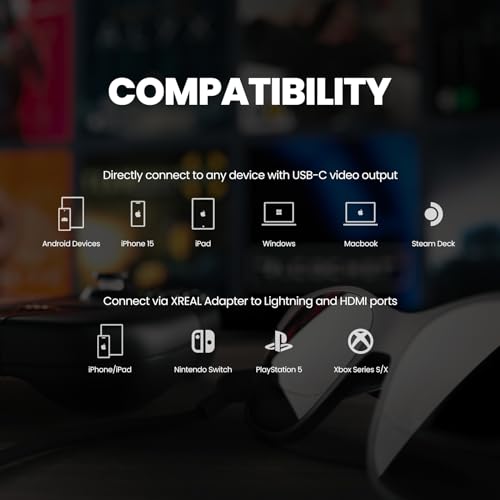
You need to plug it into a usb-c port or buy a converter from usb-c to hdmi if your PC doesn’t have a usb-c port.
For Windows, it will just replicate the screen so you can use it as your main display. The screen remains in front of you, even when you move your head.
For Macs, you can download and run XReal Nebula software which let’s you create multiple virtual desktops that can be pinned in virtual space.
It looks excellent.
They are still developing the Windows version.
Android phone, you will need to download XReals Nebula app. This has two modes. You can duplicates the phone screen or you can open a virtual environment where you can open apps that can be resized and moved in virtual space. This is currently limited to a few apps, but I use the browser and You Tube mostly. It’s a really nice experience.
If you buy the XReal Beam then this let’s you connect to your PC and resize and pin your screen in virtual space. I have a gaming PC setup without a monitor. I use these glasses as my main monitor and play games with a very large virtual screen.
It’s a bit pricey if you included the XReal Beam, but I love tech and it’s a great experience especially with games and movies.
Lastly, note that XReal are actively developing this and it’s software. I am looking forward to when Nebula is available for Windows.
Gerardo Meillon –
Tenia mis dudas de comprarlas, pero sin duda son las mejores del mercado, han solucionado sustancialmente el problema con los sensores de movimiento. Sin duda tener las 3 pantallas virtuales para trabajar en tu computadora es otro nivel.
Dan –
This product is a display and speakers ONLY and the glasses need a usb-c video source to power on. I ordered Xreal beam also and it enhances the experience well. I will write another review for that separately. Without the Xreal you will be limited to only one display mode (where user is looking) and there is no orientation awareness.
This does work with iPhone 12Pro lightning port but you really need to look at your phone screen to often to get use out of them (e.g. face recognition or browsing) but you could watch streaming apps in full screen mode I guess. I used it to plug-n-play literally to Windows work laptop and detected as secondary display at 1080p resolution.
It took a couple days to get used to working like this as a developer used to 3 monitors. Visual Studio is totally usable with these. However when I am not at a desk with monitors it is the next best thing. The video quality is great, the brightness (adjustable from the glasses) is great even without the shroud. There is no lag whatsoever.
Glasses sit naturally on the nose with no complex adjustment out of the box for me (Caucasian nose). They are light weight and I have worked all day with no discomfort (skin denting is about same as wearing sunglasses). My eyes were not strained after 3-4 hrs without removing. The only viewing issue I have noticed is at the extreme peripheral corners of the display smaller fonts (approx. 6 pt.) are a little fuzzy without pushing the glasses closer to the eyes or un-natural wearing angle. Example windows OS date-time on lower right corner is a little fuzzy but readable.
Socially i have not noticed many stares (I wouldn’t care either) but sitting is meetings might be awkward. The speaker are audible from 8+ feet to others (so no privacy) but you could use ear pods for audio. I noticed people commenting that I was starring off (not looking at my screen) and this technology is new to most people. Therefore I was described, I look like a white Ray Charles (blind guy) talking to my self in public. This is like when blue tooth ear pieces initially hit our society and people seemed to go around talking to themselves but we don’t think much of it today. I think they fact these glasses can by overlooked as sunglasses in public are a positive.
As of Nov 2023 they were retail at 270$ which is comparable to a decent vesa monitor but you can pack up easily and take anywhere you go. If you work regularly away from your desk (I need a change of env to think sometimes) and feel you need a 2nd display to be productive then I would advise using these. They are comfortable glasses and portal decent display monitors. If you need more than that then definitely add the Xreal beam. Using the Xreal beam you can get 5+ hrs of use on the go also and you get more functionality than the glasses alone offer.
Amazon Customer –
For starters, if you don’t have an Android phone, 90% of what is advertised simply will not work for you. This fact is not clear ANYWHERE on their Amazon page, and only can be found when looking into specific software versions of their garbage OS called Nebula, which by then, you would have likely already purchased the product. Their mainline feature is an AR dashboard experience with multiple monitors, which is an Android exclusive and made extremely unclear. The product also advertises being compatible with Switch, Xbox, and almost anything else with a USB-C port. This is simply untrue UNLESS you buy their additional and expensive HDMI TO HDMI ADAPTER. I mean, really: how silly is that? There’s only two reasons for the necessity of this additional product: A) the engineering simply isn’t good enough to facilitate whatever interaction their achieving by using the adapter straight on the headset, or B) it’s a flat out scam. And at that point the reason doesn’t really matter, does it.
This company needs to slash its marketing budget in half and put every last of it towards the engineering. Nothing about this product is good. For the features I DID have compatible devices for, my hardware troubles simply became software troubles. The Nebula OS (the software responsible for facilitating any function on MacOS) is simply unusable. There is about 3-4 functional buttons TOTAL throughout their entire chain of menus (buttons that aren’t: “give us some feedback!” “leave us a review!”), and even then, there is little functionality in the product at all.
If you do manage to get the Nebula software working, what you’ll find is that the glasses can successfully put up a second screen in front of your face or on a wall around you, but that’s a big IF. When I first plugged the glasses in, I was able to sustain a view like this for approximately 5 minutes, where then after the OS seemingly stopped functioning at all, even after 5 reboots and 2 reinstalls later. For the love of God, please do not buy this product.
J Morales –
I use them to watch media on iPad and M1 Mac. Also surfing the net. Big screen viewing for much less than the price of large monitors. I have also discovered they work with Microsoft Surface Duo The two screens become one when watching media with no central vertical line!
J Morales –
El concepto del producto me gusta mucho, pero así como tiene puntos positivos también tiene algunos negativos. Como contexto los dispositivos con los que logré conectarlas son mi steam deck, mi laptop windows y el ipad de mi esposa.
Puntos positivos:
*Tiene muy bonitos colores.
*La imagen tiene buena resolución 1080p, los juegos de steam deck se ven mejor en estos lentes que conectándolo a una tv de 1080p.
*No me provocan fatiga visual al usarlas por un tiempo prolongado (1hr-2hrs), como si me ocurría al jugar directamente en la pantalla del steam deck que al ser pequeña a veces se dificultaba leer algunos textos como por ejemplo en cyberpunk, que en las gafas todos los textos se ven perfectamente legibles.
*Se ven como gafas de sol normales, no luces mal o raro usándolas como las de otras marcas que e visto.
*Prácticamente es “plug and play” con mi steam deck y con mi laptop, incluso con el ipad de mi esposa, solo concetas el cable y se ve la imagen de la pantalla, quisiera que así fuera con cualquier otro dispositivo.
*Incluyen pequeñas bocinas estéreo a cada lado por lo que se escucha muy claro el audio, en mi caso prefiero usar mis audífonos bluetooth, pero es un buen agregado, seria perfecto si se pudiera controlar el volumen desde los lentes.
Puntos negativos:
*Los bordes de la pantalla se ven borrosas, las letras se ven dobles, como con ghosting en los bordes de la pantalla (No se si esto le ocurre a todos o solo a mi porque tengo un poco de astigmatismo).
*Con mis dispositivos solo funciona como un pantalla adicional, no como realidad aumentada.
*No e logrado conectarlo con mi iPhone, porque tiene entrada lightning y por lo que e leído se ocupan por lo menos 2 adaptadores, lo cual hace perder un poco de su portabilidad tener que comprar y cargar con dos accesorios adicionales, deberían de incluir con algún cable intercambiable o adaptador que facilite la conexión con iPhone, pero se vende por separado y se ocupan dos adaptadores, por lo que la idea me desagrada un poco.
Puntos que ayudarían a mejorar esta calificación:
*Estoy esperando a que lancen la aplicación de nébula para Windows, que actualmente esta en beta.
*Estoy esperando que pongan a la venta aqui en México el xreal beam, porque podría ser la solución para poder usar las gafas con mi iPhone y con mi Nintendo switch, lo que para mi agregaría mas valor al producto.
paddy567 –
Got my XReal Air this week, thought I’d post a short review. Tl;dr – great piece of hardware, not-so-good piece of software.
Before launching into the review, I should be clear about my use case: I was looking for a small portable monitor that I could use for work an entertainment when I’m traveling instead of a small screen.
Packaging and in-the-hand – The XReal comes in a small box that contains the glasses, cable, and nose pieces in what is roughly the size of a large sunglasses case. Portability is definitely there! The packaging is classy and professional, and so are the glasses and cable in the hand. They feel (and look) solid, and well made. Buttons on the glasses are responses and the cover accessory snaps on firmly. Grade: A
Plugging in for screen mirroring – The glasses work with both my laptops, my samsung tablet and my Sony 5 iv (it is not on compatibility list, but it does work). You can use all these devices without touching Nebula to mirror your screen and it just works – plug it in and you’re away – mostly. I have noticed on my phone that netflix appears to only play downloaded titles, not titles streaming. I assume this is a DRM restriction of some type; I have not experimented with other streaming apps yet. Grade: B+
Plugging in with the app – Nebula sucks, I’m sorry to say, it just sucks. The idea of being able to control/shift the screen is great, but it promises more than it delivers because a) it has no apps beyond YouTube that you would ever use, and b) many streaming and other services will not work in the Nebula browser. I’m also a bit iffy on routing, for example, my email and especially my work office 365 through a browser from a vendor I don’t really know much about. So you can’t stream in the Nebula app, at least not with anything I tried, and I’m not comfortable doing anything else in the browser. I don’t know what the answer is here, or if there is an answer. What would be ideal is be if Nebula functioned almost like a launcher that transformed my android homescreens, but still ran the actual apps, but it just doesn’t work that way. It’s a bummer, and I think it’s something that puts a lot of people off because the advertising really promotes a different user experience. I don’t care over much, but if you were invested in that experience you would be unhappy with this device. Grade: D
Viewing experience – It’s great! At least for me. Screen is crisp and legible. I can use this for work and for play, typing emails etc is no problem after some minor adjustment. The brightness levels are good, though colors do appear to be a little over-saturated to me. I can really only compare this to my metaquest 2 – which I could never even hope to use for work and isn’t really that enjoyable for watching shows due to the pixellation and ‘screen door’ effect. There is not of that here. Screen is crisp and great to watch. Do experiment with the angles on the arms and nose piece. I have found it’s best for me if they are almost angled slightly “up” off my face. The speakers are fine, I prefer using bluetooth headphones, however. Grade: A
Comfort – Not bad. In bed, there is no discomfort and I can wear these for quite some time. Sitting up, and the nose pieces do pinch the nose after a while, they could be a little larger/softer. Also, I have quite a small head, the arms are wide enough for me, but if you have a large head I imagine you could mind them a little pinchy after a time. I had no problems with headaches or anything like that from using them. Grade B
Overall, I really like this device and it meets my needs perfectly. I do think the advertising grossly oversells what you can do with them because screen resizing, head tracking etc only works in the app – and virtually nothing useful works in the app. However if you are looking like me for a portable monitor, they are terrific. B+