
 Amazon.com
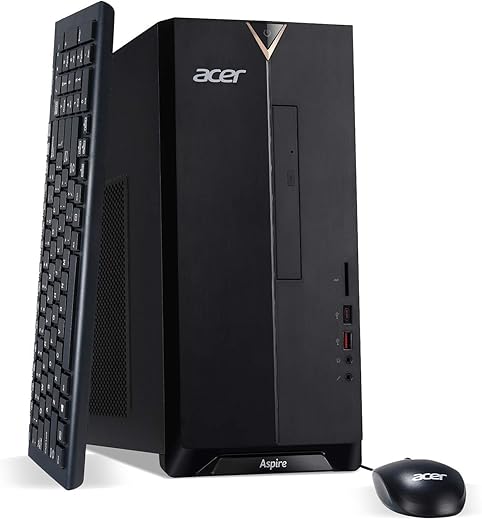
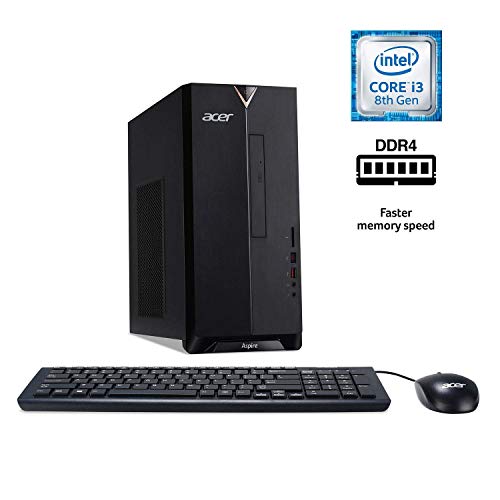
acer Aspire TC-885-UA91 Desktop, Intel Core i3 Price comparison


- All prices mentioned above are in United States dollar.
- At amazon.com you can purchase Acer Aspire TC-885-UA91 Desktop, 9th Gen Intel Core i3-9100, 8GB DDR4, 512GB SSD, 8X DVD, 802.11AC Wifi, USB 3.1 Type C, Windows 10 Home,Black for only
- The lowest price of Acer Aspire TC-885-UA91 Desktop, 9th Gen Intel Core i3-9100, 8GB DDR4, 512GB SSD, 8X DVD, 802.11AC Wifi, USB 3.1 Type C, Windows 10 Home,Black was obtained on September 24, 2025 11:08.
acer Aspire TC-885-UA91 Desktop, Intel Core i3 Price History
acer Aspire TC-885-UA91 Desktop, Intel Core i3 Description
Acer Aspire TC-885-UA91 Desktop: A Powerful Workhorse for Everyday Tasks
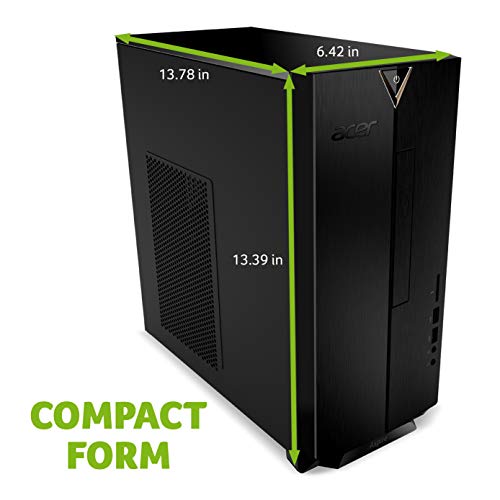
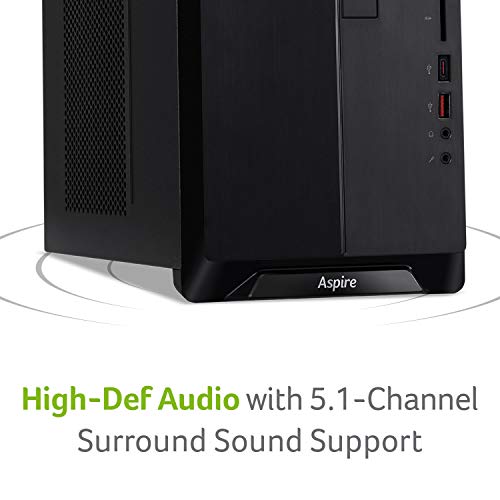
The Acer Aspire TC-885-UA91 Desktop offers a perfect blend of performance and functionality, making it an ideal choice for both home and office use. Powered by an Intel Core i3 processor, this desktop ensures that you can handle everyday computing tasks with ease. With its sleek design and compact dimensions, it fits seamlessly into any workspace. Explore its features and discover why this desktop is a trending choice among consumers today.
Key Features and Benefits
- High-Performance Processor: The Intel Core i3 processor running at 4.2 GHz ensures quick response times and efficient multitasking. Experience smooth computing whether you’re browsing the web, streaming videos, or working on documents.
- Vibrant 4K Display: With a maximum screen resolution of 3840 x 2160, enjoy detailed visuals that make movies and games come to life. This capability is perfect for graphic designers and video editors looking for precision.
- Ample RAM for Multitasking: Equipped with 8 GB DDR4 RAM, this desktop provides reliable performance, allowing you to run multiple applications simultaneously without lag.
- Fast Storage Solution: The 512 GB SSD not only offers plenty of storage space but also ensures rapid data access and boot-up times. Enjoy a snappy, responsive computing experience.
- Integrated Intel UHD Graphics 630: This graphics coprocessor allows for decent gaming and video playback, providing smooth graphics rendering while saving energy.
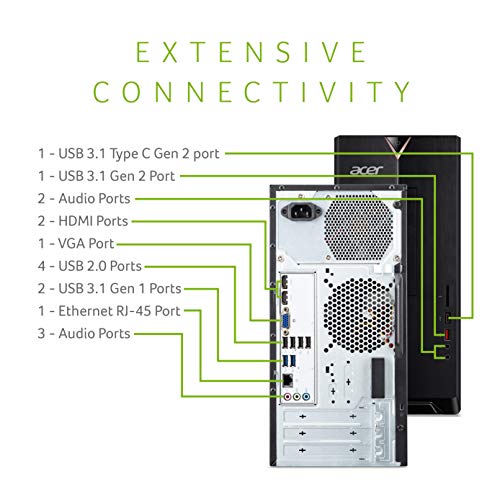
- Connectivity Options: Featuring multiple USB ports (4 USB 2.0 and 4 USB 3.0), connect all your peripherals effortlessly. Seamlessly transfer data at high speeds and sustain connectivity with external devices.
- Reliable Wireless Connection: With 802.11 wireless technology, enjoy a stable internet connection for smooth browsing and video streaming without the hassle of messy cables.
- Convenient Optical Drive: The integrated DVD-RW optical drive allows you to read and write CDs and DVDs, granting versatility in media playback and data storage.
Price Comparison Across Suppliers
The prices for the Acer Aspire TC-885-UA91 Desktop fluctuate across various suppliers. Currently, you can find great deals ranging from $549 to $679, depending on the retailer. This competitive pricing makes it a sensible option for financially conscious shoppers who want reliable tech without breaking the bank.
6-Month Price History Trends
Check the 6-month price history chart to see rising and falling trends for the Acer Aspire TC-885-UA91. Recently, the price has shown a slight decrease, making now an excellent time to purchase for those considering this desktop. The fluctuations indicate periodic discounts, revealing potential savings opportunities.
Customer Reviews: What Users Are Saying
Customer reviews highlight several positive aspects of the Acer Aspire TC-885-UA91. Users appreciate the quick boot times and the powerful performance, especially for daily use. Many note the impressive screen resolution, making media recognition an exciting experience. The SSD is frequently praised for enhancing system responsiveness.
However, some feedback mentions a need for more extensive ports and upgrade options, as certain users expressed that they wish for additional connectivity options. Despite these drawbacks, the overall sentiment remains positive, with many users finding it a valuable addition to their computing needs.
Explore Unboxing and Review Videos
Want to see the Acer Aspire TC-885-UA91 Desktop in action? Check out various unboxing and review videos available on YouTube. These videos showcase the desktop’s features, performance tests, and give you a hands-on perspective on what to expect from this powerful machine.
Overall, the Acer Aspire TC-885-UA91 Desktop is a stellar choice for anyone needing a reliable, high-performance machine for work and play. Its combination of strong specifications, practical features, and competitive pricing make it a top contender in the desktop market. If you’re looking for the Acer Aspire TC-885-UA91 Desktop, now is the time to compare prices. Compare prices now!
acer Aspire TC-885-UA91 Desktop, Intel Core i3 Specification
Specification: acer Aspire TC-885-UA91 Desktop, Intel Core i3
|
acer Aspire TC-885-UA91 Desktop, Intel Core i3 Reviews (7)
7 reviews for acer Aspire TC-885-UA91 Desktop, Intel Core i3
Only logged in customers who have purchased this product may leave a review.
Related Products






Mike DLVC –
It is so quiet, and so far works great. Very happy with it.
Les Gates –
Came with 8 gigs of ram, 500 something ssd storage and no graphics card.
I upgraded the pc to 16 gigs ram and gtx 1650
And a extra case fan.
Had to install drivers too.
Now I can game!
Hunquaman –
I have typically bought and loved Dell Inspiron desktop computers for use with school and business purposes and have been very satisfied over the years.
When we were told that we needed Windows 10, I tried to download it to my old Inspiron but was not successful because my Dell equipment was really too old for a successful install; I really love the Inspiron and Windows 7.
In February 2020, I bought a new desktop and had a really stressful experience. There was something wrong with the configuration, and the tech support people could not get the computer to perform properly. After many hours online with tech support, the situation started to seem hopeless. The pandemic began to become worrisome both here and in India (tech support), and I returned the desktop for a fully refund.
Last week I started again trying to find a desktop with Windows 10. I didn’t want to spend a small fortune for a computer that I use primarily for shopping, email, browsing, and, rarely, online banking transactions. I found this Acer after reading good reviews. Since my current desktop is an I3 and has basically the same specs, I chose this computer rather than the I5.
One of my siblings told me that Acer has a long history of excellent quality and that I would be pleased. He was right! This desktop is great.
PROS:
Comes with Windows 10 pre-installed. Plug it in. It’s ready to go.
Norton Security is pre-loaded with a 30-day trial period.
The computer is extremely user friendly. I had no struggles with glitches with any of the programs.
Bloatware is easy to recognize and easy to remove (a Windows 10 feature).
CONS:
There really are no cons except that the “feel” of the plastic components is not as hefty as some of the desktops that I have used in the past (other companies). The plastic casing of the tower, the keyboard, and the mouse are beautifully designed but not quite as heavy as prior desktops that I have owned. That isn’t necessarily a “con,” and I like the keyboard, mouse, and computer case. Very attractively designed.
MY RATING:
5 STARS
The price, the ease of use, the beautiful performance — a great buy!
NIKOLAOS KOFITSAS –
Llego a tiempo en muy buen estado y esta funcionando de maravilla. la recomiendo es un Avión.
AuntB –
Have this desktop for three years, and have no issues. Loads and shutdown in less than 20 s, quiet, and does not occupy a lot of space. Had bought it at a really special price @ $610. The only caveat is that it came with a wired USB keyboard/mouse.
R. Koenig –
Great computer
Hunquaman –
I did extensive research to buy this computer for my brother’s family in April 2020. It came with 8GB of RAM occupying one of the two RAM slots, and I bought an identical 8GB stick of DDR4 RAM (see below for more information) to fill the second open slot for a total of 16GB. I figured having 16GB is a good idea for when users like to keep a bunch of browser tabs open and/or for playing games like ROBLOX that the kids love. Also, it can’t hurt for future-proofing. Oh, and speaking of future-proofing, this thing came with a 512GB M.2 NVME SSD (made by Western Digital) and it is FAST – see the picture I included of the CrystalDiskMark transfer speeds. Basically, this “new” type of drive uses the faster PCI Express 3.x lanes (I believe in this case it is 2 lanes) instead of SATA. This drive is about the size of a stick of gum, has no moving parts, is mounted directly on the motherboard, and therefore leaves both of the hard drive bays open for installing (bottom mount 2.5″) SSD or mechanical drives in the future. If you order a drive(s) to put in these expansion bays, make sure they are 2.5″ and NOT 3.5″ because of the dimensions of the mounting holes. For what it’s worth, I found 4 screws included in the drive-mount platform, but they are too large for 2.5″ drives. I’m guessing they are for larger 3.5″ drives but I couldn’t see a way to mount those larger drives with the holes provided. I have no clue what that is about, and suppose somebody in the Acer design department just messed up.
Because my brother likes to save money on electricity, his house isn’t exactly a cool room temperature during the summer. Therefore I decided it was best to purchase and install a case fan. It is IMPORTANT to note that the motherboard header used to connect the fan doesn’t supply enough voltage to run a standard 12 volt 92mm case fan. I found this extremely odd, since the vast majority of fan headers are pushing 12 volts. I tried a 12 volt fan and it would only work for a couple seconds at computer startup. Oh well, it is what it is, and there IS a solution. I purchased a 5 volt fan and it works like a charm. Keep in mind that it will run constantly while the computer is on, and only at one speed since there is no way to use the BIOS to manipulate a case fan in any way. The particular fan I recommended (see below for more information) only makes a noticeable noise for 1-2 seconds when the computer starts up or resumes from sleep – other than that I can’t hear it at all.
IMPORTANT TO KNOW ABOUT CASE FANS: According to what I have read, if you install a 12 volt fan to a motherboard only pushing enough voltage to power a 5 volt fan, then the fan basically won’t run (or at least won’t run properly) and there is probably no harm done. However, if you REVERSE the scenario and put a 5 volt fan on a 12 volt source, you will melt the fan motor in short order (somewhere between a few seconds and maybe 20 minutes) and destroy the fan. I’m not sure if there would be a risk of fire, but why take that chance? The 5v fan on a 12v header shouldn’t apply to this computer, so don’t worry about it at this point. The only reason I mention it is in case you purchase a 5 volt fan for this computer, and then try to re-purpose it in another computer (which might likely have 12 volt headers) at some point in the future. Often, it is difficult or impossible to find the fan header voltage for a particular motherboard online, especially if it is in one of these pre-made systems. So, in my opinion, if you are unable to determine the motherboard header voltage try a 12 volt fan before trying a 5 volt fan.
CASE FAN I RECOMMEND: https://www.amazon.com/Noctua-NF-A9-5V-PWM-Premium-Quality/dp/B07DXTN515/ref=sr_1_9?crid=3DGSXUZPNMEQD&dchild=1&keywords=noctua+5+volt+fan&qid=1590449172&s=electronics&sprefix=noctua+5+v%2Celectronics%2C172&sr=1-9
8 GB RAM THAT MATCHED WHAT CAME IN MY DESKTOP (It will really only run at 2400 MHz instead of 2666 MHz because my processor is an i3, and I’m perfectly okay with that): https://www.amazon.com/gp/product/B00XLXWD5S/ref=ppx_yo_dt_b_asin_title_o04_s00?ie=UTF8&psc=1
2TB WD 2.5″ Hard Drive (I don’t want to clog up the fast NVME drive with all my documents, pictures, and videos. You will likely need to get your own mounting screws since the 4 screws included with the main PC are the wrong size. That is weird.): https://www.amazon.com/gp/product/B079BQS5WQ/ref=ppx_yo_dt_b_asin_title_o04_s00?ie=UTF8&psc=1
In conclusion, I bought this PC, and added 8GB of matching RAM to make 16GB total, a 5 volt case fan, and a 2.5″ mechanical hard drive for all my files, and a 27″ Dell 1080p monitor. For everyday computing, this thing is a beast. Ultimately, I’m in for $420 for this PC, $39 for the extra RAM, $79 for the extra hard drive, and $200 for the monitor. When tax is included, my total investment is just under $800. I think that is pretty darn reasonable for this system which should provide many years of excellent performance. I hope you found my review helpful, and wish you good fortune in all your endeavors. Peace!