
ASUS AX6000 WiFi 6 Modem Router Combo (CM-AX6000)
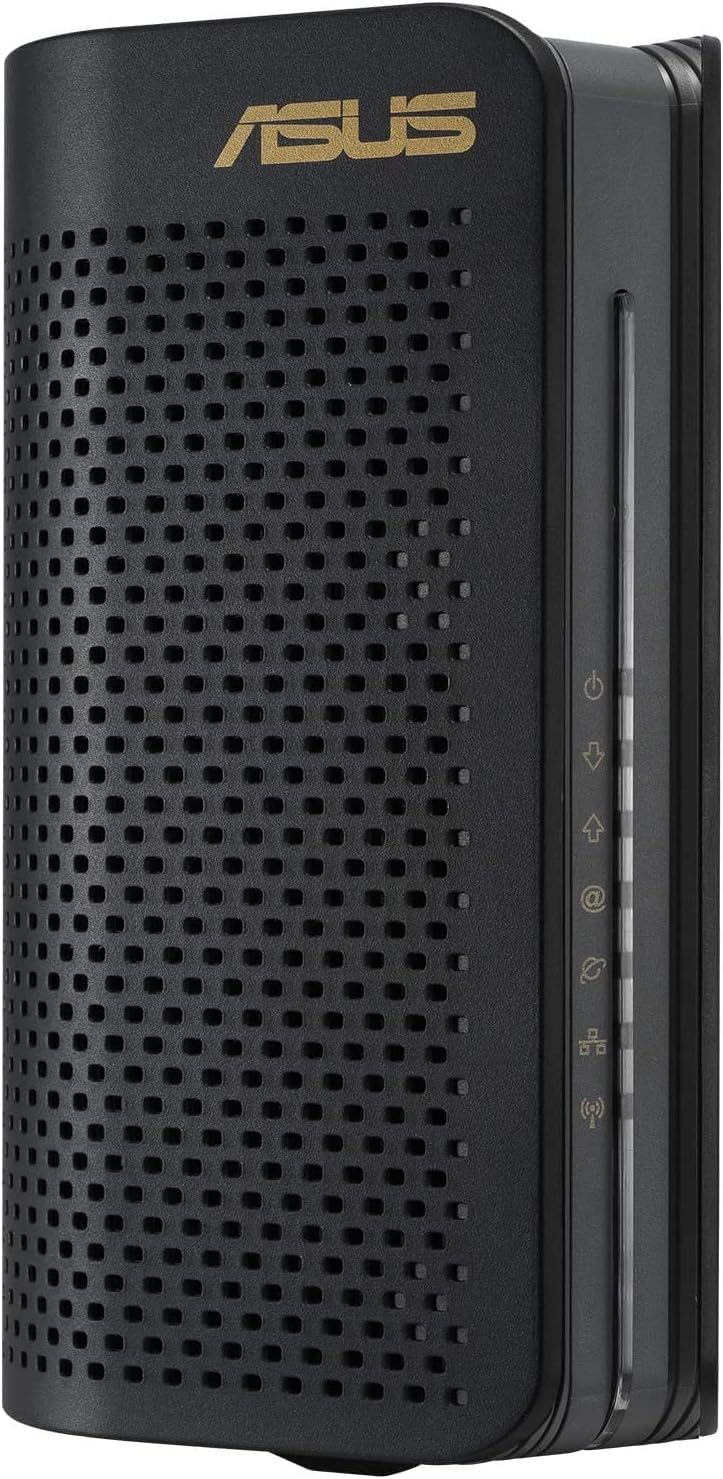
$259.00
ASUS AX6000 WiFi 6 Modem Router Combo (CM-AX6000) Price comparison

- All prices mentioned above are in United States dollar.
- This product is available at Amazon.com.
- At amazon.com you can purchase ASUS AX6000 WiFi 6 Cable Modem Wireless Router Combo (CM-AX6000) - Dual Band, DOCSIS 3.1, Gigabit Internet Support, Approved by Comcast Xfinity and Spectrum, 160MHz Bandwidth, OFDMA, MU-MIMO for only $259.00
- The lowest price of ASUS AX6000 WiFi 6 Cable Modem Wireless Router Combo (CM-AX6000) - Dual Band, DOCSIS 3.1, Gigabit Internet Support, Approved by Comcast Xfinity and Spectrum, 160MHz Bandwidth, OFDMA, MU-MIMO was obtained on September 24, 2025 04:10.
ASUS AX6000 WiFi 6 Modem Router Combo (CM-AX6000) Price History
ASUS AX6000 WiFi 6 Modem Router Combo (CM-AX6000) Description
ASUS AX6000 WiFi 6 Modem Router Combo (CM-AX6000) Enhance Your Internet Experience
The ASUS AX6000 WiFi 6 Modem Router Combo (CM-AX6000) offers a cutting-edge solution for those seeking speed and reliability in their home WiFi network. This advanced device combines a modem and a router in one sleek package, making it a perfect choice for gaming, streaming, and multitasking. Discover how this high-performance router can transform your internet experience.
Key Features of the ASUS AX6000 WiFi 6 Modem Router Combo
- WiFi 6 Technology: Experience lightning-fast internet speeds up to 6000 Mbps, allowing multiple devices to connect without lag.
- Extended Coverage: With powerful antennas and beamforming technology, the AX6000 creates a broader, more reliable WiFi coverage throughout your home.
- Built-in Modem: Enjoy the convenience of a modem-router combo, saving time and space while maximizing performance.
- Multi-Gigabit Ports: Equipped with 4 Gigabit Ethernet ports for wired connections, ensuring top-notch performance for gaming consoles and computers.
- Advanced Security Features: ASUS AiProtection provides comprehensive security against online threats, keeping your network safe and secure.
- User-Friendly Setup: Easy installation through the ASUS Router app, making it simple to manage your network settings from your smartphone.
Compact Design Meets High Performance
The ASUS AX6000 WiFi 6 Modem Router Combo is designed to fit seamlessly into any home setting. Its compact design doesn’t compromise its advanced functionality. With dual-band WiFi capabilities, this router ensures optimal performance whether you’re surfing the web, streaming shows, or else in a gaming battle.
Price Comparison Across Different Suppliers
The price of the ASUS AX6000 varies across numerous suppliers, ensuring that you find the best deal possible. On average, you can expect to see prices ranging from $299 to $349. Keep an eye on the 6-month price history chart; it reveals consistent pricing trends with occasional discounts and promotions. By comparing prices, you ensure you aren’t overspending for this revolutionary device.
Trending Price Insights
Over the past six months, the fluctuating prices for the ASUS AX6000 have shown that it often dips during sales events, making it an excellent option to monitor before purchasing. Notably, prices tend to decrease during holiday sales, providing an opportunity to secure this high-performance router at a lower cost.
What Customers Are Saying: Reviews and Feedback
Customer reviews highlight the numerous benefits of investing in the ASUS AX6000, as well as a few minor drawbacks. Overall, this modem router combo resounds with technology enthusiasts, offering:
- Positive Aspects:
- Incredible speed and range, ideal for large homes.
- Easy setup process that can be completed in minutes.
- Advanced security features provide peace of mind.
- Noted Drawbacks:
- Some users have reported occasional connectivity issues with more than 15 devices connected.
- Initial cost can be high for budget-conscious buyers.
Watch Unboxing and Review Videos
To gain deeper insights, check out several engaging unboxing and review videos available on YouTube. These videos showcase real users sharing their experiences with the ASUS AX6000, from setup to performance. Watching these reviews can help you make an informed decision about your purchase.
Why Choose the ASUS AX6000 WiFi 6?
In conclusion, the ASUS AX6000 WiFi 6 Modem Router Combo stands out as a top-tier choice for those looking to enhance their internet connectivity. With cutting-edge technology, impressive speed capabilities, and built-in firmware security, it meets the demands of today’s digital lifestyles. For seamless gaming, flawless streaming, and fast downloads, the AX6000 has you covered.
Don’t miss out on finding the best price available! Compare prices now!
ASUS AX6000 WiFi 6 Modem Router Combo (CM-AX6000) Reviews (5)
5 reviews for ASUS AX6000 WiFi 6 Modem Router Combo (CM-AX6000)
Only logged in customers who have purchased this product may leave a review.






Nelson R. –
The Good: Device is well made, has enough space for radiant cooling, quiet operation, and has some great performance! Comes with ample instructions to assist even the least tech-savvy persons in setup. Outputs on cable based ISPs are about 15% higher than stock equipment (100mbps:115mbps) with less “shared loop” peak slowdowns
The Bad: Price is pretty high. Buying on any promo or deal is necessary. Also WiFi is strong but the range isn’t the greatest, centrally located equipment can help but the range isn’t outstanding. And lastly- it’s bright. Really bright. Lots of lights on the front can be pretty intense at night or in a dark room.
The Ugly: Settings and internal menus are simple and ample for basic stuff but some of the advanced settings some may need are clunky or not available. Not something expected for an aftermarket and advanced device. And lastly unless you are willing to put devices in a DMZ or make huge sets of ports per device most items will be in an moderate NAT because of the cumbersome security system(s) even with security systems off and a static IP most things are still in a moderate NAT.
TL:DR Great performance, simple, meh WiFi range, and less than perfect internal menus but solid firewalls. Also won’t fix a struggling cable/coaxial ISP connection. Move to a fiber to the home (FTTH) service
mrRick –
I was able to unplug my broken modem/router and plug this in and within a half hour was fully operational. When browsing to this router I was presented with a Spectrum activation screen. I was easily able to replace the old device with the new one. All I needed was to enter the MAC address that is printed on the box. Within minutes the new device was activated and I was able to use ethernet and the default Wifi connection. Browsing to 10.0.0.1 allowed me into the management screen where I renamed the 2.4GHz band and the 5GHz band. Once I saved that all my IoT devices (cameras, thermostat, light switches, etc.) immediately connected and I am now back in business. Overall a pleasant experience.
The only negative for the device are the LED status lights on the front. They are very bright and since the router is just under my TV screen kinda distracting in the dark. Not a big deal but I will have to find a way (maybe a permanent marker??) to softer the light they emit.
Brian –
After my first one stopped putting out Wifi and later functioning whatsoever I had to fill out hours of paperwork and had to plead with ASUS to replace the damn thing, which I had to pay to ship out for their techs to say ‘yeah that isn’t working’, then I ended up waiting weeks after that to realize I needed to present them with a formal engraved invitation to actually replace the broken CMAX I sent them, rather than just keep it on their wall and have nothing to show for it.
They eventually replaced the broken junk, and I’ve been spending the past few months going back and forth with my ISP trying to figure out why I was only getting 1/50th of my internet speed on my new one, turns out one of the ports on the CMAX failed, so now I’m just playing hopscotch with plugs and wires as the lights slowly go out on this router/modem like a dementia patient and I happily run it into the dirt and replace it with something useful.
Amazon Customer –
TLDR: If you know you only need a modem with decent wifi – should be fine. If you want to use it for another purpose down the road – move along, or be happy with a $400 paperweight.
I purchased this modem a few months ago and it worked amazingly. Wifi range was great, stability was on point, and it was very easy to use and responsive. I needed reliability and performance as I’m an engineer and WFH, and it did that wonderfully.
Fast forward to now, when Fiber is finally available in my area, and it’s useless to me. My old modems – even my old ASUS modems – all let me use it as an access point just for wifi (to extend range/signal), as a gigabit switch, etc… In fact, I’m currently using the CMAX6000’s predecessor to provide wifi to my garage/livingroom.
This one is just a modem/router.
Spent a few days working with Asus support over chat and email to try and work around it, and nothing. It’s just a modem. You can’t pass another network signal into it since you can’t even disable DHCP to use it as a switch.
I personally will not being buying Asus network devices in the future without closely reviewing all of their documentation, as I now own a 6 month old, $400 paperweight.
Ian Veatch McCartney –
All in all, the set up for the modem was relatively simple and hassle free. Only snag I ran into was registering it with my ISP, but that’s more of a them problem than a problem with the modem itself. Suprisingly, it doesn’t seem that they listed it but it is both a DOCSIS 3.1 AND 3.0 modem, so it is backwards compatible if necessary. Thankful that it does because it was necessary as my ISP says they use 3.1 but they really use 3.0 DOCSIS. Wi-fi range is also acceptable, I can go anywhere around the house (1600 Square Ft Approx) and still have at least 3 bars signal; Which is leagues better than what we were using prior. The Modem interface is also simplistic yet functional, which is exactly what I expect from a Modem. No flashy, over the top, complex and/or unintuitive controls here. I’ve been using ASUS for years now (Approx 7 or 8 yrs), from Monitors to computer parts and I will continue to support them as they keep releasing (mostly) quality products compared to others, and their support is super friendly as well as helpful. Keep killing it, ASUS!