
ASUS Dual-Band Wireless-AC1300 USB Adapter Price comparison


ASUS Dual-Band Wireless-AC1300 USB Adapter Price History
ASUS Dual-Band Wireless-AC1300 USB Adapter Description
ASUS Dual-Band Wireless-AC1300 USB Adapter – Fast, Reliable Connectivity
The ASUS Dual-Band Wireless-AC1300 USB Adapter delivers ultimate wireless performance for gamers, streamers, and everyday users alike. With dual-band connectivity, it offers fast speeds and enhanced range, making it an indispensable device for anyone looking to upgrade their internet experience. Explore its features and discover why it’s trending in today’s market.
Key Features & Benefits of the ASUS Dual-Band Wireless-AC1300 USB Adapter
- Dual-Band Technology: Operates on both 2.4GHz and 5GHz bands. This flexibility allows for optimized speeds, whether you’re gaming or streaming.
- High-Speed Performance: Achieve wireless speeds up to 1300 Mbps. Experience seamless streaming and online gaming without interruptions.
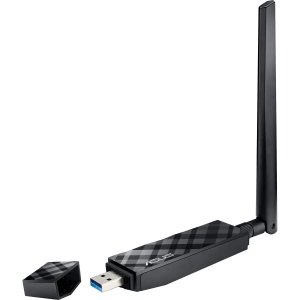
- Compact and Portable Design: Its small form factor makes it easy to carry, making it ideal for users who travel frequently.
- Simple Plug-and-Play Installation: Easily connects to your device. No complicated setup processes required!
- WPA/WPA2 Encryption: Enhanced security features protect your data, ensuring a secure connection without compromising speed.
Price Comparison Across Suppliers
The ASUS Dual-Band Wireless-AC1300 USB Adapter is competitively priced across multiple retailers. Currently, prices range from $29.99 to $39.99. Retailers such as Amazon and Newegg frequently offer discounts and special promotions. Staying informed with our price comparison tool can ensure you find the best deal!
6-Month Price History Insight
Analysis of the 6-month price history shows a consistent trend of decreasing prices over time. Initially priced at $49.99, the adapter saw significant reductions, making it more accessible to consumers. This trend suggests that now is a great time to purchase!
Customer Reviews: The Good & The Bad
ASUS’s Dual-Band Wireless-AC1300 USB Adapter has garnered numerous reviews. Customers appreciate its high-speed performance, especially for gaming and streaming. Users frequently highlight the ease of setup, making it user-friendly for all skill levels.
- Positive Reviews: Many users report excellent Wi-Fi range and speed, stating that it certainly beats their previous adapters. The plug-and-play functionality is frequently praised as a standout feature.
- Notable Drawbacks: Some customers mention that the adapter can occasionally struggle in areas with many competing signals. Additionally, a few users reported minor compatibility issues with older devices.
Unboxing and Review Videos
Many tech enthusiasts have shared unboxing and review videos on platforms like YouTube. These videos provide firsthand insights into the ASUS Dual-Band Wireless-AC1300 USB Adapter, showcasing its setup process, performance tests, and overall functionality. Watching these can help you make an informed purchasing decision.
Why You Should Choose the ASUS Dual-Band Wireless-AC1300 USB Adapter
If you’re searching for the best mix of performance, portability, and value, the ASUS Dual-Band Wireless-AC1300 USB Adapter checks all the boxes. It is perfect for heavy users, whether you’re working from home, gaming, or streaming high-definition content.
Don’t settle for less when it comes to your internet experience. With its competitive pricing and excellent performance metrics, the time to buy is now. Compare prices and find your perfect deal!
Compare prices now!
ASUS Dual-Band Wireless-AC1300 USB Adapter Reviews (9)
9 reviews for ASUS Dual-Band Wireless-AC1300 USB Adapter
Only logged in customers who have purchased this product may leave a review.





VaRun –
Excelente velocidad, la velocidad de transmision se siente casi como cuando tenia cableada mi PC
Mike Stewart –
On Windows 8.1 installation is pretty straight forward, It automatically install drives when you connects, before my laptop have inbuilt (Broadcom 802.11n N150) hardware it show signal only single bar in first-floor than drought ASUS USB AC56 802.11ac AC1200 now it shows full signal.
Fast shipping and well packed by Amazon.
Awesome Product……!
Cliente de Amazon –
Impressive
jason –
the flexability of using the cradle & lead running to the back of the system or just plugging the stick into the usb3.0 at front of the box is great.
Skoo –
My house is two stories. My router lives on the 2nd floor in the middle of the house. My previous set up yielded me around 5Mbps down and up which is atrocious and led me to look into this product.
My setup is Windows 10. As others have mentioned, and ASUS states on their website, this is plug and play on Win 10. That’s it.
My speeds jumped from 5Mbps Down/Up to 83 down and 26 up! I have 75/75 internet so the up isn’t amazing, but this is a remarkable improvement over my last adapter (motherboard integrated).
I like that the adapter is able to be moved around via the USB cable and is the main reason why I didn’t get the PCI-E version.
Connection seems pretty stable so far. I did have a couple drop outs on 5GHZ but they could have been flukes as most days I don’t have a single drop.
The range also seems very good. My previous adapter only got me around 2/4 WiFi bars. This stays usually around 4/4.
Overall, I can’t really find any fault. Easy to use, fast, and adaptable. I guess it’s a little pricey.
Matticus Caesar –
I bought 3 of these for various devices in my home, and they work well for the most part. I have an AC router in my home and these connect to it very nicely. I consistently get data rates of 525 – 650 Mbps, with an occasional burst to 866 Mbps.
File transfer rates are excellent, and streaming video from outside (Netflix) starts in HD mode right out of the gate (it used to start in a low-def mode, then over the course of 5-10 mins it would buffer enough to convert to HD).
I’m only giving 3 stars because I am finding the USB connection to my computers to be unstable. I have tried both direct connection them to USB 3.0 ports and by using the cradle & cable, but in both cases I find I get random USB disconnect events. I do have the most recent drivers (as of late November 2014). Occasionally, i need to reboot any computer in question to get it to recognize the adapter again. I don’t seem to have this issue with any other USB 3.0 devices on any of my computers, so I’m guessing there’s a flaw in the device driver for this adapter.
I am hoping another driver update fixes this problem because these are otherwise fantastic AC adapters.
I will update this review later if I get a fix
Update, 3.5 years later… 6/5/2018
I should have posted this a long time ago, but an update to the Asus drivers in 2015 did fix the USB connectivity issue. These adapters work very well now (for what few devices I have left that don’t have natively built-in wireless AC). Upgrading review to 5 stars.
A. Suarez –
Muy buen dispositivo, excelente, precio, calidad y buena cobertura, aún con impuestos es mucho más barato y mejor de lo que hay en México
Fact_Based_Reviewer –
Simple driver/utility install, no issues. No issues until I started trying to connect to my Asus RT-AC66U 5GHz (AC) network. It just had problems left and right. Connection constantly dropping. I mucked with the settings until I kinda got it working but still problems re-connecting during reboot…
I was just seconds away from returning when I came across a review that basically said this, “the ASUS drivers including the install disk are garbage, Do not use the software. Just plug it in and let your computer do the work. No need for any additional software.”.
I uninstalled the driver, utility and the AC56 from DeviceManager. Did a reboot installed the Driver from ASUS’ website. Now that Win7 manages the AC56 no problem. It’s blazing fast.
—————————
Update
After two days it just has way to many problems. It acted fine for a short while but would often find the adapter frozen and no internet connection. Had to unplug&plug to get it working again. Too many problems! This is a terrible product! I expected better from ASUS.
—————————
Update Update
I believe that my problem may not have been AC56. I think my problem stemmed from BlueTooth interference. After disabling BT all is well now.
Skoo –
This is a great product. I have had it working for almost 6 months and never had a problem with it. I needed to replace my internal wi-fi board in my desktop computer running Windows 7 Pro 64 bit and I wanted something that was easier to replace if it went bad. The ASUS USB-AC56 was the perfect answer. I decided on this product based on the reviews from other users and I was not disappointed. It proved to be more sensitive than my previous one and the price was fair for a product this good. Product installation was very straightforward:
1.- Be sure your computer has internet access through an alternative means (a LAN cable directly connected to your modem works best)
2.- Plug the ASUS USB-AC56 into a USB port and let it do its thing (LED will come on, flash, etc.)
3.- Wait for Windows to look for and assign a driver to it
4.- At this point, it should work perfectly (it did for me under Windows 7 Pro 64 bit)… but if not, go to the next step
5.- Download an updated driver for your OS directly from ASUS at this link:
https://www.asus.com/us/Networking/USBAC56/HelpDesk_Download/
6.- If the file downloaded is zipped or otherwise compressed, you will have to unzip/uncompress it into another folder before proceeding.
7.- Go to the Device Manager, find the ASUS wireless adapter and choose “Update driver”.
8.- Select the folder where you uncompressed the driver and allow Windows to update the driver.
9.- All done !!! Go enjoy your new wi-fi adapter