
D-Link AC2600 Dual Band Gigabit Router DIR-882-US
$149.00
D-Link AC2600 Dual Band Gigabit Router DIR-882-US Price comparison

- All prices mentioned above are in United States dollar.
- This product is available at Amazon.com.
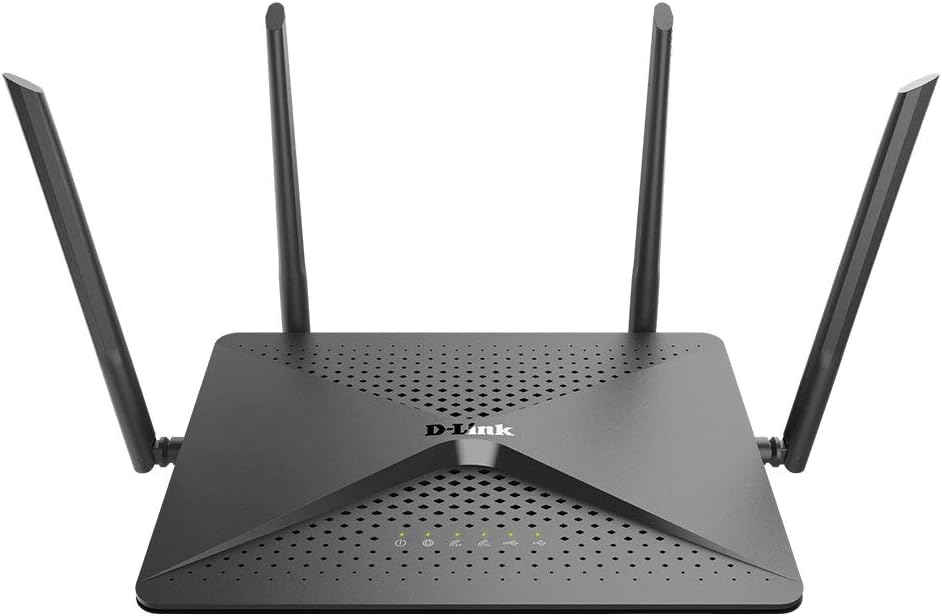
- At amazon.com you can purchase D-Link WiFi Router, AC2600 MU-MIMO Dual Band Gigabit 4K Streaming and Gaming with USB Ports, 4x4 Wireless Internet for Home (DIR-882-US), Black for only $149.00
- The lowest price of D-Link WiFi Router, AC2600 MU-MIMO Dual Band Gigabit 4K Streaming and Gaming with USB Ports, 4x4 Wireless Internet for Home (DIR-882-US), Black was obtained on September 24, 2025 04:27.
D-Link AC2600 Dual Band Gigabit Router DIR-882-US Price History
D-Link AC2600 Dual Band Gigabit Router DIR-882-US Description
D-Link AC2600 Dual Band Gigabit Router DIR-882-US: Revolutionize Your Home Network
Experience seamless internet connectivity with the D-Link AC2600 Dual Band Gigabit Router DIR-882-US. Designed for the modern home, this router delivers fast speeds, robust security, and impressive performance for all your devices. Whether you’re streaming, gaming, or browsing, the DIR-882-US provides the reliability you need. Read on for a detailed overview, price comparisons, and insights from fellow users.
Key Features and Benefits of the D-Link AC2600 Router
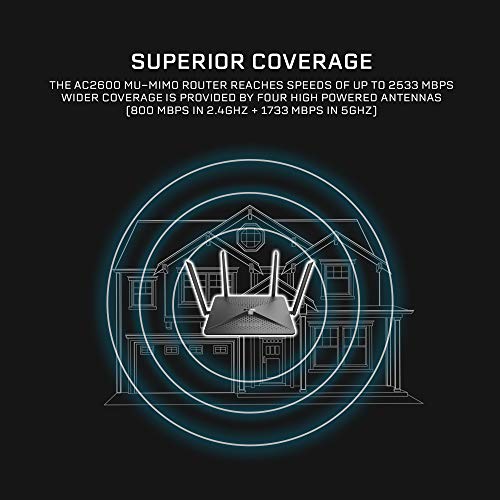
- Dual Band Performance: With speeds up to 2.53 Gbps, you can enjoy lag-free gaming and seamless streaming on both 2.4 GHz and 5 GHz bands.
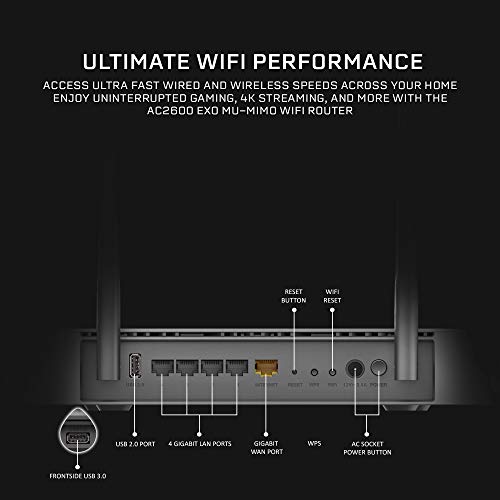
- Gigabit Ethernet Ports: Four fast Ethernet ports ensure stable wired connections for your devices, perfect for gaming consoles and smart TVs.
- Advanced QoS: Quality of Service technology prioritizes bandwidth according to your needs, ensuring that high-demand activities get the speed they require.
- Robust Security Features: Keep your network safe with WPA3 encryption, guest network access, and integrated firewall protection.
- Smart Connect Technology: Automatically assigns devices to the best band, optimizing performance without requiring manual adjustments.
- USB 3.0 Port: Easily share files and devices across your network with fast USB access.
Price Comparison Across Multiple Suppliers
The D-Link AC2600 Dual Band Gigabit Router DIR-882-US is competitively priced across various suppliers. While prices can vary slightly, notable comparisons show that major online retailers often offer discounted rates. Keep an eye on seasonal sales to get the best deal. As of now, the average price is significantly lower than last month’s trend, making it an excellent time to buy.
Insights from the 6-Month Price History Chart
Over the past six months, the price history indicates a steady decline, with occasional spikes during promotional events. The trend suggests that now is a strategic moment to invest in the D-Link AC2600, as its pricing seems more favorable than just a few months ago. This data supports the notion that waiting for a better price may not be necessary as the current price is at a low point.
What Customers Are Saying: Reviews of the DIR-882-US
Customer reviews for the D-Link AC2600 Dual Band Gigabit Router DIR-882-US largely highlight its reliability and speed. Users appreciate how it handles multiple devices without lag, which is essential in homes with smart TVs, gaming consoles, and streaming devices. The setup process is straightforward, earning praise for its user-friendly interface.
However, some users noted that the range could be improved, especially in large homes. A few reviewers mentioned occasional drops in connectivity but highlighted that it was likely due to interference rather than the router’s performance. Overall, most users would recommend this router for anyone in need of high-speed internet.
Explore Unboxing and Review Videos
For those looking to see the D-Link AC2600 Dual Band Gigabit Router DIR-882-US in action, various unboxing and detailed review videos are available online. These resources offer real-life demonstrations of setup and performance, allowing potential buyers to visualize the product’s capabilities. Catching a glimpse of the router in action can alleviate any uncertainties and provide you with a clearer idea of what to expect.
Conclusion
The D-Link AC2600 Dual Band Gigabit Router DIR-882-US is a powerful addition to any home network. With its cutting-edge features, competitive pricing, and positive user reviews, it stands out as a leading option for those seeking efficient and reliable internet connectivity. Whether you need it for gaming, streaming, or general browsing, this router promises to meet your demands.
Don’t miss out on the chance to elevate your home network. Compare prices now!
D-Link AC2600 Dual Band Gigabit Router DIR-882-US Reviews (9)
9 reviews for D-Link AC2600 Dual Band Gigabit Router DIR-882-US
Only logged in customers who have purchased this product may leave a review.





Laura S –
Even though I have Fios, my internet connectively was terrible. The issue was clearly the Verizon router (that I was stupidly renting from them) because when I connected directly via Ethernet cable, the speed was fantastic. It took some finagling as my ONT data port was for Coaxial only, so I had to call Verizon and get them to switch it over to Ethernet. But once I did that, the setup on this router took less than 5 minutes, and as you can see in the speed tests, this router is awesome. The test was run from a room away from the router with several other devices connected at the same time. Yay!!
Rick –
Setting it up on a PC is easy and intuitive. Magnificent product with a repetitively complicated application that seems like it’s from another brand. I would buy it again, it works well and solved my lack of signal, but forget about the application.
DC –
As a long-time user of DD-WRT on another brand of WiFi router, when it came time to upgrade, support for DD-WRT was a must-have. After lengthy “research”, I settled on the D-Link DIR-882-US for several reasons.
DD-WRT seems to have limited support of 802.11ax so far, so 802.11ac was preferred. Of the numerous brands and models, this device seemed to have a great balance of speed, price, and support by DD-WRT. Since the construction of my multi-story house requires multiple WiFi devices for full coverage, price was critical.
Additionally, many devices on the market are large and ugly. The DIR-882-US is neither. It looks professional and unassuming, and if it peeks out from behind my furnishings will not look like a tacky “gamerz” WiFi device. One location it was needed required vertical wall-mounting, and this has been working well.
It is easily 5-10 times as fast as my older WiFi devices. Achieving this did take some effort, due largely to overconfidence on my part because of having experience with DD-WRT on another brand of device. I basically messed-up the first time I tried installing DD-WRT and had to temporarily roll-back the old devices for a couple of days while I diagnosed things and walked through the installation and setup sequence more carefully. Once I had the latest DD-WRT installed, everything has been working very well.
Note that I never tried the vendor’s software, only DD-WRT.
There are faster WiFi routers out there, even faster 802.11ac devices supported by DD-WRT. For my situation, the DIR-882-US router hits the sweet spot for value, and has been an excellent upgrade.
Laura S –
At first, I was really dissapointed with the extremely poor performance of this wireless router. Every single firmware ( I even tried with DD-WRT) made it worse; except version “WPA2 Security (KRACK) Patch (1.02B02 BETA)”. Don’t forget to do a 10 second reset after successfully uploading the firmware to the flash memory. Also, if you’re having trouble with webpages not loading images or taking forever to load, try changing the MTU value (take a look at the troubleshooting section of the manual) in Settings>Internet>Advance.
Finally, the UI is too simple, making things like QoS (which is the main feature in a gaming router) way too basic. It also lacks features like LAN segmentation (VLAN), which is very useful when you have IP cameras and/or a NAS.
If you are a gamer and your ISP uses HFC (Cable) Internet connections, don’t expect this router to improve your Internet connection by lowering your ping or giving you some extra bandwidth. The only thing that gives you a low ping and low jitter, is being close to the server and switching to a fiber connection (FTTH). Besides, the best for a gaming console or PC is a wired connection, so make sure that whatever network equipment you plan to buy, at least meet these 4 basic requirements:
1. Decent ethernet cables (Cat6 and above)
2. Gigabit ethernet ports
3. High throughput (WAN>LAN/LAN>WAN)
4. Advance QoS features that allow you to prioritize traffic not only by device, but also by protocol or even application.
If you are looking for a solid gaming router, keep looking, this woudn’t be your best choice. If you can get one of these at 50% off (I got mine at $72) and somehow you can make it work, then it’s alright. It gets the job done for most use cases.
Edit: If you are troubleshooting the missing images, slow webpage loading, and overall lagging; check the color of the Internet connection LED (the second from left to right). If the LED is amber, then there’s some kind of problem or limitation with the Internet connection. Try changing the MTU number (in my case, 1500 was the right value). When the LED changes to a green color, the problem is fixed.
Philip –
Muy sorprendido con el funcionamiento, yo tengo los 3 conectados en mi casa de 180 metros cuadrados con paredes de concreto muy gruesas y funciona al 100% mi internet hasta el último rincón…
Pako mcssay –
Easy to setup and significantly boosts the wifi signal in our apartment with concrete walls.
Diego_Ex_Machina –
Es lo que esperaba buena, señal y cobertura de internet sin falllos y fácil instalar por el precio es una buena opción
Rodrigo Polanco Sanchez –
I am currently using BSNL 100mbps FTTH connection n with the factory modem/router i was getting around 45 mbps max in 2.4GHz frequency. But after using this router m getting around 50+ mbps in 2.4 GHz frequency n 60+ mbps in 5 GHz frequency. Though yet to receive in the 70 ish. Easy to install, highly customise able. Though I am getting around 90s with RJ45 in my laptop but m happy with the performance of this router n will explore new settings to optimise its performance.
Diego_Ex_Machina –
Last year, I got tired of my TP-Link Archer AC1750 and decided to ‘upgrade’ to a pair Google OnHubs to take advantage of Google WiFi’s supposedly great mesh network system. I have never owned a more disappointing, piece of garbage, feature-less router than Google WiFi. This past weekend was the last straw, so I decided to look elsewhere. Most of these mesh systems attempt to be very consumer friendly in that they only offer apps for management rather than a web admin page. I *need* a web admin page. I do port forwarding and use DHCP reservations, which are frustrating to do on an app, and I flat out hate using my phone to administer my router.
My house is 2350 sqft, and 2 stories. I was initially concerned that the D-Link AC2600 EXO (DIR-882) wouldn’t cover my whole house and back yard, but those concerns were unfounded. I placed the router upstairs in the front of the house, and speed tests are still excellent in the backyard.
The web admin page is clean and uncluttered, and updating the router didn’t wipe the settings, which may seem like an obvious feature, but tell that to TP-Link. The only thing that was difficult to find was where to do DHCP reservations (the home menu, click on the device list, then on a specific device). Everything else was pretty straightforward.
I did turn off the smart connect feature (or whatever it’s called) on the Wireless page, because my iPhone was connecting automatically to the 2.4 GHz network instead of the 5 GHz network. That might’ve been because of something I did on my Mac, though (changes sync across iCloud…yadda yadda), so possibly not the router’s fault. Anyway, overall, I’m happy with this router so far. The price point for the feature set seems pretty hard to beat.