
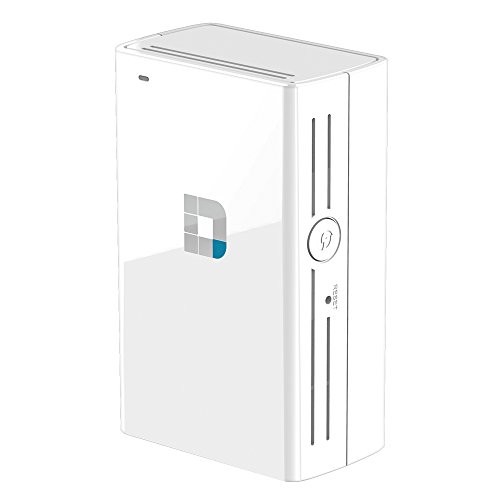
D-Link Wi-Fi AC750 Dual Band Extender DAP-1520
Original price was: $106.10.$22.98Current price is: $22.98.
D-Link Wi-Fi AC750 Dual Band Extender DAP-1520 Price comparison


- All prices mentioned above are in United States dollar.
- This product is available at Amazon.com.
- At amazon.com you can purchase D-Link Wi-Fi AC750 Dual Band Range Extender (DAP-1520) for only $17.99
- The lowest price of D-Link Wi-Fi AC750 Dual Band Range Extender (DAP-1520) was obtained on September 11, 2026 09:16.
D-Link Wi-Fi AC750 Dual Band Extender DAP-1520 Price History
D-Link Wi-Fi AC750 Dual Band Extender DAP-1520 Description
D-Link Wi-Fi AC750 Dual Band Extender DAP-1520 Enhance Your Internet Experience
Elevate your online experience with the D-Link Wi-Fi AC750 Dual Band Extender DAP-1520. This powerful device enhances your Wi-Fi coverage, ensuring seamless connectivity throughout your home or office. Whether you’re streaming, gaming, or browsing, this extender offers reliable performance to meet all your internet needs.
Key Features of the D-Link AC750 Dual Band Extender
- Dual Band Technology: This extender operates on both 2.4GHz and 5GHz bands. Enjoy faster speeds and less interference, perfect for high-bandwidth activities like streaming HD videos or online gaming.
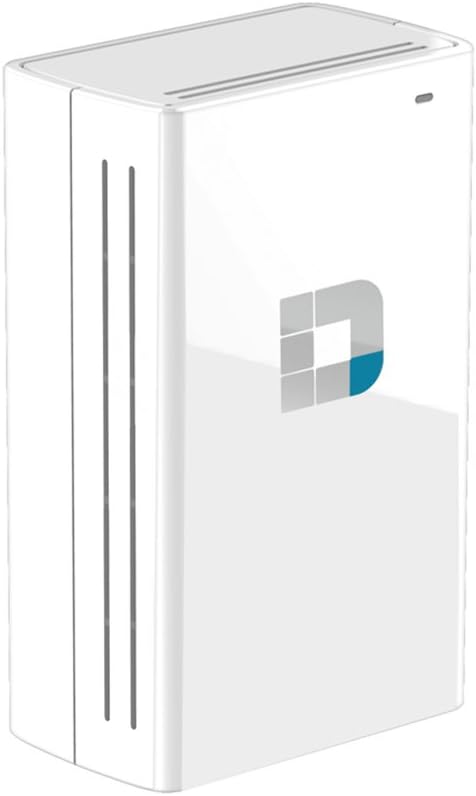
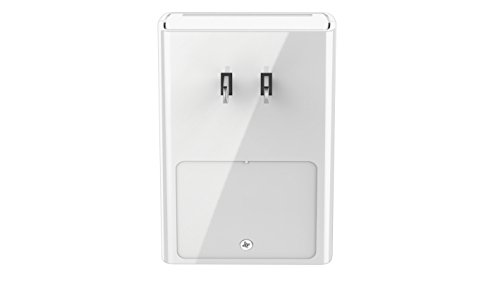
- Compact Design: The ergonomic design of the DAP-1520 makes it easy to plug into any outlet without obstructing adjacent sockets. Its size allows you to position it wherever you need an internet boost.
- Simplified Setup: With a straightforward setup process, users can connect the extender to their Wi-Fi network within minutes. The WPS button facilitates an easy and secure connection to your existing router.
- Ethernet Port: The built-in Ethernet port enables you to connect wired devices like Smart TVs, gaming consoles, or desktop computers, providing a stable and fast internet connection.
- 6-Month Price History: Understanding market trends is important. This extender’s price has consistently remained competitive, allowing you to get great value for your investment.
Price Comparison Across Different Suppliers
The D-Link Wi-Fi AC750 Dual Band Extender DAP-1520 is available at various retailers, including major online platforms. Prices range from $39.99 to $59.99, allowing buyers to choose the best deal that fits their budget. Check the 6-month price history chart for trends that reflect fluctuating prices and make an informed purchase.
6-Month Price Trends
The price history indicates that the D-Link AC750 remains affordable, with occasional discounts seen during seasonal sales. Several reviews highlight its value compared to similar products in the market. This trend supports the decision to invest in this extender, ensuring you stay connected without overspending.
Cumulative Customer Reviews Summary
User feedback for the D-Link AC750 Dual Band Extender is largely positive, celebrating its effectiveness in extending Wi-Fi coverage. Customers appreciate the reliable performance and ease of use. Here are some key takeaways:
- Positive Aspects:
- Boosts signal strength in hard-to-reach areas.
- Easy installation process with clear instructions.
- Compact design fits well into any location.
- Noted Drawbacks:
- Some users experienced difficulties in connecting to certain older router models.
- A few reviews mentioned that it occasionally dropped the connection in high-traffic environments.
Explore Unboxing & Review Videos
Interested in seeing the D-Link AC750 Dual Band Extender in action? Check out various YouTube unboxing and review videos that showcase the device’s features and performance. Users provide real-time insights, offering a closer look at its capabilities and practicality for home use.
Summarizing the Benefits of the D-Link AC750 Extender
The D-Link Wi-Fi AC750 Dual Band Extender DAP-1520 is an essential device for anyone seeking reliable internet coverage. Its dual-band technology provides optimal performance for streaming and gaming. With a simple setup and Ethernet port for wired connections, this extender is designed to elevate your online activities effortlessly.
By comparing prices, you can ensure you get this extender at the best possible rate. Don’t miss capturing the deals reflected in the price history chart.
Why Wait? Enhance Your Connectivity Today!
With robust features and a proven track record, the D-Link AC750 Dual Band Extender is the ideal solution for extending your Wi-Fi range. Compare prices now and take the next step towards a seamless internet experience!
D-Link Wi-Fi AC750 Dual Band Extender DAP-1520 Reviews (9)
9 reviews for D-Link Wi-Fi AC750 Dual Band Extender DAP-1520
Only logged in customers who have purchased this product may leave a review.






Edward L. Brown –
3 Stars is a bit misleading…actually, the unit DOES EXTEND my 5G network and I must say that I am satisfied with its performance; for me, setup was a snap because I already own a D-Link Router…IF YOU DON’T…the setup could be an all day head scratcher, and you’ll still end up calling support…of course, this wouldn’t apply to a network administrator (hint, hint).
The unit is very well build and true dual-band…however, you don’t find out until you get it working that you have ADDITIONAL wireless networks. I thought this unit would JUST EXTEND the signal inside my home…you know, find it and push it farther outward…
This is not the case…since I have a dual-band router, the AC750 created its own dual-band networks…yeah, now I have FOUR wireless networks.
And the manual NEVER MENTIONS ONCE that you actually HAVE TO CONNECT TO ONE OF THE EXTENDED (EXT extension) networks for the extended signal. And, yes, I’ll admit, this could have been a no-brainer…but a tidbit of info like that in the manual would have gone a long way.
Moreover, according to the manual, the unit (from wherever it’s plugged in) reduces the original signal 50% from its plugged in point. So, instead of finding your signal and PUSHING IT OUTWARDS…the AC750 steals 50% of your signal, and then it pushes what it stole outward.
My router is in my basement and I have a network media player in my bedroom on the third floor and I needed an extender. This IS doing the job and at the end of the day, that’s all I want…you might want to at least consider my comments…and I would recommend the AC750.
Rajeev N. –
Don’t buy this junk unless you are happy to reset it 5 or 6 times a day after it hangs
And the seller and Amazon won’t lift a finger to help
RJ –
Item arrived with no issues. I tried to use the WPS function with my router, but that didn’t work. I blame the cable company’s equipment-always spotty. I had read reviews saying that there’s a DLink app, but when I researched, it didn’t support this model. 3rd option was to use the browser and configure. No problems following the directions and it was a simple set up. I had another extender (TP-Link AC750 Dual Band Wi-Fi Range Extender (RE200)), but wanted to try the D-Link as a lower cost alternative. It works great for my needs: fill in some dead space at the end of the house. I’ve been using that room to work from home and my VPN connection is very good. Like the dual bands because we have older devices that only works at 2.4 vs 5.0. So far so good.
Placeholder –
I am happy with the performance.
I am writing this review after more than one month of use.
Pros:
Simple to configure
Does its job as per specs
Dual band helps connection speed
Sleek
Cons:
I am not able to keep my main router SSID hidden
Kevin Sutlich –
Works well – not to easy to setup
Paul –
This product seems high quality and does the job its intended to do which in my case was extend my network.
Pros
Looks good
Un-noticeable next to white walls
Strong and reliable connection
Easy to use local setup page
Provides 5G and 2G connections
Cons
The download speed is a lot slower than if i was directly connected despite it not being that far away from the router
It slows down when multiple devices are using it
It gets quite warm to touch
Overall if you are just looking to extend phones and laptops which do not require ultra-high speed internet then this is for you and the 2.4GHZ connection does extend very far so i like it for that and this is why i would recommend it.
SPEEDS:
when i am connected to 5GHZ on my PC with a very fast capable wifi adapter the speeds from the extender are at 50mbps maximum i have seen so far despite my router giving out 160mbps, the upload is good and maxes out at the normal router speed of 12mbps. although a little disappointed about the speed, this speed is well capable enough for any type of internet usage such as HD streaming.
darkgray –
This product works well for a few hours or may be a day or so (at home). After a day or so devices connected through it looses connectivity to internet. Devices stay connected but no data gets exchanged. Devices have to reconnect to start working again. Considering that this gets setup as an access point (not a router) it shouldn’t be acting that way. I have to figure out how to get rid of this thing now as it rendered itself useless. Requires frequent power cycle. I have gone through the menu and there isn’t a whole lot to configure.
I haven’t tried to use it from a hotel room but didn’t find a way to accept terms and conditions of public internet.
NOT FOR LONG TERM USE.
Jack –
The DAP-1520 / AC750 range extender seems to work well for me so far, for my simple situation. I would give it 5 stars except that setup was not smooth. D-Link has a MOBILE SETUP APP that worked well for me but they don’t advertise the app at all. The device comes with a simplistic quick install guide. At the end of that guide there’s a completely inconspicuous note telling you there’s a full manual online. Only the full manual tells you about the app.
There are three setup methods for the DAP-1520
– Using the WPA button
– Using the web interface (from a web browser on a computer)
– Using the D-Link setup app on an iPhone, etc.
The first two methods failed for me, while the third method (the app) was successful. I think the first method failed because my base station’s WPA button doesn’t do what it should.
To install the DAP-1520, the first thing I did was put the unit into an outlet near my WiFi base station (which is an ActionTec WCB3000N WiFi Extender). Pressing the WPA button on the base station (for several seconds) and then walking over to the DAP-1520 and pressing its WPA button would not create a connection. As I said, this appears to be an ActionTec problem.
Then I tried using the web browser (Firefox on Windows 7). None of the recommended URLs could connect to the DAP-1520. I tried http://dlinkapp.local. I tried the URL on the configuration card – http://dlinkappxxxx.local where xxxx is specific to the unit. I tried the IP address 192.168.0.50 as indicated in the quick install manual. My ActionTec’s IP address is 192.168.1.18.
Finally I found the iPhone app. It found the DAP-1520 via WiFi and walked me quickly through the setup. It worked quite well.
Also, the quick install guide also says the MAC ID of the unit is on a label on the side of the unit. It’s not. It’s printed on the carton.
Amazon Customer –
Great product and a great price. Ordered it in the evening and it was delivered the next day! Even with the free delivery!
Used the iPhone app to set it up, really easy to do. Now able to use both frequencies from my router anywhere in the house. Great product and a great price, would defiantly recommend.