Best Smart Home Devices for Beginners in 2026
The best smart home setup for a beginner does not start with dozens of gadgets. Start with one controller or ecosystem, add one simple device such as a smart plug or light, learn how routines work, and expand only when a new device solves a real problem.
For most beginners, the Amazon Echo Dot Max is the easiest foundation for an Alexa-based home, while the TP-Link Tapo P125M is one of the simplest and least expensive ways to try automation. The Philips Hue Essential Starter Kit is a better starting point if lighting is your priority, and devices such as the Tapo C120 camera, Blink Battery Doorbell 2K+, Nest Learning Thermostat and Aqara U200 smart lock make sense once the basics are working.
The key is compatibility. Matter has made it easier for products from different brands to work across major platforms, but Matter, Thread, Wi-Fi and individual ecosystems are not interchangeable terms. This guide explains what each device needs, which products require an extra hub or controller, and the best order to build a smart home without buying yourself into a corner.
Quick Answer: Best Smart Home Devices for Beginners
Best First Smart Home Device: Amazon Echo Dot Max — a practical starting point for Alexa voice control and future smart-home expansion.
Best First Automation: TP-Link Tapo P125M — an inexpensive Matter smart plug that lets you learn schedules, remote control and routines without installing anything permanent.
Best Smart Lighting Starter Kit: Philips Hue Essential Starter Kit — four color bulbs and a Hue Bridge in one package with room to expand later.
Best Budget Security Camera: TP-Link Tapo C120 — 2K video, indoor/outdoor protection and local microSD storage without requiring a cloud subscription for basic recording.
Best Smart Security Upgrade: Aqara Smart Lock U200 — a retrofit lock with fingerprint, keypad and Matter-over-Thread support for compatible homes.
How We Chose These Smart Home Devices
We focused on products that make sense for someone building a smart home for the first time. That means setup difficulty, platform compatibility and ongoing costs matter just as much as individual features. A technically impressive device can still be a poor beginner recommendation if it requires several extra hubs, an expensive subscription or complicated installation.
We also considered current U.S. availability, Matter and Thread support where relevant, whether a device can continue to be useful as the home expands, and whether its main functions work without forcing the buyer into unnecessary recurring fees.
Discompare did not conduct hands-on laboratory testing for this guide. Recommendations combine current manufacturer specifications, platform documentation and recent independent smart-home coverage.
Choose Your Smart Home Ecosystem Before Buying Devices
The first decision is not which bulb or camera to buy. It is which platform will organize your devices. Amazon Alexa, Google Home, Apple Home and Samsung SmartThings can all manage a modern smart home, but they emphasize different strengths.
| Ecosystem | Best For | Typical Controller | Main Strength | Watch-Out |
|---|---|---|---|---|
| Amazon Alexa | Broad device choice and voice control | Echo devices | Large accessory ecosystem | Some newer Alexa+ capabilities may involve additional services |
| Google Home | Google and Android households | Google Home and Nest devices | Straightforward Home app integration | Advanced Matter features can differ by device category |
| Apple Home | iPhone-first households | HomePod or Apple TV | Tight integration with Apple devices | Accessory selection can be narrower than Alexa in some categories |
| SmartThings | Cross-brand automation | SmartThings-compatible hub/controller | Flexible automations and device support | More learning than a basic voice-assistant setup |
You do not need to stay with one manufacturer. Matter is specifically intended to improve interoperability, but choosing one primary control platform still makes setup and troubleshooting much easier.
Matter vs Thread: What Beginners Actually Need to Know
Matter is a smart-home interoperability standard. It gives supported devices a common way to work with compatible ecosystems such as Alexa, Google Home, Apple Home and SmartThings.
Thread is a networking technology. Some Matter devices communicate over Wi-Fi, while others use Thread. A Matter-over-Thread accessory such as the Aqara Door and Window Sensor P2 needs access to a compatible Thread Border Router as well as a Matter controller.
Simple rule: A Matter logo does not automatically mean “no hub required.” Check whether the product uses Wi-Fi or Thread and whether your existing controller provides the infrastructure it needs.
Matter also does not guarantee that every advanced manufacturer-specific function appears identically inside every ecosystem. Basic control may work across several platforms while specialized features remain available only in the manufacturer’s own app.
Best Smart Home Devices Compared
| Device | Best For | Main Connection | Matter | Extra Hub / Controller Requirement | Installation | Regular Price Reference |
|---|---|---|---|---|---|---|
| Amazon Echo Dot Max | First smart-home controller | Wi-Fi / smart-home radios | Yes | No extra hub for basic use | Very easy | $99.99 reference |
| Tapo P125M | First automation | Wi-Fi | Yes | Matter controller for Matter ecosystem use | Very easy | $19.99 MSRP |
| Philips Hue Essential Starter Kit | Smart lighting | Zigbee / Bluetooth | Via Hue Bridge | Hue Bridge included | Easy | $119.99 |
| Aqara Door and Window Sensor P2 | Automations and sensors | Thread | Yes | Matter controller + Thread Border Router | Easy once infrastructure exists | About $30 class |
| Tapo C120 | Budget security camera | Wi-Fi | No | No for Tapo app use | Easy | $39.99 |
| Blink Battery Doorbell 2K+ | Battery video doorbell | Wi-Fi | No | Blink Sync Module required | Easy to moderate | $79.99 starting reference |
| Nest Learning Thermostat (4th Gen) | Heating and cooling automation | Wi-Fi | Yes | No extra hub for Google Home use | Moderate | $279.99 |
| Aqara Smart Lock U200 | Smart entry | Thread | Yes | Matter controller + Thread Border Router for Matter integration | Moderate | $169.99 reference |
Compare Current Smart Home Device Prices
Smart-home pricing changes frequently, particularly during seasonal promotions. Use current retailer offers as the shopping reference rather than choosing a device because of a temporary sale price.


1. Amazon Echo Dot Max — Best First Smart Home Device
Best for: beginners who want to build around Alexa and want one device that can handle voice control while becoming part of a larger smart-home system.
The Echo Dot Max is our first recommendation because a beginner usually benefits more from a useful controller than from buying several unrelated accessories. It works as a smart speaker for everyday voice commands and provides the foundation for compatible lights, plugs, sensors and other devices that can be organized through Alexa.
The current Echo generation supports modern smart-home technologies including Matter, while Amazon’s broader hub support makes it easier to expand beyond simple Wi-Fi accessories later. That means the Dot Max can remain useful after the first smart plug or bulb rather than becoming a disposable starter product.
The most important choice is ecosystem fit. If everyone in your home already uses Google Home or Apple Home as the primary interface, buying an Echo only because it is popular adds another app and voice assistant without solving a real problem.
Pros
✅ Useful starting point for an Alexa smart home
✅ Combines speaker and smart-home control in one device
✅ Matter support improves future accessory flexibility
✅ Easier to grow from than a single isolated smart gadget
Cons
❌ Best suited to households willing to use Alexa as a primary platform
❌ No built-in display
❌ Some newer assistant features can involve additional services beyond basic device control
Who should skip it: Apple Home or Google Home households that already have a controller they prefer.
Alternative: A current Google Home controller for Google-first households or HomePod for Apple Home.

Oh-so stylish and sounds sensational — upgrade your space with the Echo Dot Max. Enjoy stunning sound and full Alexa smart-home control in one sleek hub. Order yours today and take your sound and smart home to the max.
2. TP-Link Tapo P125M — Best First Smart Home Automation
Best for: anyone who wants to understand smart-home routines without committing to expensive hardware or permanent installation.
A smart plug is one of the best first smart home devices because the result is immediately understandable. Plug in a compatible lamp or other suitable appliance, connect the P125M, and you can control power remotely, set schedules and include the outlet in routines.
The Tapo P125M has a $19.99 MSRP and supports Matter, allowing it to work with major Matter-compatible platforms including Apple Home, Alexa, Google and SmartThings. TP-Link also provides scheduling, Auto-Off and other controls through its own app.
Matter is especially useful here because a beginner can experiment without making an early accessory purchase unnecessarily dependent on one voice-assistant brand. Once configured, Matter devices can communicate locally on the home network for supported functions.
Pros
✅ Very low-cost way to learn smart-home automation
✅ Matter support across major ecosystems
✅ No electrical rewiring
✅ Scheduling and Auto-Off are useful beyond voice control
Cons
❌ Does not provide energy monitoring
❌ Uses 2.4GHz Wi-Fi
❌ A smart plug should only be used with appliances appropriate for remote power switching
Who should skip it: buyers whose main goal is electricity-consumption tracking.
Alternative: A Tapo or Kasa model with energy monitoring if usage data is more important than keeping the first purchase as inexpensive as possible.
Take full control of lights and appliances with a compact, 15A smart plug that works with Amazon Alexa, Google Assistant and Matter. Easy to install and simple to use — enjoy reliable voice control and remote access in seconds. Order your Tapo P125M now and start enjoying seamless, smarter control today.
3. Philips Hue Essential Starter Kit — Best Smart Lighting Starter Kit
Best for: beginners who want smart lighting that can start in one room and grow into a larger whole-home system.
The Hue Essential Starter Kit is more expensive than buying a few generic Wi-Fi bulbs, but it provides a better foundation. The kit includes four E26 color and tunable-white bulbs plus a Hue Bridge, so the buyer receives both the lights and the infrastructure needed to build a more capable lighting system.
Each Essential bulb provides up to 800 lumens, supports warm-to-cool white from 2200K to 6500K and can dim to 2%. The Bridge supports voice assistants and broader integrations including Alexa, Google Home, Apple Home, SmartThings and Matter.
The key advantage is expansion. You can later add switches, sensors and additional lights without turning every bulb into another isolated Wi-Fi endpoint. For someone who already knows they want more than a single novelty bulb, that is worth the higher starting cost.
Smart lighting can also fit naturally into a workspace. If your first automation is for a desk or study area, pair lighting routines with a practical physical setup from our best home office desks for productivity guide.
Pros
✅ Four bulbs and a Hue Bridge in one package
✅ Full color plus tunable white lighting
✅ Strong path for future expansion
✅ Works across major smart-home ecosystems through the Bridge
Cons
❌ More expensive than basic Wi-Fi bulbs
❌ Adds a dedicated bridge to the network
❌ Essential bulbs do not dim as deeply as some premium Hue products
Who should skip it: someone who wants only one inexpensive smart bulb with no intention of expanding.
Alternative: A single Matter-compatible bulb for testing basic smart lighting before committing to an ecosystem.

Bring smart, color-changing lighting to every room — the Philips Hue Essential Kit includes a Hue Bridge and four E26 bulbs for simple setup through the Hue app. Customize scenes, adjust color and brightness, and control your lights from anywhere for instant ambiance. Ready to upgrade your home? Get the Philips Hue Essential Kit 4 E26 Bulbs today and start lighting smarter.
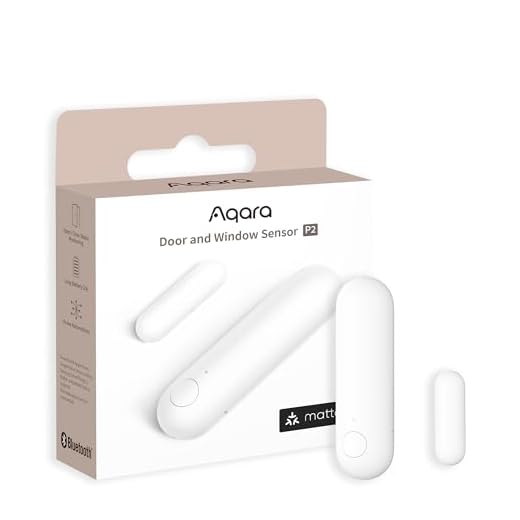
4. Aqara Door and Window Sensor P2 — Best First Smart Sensor
Best for: beginners who already have a compatible Matter controller and Thread Border Router and want to move from remote control to automatic routines.
A smart home becomes more useful when actions happen because something changed, not because you asked a voice assistant to do something. Aqara’s Door and Window Sensor P2 can detect whether a door, window, cabinet or similar opening is open or closed and use that state as an automation trigger.
The P2 uses Matter over Thread and can integrate with major Matter ecosystems. For example, a door opening can trigger a compatible light, or a window opening can become part of a climate or security routine.
Its biggest beginner caveat is also the reason we rank it after the simpler devices. It requires a Matter-compatible Thread Border Router. If your home does not already have the necessary infrastructure, the sensor is not the standalone $30-class accessory it first appears to be.
Pros
✅ Introduces true sensor-based automation
✅ Matter-over-Thread support
✅ Simple adhesive installation
✅ Can be used on doors, windows and cabinets
Cons
❌ Requires suitable Matter and Thread infrastructure
❌ Not the best first product before an ecosystem has been selected
❌ Advanced behavior can still depend on the platform controlling it
Who should skip it: buyers who do not yet know whether their existing controller provides a Thread Border Router.
Alternative: A Wi-Fi or ecosystem-specific contact sensor when an existing hub already supports it.

Keep your home safe and informed with the Aqara Smart Door Window Sensor P2.
Featuring a high‑precision Hall sensor, it accurately detects the open/closed status of doors, windows, and drawers—compact enough for tight spots (main and accessory unit no more than 22 mm apart).
Ready to upgrade your home security? Buy the Aqara Sensor P2 now and start monitoring in minutes.
5. TP-Link Tapo C120 — Best Budget Smart Security Camera
Best for: beginners who want a low-cost camera with useful local recording and no requirement to pay for cloud storage just to save basic footage.
The Tapo C120 stands out because it offers several features normally associated with more expensive cameras. It records at 2K QHD resolution, carries IP66 weather resistance for indoor or outdoor placement, includes person, pet and vehicle detection, and supports both color night vision and invisible infrared modes.
A microSD card can provide local storage up to 512GB, while Tapo Care remains optional for cloud-based features. That makes the camera easier to recommend to a beginner who does not want every smart-home device to create another subscription.
The main limitation is power. The C120 is a plug-in camera, not a battery model. Outdoor installation therefore depends on having a practical power route even though the camera itself is weather-resistant.
Pros
✅ 2K QHD video
✅ IP66 indoor/outdoor protection
✅ Person, vehicle and pet detection
✅ Local microSD storage reduces dependence on a subscription
Cons
❌ Requires plug-in power
❌ Not a Matter camera
❌ Outdoor placement still depends on a suitable power source
Who should skip it: anyone whose installation location has no practical access to power and therefore requires a fully battery-operated camera.
Alternative: A battery camera from your existing security ecosystem.
TP-Link Tapo Indoor Outdoor Wi‑Fi Camera brings 2K color night vision, dual spotlights, and IP66 weatherproofing for reliable 24/7 monitoring—indoors or out. Smart AI detects people, pets, and vehicles while two‑way audio, easy magnetic mounting, and Alexa/Google compatibility make setup and control effortless. Keep footage locally or in the cloud and customize light/sound alarms to deter intruders. Order yours today and start protecting what matters most.
6. Blink Battery Doorbell 2K+ — Best Easy-Install Video Doorbell
Best for: beginners who want a battery-powered front-door camera and already use, or are comfortable adopting, Blink and Alexa.
The Blink Battery Doorbell 2K+ is easier to install than a doorbell that requires existing wiring as its primary power source. It can operate wire-free using three lithium AA batteries, while also supporting compatible existing doorbell wiring.
Its current 2K-generation hardware provides a square head-to-toe view and a 140-degree horizontal field of view. Blink also offers both subscription-based cloud storage and local storage options through compatible Sync Modules.
The important purchasing detail is that the Battery Doorbell 2K+ requires a Blink Sync Module to function. A beginner comparing sticker prices must therefore consider the complete system rather than assuming the doorbell is a standalone Wi-Fi device.
Pros
✅ Battery-powered installation option
✅ 2K square head-to-toe image
✅ Local storage is possible with compatible Sync Module hardware
✅ Strong fit for an Alexa-oriented home
Cons
❌ Sync Module is required
❌ Some cloud and smart-detection functions depend on a Blink plan
❌ Ecosystem fit is strongest for Alexa rather than every smart-home platform
Who should skip it: buyers who want a completely standalone doorbell or whose smart home is centered on another ecosystem with a better native doorbell option.
Alternative: A wired smart doorbell if the home already has compatible wiring and avoiding a required Sync Module matters more than battery installation.

Protect your home with the Blink Battery Doorbell 2K+ White Add-On — get stunning 2K video and months-long battery life for reliable, low‑maintenance security.
Its fully wireless setup is perfect for renters and homeowners alike, delivering the protection and convenience you can count on.
Add the Blink Battery Doorbell 2K+ White Add-On to your cart today and enjoy clearer, smarter home security — shop now.
7. Google Nest Learning Thermostat (4th Gen) — Best Smart Thermostat for Beginners
Best for: homeowners ready to move beyond simple plugs and lights and automate a compatible U.S. HVAC system.
The Nest Learning Thermostat is a more substantial smart-home upgrade because it controls equipment that affects comfort and energy use throughout the home. Google’s fourth-generation model works with most 24V HVAC systems and supports Matter in addition to Google Home control.
It includes a Nest Temperature Sensor, allowing the system to consider temperature in another part of the home rather than relying only on the thermostat’s wall location. Google also provides Smart Schedule and other adaptive climate features designed to automate routine temperature changes.
Unlike installing a smart plug, thermostat compatibility must be checked before purchase. Google provides a compatibility process, and although many systems do not require a dedicated C-wire, particular HVAC configurations can have additional power or wiring requirements.
Before buying: Confirm HVAC compatibility and follow the manufacturer’s wiring guidance. A smart thermostat is not a good place to guess based only on the shape of your existing thermostat.
Pros
✅ Matter-compatible current Nest thermostat
✅ Nest Temperature Sensor included
✅ Works with most 24V U.S. HVAC systems
✅ Two-year standard retail warranty
Cons
❌ Considerably more expensive than beginner plugs, bulbs or sensors
❌ HVAC compatibility must be confirmed
❌ Installation involves thermostat wiring rather than simple plug-and-play setup
Who should skip it: renters without permission to change thermostat hardware or homes whose HVAC system is not compatible.
Alternative: A compatible ecobee model if its HVAC support or ecosystem integration better matches your system.
Upgrade your home's comfort and efficiency with the Google Nest Thermostat 4th Gen with Sensor (Google GA05551‑US) in Polished Silver.
Control temperature from anywhere, use the room-aware Sensor for smarter comfort, and cut energy waste without lifting a finger.
Order yours today — Shop now and take control of your climate with the polished, powerful Nest Thermostat.
8. Aqara Smart Lock U200 — Best Beginner Retrofit Smart Lock
Best for: households that want smart entry features while keeping compatible existing exterior lock hardware.
The Aqara U200 is appealing because it is a retrofit smart lock. Instead of necessarily replacing the entire visible exterior lock assembly, it installs around compatible existing hardware on the interior side and adds a keypad outside.
It supports several entry methods including fingerprint, passcode and Apple Home Key, and its Matter-over-Thread support allows integration with compatible ecosystems when the home has the required Matter controller and Thread Border Router.
This is not the device to buy first if you are still figuring out what Matter and Thread mean. It makes much more sense after the home’s controller and network infrastructure are already working, because smart-lock access is important enough that reliability and fallback methods matter more than novelty.
Pros
✅ Retrofit approach can preserve existing exterior hardware
✅ Fingerprint and keypad access
✅ Supports Apple Home Key
✅ Matter over Thread broadens ecosystem options
Cons
❌ Existing lock and door compatibility must be checked
❌ Matter integration requires suitable Thread infrastructure
❌ More setup complexity than a plug, bulb or sensor
Who should skip it: anyone whose existing deadbolt is incompatible or who has not yet established a reliable smart-home controller.
Alternative: A full-replacement smart lock designed specifically for your preferred platform and door hardware.
Upgrade to secure, convenient access: fingerprint keypad, Matter smart-home integration, and NFC unlocking with your iPhone or Apple Watch even when the lock is powered off — NFC cards supported too.
To confirm the U200 fits your door, compare your door’s measurements (door thickness, backset and bore hole size) and deadbolt type to the U200 compatibility specs on the product page. Not sure what to measure? Send us photos and your measurements or use the compatibility checker on the product page and our team will help confirm the right fit.
Ready to install? Check compatibility now or contact support to get personalized help.
The Best Order to Build Your First Smart Home
Step 1: Pick One Primary Ecosystem
Choose Alexa, Google Home, Apple Home or SmartThings as the primary interface before buying several devices. Matter reduces lock-in, but one main platform keeps household control simpler.
Step 2: Start With a Smart Plug or Smart Light
A plug or bulb gives you an immediate result with very little installation risk. Use it to learn schedules, rooms, device names and voice commands before adding more expensive hardware.
Step 3: Build Your First Automation
A smart home becomes useful when several actions can happen together. A simple “Good Night” routine might turn off a living-room plug, switch off lights and adjust compatible climate controls.
Step 4: Add Sensors
Once routines make sense, sensors remove the need to issue commands manually. A contact sensor can trigger a light when a door opens or generate a notification when a window is left open.
Step 5: Add Security Devices
Cameras and doorbells introduce storage, privacy and notification decisions. Decide whether you want local storage, cloud recording or both before building an entire camera system.
Step 6: Add Thermostats and Locks Last
Thermostats and smart locks can be more valuable than novelty gadgets, but they also interact with critical home systems. Add them after you understand the ecosystem and have verified hardware compatibility.
Do You Actually Need a Smart Home Hub?
Not necessarily. Many Wi-Fi smart plugs, cameras and bulbs can work through their own apps without a traditional hub. Matter can also let supported Wi-Fi devices join several major ecosystems through a compatible Matter controller.
However, hubs and border routers still matter. Philips Hue uses its Bridge to create a more scalable lighting system. Matter-over-Thread devices need a Thread Border Router. Blink’s Battery Doorbell 2K+ requires a Sync Module. The word “smart” therefore does not mean every product connects directly to Wi-Fi with no supporting hardware.
The better question is: what infrastructure does this specific device require? Check that before buying.
Beginner Smart Home Mistakes to Avoid
Buying Too Many Devices at Once
Start small. Ten newly installed gadgets create ten opportunities for naming conflicts, Wi-Fi problems, notifications and confusing automations. Learn the system with one room first.
Confusing Matter With Thread
Matter handles interoperability. Thread is one network technology that Matter can use. A Thread accessory can require hardware that a Wi-Fi Matter device does not.
Assuming Matter Means Every Feature Works Everywhere
Matter improves basic cross-platform control, but manufacturers and ecosystems can still expose advanced features differently. Always check the specific feature you care about.
Ignoring Subscription Costs
Cameras and doorbells are the biggest source of recurring smart-home costs. Decide whether cloud history, advanced detection or extended storage is worth paying for before buying several cameras from one ecosystem.
Automating Appliances That Should Not Be Remotely Switched
A smart plug is not appropriate for every appliance. Follow the appliance manufacturer’s safety instructions and never use automation to bypass controls that require direct supervision.
Ignoring Account Security
Use unique passwords, enable multi-factor authentication where available and keep device firmware updated. This becomes increasingly important as cameras, locks and entry systems join the network.
What Should You Add After the Basics?
Once lighting, simple routines and security are working reliably, consider devices that automate repetitive household jobs rather than adding gadgets simply because they connect to an app.
A robot vacuum is a good example because its value comes from performing a recurring physical task, not merely allowing remote control. Our best robot vacuum cleaners for busy families guide compares options for hands-off floor cleaning.
Other useful next steps can include leak sensors, motorized shades, smart garage controls and energy monitoring. Add each category only when the automation has a clear purpose.
Frequently Asked Questions
What smart home device should a beginner buy first?
A smart speaker/controller or inexpensive smart plug is usually the best first purchase. The Echo Dot Max provides a foundation for an Alexa-based system, while the Tapo P125M lets you experiment with automation for very little money.
Do I need a hub for a smart home?
Not for every device. Many Wi-Fi devices work through their own apps, but some products require additional infrastructure. Hue uses a Bridge for its full system, Blink Battery Doorbell 2K+ requires a Sync Module, and Matter-over-Thread devices need a Thread Border Router.
What is Matter?
Matter is an interoperability standard designed to help supported smart-home products work across compatible ecosystems. It can reduce brand lock-in, but it does not guarantee that every manufacturer-specific feature appears identically in every platform.
What is the difference between Matter and Thread?
Matter defines how compatible smart-home devices communicate at the application level, while Thread is a low-power mesh networking technology that some Matter devices use. Matter-over-Thread accessories require access to a Thread Border Router.
Is Alexa, Google Home or Apple Home best for beginners?
The best ecosystem is usually the one that matches the devices your household already uses. Alexa offers very broad accessory compatibility, Google Home fits naturally into Google households, and Apple Home is attractive to people already centered on iPhone, HomePod and Apple TV.
Can smart home devices from different brands work together?
Yes, often. Matter, major smart-home platforms and manufacturer integrations allow many cross-brand combinations. Always verify the exact product and feature rather than assuming two devices will work together simply because both are described as smart.
Do smart home devices work if the internet goes down?
Some local controls and Matter functions can continue on the local network, while cloud-dependent features, remote access and certain voice-assistant functions may stop until the internet connection returns. Behavior depends on the specific device and platform.
How much should a beginner spend on a smart home?
You can learn the basics for less than $100 with a controller and smart plug, or spend roughly $100–$250 to add useful lighting and sensors. Thermostats, locks, cameras and doorbells should come later when you know which ecosystem and features you actually want.
Final Verdict: The Best Smart Home Setup for Beginners
The best beginner smart home is not the one with the most connected products. It is the one that is simple enough that everyone in the household will actually use it.
Start with the Amazon Echo Dot Max if Alexa is your preferred platform, then add the Tapo P125M to learn routines without spending much. If lighting is the main goal, the Philips Hue Essential Starter Kit gives you a stronger long-term lighting foundation than a collection of unrelated bulbs.
After that, add devices based on problems rather than novelty. The Aqara P2 can make automations react to doors and windows, the Tapo C120 adds affordable video monitoring, and the Blink Battery Doorbell 2K+ gives Alexa-focused homes a relatively simple battery doorbell path.
The Nest Learning Thermostat and Aqara U200 should come later. Both can be valuable upgrades, but thermostat wiring, lock compatibility and Matter-over-Thread requirements make them better second-stage smart-home purchases.
Best First Device: Amazon Echo Dot Max
Best First Automation: TP-Link Tapo P125M
Best Lighting Starter: Philips Hue Essential Starter Kit
Best Budget Camera: TP-Link Tapo C120
Best Advanced Beginner Upgrade: Aqara Smart Lock U200
Sources
- Tom’s Guide — Smart Home Essentials for Beginners
- Connectivity Standards Alliance — Matter 1.6 Enables More Intuitive Setup, Multi-Ecosystem Experiences, and Context-Driven Control
- Amazon — Current Echo devices and Echo Dot Max product information
- Tom’s Guide — Best Smart Home Devices
- Philips Hue — Essential Starter Kit: 4 E26 Smart Bulbs
Product Groups: Amazon Echo Dot Max, TP-Link Tapo P125M Mini Smart Wi-Fi Plug, Philips Hue Essential Starter Kit 4 E26 Smart Bulbs, Aqara Door and Window Sensor P2, TP-Link Tapo C120 Indoor/Outdoor Home Security Wi-Fi Camera, Blink Battery Doorbell 2K+, Google Nest Learning Thermostat (4th Gen), Aqara Smart Lock U200