
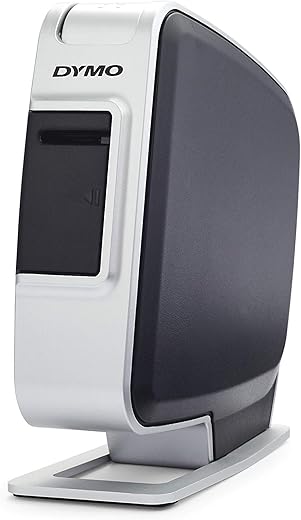
DYMO LabelManager Plug N Play Label Maker
$59.79
DYMO LabelManager Plug N Play Label Maker Price comparison
DYMO LabelManager Plug N Play Label Maker Price History
DYMO LabelManager Plug N Play Label Maker Description
DYMO LabelManager Plug N Play Label Maker – The Ultimate Labeling Solution
The DYMO LabelManager Plug N Play Label Maker offers an effortless way to create professional-quality labels for any project. Whether for home organization or office labeling, this label maker is designed to simplify your labeling tasks with advanced features and user-friendly operation. Check out the current DYMO LabelManager price, and see how it compares across various suppliers!
Main Features and Benefits of the DYMO LabelManager
- Plug N Play Convenience: Simply connect to your computer via USB, and begin printing with no software installation required.
- High-Quality Printing: The label maker produces crisp, clear text on a variety of label types, ensuring a professional look.
- Compact Design: Lightweight and portable, this label maker can be taken anywhere, making it ideal for both office and personal use.
- Customizable Labels: Offers a variety of font styles, sizes, and symbols, allowing you to create unique labels tailored to your needs.
- Wide Label Compatibility: Compatible with various DYMO label types, ensuring flexibility for different labeling tasks.
- Efficient Power Usage: With a low power consumption feature, the DYMO LabelManager extends battery life, making it cost-effective.
Price Comparison Across Suppliers
When searching for the DYMO LabelManager Plug N Play Label Maker, you will find prices vary across different suppliers. Our comparison shows that retailers have varying price points, often influenced by specials or shipping costs. Make sure to check out the latest prices and deals for the best value.
6-Month Price History Trends
Evaluating the 6-month price history chart, shoppers can see fluctuating trends with the price dipping significantly during holiday sales and back-to-school promotions. Knowing these trends can help you determine the best time to purchase your DYMO LabelManager at the most affordable rate.
Customer Reviews: What Users Are Saying
The reviews for the DYMO LabelManager Plug N Play are predominantly positive. Customers appreciate the sleek design and functionality, especially the ease of use right out of the box. Key highlights include:
- Ease of Use: Users find the plug-and-play feature extremely convenient, taking just moments to set up and use.
- Label Quality: Many reviews mention satisfaction with the print quality, with labels that look professional and clear.
- Versatility: Customers enjoy the range of label styles and sizes available, enhancing their organizational efforts.
However, some users noted a few drawbacks as well:
- Battery Life: A few customers have mentioned limited battery life, particularly with heavy usage.
- Software Limitations: Some users expressed wishes for more advanced software options, though most find the built-in features adequate.
Review and Unboxing Videos
For those looking to see the DYMO LabelManager in action, many unboxing and review videos are available online. These resources provide insights into the setup process and showcase the label maker’s capabilities, helping you make an informed purchasing decision. Don’t miss out on viewing these videos to see how easily you can create labels!
In conclusion, the DYMO LabelManager Plug N Play Label Maker is a reliable choice for anyone seeking an efficient labeling solution. Compare prices now to find the best deals and take advantage of the fantastic features offered by this versatile label maker!
DYMO LabelManager Plug N Play Label Maker Reviews (8)
8 reviews for DYMO LabelManager Plug N Play Label Maker
Only logged in customers who have purchased this product may leave a review.
AMRIT PAL SINGH BRAR –
I bought this for simple around-the-home labelling duties. Well made. Bigger than I thought it would be. Glad they supplied cable as the USB connector into the unit is an old-style that I did not have lying around.
Would recommend downloading the additional full Desktop software from Dymo site. It’s not very intuitive but once you work it out it’s fine and offers a lot of extra options.
I had setup issues when first using related to what appears to be a know-issue with the tape-cartridges. You load the tape unit, and when printing it makes lots of noise as if it’s working, but the tape does not move or print. Some searching online indicated this was a common issue and relates to the tape cartridge and not the printer. I was able to solve it eventually by following the online help from others. Seems to be a hit-miss thing depending on the individual cartridge. So am expecting to encounter this again.
That issue aside, I’m very happy with this printer. Great labels and the convenience of using my computer to create them rather than dealing with the (necessarily) clunky interfaces on the stand-alone units. If you don’t need a portable stand-alone unit then this is the one for you. No batteries required either. Powered by rechargeable internal battery and charged by the same USB connection to PC.
UPDATE: Beware that the INTERNAL BATTERY degrades if not kept charged up. Something I did not know. I just took this out of the cupboard after about 8-9 months of not using it and it will not print. Looking online this appears to happen when the internal battery self-discharges and then degrades below the point where it will charge again. Rendering the printer useless without a replacement battery which are very hard to find and cost over half the price of a new unit. If I had known then I would have set a reminder to charge the battery by connecting to my PC every 1-2 months. Now I have the annoying prospect of buying another new unit of this exact same printer, just so I can use up the various tapes I already have. Or start again with another brand/style of label maker that does not have this issue.
Felipe –
El articulo cumplio con las caracteristicas que buscaba, en mi caso manejo un equipo windows 10 basicamente solo lo conectss por medio del cable usb y la compu lo detecta y abre programa para manejarlo el cual esta muy simple tienes de 2 o escribes palabras o bien copias y pegas imagenes en mi caso copio imagenes de codigos para poderlos imprimir es muy sencillo puesto que el programa maneja capturas fe pantalla por otro lado imprime a buena velocidad y de manera simple me parece si quieres para etiquetas sencillas y codigos de barra no le pienses mas el producto te sirve para eso y esta a un precio muy bueno espero les sirva mi reseña a alguien
C. Weaver –
Since I have another DYMO Hand Held Label Maker, I sort of expected this one to be very much like it. I was very much wrong. This PNP Label Maker is very much just what it says it is. A very good label maker that connects up to a PC at a very good price. I was a bit concerned about how easy it would be to hook up. (I can sometimes get confused about what goes where when getting things hooked up right.) But I shouldn’t have worried. The instructions are very clear and it’s hard to mess up. After placing the batteries into the label maker. (They only go in one way.) and snapping in the supplied label tape cart. and plugged it into a available USB slot and it was “seen” right away as a addition drive on your computer. After the computer “sees” the drive you either right click and selected open or double click on the DYMO software icon and it opens the app where you create and then print your labels from. I was impressed how easy it was to print out the first label. And it printed out almost right away after I clicked the print button. I also was impressed by the quality of the label itself. I was expecting the same or somewhat like the same type of label that my handheld label printed out. Instead this label’s surface is shiny and it feels a bit tougher than the older hand held labels I’m used to. The blank label refills are a bit more pricey, but not by much and given the way they look when applied, I could deal with that. One small thing that may cause some people a problem, but wasn’t one for me. If you turn off or unplug the label maker, it acts just as if you had unplugged a USB external drive. That is, it isn’t available unless it’s plugged in and powered on. So if you use the power button on the label maker, it acts as if you’ve disconnected the label maker totally even though it’s still plugged in. Since I usually leave my systems on, this isn’t a real problem for me. Overall, I’m very happy with my purchase and can say, so far, it’s a really good way of getting a label maker attached to your computer. Good job!!
8/25/15 Update: The only problem I’ve had with this label maker is with the battery and that was more than likely my fault. But I feel a buyer should know this. If you have problems check out the battery as mine seems to have gone dead. It wouldn’t recharge and as a result the label maker’s software doesn’t remain connected to the PC but will drop in and out and finally out altogether. Batteries are available at DYMO for this item but I couldn’t find one on Amazon that would fit it. Still a really good label maker but this one thing is a problem as you should be able to get a replacement battery easily and not have to buy from just one place. This doesn’t change my rating but is there for consideration.
Poc Network // Tech –
It works great. You get a lot of labels out of each cartridge and you save a lot of effort by being able to simply type and print to it like any other printer. Beats thumbing around on a handheld device. Be cautioned though, that you may be struck with the label bug and find all sorts of things labeled that you wouldn’t normally expect to see. We have been noticing it a lot around the office ever since we picked up a number of these.
Update: Over time, we had to drop this score from 5 stars to just 1. We hardly run into something we want to leave a 1 (or preferably less) star review for, but this one fills the need without a doubt. The printer is absolutely amazing until it completely fails on you. Which it will within 1-3 years it seems. This is pointed out in other reviews and all of those reviews are correct. There is an internal battery that will simply die over time and Dymo designed it to fail when the battery dies by not allowing it to function without the battery properly being able to take a charge inside. Even if you keep it plugged into USB at all times, it will not function if the battery is dead. The battery is half the cost of the printer or more, thus not a justifiable cost. There are 3rd party knockoff batteries, but they will still run you $20-$30. In the end, these printers turned out to be a flop.
We now have had five units in the last 5 years that have found their way into the trash. The first one that failed, we tried replacing but that one had problems from the start and had to be returned. So now, we no longer have any of this model here in the office. We still have the 450 Turbos which work good, but could never recommend this one again and heavily advise against buying one.
Poc Network // Tech –
I researched a lot before picking a label maker and I’m very happy I chose this one! Great value for what it can do.
My few issues with it:
The software that shows up to install when you plug the machine in is outdated and could not be installed on my Mac. I had to search for a newer driver on the website, and somewhere I found one that had the picture of my model. I installed it and it would keep telling me the printer was “not connected”. Turns out it was the wrong driver, I found the right one kind of buried somewhere. With the right one it worked perfectly.
Something else is that the Dymo software itself is not great. When you type your text, it adds an unnecessary margin around it, making the text smaller than it has to be. When you add a second element like a clipart, the extra margin from the text and the clipart creates a large gap between the two, which doesn’t look great. The solution for me was making all my labels on Photoshop with 0 margins around the text and images. That way there’s no wasted space on the top and bottom (for some reason, the app doesn’t add them if you’re inserting an image), and I can just cut away the extra side margins once it prints. There’s no reason for the software to add those top/bottom margins, but as long as I can do it right by importing an image, I’m happy!
Even with those down sides, this is still a 5-star review because the cost-benefit of this machine makes it totally worth it! The labels look amazing, I don’t have to worry about batteries because it’s USB, and now that I figured out how to make them look the way I want, it’s super fast to make them.
If you want total control over the design of your labels and are able to design them in an external app, I definitely recommend this model!
Gordon Wedman –
An excellent product for home and office use. Seller is very good. The product was shipped directly from USA to India.
Panda –
Easy to use and makes very legible labels on half inch tape. I am using with Windows 10 without problem.
Tim Johns –
Elijó está calificación ya que es un producto de muy buena calidad y durabilidad.
Me gusta ya que se pueden imprimir las etiquetas desde la computadora, de una forma fácil y sencilla.
La recomiendo a todas las personas que quieran imprimir etiquetas de una forma sencilla.
Nota: El producto viene de importación y mi paquete lo abrieron de una forma muy brusca y sin tener el menor respeto por los artículos que venían dentro; cortando la caja del producto,la guía rápida de inicio y la póliza de garantía, la impresora sólo tiene una raspadura pero funciona bien. Ojalá que tengan más cuidado con los productos que manejan.