
 Amazon.com
fanxiang 2TB PCIe Gen3 NVMe SSD for Mac Price comparison


- All prices mentioned above are in United States dollar.
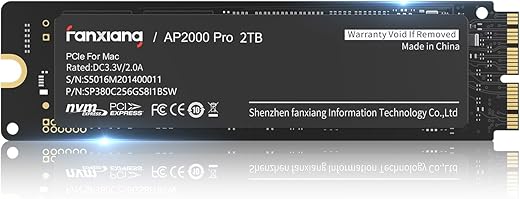
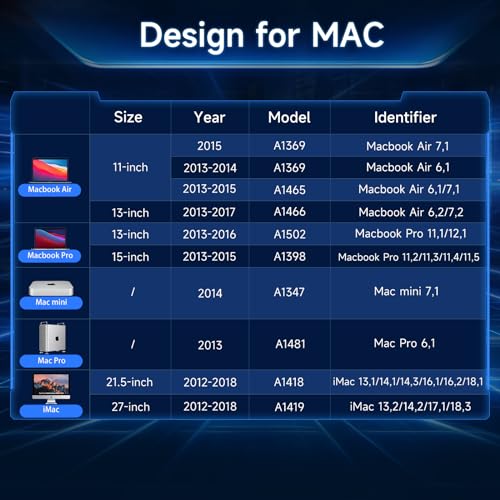
- At amazon.com you can purchase fanxiang 2TB SSD PCIe Gen3 NVMe Internal Solid State Drive, Up to 3500MB/s Compatible with MacBook Air 2017, MacBook Pro 2015, iMac 2016, Mac Pro 2013, Mac Mini 2014 for only
- The lowest price of fanxiang 2TB SSD PCIe Gen3 NVMe Internal Solid State Drive, Up to 3500MB/s Compatible with MacBook Air 2017, MacBook Pro 2015, iMac 2016, Mac Pro 2013, Mac Mini 2014 was obtained on September 24, 2025 17:34.
fanxiang 2TB PCIe Gen3 NVMe SSD for Mac Price History
fanxiang 2TB PCIe Gen3 NVMe SSD for Mac Description
Unlock Superior Performance with the fanxiang 2TB PCIe Gen3 NVMe SSD for Mac
Experience lightning-fast data transfers and enhanced system responsiveness with the fanxiang 2TB PCIe Gen3 NVMe SSD for Mac. This solid-state drive, designed with the latest technology, serves as an excellent upgrade for Mac users seeking optimal performance. Whether you are gaming, streaming, or handling intensive applications, this SSD ensures your Mac operates at peak efficiency. Explore the advantages of this SSD with its powerful specs and competitive pricing across various suppliers.
Key Features and Benefits of the fanxiang 2TB SSD
- Massive Storage Capacity: With 2TB of storage, the fanxiang SSD allows you to store thousands of files, applications, and media without compromising on speed or efficiency.
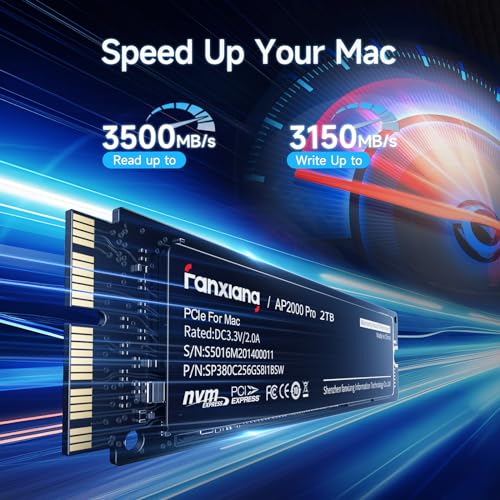
- Blazing Fast Speeds: Enjoy read speeds up to 2500 MB/s and write speeds reaching 3100 MB/s. This translates into swift boot times, faster file transfers, and reduced load times for applications.
- Top-tier Data Transfer Rate: The data transfer rate of 3500 MB/s ensures that you can handle large data sets and multiple tasks simultaneously without a hitch.
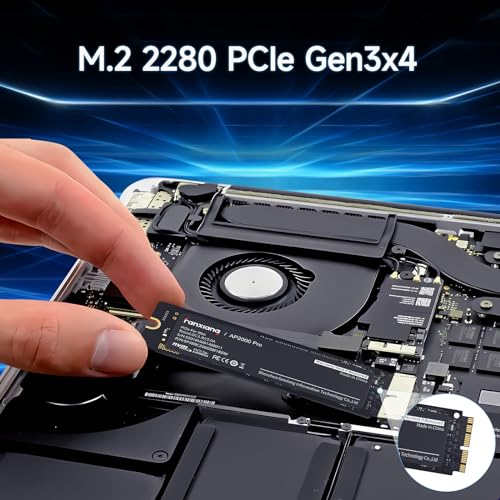
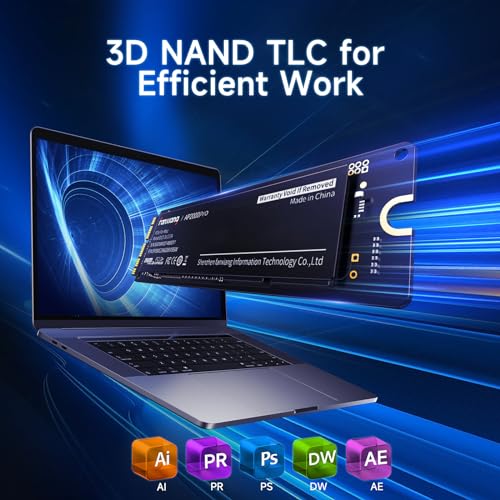
- Compact Dimensions: At just 3.5 x 0.94 x 0.09 inches, this M.2 2280 SSD fits seamlessly into your Mac, providing a space-saving solution without sacrificing performance.
- PCIE x 4 Interface: Leveraging the PCIe Gen3 technology, this drive significantly reduces latency while increasing bandwidth. Perfect for gamers and creatives alike!
How Does the Pricing Compare?
When it comes to price, the fanxiang 2TB PCIe Gen3 NVMe SSD offers excellent value for its performance features. Prices have remained competitive across various suppliers, making it easier for you to compare options and find the best deal. You can typically find this SSD priced similarly among major retailers, making it a popular choice for those upgrading their Mac systems.
Notable Trends from the 6-Month Price History
A closer inspection of the 6-month price history chart reveals a steady price point with occasional dips during promotional sales. This trend suggests that keeping an eye on the market can yield significant savings. Shoppers have noted that waiting for sales events might lead to the best deals on this high-performance SSD. Monitor the charts to stay informed about the optimal time to purchase.
Customer Reviews Summary
Customer feedback has been overwhelmingly positive regarding the fanxiang 2TB PCIe Gen3 NVMe SSD. Users rave about the increase in speed and efficiency it brings to their Mac systems. Several reviews highlight the following points:
- Performance Boost: Many users report a marked improvement in boot times and application loading speeds.
- Reliability: Customers appreciate the stability and reliability of this SSD, mentioning it rarely crashes or malfunctions.
- Easy Installation: The installation process is straightforward, allowing users to upgrade their systems without hassle.
However, some users have pointed out that the SSD may run slightly warm during heavy use. While this is typical for high-performance SSDs, it’s worth considering for those who prefer cooler operating components.
Explore Unboxing Videos and Reviews
Before making your purchase decision, consider watching unboxing and review videos available on platforms like YouTube. These videos provide invaluable insights into the installation process and real-world performance evaluations from users. By exploring these resources, you can gain a comprehensive understanding of the fanxiang 2TB PCIe Gen3 NVMe SSD’s capabilities and features.
Final Thoughts: Elevate Your Mac Experience!
The fanxiang 2TB PCIe Gen3 NVMe SSD for Mac is an exceptional choice for anyone looking to boost their system’s performance effortlessly. With its powerful specs, competitive pricing, and solid user reviews, this SSD is undoubtedly a worthy investment for Mac users. Don’t miss out on the chance to transform the way you use your Mac.
Ready to enhance your computing experience? Compare prices now!
fanxiang 2TB PCIe Gen3 NVMe SSD for Mac Specification
Specification: fanxiang 2TB PCIe Gen3 NVMe SSD for Mac
|
fanxiang 2TB PCIe Gen3 NVMe SSD for Mac Reviews (13)
13 reviews for fanxiang 2TB PCIe Gen3 NVMe SSD for Mac
Only logged in customers who have purchased this product may leave a review.




Pjam –
Das MacBookAir von Anfang 2015 hat 120GB SSD – und 9 Jahre später, sollte es ein finales 1TB Upgrade bekommen und ich habe mich für dieses Modell entschieden, weil es ohne Adapter direkt funktioniert. ABER ACHTUNG: Bitte erst ein aktuellen Boot-USB-Stick erstellen! Apples „Internet-Recovery“ erkennt nämlich die Festplatte nicht, weil sie kein Apple-Identifier hat. Mit einem aktuellen Mac OS vom USB-Stick gebootet funktioniert die SSD auch bestens 🙂
PawPawDog –
First of all, be sure you are aware this SSD is only compatible with certain Mac models in certain time periods. You want to check the compatible model list before ordering. The connector pin layout is NOT the same as normal M or B key commonly used for M.2 models.
On the other hand, if you did not read the description and ordered it by mistake, there are inexpensive adapters available on Amazon that can convert this module to the regular M key NVME, but you have to watch out for the length of the adapter may not fit to the regualr 2280 space.
Performance wise, this one really can deliver the advertised speed and will certainly bring more life to the old Mac.
hiro –
Montato in un computer Apple ricondizionato. Al momento tutto funziona bene.
Leif Robertson Fifer –
This does not work with Mac Pro 2013 (late) models. No good
hitori –
Replaced the original HD in an old 2014 Mac Mini and it breathed new life into it. There are plenty of videos on YouTube that show how to do it and I just followed the steps in them. The computer is snappier and it’s good enough for how I use it. This upgrade bought me a few more years of life in my computer before I have to replace it. Worth the cost and effort.
Julio Angel Perez –
Installed in my Mac Pro late 2013 without a hitch and copied my bootable backup drive to it,some 350gigs, in about 20mins. I am a little concerned that there is no obvious heatsink other than the back looks like there may be something stuck to it but I will buy one if it proves necessary, however at the moment the computer is running no hotter than usual, even after copying the 350gigs, so at the moment I am very happy even though the speed is around 1500 not the 3500 mentioned in the description, it is still nearly twice the speed of the original.
I can’t comment on reliability as yet, I will update this review if it fails at anytime.
PawPawDog –
I didn’t realize that the pin layout on this m.2 drive would be completely different than a regular m.2 SSD/NVMe drive.
I can’t give a full-featured review, but I can warn PC users not to bother with this one. The listing is pretty clear that it’s meant for a mac computer. Good on these guys for making something that will work with Apple’s proprietary nonsense.
Az –
I will never understand two things – one, why Apple has to be so proprietary as to make life more difficult when they claim to want to make life easier with their products, and two, why people will order products intended for use with a Mac and then rate them poorly because they can’t use them in other ways.
This drive works beautifully in the Macs for which it was designed. It’s easy to install, fast, and so far, reliable. Worked beautifully for me as an upgrade for my older Mac. It also works well in an external enclosure designed for the same year Mac slot – I used that to transfer the contents of my old drive to this one before swapping them. So for what it specifically says it’s supposed to be for and do, it’s excellent. Don’t get this for another purpose, you’ll probably be as disappointed as those that already made that mistake. It’s great for what it is.
Adam McDorman –
Slower than advertised in Crystal Diskmark, more like 1800MB/s sequential read.
FOURMI –
lo he devuelto porque no funciona !!!
Stephen Hopkins –
le disque ne monte pas, impossible de l’utiliser.
T. P. –
I ordered this SSD drive to use with an older macbook air. Unfortunately, I got the model year wrong and this drive isn’t compatible with the laptop. That laptop is a mid-2012 so I had the year wrong and the drive used in there is different (doesn’t even support NVME).
Oh well. So, now I have this drive and no mac products to use it in. Here’s what I did:
Ordered a 12+16 Mac SSD to M.2 nvme drive adapter. This lets you put the existing mac drive into a standard pcie nvme ssd m.2 slot that all current systems use. Now, I’m lazy and didn’t want to find which computer I have has an available 22110 slot (the adapter is longer than the common 2280 drives) and I disassembled an external 2280 usb-c adapter so I could plug this contraption into it.
The interesting thing to note is that the drive itself works as a normal ssd drive when connected to a windows computer after going through a m.2 connector adapter and usb-c to m.2 adapter/enclosure (unenclosure?). Not the exact scenario I was hoping for but I was able to confirm it works before plugging it into one of my desktop machines and it only took a minute.
Performance was as expected for an external drive. It saturated the connection speed for my usb enclosure.
Lesson learned, double check your laptop compatibility before buying. Glad it worked in the usb enclosure and I do have a path forward to use this permanently in one of my desktop machines. Although the drive is listed as mac only, it can be used in a PC if you jump through some hoops.
Cliente de Kindle –
Ha funcionado muy bien, y llego rápido!