
Focusrite Scarlett Solo 4th Gen USB Audio Interface
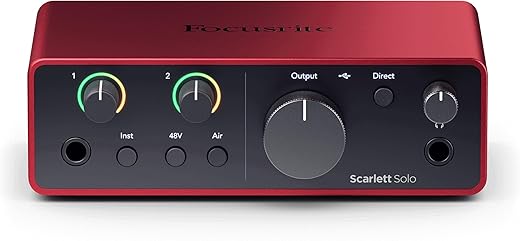
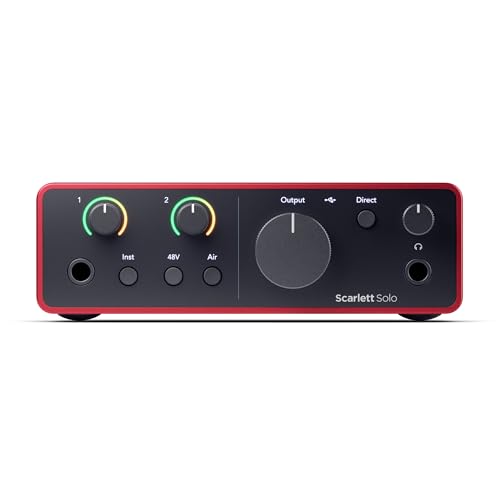
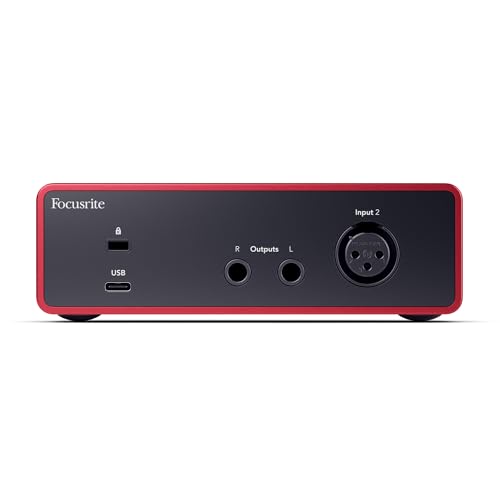
$149.99
Focusrite Scarlett Solo 4th Gen USB Audio Interface Price comparison
- All prices mentioned above are in United States dollar.
- This product is available at Amazon.com.
- At amazon.com you can purchase Focusrite Scarlett Solo 4th Gen USB Audio Interface, for the Guitarist, Vocalist, or Producer — High-Fidelity, Studio Quality Recording, and All the Software You Need to Record for only $149.99
- The lowest price of Focusrite Scarlett Solo 4th Gen USB-C Audio Interface was obtained on September 22, 2025 04:08.
Focusrite Scarlett Solo 4th Gen USB Audio Interface Price History
Focusrite Scarlett Solo 4th Gen USB Audio Interface Description
Discover the Focusrite Scarlett Solo 4th Gen USB Audio Interface
The **Focusrite Scarlett Solo 4th Gen USB Audio Interface** is designed for musicians and audio enthusiasts who demand high-quality sound and user-friendly features. This compact audio interface is perfect for recording, mixing, and producing music, whether you are at home or on the go. With its impressive specifications and modern design, it stands out as a top choice in the market.
Key Features of the Focusrite Scarlett Solo
- High-Quality Audio: Experience pristine sound quality with 24-bit/192kHz audio resolution, ensuring your recordings are clear and professional.
- Easy USB-C Connectivity: Enjoy fast and reliable connections with the USB-C port, compatible with all major operating systems, including Mac OS, Windows OS, and iOS.
- Compact and Lightweight: Weighing just 14.4 ounces and measuring 3.78 x 5.63 x 1.79 inches, it’s easy to take the Scarlett Solo wherever you go.
- Versatile Compatibility: Connect a microphone, instrument, or headphones seamlessly. The Scarlett Solo is compatible with all audio recording software, making it an ideal choice for any setup.
- Enhanced Performance: With upgraded features, the 4th generation provides better latency management and more stable performance during your recording sessions.
- Intuitive Design: Simplified controls and indicators make it easy to monitor your audio levels and settings accurately.
Price Comparison Across Leading Suppliers
When it comes to pricing, the **Focusrite Scarlett Solo 4th Gen USB Audio Interface** offers competitive options across various retailers. Prices typically range from $129.99 to $149.99, depending on the supplier. Whether you choose to shop online or in-store, you can always find a deal that suits your budget. The 6-month price history shows a consistent price trend, highlighting that now is a great time to purchase, as previous spikes indicate popularity during major promotions.
Trends in Price History
Our comprehensive 6-month price history chart reveals that the Focusrite Scarlett Solo has experienced slight fluctuations in its pricing, primarily during holiday sales and promotional events. This data shows how favorable current pricing is compared to previous months, making it an excellent opportunity for savvy shoppers. Don’t miss the chance to secure this audio interface at an attractive price!
Customer Reviews: What Users Are Saying
Customer feedback on the **Focusrite Scarlett Solo 4th Gen USB Audio Interface** paints a positive picture overall. Users frequently highlight its superb sound quality, ease of use, and compactness. Here are some common points from reviews:
– **Positive Aspects:**
– Many appreciate the clear audio output and professional-grade recordings.
– Users find it easy to set up, making it a hit among beginners and experienced audio engineers alike.
– The lightweight design and durable build make it a perfect travel companion for musicians on the go.
– **Noted Drawbacks:**
– Some customers have expressed concerns about driver compatibility with outdated operating systems.
– A few users mentioned the lack of extra inputs for more complex recording setups.
Overall, the focus has been on the strengths of the Scarlett Solo, underscoring its position as a reliable choice in the competitive audio interface market.
Explore Related Unboxing and Review Videos
For those interested in a hands-on look at the **Focusrite Scarlett Solo 4th Gen**, there are numerous unboxing and review videos available on platforms like YouTube. These reviews showcase the interface in action, providing insights into setup processes, functionality, and audio quality. Watching these videos can help you understand the product better and see how it fits your specific needs.
Why Choose the Focusrite Scarlett Solo?
The **Focusrite Scarlett Solo 4th Gen USB Audio Interface** is more than just a tool; it’s an investment in quality sound and reliability. From studio recording to home use, it provides everything you need to get started on your audio projects.
As you consider your options, remember to check the prices and product reviews prevalent across multiple sites to ensure you’re making the best decision. The combination of high-quality performance, excellent price range, and positive customer feedback makes this audio interface a standout option.
Ready to elevate your audio experience? **Compare prices now** and discover the best deal on the Focusrite Scarlett Solo 4th Gen USB Audio Interface!
Focusrite Scarlett Solo 4th Gen USB Audio Interface Specification
Specification: Focusrite Scarlett Solo 4th Gen USB Audio Interface
|
Focusrite Scarlett Solo 4th Gen USB Audio Interface Reviews (13)
13 reviews for Focusrite Scarlett Solo 4th Gen USB Audio Interface
Only logged in customers who have purchased this product may leave a review.
Related Products

OLUWASEUN ALAUSA –
Nice Audio System. I love the simplistic setup.
Alexander M –
I recently added the Focusrite Scarlett Solo 4th Gen USB Audio Interface to my mini home studio setup, where I’m using it with my new Yamaha HS8 monitors. As a guitarist and vocalist, I needed a solution for high-fidelity, near studio-quality demo recordings that wouldn’t complicate my setup. This interface has definitely delivered.
The sound quality is exceptional. The preamps offer crystal-clear audio, capturing both guitar and vocals with impressive detail. It’s evident that Focusrite has invested in top-notch audio performance. The interface is also incredibly user-friendly, making it easy to get started without wading through complicated settings.
However, if you’re planning to record a full band, the Scarlett Solo might fall short, as it’s designed for more basic needs. For those moments when you’re capturing your 1am inspirations, it’s perfect. It pairs beautifully with the Yamaha HS8 monitors and provides everything you need to start recording right out of the box. I switch between using it with my vintage Sony Studio Monitor headphones and the HS8s, depending on the task at hand.
Let me know your experience, and if this review helps. Thanks!
Florian Guilbault –
I wasn’t sure when I bought it, but it worked smoothly with GarageBand on macOS 10.13 High Sierra without any software installed and I was able to record. The product is great!
Austin –
Like the title says, I bought this to replace my preamp that doesn’t have a headphone out, only to find out my speakers could hit maybe quarter volume. I haven’t tried recording with it but I paired it with a set of DT990s and it powers those just fine. Great build quality.
L.Nitesh kumar –
Acheté pour enregistrer ma basse sur mon ordinateur. Pour peu que l’ordinateur soit assez puissant et optimisé pour minimiser la latence et que la simulation d’ampli utilisé avec est de qualité… et bien, ça fonctionne parfaitement, du moins pour mes besoins. J’en suis très satisfait.
Cecil –
Easy plug and play and works very well. Love the new features like the live input monitoring. Very clean and solid design that seems heavy duty. Also love the fact the mic input port is on the back of the interface.
El Skillet –
Compact and beautifully designed. Very easy to set up and use. Includes software is a true bonus. Could not be happier.
ttv.xpassword__ –
Great product for beginners
Artur Alexandre –
Muito boa a interface da Focusrite. Atende a todos as minhas necessidades. A mudança da entrada de microfone para a parte de trás e a inserção do botão isolado de controle de áudio para headset foi excelente.
Blake –
I use this for recordings and gaming as well. This helps maximize my Mic 🎙️ sound and volume and with the help of a cloud lifter makes it super clear and crisp. You’ll need a headphone jack to connect your own headphones into it. Something I learned when I got it. Drivers are super easy to install only takes a few moments and there’s also a website for it to help you get started. It’s a small device so it’s very portable and doesn’t take up much space at all. It’s a worthy investment.
FelCastro –
I selected the Scarlett Solo because, from what I first read, it seemed to be an excellent match for my Shure SM58 and it had an impressive count of ratings in Amazon. So I got the Scarlett Solo, plugged it in and followed instructions to install the control application and drivers.
After the installation I noticed the volume was so low that I could barely hear my voice. I know that this mic is “very quiet” and found that apparently the Scarlett, with the Focusrite drivers, is not good enough to do any recording in Windows, at least not with the SM58.
Testing in Windows using the Device Properties confirmed that Windows could not get enough volume from the Scarlett. So, this was not a problem in the DAW.
It could be just a problem with my microphone. However, I uninstalled all the Focusrite software and let Windows to use its default drivers. As a result of that the volume increased notably, and now I am able to do a recording setting the gain a 75% and volume to 90 in the Device Properties in Windows.
I initially gave it a low rating of 2 stars because the Focusrite drivers seem to be at fault, and reading through the internet again I found that to be a known problem.
Although the Solo is partially usable without the Focusrite Control/drivers, you really need the oficial drivers to properly do multitrack recording. I needed to buy a FetHead for this combination to work.
So Scarlett Solo and Shure SM58 don’t seem to be a good match in Windows 10.
——————————————————————————————————–
Update.
I returned the Solo/FetHead and purchased the 2i2, which works well with my mic. The input is not as high as with the Solo/FetHead combination, but it works well enough and it is actually less expensive.
I don’t really need two inputs, but I love the 2i2; I have the impression that the quality of the sound with the 2i2 is better than what I was getting with the Solo/FetHead combination, although that is a bit subjective.
For that reason I modified my rating from 2 to 4 stars.
Randy Wilson –
Worked great with a Taylor acoustic guitar with a built-in onboard pick-up. I plugged a 1/4″ jack from the guitar to this device, then USB-C on the device to a USB hub. Then selected the device for both input and output in Logic Pro X. I created a new project and told it to use “Guitar or Bass” for the first track. Then I played with various Amps available in Logic Pro, and had fun playing my guitar with all kinds of effects.
The one thing I wish it had was an off switch so that I wouldn’t have to unplug the USB-C cable in order to get the lights to turn off when I sleep the computer, which is in the same room where I sleep.
ttv.xpassword__ –
recommend it if you have a good quality mic and/or headset..
the quality of the music when i listen to it with some dt990 pro is amazing (louder/better quality) not as much bass and foot sound for FPS then a sound care with scout mode but still very good.. i have a creative soundblaster z soundcard and i liked the sound but this thing work 1 out of 10 times for me and my friend who had the soundblaster x. soo RIP this brand I went for the focusrite and i work absolutely fine.
i have the mv7 xlr plug in, very good setup. didnt hear an improvement towards the sound because the mv7 plug’D with the usb C on your pc already does an amazing job + you can only use the shurePlus motiv software only with the usb c plug in. But even plug with the xlr directly in the solo, had nothing to do and still get the amazing sound quality with very low background noise