Best Logitech Keyboards for Work & Gaming in 2026
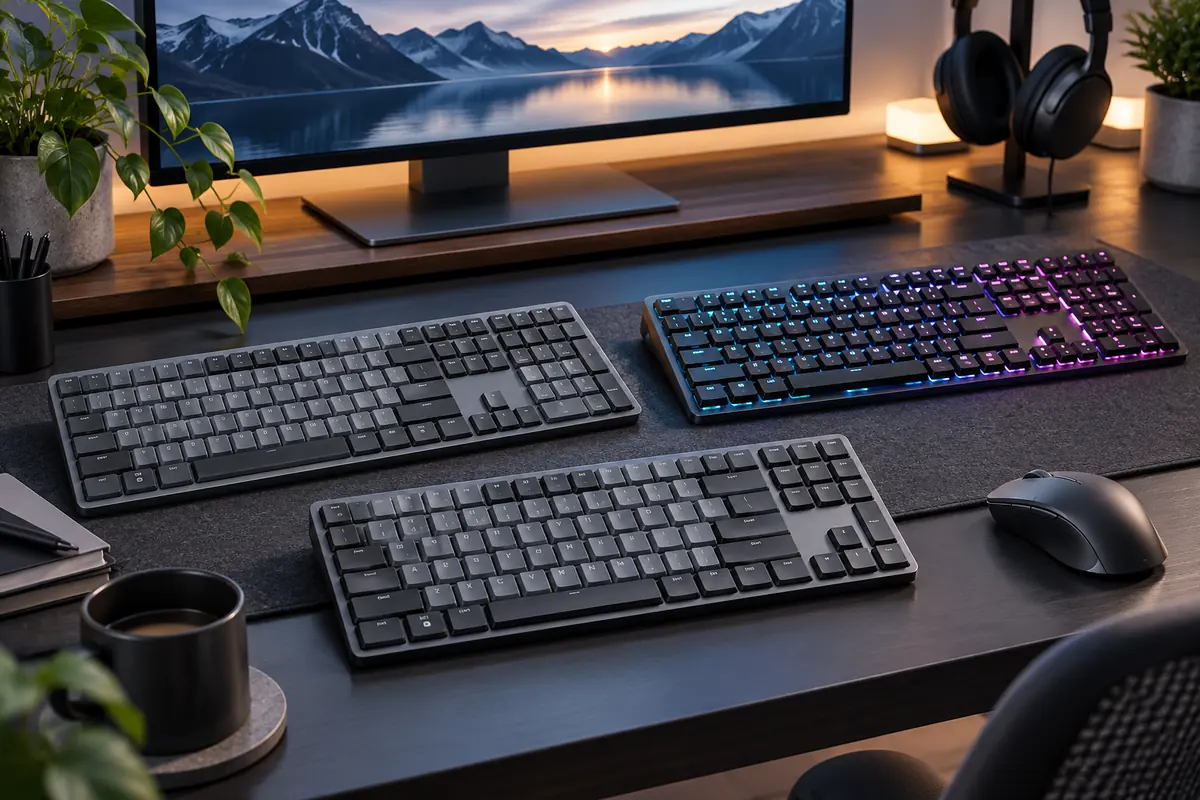
The Logitech G915 X LIGHTSPEED is our best Logitech keyboard for shoppers who want one premium board for both work and gaming. It combines gaming-grade LIGHTSPEED wireless, low-profile mechanical switches, Bluetooth, wired connectivity, RGB lighting and a full-size layout that is still practical for spreadsheets and everyday productivity.
That does not make it the right Logitech keyboard for everyone. The MX Keys S is a better choice for quiet office typing and switching between multiple computers, while the G515 RAPID TKL is the stronger specialist option for competitive gaming. Mechanical-keyboard fans who spend most of their time working should look closely at the newer Alto Keys K98M, and the Signature Slim K950 remains a more affordable productivity option.
The important distinction is that Logitech’s office and gaming keyboards are designed around different priorities. A comfortable multi-device work keyboard is not automatically a low-latency gaming keyboard, and a competitive gaming model may sacrifice the numpad, quiet typing or easy multi-device switching that matters during a workday.
Quick Answer: Best Logitech Keyboards
Best Overall for Work & Gaming: Logitech G915 X LIGHTSPEED — premium low-profile mechanical typing with gaming-grade wireless and a full-size layout.
Best for Work: Logitech MX Keys S — quiet scissor switches, smart illumination and three-device switching make it the strongest productivity-focused pick.
Best for Competitive Gaming: Logitech G515 RAPID TKL — magnetic analog switches, adjustable actuation and Rapid Trigger are built for fast gaming input.
Best Mechanical Keyboard for Work: Logitech Alto Keys K98M — a 98% gasket-mounted mechanical board with hot-swappable switches and PBT keycaps.
Best Affordable Work Keyboard: Logitech Signature Slim K950 — full-size, quiet and able to switch between three devices without MX-series pricing.
How We Choose the Best Logitech Keyboards
We separated work and gaming performance instead of treating every Logitech keyboard as interchangeable. Our criteria included typing quality, gaming responsiveness, wireless connection type, multi-device support, layout, switch technology, backlighting, software customization, noise, current U.S. availability and overall value.
We also prioritized the current Logitech lineup. The G915 X replaces the original G915 as the more relevant premium crossover recommendation, while newer models such as the G515 RAPID TKL and Alto Keys K98M now cover use cases that older Logitech roundups may miss.
Discompare did not conduct hands-on laboratory testing for this guide. Recommendations combine current Logitech specifications with recent independent keyboard testing and comparisons.
Logitech Keyboard Lines Explained
Logitech sells keyboards under several families, and understanding those families makes the buying process much easier.
Logitech MX and Productivity Keyboards
The MX line prioritizes productivity, quiet typing, multi-device workflows and Logi Options+ customization. MX Keys S is the clearest example: it uses low-profile scissor switches, supports three connected devices and is designed around comfortable everyday typing rather than competitive gaming latency.
Logitech G Gaming Keyboards
Logitech G keyboards prioritize gaming response, LIGHTSPEED wireless, mechanical or magnetic switches, RGB lighting and deeper G HUB customization. G915 X, G515 LIGHTSPEED and G515 RAPID all belong in this group, but they target different levels of gaming performance and different layouts.
Logitech Ergo Keyboards
The Ergo family focuses on workstation comfort. Wave Keys uses a wave-shaped key layout and integrated cushioned palm rest instead of mechanical switches or gaming-oriented features.
Best Logitech Keyboards Compared
| Keyboard | Best For | Layout | Switch Type | Wireless | Backlight | Regular Price Reference | Main Trade-Off |
|---|---|---|---|---|---|---|---|
| Logitech G915 X LIGHTSPEED | Work + gaming | Full-size | Low-profile mechanical | LIGHTSPEED + Bluetooth | LIGHTSYNC RGB | $259.99 | Expensive |
| Logitech MX Keys S | Office work | Full-size | Scissor | Bluetooth + Logi Bolt | Smart white backlight | $129.99 | Not ideal for competitive gaming |
| Logitech G515 RAPID TKL | Competitive gaming | TKL | Magnetic analog | No — wired | LIGHTSYNC RGB | $169.99 | Wired and no numpad |
| Logitech Alto Keys K98M | Mechanical productivity | 98% | Hot-swappable mechanical | Yes | White | $119.99 | Taller and louder than MX Keys S |
| Logitech G515 LIGHTSPEED TKL | Wireless gaming value | TKL | Low-profile mechanical | LIGHTSPEED + Bluetooth | LIGHTSYNC RGB | $159.99 | Fewer controls than G915 X |
| Logitech Signature Slim K950 | Affordable productivity | Full-size | Scissor | Bluetooth / compatible Logitech receiver support | No | $89.99 | No backlighting |
| Logitech Wave Keys | Ergonomic office work | Compact full-size | Membrane / scissor-style office keys | Bluetooth + Logi Bolt | No | $69.99 | Not intended for serious gaming |
Compare Current Logitech Keyboard Prices
Keyboard pricing changes frequently, especially across Logitech G gaming models. Use current retailer offers rather than choosing a keyboard because of a temporary sale price.


1. Logitech G915 X LIGHTSPEED — Best Overall for Work & Gaming
Best for: buyers who want one premium full-size keyboard that can handle gaming at night and serious desktop work during the day.
The G915 X LIGHTSPEED is the strongest all-round Logitech keyboard because it bridges the gap between the company’s productivity and gaming families better than the alternatives. Logitech gives it low-profile GL mechanical switches with a 1.3 mm actuation point, LIGHTSPEED wireless, Bluetooth and wired data connectivity.
For work, the full-size layout provides a numpad and dedicated media controls. For gaming, LIGHTSPEED avoids relying on Bluetooth for low-latency input, while G HUB and KEYCONTROL allow deeper key customization and macros. LIGHTSYNC RGB also provides per-key lighting for users who want a gaming-oriented setup.
RTINGS currently places the G915 X LIGHTSPEED at the top of its Logitech keyboard recommendations, specifically because it can serve both gaming and everyday productivity use. The current X generation also improves on the older G915 design with PBT keycaps and updated construction.
The biggest downside is simply cost. At a $259.99 regular price, you are paying for the crossover capability. An office-only buyer does not need LIGHTSPEED or extensive gaming customization, while a competitive player who does not use a numpad may prefer the smaller G515 RAPID TKL.
Pros
✅ Strong combination of productivity and gaming performance
✅ LIGHTSPEED, Bluetooth and wired connectivity
✅ Low-profile mechanical switches
✅ Full-size layout with dedicated media controls
✅ PBT keycaps and extensive G HUB customization
Cons
❌ Expensive
❌ Full-size footprint takes more desk space
❌ Overkill for users who never play latency-sensitive games
Who should skip it: office-only buyers who would get more practical value from MX Keys S, and competitive players who want magnetic switches and a smaller TKL layout.
Alternative: MX Keys S for work-first use or G515 LIGHTSPEED TKL for a lower-cost wireless gaming setup.

Upgrade your setup with the Logitech G915 X Wireless GL Red Keyboard — a high-performing, ultra-slim wireless board finished in a striking red for modern style.
Feel the precision of GL Red switches and enjoy the freedom of lag-free wireless performance.
Order now to add pro-level responsiveness and standout design to your desk.
2. Logitech MX Keys S — Best Logitech Keyboard for Work
Best for: writing, spreadsheets, general office work and users who regularly switch between multiple computers or mobile devices.
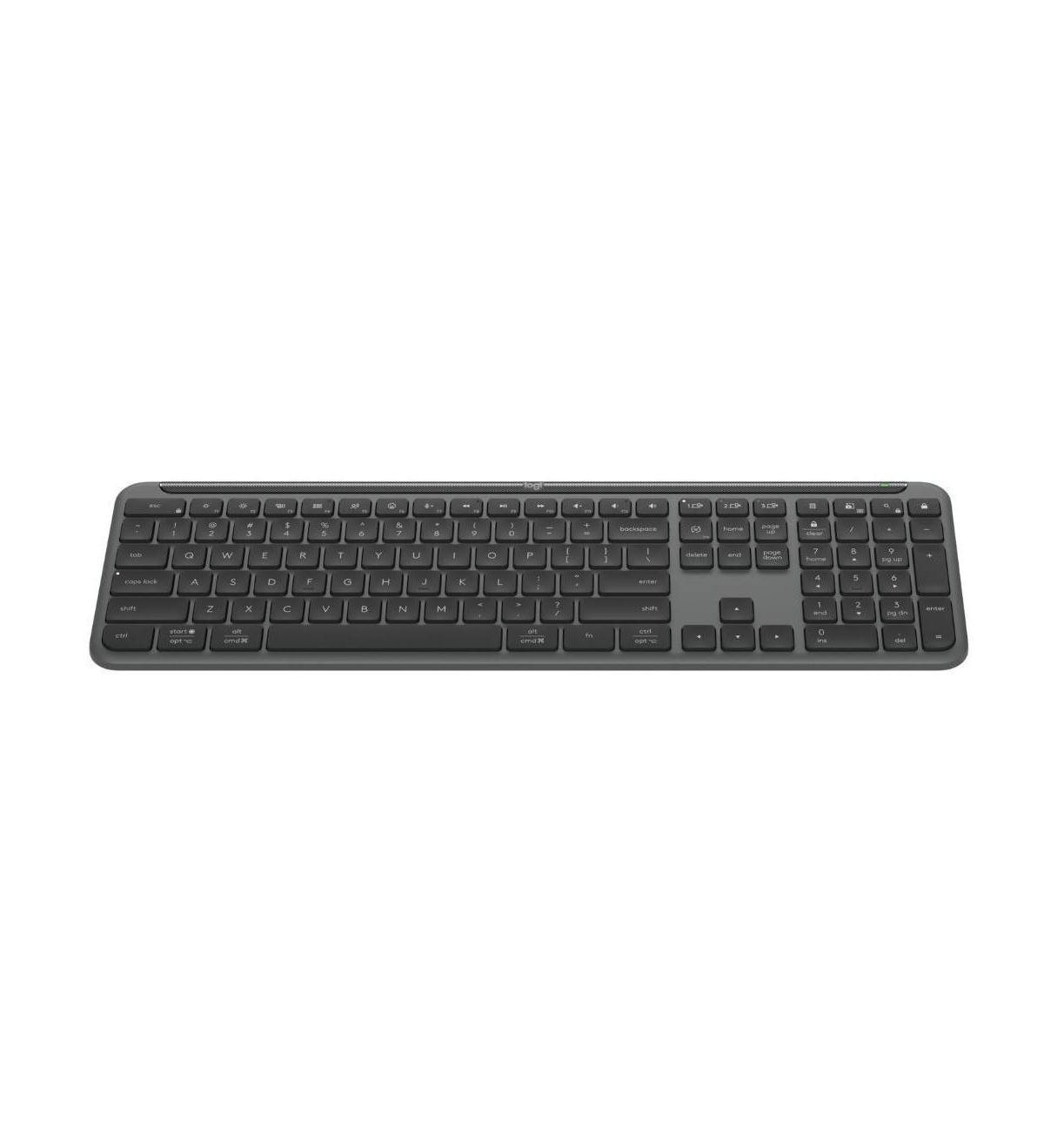
MX Keys S is the better choice than a Logitech G keyboard when productivity comes first. Its low-profile scissor switches are quiet and stable, while the sculpted keycaps are designed to guide your fingertips toward the center of each key.
The keyboard can pair with up to three devices and switch between them using dedicated Easy-Switch keys. Connectivity is available through Bluetooth Low Energy or the included Logi Bolt receiver. That makes it especially practical for a home office where one keyboard might be shared between a work laptop and a personal desktop.
The backlighting is also more office-oriented than gaming RGB. Hand-proximity sensors activate the lighting as your hands approach, and the system can adjust illumination according to ambient conditions.
Battery life is rated at up to 10 days with backlighting under Logitech’s stated settings, or up to five months with the lighting turned off. USB-C charging means the keyboard can remain in regular use without relying on disposable batteries.
If your workstation moves between a laptop and desktop throughout the week, pairing the keyboard with one of the systems in our best Dell laptops for work and study guide is the type of multi-device workflow where MX Keys S makes the most sense.
Pros
✅ Excellent fit for quiet office typing
✅ Switches between up to three devices
✅ Bluetooth and Logi Bolt connectivity
✅ Smart backlighting with proximity sensing
✅ Long battery life with backlighting disabled
Cons
❌ Not designed for competitive gaming latency
❌ No mechanical switches
❌ No gaming RGB or LIGHTSPEED connection
Who should skip it: competitive gamers and anyone who specifically wants a mechanical typing experience.
Alternative: Alto Keys K98M for mechanical productivity or G915 X for a true work-and-gaming crossover.
The Logitech MX Keys S delivers precision illuminated keys, programmable controls, and seamless Bluetooth or USB‑C connectivity — plus a removable numeric keypad — for a versatile, feature‑rich typing experience on computers and tablets. Order yours today and type smarter — add it to your cart now.
3. Logitech G515 RAPID TKL — Best for Competitive Gaming
Best for: competitive players who prioritize adjustable actuation, Rapid Trigger and a compact gaming layout over wireless convenience.
The G515 RAPID TKL is the most specialized gaming keyboard in this list. Instead of conventional mechanical switches, it uses low-profile magnetic analog switches. That lets Logitech adjust how the keyboard interprets key travel rather than relying on one fixed mechanical actuation point.
The key feature is Rapid Trigger, which allows a key to reset based on movement rather than requiring it to return to a conventional fixed reset point. This can be useful for repeated directional inputs in fast competitive games. Logitech also supports adjustable actuation, Key Priority and multipoint actions through its gaming software.
The chassis is only about 22 mm high, so the keyboard retains Logitech’s low-profile design language even though the switch technology is significantly different from G915 X or G515 LIGHTSPEED.
The trade-off is connectivity. G515 RAPID is a wired keyboard. For a fixed gaming desk that can be a non-issue, but anyone trying to keep a cable-free work-and-play setup should consider the wireless G515 LIGHTSPEED instead.
Pros
✅ Magnetic analog switch technology
✅ Rapid Trigger for fast repeated inputs
✅ Adjustable actuation
✅ Compact TKL layout leaves more mouse space
✅ Low-profile 22 mm design
Cons
❌ Wired only
❌ No numpad
❌ Specialized gaming features add little value for normal office typing
Who should skip it: productivity-first users and gamers who prioritize a wireless desk over analog-switch features.
Alternative: G515 LIGHTSPEED TKL for wireless gaming or G915 X for a full-size crossover keyboard.
At just 22 mm high, this ultra-slim, low-profile mechanical keyboard delivers sleek style, ergonomic support, and reduced key travel for faster, more responsive gaming. Ready to feel the difference? Buy the G515 TKL now and transform your play.
4. Logitech Alto Keys K98M — Best Mechanical Keyboard for Work
Best for: office and creative users who want a more substantial mechanical typing experience without giving up a compact numpad layout.
Alto Keys K98M is one of the most interesting recent additions to Logitech’s productivity range because it adopts features normally associated with enthusiast mechanical keyboards. Its 98-key layout preserves a numpad while reducing some of the empty spacing of a conventional full-size board.
The keyboard uses Logitech’s UniCushion full-frame gasket structure, which is designed to absorb vibration and soften the feel of each keystroke. The included linear Marble switches are hot-swappable, giving owners more flexibility than a sealed office keyboard with non-replaceable switch mechanisms.
PBT keycaps and white backlighting reinforce the premium mechanical positioning, while Logi Options+ supports customizable action keys for productivity shortcuts.
RTINGS finds the Alto’s typing quality stronger than MX Mechanical in several respects, particularly its stabilizers and vibration damping. Compared with MX Keys S, though, the Alto is taller and noticeably louder. That means its more satisfying mechanical feel comes with a real office-environment trade-off.
Pros
✅ Gasket-mounted mechanical design
✅ Hot-swappable linear switches
✅ PBT keycaps
✅ Compact 98% layout keeps a numpad
✅ White backlighting and productivity customization
Cons
❌ Louder than MX Keys S
❌ Taller profile may benefit from a wrist rest
❌ Not designed as a competitive gaming keyboard
Who should skip it: users sharing a very quiet office or anyone who specifically needs Logitech G gaming performance.
Alternative: MX Keys S for quieter productivity or MX Mechanical if low-profile mechanical typing is the priority.
Hear and feel the difference with the Logitech Alto Keys K98M — a wireless, backlit mechanical keyboard with UniCushion gasket that delivers rich, satisfying keystrokes. Customize its premium design and sound to transform your workspace into a more tactile, inspiring place. Order your K98M today and elevate every keystroke.
5. Logitech G515 LIGHTSPEED TKL — Best Wireless Gaming Value
Best for: gamers who want low-profile mechanical switches and LIGHTSPEED wireless but do not need the full-size G915 X layout or its higher price.
G515 LIGHTSPEED TKL is the practical middle ground in Logitech’s gaming lineup. It retains the low-profile 22 mm design, GL mechanical switches, double-shot PBT keycaps, LIGHTSYNC RGB and sound-dampening construction while using a smaller tenkeyless layout.
Connectivity is one of its biggest advantages. The keyboard can use LIGHTSPEED wireless for gaming, Bluetooth for a second device or USB for wired data. That gives it more flexibility than G515 RAPID while still keeping the desk cable-free during normal use.
Independent comparisons find its core gaming performance close to the more expensive G915 X. What you give up are the flagship’s full numpad and more extensive dedicated controls rather than the basic wireless gaming capability.
That makes G515 LIGHTSPEED especially attractive for smaller desks. If you are building a compact home workstation, our best home office desks for productivity guide can help you judge how much desk width you actually need for a TKL keyboard, monitor setup and mouse space.
Pros
✅ LIGHTSPEED gaming wireless
✅ Bluetooth and wired modes
✅ Low-profile GL mechanical switches
✅ PBT keycaps and sound dampening
✅ Smaller footprint than G915 X
Cons
❌ No numpad
❌ Fewer dedicated controls than G915 X
❌ Does not offer the magnetic analog switches of G515 RAPID
Who should skip it: spreadsheet-heavy users who need a numpad or competitive players specifically shopping for Rapid Trigger.
Alternative: G915 X for a full-size wireless crossover or G515 RAPID for magnetic analog input.

Elevate your setup with the Logitech G515 LIGHTSPEED TKL Wireless Keyboard — ultra-fast LIGHTSPEED wireless performance in a compact tenkeyless design that frees desk space without sacrificing control. Get the responsiveness and reliability you need for serious gaming and seamless productivity. Order yours today and upgrade your keyboard experience.
6. Logitech Signature Slim K950 — Best Affordable Work Keyboard
Best for: general office users who want quiet multi-device typing at a lower price than MX Keys S.
The Signature Slim K950 covers the core productivity features most people actually need. It has a full-size layout, laptop-style low-profile typing and the ability to pair with three devices, allowing you to move between a work computer, personal machine, tablet or phone.
Logi Options+ can customize supported keys and shortcuts, including Smart Actions for repeated workflows. The design is intentionally simpler than MX Keys S, which helps keep the current regular price at $89.99.
The biggest omission is backlighting. That is easy to live without in a bright office but can matter for people who regularly work in dim rooms. Materials and overall feel are also less premium than Logitech’s MX range.
Gaming is another limitation. K950 works perfectly well for casual games, but its office-focused wireless behavior and higher latency make it a poor recommendation for competitive gaming compared with Logitech G models.
Pros
✅ Affordable full-size productivity layout
✅ Switches between three devices
✅ Quiet laptop-style typing
✅ Logi Options+ shortcut customization
Cons
❌ No backlighting
❌ Less premium construction than MX Keys S
❌ Not suited to latency-sensitive competitive gaming
Who should skip it: users who need backlighting or plan to use one keyboard for serious gaming.
Alternative: MX Keys S for a more premium work keyboard.
Ready to simplify your workspace?
The Logitech Signature Slim K950 Keyboard (Graphite) pairs with up to three devices — your work and personal computers, tablet, or phone — so you can switch quickly and stay focused.
Order yours today and streamline typing across all your devices.
7. Logitech Wave Keys — Best Ergonomic Logitech Keyboard for Work
Best for: office users who prefer a gently curved keyboard and integrated cushioned palm support instead of a conventional flat board.
Wave Keys takes a different approach from Logitech’s gaming and MX models. The keys follow a wave-shaped layout intended to place the hands and forearms in a more natural typing position, while the attached palm rest uses multiple layers of cushioning.
Logitech developed the keyboard through its Ergo Lab and lists certification from United States Ergonomics. The keyboard can connect through Bluetooth or the included Logi Bolt receiver and switch between compatible computers, tablets and phones with Easy-Switch controls.
Battery life is rated at up to three years from two AAA batteries under Logitech’s stated usage conditions. That makes it a low-maintenance office keyboard even though it does not provide rechargeable power or backlighting.
The ergonomic shape requires some adjustment if you have spent years on conventional straight keyboards. Its office-oriented key mechanism is also quiet but does not provide the crisp mechanical feel of Alto K98M or the gaming responsiveness of Logitech G models.
Pros
✅ Wave-shaped ergonomic layout
✅ Integrated cushioned palm rest
✅ Bluetooth and Logi Bolt support
✅ Multi-device Easy-Switch controls
✅ Up to three years of stated battery life
Cons
❌ No backlighting
❌ Integrated palm rest is not removable
❌ Wave layout requires an adjustment period
❌ Not intended for competitive gaming
Who should skip it: gaming-first buyers or anyone who strongly prefers a conventional straight keyboard layout.
Alternative: MX Keys S for a conventional productivity layout.
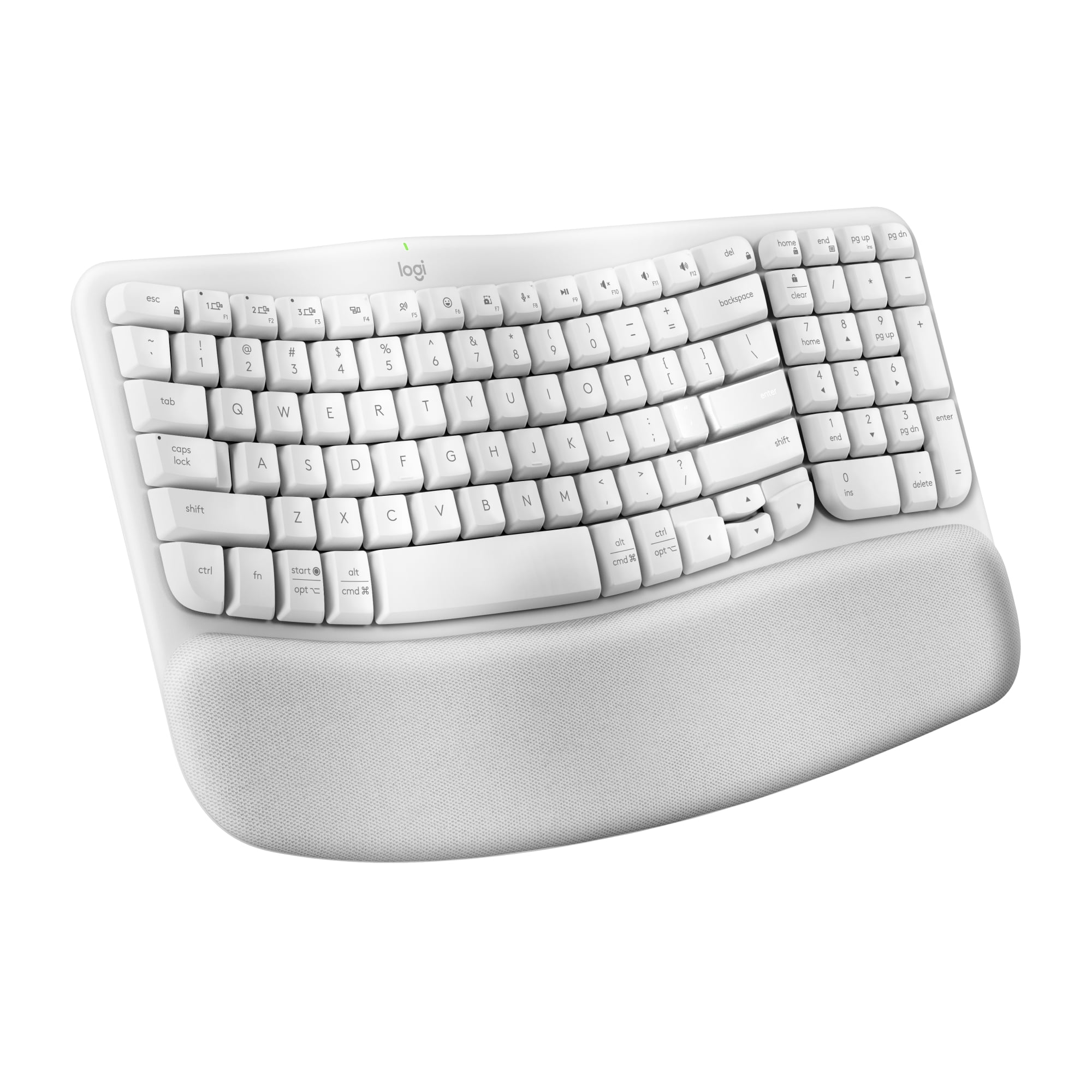
Logitech Wave Keys Wireless Ergonomic Keyboard — bring comfort back to your workday with a keyboard shaped to feel instantly familiar. Its cushioned memory-foam palm rest, natural curved layout, and wireless freedom keep your wrists supported and your typing smooth; personalize keys to match your workflow. Order yours today and type better — feel the Wave.
Logitech Keyboards We Considered but Didn’t Pick
Logitech MX Mechanical: Still a strong low-profile productivity keyboard, but Alto Keys K98M now offers a more distinctive mechanical experience with a gasket mount and hot-swappable switches. MX Mechanical remains the better alternative if you specifically want low-profile mechanical keys.
Original Logitech G915 LIGHTSPEED: Still available, but G915 X is the more current generation and improves the platform with updated construction, PBT keycaps and newer customization features.
Logitech G515 TKL Wired: A reasonable lower-cost gaming keyboard, but it sits between clearer recommendations. G515 LIGHTSPEED is better for wireless buyers, while G515 RAPID provides the more advanced competitive feature set.
MX Keys Mini: Excellent for compact productivity setups, but the full-size MX Keys S is more broadly useful for this work-and-gaming roundup.
Pebble Keys 2 K380s: Affordable and highly portable, but better suited to travel, tablets and secondary-device typing than a primary desktop workstation.
Logitech MX vs Logitech G: Which Should You Buy?
Choose a Logitech MX or productivity keyboard when typing comfort, multi-device switching, low noise and office shortcuts matter more than gaming latency. MX Keys S is the clearest example.
Choose a Logitech G keyboard when gaming responsiveness, LIGHTSPEED wireless, RGB lighting, macros or specialized switch technology matter. G915 X provides the best balance for someone who works and games on the same computer.
The two product families can overlap, but they are not interchangeable. MX Keys S can play games, and G915 X can type documents, yet each is optimized around a different priority.
Mechanical vs Scissor Logitech Keyboards
Scissor-switch keyboards such as MX Keys S and Signature Slim K950 have short key travel and a familiar laptop-like feel. They are typically quieter and lower in profile, which makes them easy to use for long office sessions without a wrist rest.
Mechanical keyboards such as G915 X, G515 LIGHTSPEED and Alto Keys K98M use individual switch mechanisms that produce a more defined key feel. Logitech offers both gaming-focused low-profile mechanical switches and more traditional productivity-oriented mechanical designs.
Mechanical does not automatically mean better. A quiet shared office can favor MX Keys S, while someone who values switch feel and customization may prefer Alto K98M.
Full-Size vs TKL vs 98% Logitech Keyboards
Full-size keyboards such as G915 X and MX Keys S include a number pad and make the most sense for spreadsheets, data entry and users who rely on dedicated navigation keys.
TKL or tenkeyless models such as G515 RAPID and G515 LIGHTSPEED remove the numpad. That makes more room for mouse movement and is particularly useful for gaming desks.
98% boards such as Alto Keys K98M compress the layout so you keep the numpad while reducing unused space between key clusters.
The right size depends on your work, not just appearance. If your desk also carries multiple displays and other accessories, our best monitor setups for your home office guide can help plan the complete workstation footprint.
LIGHTSPEED vs Bluetooth vs Logi Bolt
LIGHTSPEED
LIGHTSPEED is Logitech G’s gaming-focused wireless connection. It is the connection to prioritize when you want wireless convenience without relying on ordinary Bluetooth for latency-sensitive games.
Bluetooth
Bluetooth is convenient because it does not require a USB receiver and works with a wide range of computers, tablets and phones. It is especially useful for secondary devices, but Logitech’s gaming boards generally provide LIGHTSPEED for their primary gaming connection.
Logi Bolt
Logi Bolt is used across many Logitech productivity products such as MX Keys S and Wave Keys. It is designed for reliable office-device connectivity rather than as Logitech’s gaming wireless standard.
The simplest rule is: LIGHTSPEED for serious wireless gaming; Logi Bolt for compatible office setups; Bluetooth for broad device flexibility.
Which Logitech Keyboard Is Best for Your Setup?
| Your Priority | Best Pick | Why |
|---|---|---|
| One premium keyboard for work and gaming | G915 X LIGHTSPEED | Full-size productivity layout plus gaming-grade wireless |
| Quiet office productivity | MX Keys S | Quiet typing, smart lighting and three-device switching |
| Competitive gaming | G515 RAPID TKL | Magnetic switches, Rapid Trigger and adjustable actuation |
| Mechanical typing for work | Alto Keys K98M | Gasket mount, hot-swappable switches and compact numpad layout |
| Wireless gaming value | G515 LIGHTSPEED TKL | LIGHTSPEED performance without flagship pricing |
| Affordable office use | Signature Slim K950 | Multi-device full-size productivity at a lower price |
| Ergonomic office layout | Wave Keys | Curved key layout and integrated cushioned palm rest |
Frequently Asked Questions
What is the best Logitech keyboard overall?
The Logitech G915 X LIGHTSPEED is our best overall Logitech keyboard for someone who needs both productivity and gaming capability. MX Keys S is the better choice if your use is almost entirely office work.
Which Logitech keyboard is best for office work?
MX Keys S is the strongest general office pick because it combines quiet low-profile typing, smart backlighting, Logi Bolt, Bluetooth and three-device switching.
Which Logitech keyboard is best for gaming?
G515 RAPID TKL is our specialist competitive-gaming pick because of its magnetic analog switches and Rapid Trigger. G915 X LIGHTSPEED is better if you also need a full-size keyboard for everyday work.
Is Logitech MX Keys S good for gaming?
It is fine for casual gaming, but its office-oriented wireless design and latency make it less suitable for competitive games than Logitech G keyboards using LIGHTSPEED or wired gaming connections.
Is the Logitech G915 X worth it?
It makes the most sense when one keyboard needs to serve both productivity and serious gaming. Office-only buyers can spend much less on MX Keys S, while competitive gamers who do not need a numpad may prefer G515 RAPID.
What is the difference between Logi Bolt and LIGHTSPEED?
Logi Bolt is used primarily with Logitech productivity devices, while LIGHTSPEED is Logitech G’s gaming-focused wireless technology. Bluetooth provides an additional broadly compatible option on many Logitech keyboards.
Which Logitech mechanical keyboard is best for work?
Alto Keys K98M is our mechanical productivity pick because it combines a 98% layout with a gasket mount, hot-swappable switches, PBT keycaps and productivity customization. MX Mechanical remains a good alternative for users who prefer low-profile mechanical keys.
Logitech vs Razer: which is better for gaming?
Neither brand is automatically better for every player. Within Logitech’s current lineup, G515 RAPID targets competitive analog-switch gaming while G915 X and G515 LIGHTSPEED emphasize wireless performance. Compare the exact switch technology, layout and features you need rather than choosing only by brand.
Final Verdict: Which Logitech Keyboard Should You Buy?
The Logitech G915 X LIGHTSPEED is the best choice when your PC handles both serious work and gaming. It is expensive, but the combination of a full-size layout, low-profile mechanical switches, LIGHTSPEED wireless, Bluetooth and wired connectivity means you do not need separate office and gaming keyboards.
Choose the MX Keys S instead if productivity is clearly the priority. It is quieter, simpler and better suited to multi-device office workflows. Competitive gamers should move in the other direction and choose the G515 RAPID TKL for magnetic switches and Rapid Trigger.
If mechanical typing itself is the attraction, Alto Keys K98M is the more interesting work keyboard, while G515 LIGHTSPEED TKL gives gaming buyers a lower-cost wireless route. The Signature Slim K950 covers affordable office work, and Wave Keys is the strongest option here for users who specifically want Logitech’s curved ergonomic layout.
Best Overall for Work & Gaming: Logitech G915 X LIGHTSPEED
Best for Work: Logitech MX Keys S
Best for Competitive Gaming: Logitech G515 RAPID TKL
Best Mechanical Keyboard for Work: Logitech Alto Keys K98M
Best Affordable Work Keyboard: Logitech Signature Slim K950
Sources
- RTINGS — The Best Logitech Keyboards of 2026
- Logitech G — G915 X LIGHTSPEED Wireless Gaming Keyboard
- Logitech — MX Keys S Advanced Wireless Illuminated Keyboard
- Logitech G — G515 RAPID TKL Wired Analog Gaming Keyboard
- Logitech — Alto Keys K98M Wireless Mechanical Keyboard
Product Groups: Logitech G915 X LIGHTSPEED, Logitech MX Keys S, Logitech G515 RAPID TKL, Logitech Alto Keys K98M, Logitech G515 LIGHTSPEED TKL, Logitech Signature Slim Keyboard K950, Logitech Wave Keys