
Fosgoit Printhead Cleaning Kit for DTF/DTG Printers

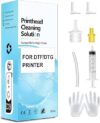
$19.99
Fosgoit Printhead Cleaning Kit for DTF/DTG Printers Price comparison

- All prices mentioned above are in United States dollar.
- This product is available at Amazon.com.
- At amazon.com you can purchase DTF Cleaning Solution for DTF DTG Printers, DTF Cleaner Solution Best 100mL for only $19.99
- The lowest price of DTF Cleaning Solution for DTF DTG Printers, DTF Cleaner Solution Best 100mL was obtained on October 18, 2026 02:06.
Fosgoit Printhead Cleaning Kit for DTF/DTG Printers Price History
Fosgoit Printhead Cleaning Kit for DTF/DTG Printers Description
Fosgoit Printhead Cleaning Kit for DTF/DTG Printers: Optimal Maintenance Solution
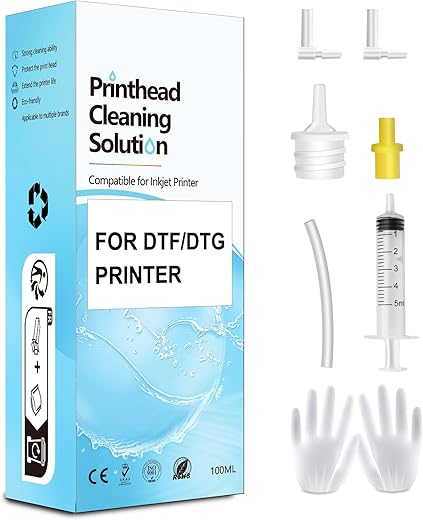
Keeping your DTF and DTG printers in peak condition is crucial for achieving high-quality prints. The Fosgoit Printhead Cleaning Kit offers a reliable and comprehensive solution to ensure your printer performs optimally. This specially formulated cleaning kit not only enhances printing quality but also prolongs the lifespan of your printer, making it an essential tool for any printing enthusiast.
Key Features and Benefits
- Effective Cleaning Formula: The Fosgoit cleaner is designed to dissolve stubborn ink residue, ensuring that printheads remain unclogged. This enhances the vibrancy and accuracy of all your prints.
- Convenient 100mL Size: The kit comes with 100mL of cleaning solution, offering ample product for multiple cleaning sessions while maintaining practicality for storage.
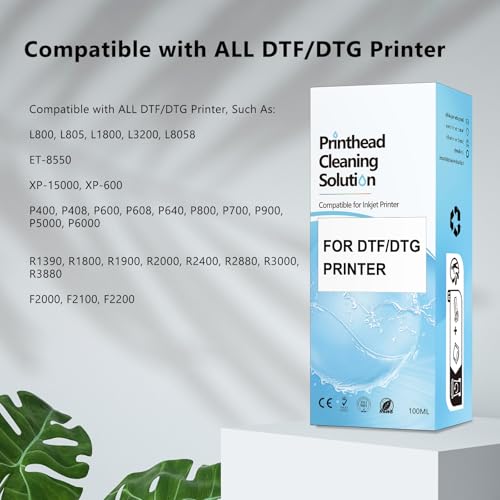
- Multicolor Ink Compatibility: Suitable for use with various ink types, including multicolor inks used in DTF and DTG printing. This versatility makes it an ideal choice for different printing needs.
- Lightweight and Portable: Weighing only 5.3 ounces and measuring 1.97 x 2.76 x 6.3 inches, this kit is easy to handle, transport, and store, making it perfect for at-home use or travel.
- Designed for DTF/DTG Printers: Specifically crafted for direct-to-film (DTF) and direct-to-garment (DTG) printers, ensuring tailored performance and results.
Price Comparison Across Suppliers
The Fosgoit Printhead Cleaning Kit is available through various online and retail suppliers. Prices often vary, allowing you to choose based on your budget. Be sure to check our six-month price history chart to identify the best time to purchase, as it showcases trends and fluctuations in price. This helps you save money while ensuring you get the cleaning solution your printer needs.
Six-Month Price Trends
Our six-month price history for the Fosgoit Printhead Cleaning Kit indicates a stable pricing point with occasional lower offers. Monitoring these trends allows you to nab the best deal, providing insight into when the kit is most affordable without compromising on quality.
What Customers are Saying
Customers have generally praised the Fosgoit Printhead Cleaning Kit for its effectiveness and easy-to-use formula. Many have noted that regular use results in significantly improved print quality, highlighting less clogging and vibrancy in their prints. Reviews often reference how well it works with different types of printers and inks, making it a versatile tool for both hobbyists and professionals.
However, some users have experienced minor drawbacks, such as the need for multiple applications when dealing with severe clogs. Others noted that while the packaging is compact, the single 100mL bottle might not last for extensive cleaning needs. Overall, the positive feedback far outweighs the negatives, solidifying its reputation in the print community.
Explore Unboxing and Review Videos
For a comprehensive understanding of the Fosgoit Printhead Cleaning Kit, we recommend checking out unboxing and review videos available on platforms like YouTube. These videos offer insightful demonstrations on how to effectively use the cleaning kit, along with firsthand reviews from experienced users who share their results and tips.
Why Choose the Fosgoit Printhead Cleaning Kit?
In the world of DTF and DTG printing, maintaining your equipment is as important as knowing how to use it. The Fosgoit Printhead Cleaning Kit not only helps prevent clogging and ink stagnation but also contributes to the overall efficiency of your printing operations, ensuring that your artwork remains vibrant and professional. With its user-friendly design and positive customer feedback, it stands out as a top choice for those serious about their printing endeavors.
Incorporating this product into your regular maintenance routine will greatly enhance the longevity and performance of your printer, giving you peace of mind and superior results.
Compare prices now!
Fosgoit Printhead Cleaning Kit for DTF/DTG Printers Specification
Specification: Fosgoit Printhead Cleaning Kit for DTF/DTG Printers
|
Fosgoit Printhead Cleaning Kit for DTF/DTG Printers Reviews (5)
5 reviews for Fosgoit Printhead Cleaning Kit for DTF/DTG Printers
Only logged in customers who have purchased this product may leave a review.
DN Reviewer –
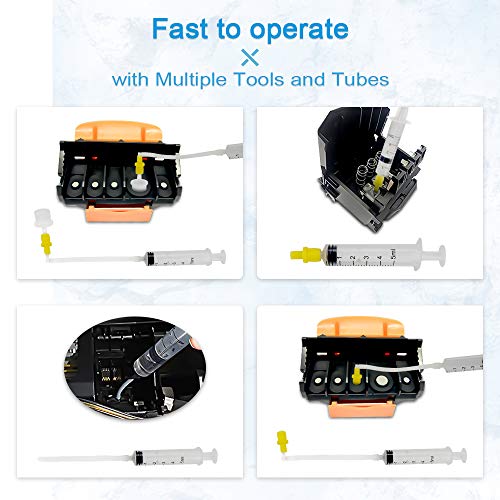
Had a gummed up print head on an HP MFP. Tube on syringe fit perfectly on the print heads. I did use something very absorbent to place in the print head track, other than paper towel. Get some cammode pads. They arent expensive and super absorbent (equals less potential mess to wipe down and clean up). Prior to cleaning, print jobs were super faded and sometimes blank with little spots. Only had to run it through once on each head and a tiny wipe down. On first print job attempt, post cleaning, all was great. Its a good product.
Luis –
Todo llego a tiempo, el producto funciona a la perfeccion ya lo use y si destapa los cabezales que tienen burbujas de aire.
CountryLane –
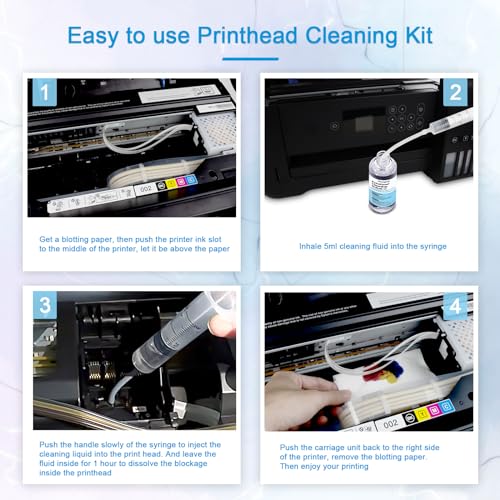
The kit included adapters to make it compatible with multiple models of printer. For my Epson Workforce, the silicone tube was all I needed. It slips over the printer header nipple pretty easily, but is very tough to get onto the end of the syringe so I recommend doing the latter first. Then fill the syringe with your solution before attaching it to the printer and irrigating each ink nipple. It took 2 irrigations for me to completely clean my unit and 2 cycles of the printer doing nozzle checks and 1 new ink cartridge before it was happy. However, this was much cheaper than buying a new printer! Solid product that fills a vital need.
OTHER IMPORTANT TIPS:
1) Watch some YouTube videos to understand how to park your print head in a position where you can access the internals after you power it off.
2) Extract the ink cartridges and put a piece of Scotch tape over the orifice. This will prevent leaking on your desk and keep it from drying out while the solution sits in your printer.
3) You may need to gently lift the print head assembly to slide your folded up paper towel under it to catch the solution (do NOT skip this step!).
4) Give it at least an hour of soaking time – several hours or overnight may be required if it’s badly gummed up.
5) A second dosing with the syringe may be necessary to flush out the gunk dissolved from the first attempt. (Using the syringe to pull and push the solution in and out may also help.)
6) Peel the Scotch tape off before reinserting the cartridges, then run Nozzle Check, Print Head Alignment, Cleaning Cycle and anything else available in the printer software.
7) Be prepared to buy new ink cartridges. Printers can be pretty hateful about messing with the cartridges and it may refuse to recognize them.
Pato McPickle –
I tried printing a copy of a printer purge file that had all colors and check which color was having a clog. Two colors had a 100% clog. I tried printing several times with the same result. Then did a light head cleaning (3 minutes) and that did not work. Stoped doing the 7 minute clean up until I tried this product.
I reluctantly purchased it as a last option before I gave up on the printer. Was already looking for new printers. When it arrived, i was ready but my ET-4700 did not readily lifted up to get to the printer heads. You have to remove two little screws right above where the printed page comes out. Then the top part goes up and you have full access to the printer heads.
You have to put something to keep the top of the printer opened. The next step is to put paper towel right under the printer heads. You have to fold the paper very tightly as there is not very much clearance between the printer head and the bottom of the printer. The syringe can eject 5mm at a time. This is good so that you don’t flood the bottom of the printer. The bottle comes with 100mm and it is recommended to flow no less than 20mm into each color head with a possible clog.
After the paper towel is in placed between the printer bottom and the printer head, you have to gently take the soft plastic tubes out of the cassette (a little reservoir box where the ink passes right before it prints to the page) that sits right on top of each printer head.
You have a choice to make as to where you plug the tube that comes out of your syringe.
1st Choice: Place the syringe tube on the same place as the soft plastic tubes that flow the ink from the big reservoir.
2nd Choice: Remove the cassette (a little reservoir box where the ink passes right before it prints to the page) that sits right on top of the print head and connect the syringe tube where the cassette makes contact with the print head.
I chose the first one as it seemed the most thorough option. The videos I saw stat that it is almost always right on the head but I though why not clean anything in the cassette as well. Plus the syringe connection to the print head did not all that tight (worried about leaks).
We did 4 flows (as the syringe has 5mm) for each troubled color (we had Yellow and Cyan with a complete clog). I had to be careful when i replaced the plunger after I filled the syringe with the clear fluid that came with the product. The plunger seems to have a very tight seal and I was afraid of shooting the liquid really fast as I replaced the plunger.
After you shoot 10mm of liquid; move the head towards the other side of the paper towel to get that side ready for the other 10mm of clear liquid. If you see the paper towel completely soaked in ink. Then replace it. I recommend using the gloves (plastic bag material) that came with the product of use your own nitrile gloves. The paper towel will be very saturated with a clear solution and remaining ink. Move the head to the left or right and remove the paper towel. Use another paper towel for the next color but if you see too much liquid, clean the printer bottom before moving to the next clogged color.
We only had two colors to do so, we used a few more paper towels to clean the bottom of the printer when we were done. Replaced the soft tubes that go to the cassette (gentle and slow proces) the tubes felt pretty delicate.
We went ahead and did the full printing head clean regardless (7 minutes). You have to turn the printer off and then hold power button + help button for a few seconds to turn on into full cleaning mode. I had full ink on the tanks before I started this process and then seven minutes later I saw that all had gone down, mostly the black ink for some reason.
Test post-product:
Printed the head alignment page and surprise!! I SAW ALL FOUR COLORS in all their glory!
Then printed a personal document and it was perfect.
Very good product and resulted just as intended. Will definitely have this on hand and also use the printer more often from here on.
Satisfied Customer.
Denice A. Minier –
This product is amazing and saved us from having to buy a new printer. You can’t go wrong with this product and the great price. After concluding we had a clogged print head and did all the maintenance we were left with cleaning the line. This product was easy, quick, affordable and a huge saver of money