
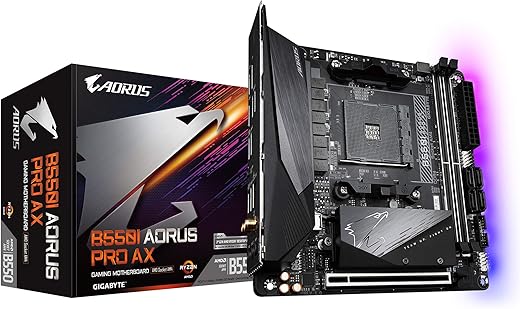
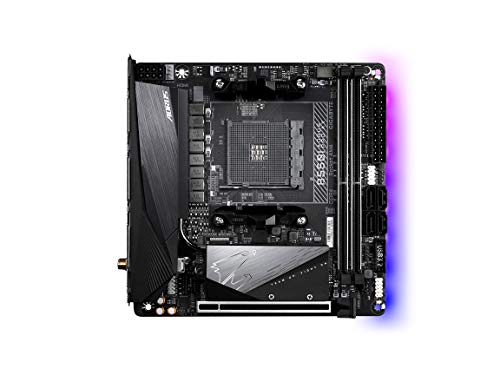
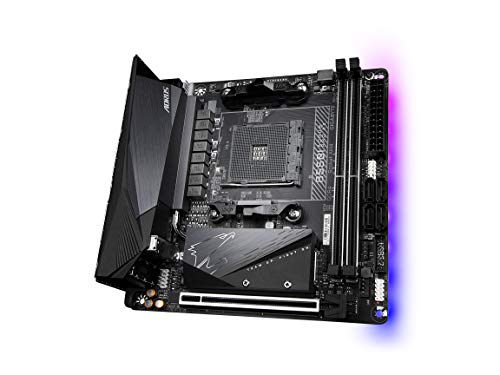
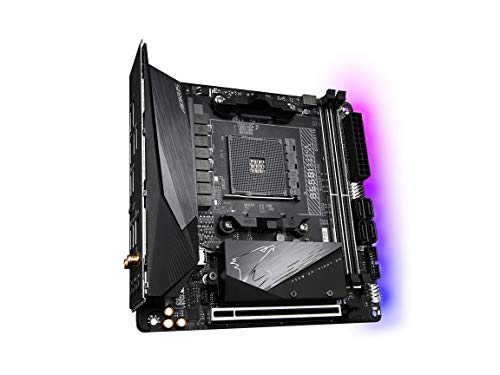
GIGABYTE B550I AORUS PRO AX Motherboard
 Newegg.com
  Neweggbusiness.com
  Woot.com
  Walmart.com
  eBay
eBay 
$49.99
GIGABYTE B550I AORUS PRO AX Motherboard Price comparison






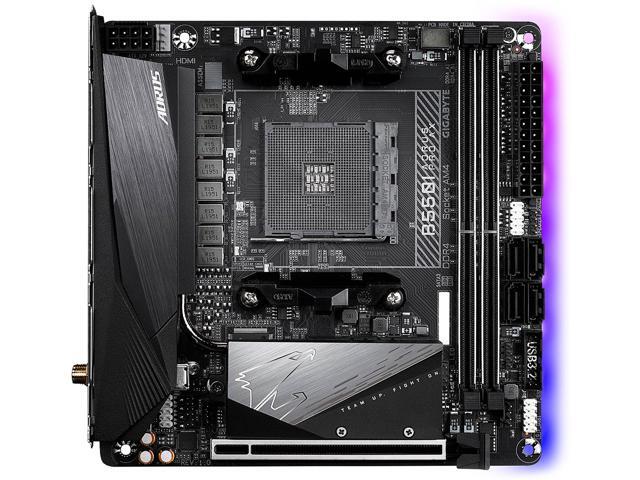

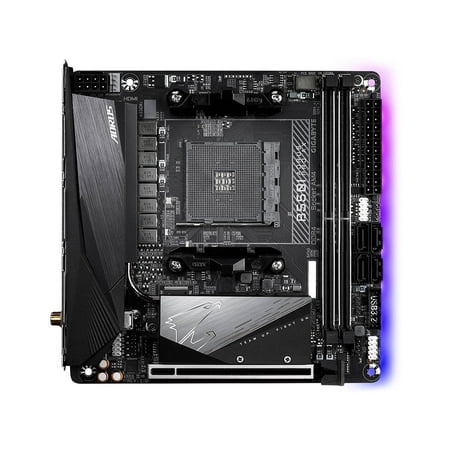



- All prices mentioned above are in United States dollar.
- This product is available at Amazon.com, Walmart.com, Newegg, Newegg Business.
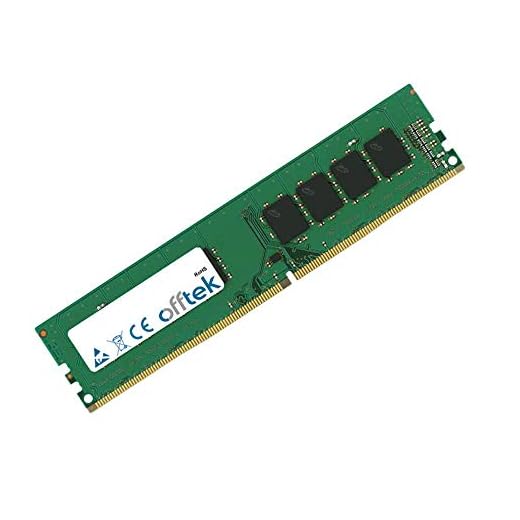
- At amazon.com you can purchase parts-quick 8GB Compatible Memory for Gigabyte B550I AORUS PRO AX Motherboard DDR4 3200MHz UDIMM RAM for only $49.99 , which is 76% less than the cost in Newegg Business ($209.99).
- The lowest price of Open Box - GIGABYTE B550I AORUS PRO AX AM4 AMD B550 Mini-ITX Motherboard with Dual M.2, SATA 6Gb/s, USB 3.2 Gen 1, WIFI 6, 2.5 GbE LAN, PCIe 4.0 was obtained on September 24, 2025 19:14.
GIGABYTE B550I AORUS PRO AX Motherboard Price History
GIGABYTE B550I AORUS PRO AX Motherboard Description
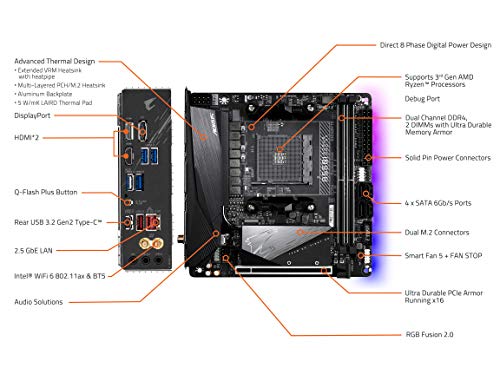
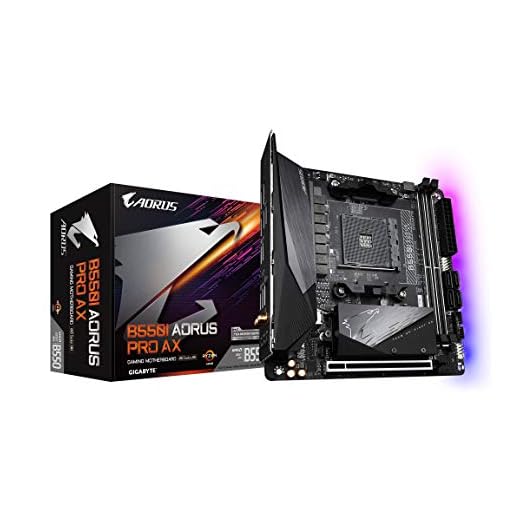
Discover the GIGABYTE B550I AORUS PRO AX Motherboard
The GIGABYTE B550I AORUS PRO AX Motherboard is designed for gaming enthusiasts who demand high performance and reliability. This compact yet powerful motherboard offers cutting-edge features while ensuring seamless wireless connectivity and efficient multitasking. Unleash your potential with this remarkable product, perfect for building your dream PC setup. Find the latest GIGABYTE B550I AORUS PRO AX Motherboard prices and reviews below.
Main Features and Benefits of the GIGABYTE B550I AORUS PRO AX Motherboard
-
Support for DDR4 Memory:
The GIGABYTE B550I AORUS PRO AX supports DDR4 SDRAM, providing maximum memory speeds of up to 2133 MHz. This ensures your PC can handle demanding applications and intense gaming sessions without lag. -
Advanced Wireless Connectivity:
Equipped with 802.11ax wireless technology, this motherboard delivers lightning-fast internet speeds and improved range. Enjoy smooth online gaming, streaming, and downloads without interruption. -
Multiple USB Ports:
Featuring two USB 2.0 ports, the B550I AORUS PRO AX offers flexibility for connecting multiple peripherals. Easily plug in your keyboard, mouse, and other devices while enjoying optimal performance. -
Compact Dimensions:
Measuring just 8.74 x 7.44 x 3.07 inches and weighing only 2.2 pounds, this motherboard is perfect for small form factor builds. It provides powerful components without taking up excess space in your case. -
Graphics Card Interface:
Compatible with PCI Express graphics cards, the B550I AORUS PRO AX ensures enhanced graphics performance. This makes it ideal for gamers and content creators who require top-notch visuals. -
Multiple HDMI Ports:
With two HDMI ports, this motherboard supports multiple displays, giving you the ability to expand your workspace or enhance your gaming experience.
Price Comparison for the GIGABYTE B550I AORUS PRO AX Motherboard
As of now, prices for the GIGABYTE B550I AORUS PRO AX Motherboard vary between retailers, allowing you to find the best value for your investment. Average prices range from $X to $Y, making it essential to compare options to get the best deal. Use our price comparison tool to see the most competitive offers and select the one that suits your budget.
6-Month Price Trend Analysis
The price history of the GIGABYTE B550I AORUS PRO AX Motherboard shows a steady demand among consumers. Over the past six months, prices have fluctuated slightly, indicating seasonal sales and restock periods. Currently, the trend indicates a stable price point, making this an ideal time to invest in a motherboard that promises high performance and longevity.
Customer Reviews Summary
Customer feedback on the GIGABYTE B550I AORUS PRO AX has been largely positive, with many users praising its performance and features. Common highlights include:
- Excellent build quality and durable materials.
- High-speed internet accessibility due to advanced wireless tech.
- Effortless installation process and compatibility with various components.
However, some users noted limitations in the number of memory slots and the absence of certain advanced features found in higher-end models. Overall, the consensus is that the benefits significantly outweigh these drawbacks, especially for its price range.
Unboxing and Review Videos
For a closer look at the GIGABYTE B550I AORUS PRO AX Motherboard, consider checking out unboxing and review videos available on YouTube. These videos provide insightful reviews, real-world performance tests, and installation guides, which can help you make an informed decision.
Conclusion
In summary, the GIGABYTE B550I AORUS PRO AX Motherboard is an excellent choice for gamers and PC builders alike. Its impressive specifications, including support for high-speed DDR4 memory and advanced wireless features, make it a standout product in the market. Don’t miss the opportunity to experience top-tier performance in a compact form factor.
Compare prices now!
GIGABYTE B550I AORUS PRO AX Motherboard Specification
Specification: GIGABYTE B550I AORUS PRO AX Motherboard
|
GIGABYTE B550I AORUS PRO AX Motherboard Videos


GIGABYTE B550I AORUS PRO AX Motherboard Reviews (11)
11 reviews for GIGABYTE B550I AORUS PRO AX Motherboard
Only logged in customers who have purchased this product may leave a review.


Robert –
I ordered a used board from Amazon, because of high pricing on many pc components lately thinking if it lasts me a year or two that would do. I received the product and it was a little beat up, but not horrible, but alas it was not working. This prompted me to return it for refund which lead me to a phrase in Amazon’s return script stating how can we make this right. They are only six benign words apart but put together they had an impact on me. What Amazon offered was a cross shipment with another board which turned out to be in excellent shape, and worked first boot. So this review is more a thank you to Amazon, more than anything. Also note on the packaging there was a sticker thanking me for giving this used product a second life, which made me feel good about my purchase. As for the motherboard it’s a great board, if your partial to mini ITX systems. You really don’t loose much over a full ATX besides case footprint. Perfect for limited space setups.
Michael Andrijich –
If you a high quality ITX board that works well with your Ryzen 5000 CPU and offers good value for your money, this is it. The WIFI and BT connections are a bonus.
Taylor Shin –
Grabbed this board on special and it was perfect for my ITX build. Paired it with a 5600x and 32gb of RAM and very happy with the performance.
Kindle Customer –
The ram slots are crunchy like they have sand in them. It’s probably why I’ve had a lot of trouble getting the ram to seat properly.
Trying to reset the bios is like pulling teeth. It doesn’t work. It takes me literally hours and the only reason it works sometimes is because I’ll make a hardware change like changing the ram or something. Right now I’m trying to reset the bios because I did an unstable CPU overclock and it freezes on the motherboard logo screen (just after post). I’ve tried everything, flipping the PSU switch and unplugging the power cord (just to be extra sure) and waiting a few minutes, and I’ve tried holding the pins jumped for varying amount time between 5 seconds and 1 minute. I’ll be damned if I have to completely disassemble my PC just to get to the cmos battery. If I can get the bios reset I’m just going to enable XMP and set my custom fan curve. I have zero confidence in overclocking on this board because I can’t reset the bios. On all my previous systems, there was no fuss. You just turn it off, disconnect power, jump the pins for about 10 seconds and boom, you can start tinkering again. Not on this board.
The drivers for the wifi and bluetooth don’t install very well. Windows pops up a prompt asking if they installed properly and I don’t know until I restart my system. Luckily they work.
I regret buying this board. It’s got a few cool features but the bad outweighs the good for me.
BryanBielka –
Do not now what to say.
It just works.
Will Chen –
Very solid the only complaint I have is the bluetooth issue. I literally had to buy a separate dongle to make it work. After updates installed and BIOS update as well it will simply no work properly have this in mind if planning on buying it
Desmond Chow –
約2.1万円で購入し、2020/08/12のレビューです。*2020/11/01に追記
<総評>
他社製よりも癖が少なく、幅広い層にお勧めできる製品です。B550らしくチップセットやVRMにファンがついていないため静音性重視の人にはうれしい設計です。ヒートシンクが立派なため冷却面にも抜かりはありません。パッシブな冷却方法を採用しているためトップフローのCPUクーラーの相性が良いと考えられます。
減点部分としてはフロント用のUSB Type-Cヘッダーがない点と水冷ポンプ用のヘッダーがない点と光デジタル端子がない点です。逆に言えば、水冷・光デジタル端子を使用せず、ケースにType-Cがない人の場合欠点がないです。シンプルで優れた構成を可能とするMini-ITXマザーボードです。
<主な特徴>
・Mini-ITXマザーボード(170mm×170mm)
・B550のチップセット
・CPUの互換性:Ryzen 3000シリーズ(末尾がX,XT,無印)、Ryzen 4000Gシリーズ、Ryzen 5000シリーズ
・6+2の電源フェーズ設計(90Aの電源フェーズのため性能的には十分)
・一体型のIOパネルとマザーボードのバックプレートの装備
・パッシブな冷却機構(マザーボード上に冷却ファンがない)
・2つのメモリスロット(2×DDR4 DIMM)と1つのPCIE×16スロット
・2×リア側USB3.2 Gen2(Type-A×1個、Type-C×1個)
・6×USB3.2 Gen1(リア側USB Type-A×4個、フロント側×2個)
・WiFi6機能(2020/8/21時点で最新の無線LAN)(Wireless AX 200)
・Realtekl製2.5ギガビット有線LAN(2.5GbEの場合Intel製よりおすすめ)
・Realtek ALC 1220ベースのオーディオチップ(音質はそこそこ良い方です)
・リア側に3.5mmオーディオジャック×3個
・2個×HDMI2.1、1個×DisplayPort1.4
・2つのケースファンコネクタ
・Q-Flash Plus機能(BIOSをCPU/メモリ抜きで更新する機能で、新CPU発売/メモリで詰んだときに重宝する。)
・4×SATA3.0端子(排他利用制限なし)
・2×M.2スロット(表側にPCIE4.0×4/SATAのM.2、裏側にPCIE3.0×4/SATAのM.2)
*Ryzen 4000Gシリーズの場合、M.2とPCIE×16スロットがPCIE4.0から3.0に置換される
<BIOSバージョンごとの対応CPU>
Ryzen 3000シリーズ→全てのバージョンで対応(セキュリティ更新のためF2以上がおすすめ)
Ryzen 4000Gシリーズ→F2以上(メモリ互換性向上のためF3以上がおすすめ)
Ryzen 5000シリーズ→F10以上
<詳細な評価(ハードウェア面)>
VRMフェーズ数自体は多くないが1フェーズ当たりの性能が高いため、実は強力な電源設計をしています。IOパネルが一体型でマザーボードにもバックプレートが備えているため、自作初心者にありがちなIOパネル取り付け忘れやボード裏を傷つけて故障の原因になることを防げます。
ストレージ面としては裏と表に1個ずつM.2があるのでPCIE4.0対応のM.2 SSDの導入を考えている人にはうれしいです。
音質面について記します。Realtek ALC 1220ベースのチップが採用されているので、音質に不満はないです。ただし、見た感じオペアンプがないので音質面に過度な期待は禁物です。試していませんが、高インピーダンスのヘッドホンを使うには不向きと考えられます。しかしながら、この音質で不満に感じるならサウンドカード/ユニット(Sound Blaster X3など)を使用した方が満足すると思います。
IO関連も充実しています。内臓グラフィックスで3画面出力対応し、USBの個数は合計で6~10個です。内臓グラフィックスによる画面出力数の多さは強みの一つです。
マザーボードのレイアウトに関して、標準的なレイアウトで癖が少なく、ケースとの相性を問うようなレイアウトではないです。
欠点に関してもMini-ITX用のケースを使用して、水冷やフロントUSB Type-Cを使用する人は少ないでしょう。Mini-ITXという規格上、シンプルな構成になりやすいので、純粋な性能を追求した良い設計です。
逆に水冷(240mm以上)とType-Cを活かせるMini-ITXらしい小型ケースはかなり限られます。私が知る限り、今のところFractal DesignのEra ITXくらいです。
<詳細な評価(ソフトウェア面)>
Ryzen 5 3600を装着したときは問題がありませんでしたが、Ryzen 5 PRO 4650Gを使用したとき、F4-3200C16D-16GTZRX(DDR4-3200のOCメモリ)のブルースクリーンが発生しました(2020/08/12時点)。仕方がないのでCMK16GX4M2B3000C15(DDR4-3000のOCメモリ)に交換したら正常に動作できました。
某有名オーバークロッカーも述べていましたが、Ryzen 4000Gシリーズはまだまだメモリ互換性の最適化ができておらずエラーが起きやすいようです。実際Ryzen 5 3600のときは問題がなかったので、この推測は正解だと考えられます。
AMDの新作CPUの発売直後にはよくあることですので、おそらく今後のBIOSアップデートでメモリ互換性が向上すると思います。DDR4-3200が動作しなくても、新しいBIOSが公開されるまでは動作周波数を落として使用することをお勧めします。仮にBIOSが原因で、PCの起動がうまくいかなくてもQ-Flash PlusボタンでBIOS更新できます。BIOSで手詰まりになった場合、ぜひ試してみてください。
BIOSの設定項目の種類はROG Strix X570-E Gamingと比べると劣りますが、必要十分な項目があります。GigabyteのBIOSのデザインが新しくなっており、スタイリッシュでした。
Gigabyte製の付属ユーティリティーはいつも通りの完成度です。Gigabyte製の特徴としては様々な種類のユーティリティーが充実しており、OC、ハードウェア監視、RGB機能等と色々できます。初めて購入する人にとってはユーティリティーが多くて煩雑ですが、とりあえずAPP Centerをインストールすると良いです。ちなみに光らせる機能としてはASUSやMSIには劣ります。
(2020/11/01追記)
F11dのBIOSバージョンにてブルースクリーンになったメモリが使用できました。F3のアップデートでメモリ互換性の向上があったからだと思います。
<デザイン>
好みの問題ですが、デザインは秀逸です。派手さがなく、上品なデザインに一目惚れしました。芸術的です。
<その他>
細かい点ですが、バックパネルI/Oの2つのアンテナコネクタ間距離が近すぎるため自分で用意したアンテナが装着できない可能性があります。付属アンテナは問題なく装着できますが、結構大きいので気になります。アンテナのベース部分にマグネットがついているので、鋼製のケースと相性が良いです。
2つの4ピンケースファンコネクタについてですが、片方のコネクタの形状が通常の規格でないです。梱包された変換ケーブルがで通常の規格にできます。
<所感>
個人的に他社製のMini-ITXマザーに気に入らなかった点(X570なら許容できるがB550にファンが付いている、iGPUの画面出力数が相対的に少ない、価格が高い等)が多かったため、B550I AORUS PRO AXを購入しました。正直Gigabyteには良くも悪くもない印象を持ってますが、この商品に関しては大変素晴らしいと思います。
<使用環境>
マザーボードのBIOSバージョン:F11d(Amazonから届いた時点(2020年8月上旬)はF2)
CPU:Ryzen 5 PRO 4650G
グラフィックス:内臓グラフィックス(ドライバはAdrenalin 2020 10.1を使用)
メモリ:CMK16GX4M2B3000C15(8GB×2枚、XMPで3000MHzで使用)
電源ユニット:KRPW-TX300W/90+
<参考ベンチマーク>
Cinebench R20(全コア):約3500点
ドラクエ10(最高品質、フルHD、ウインドウ):約10300点
*マザーボード自体に問題はなさそうです。
Will Chen –
The Gigabyte B550I Aorus Pro AX is one of the most affordable B550 ITX motherboards on the market at the time of this review, yet it is also extremely solid with all the latest features that an enthusiast may want in an ITX motherboard.
Pros:
For myself personally, the reasons for choosing this motherboard or a B550 board in general, is to have better/sooner support for the Ryzen 5000 series, along with things like PCIe 4.0, USB 3.2, and 2.5 Gigabit Ethernet. This board also features a very handy Q-Flash feature for flashing the BIOS without having anything aside from a power supply and a USB stick, so no need to worry about having a Ryzen 3000 series chip on-hand to flash the latest BIOS. The board also features a backplate that really makes it feel like a properly premium and sturdy product. Compared to its X570 sibling, this board is around $30 less expensive but does not lack anything notable in my opinion, aside from the M.2 slot on the back of the board being PCIe 3.0 whereas the X570 version has PCIe 4.0 on both M.2 slots. The B550 also does not have a chipset cooling fan, which to me is an advantage over the X570 because it eliminates a potential source of noise and premature failure.
It’s also worth noting that the chipset fan on the X570 version takes up one of the 3 fan headers, whereas all 3 headers on this board are usable. The X570 version also appears to only have USB 3.1 Gen 2 and 1.0 Gigabit Ethernet.
Cons:
This board does not have any provisions for front panel USB-C ports, so beware if your case features any USB-C ports that will need to be connected to the motherboard. Officially, the B550 chipset only supports Ryzen 3000 series out of the box, with Ryzen 5000 support enabled via a BIOS update. On the other hand, the X570 version will support Ryzen 2000 series as well, so in that regard the B550 board does lack a bit of flexibility.
Additional Notes:
I picked up this motherboard with the intention of using it with a Ryzen 5000 series chip when I get around to buying one sometime next year. The reason for buying this board now is mainly because availability for this board has been very inconsistent until recently, so I figured it would be wise to buy one while it’s readily available. I’m currently using a Ryzen 2700X which isn’t officially supported by the B550 chipset, so I was originally going to leave this board on the shelf until I got a Ryzen 5000 series CPU.
I saw a few reports of people getting 2000 series CPUs to work in B550 boards, though they were few and far in between. However, I was going to go ahead and flash this board to BIOS version F10 to enable Ryzen 5000 support, so I thought it wouldn’t hurt to check if my 2700X will post in this board while I’m at it. The board was probably preloaded with the F1 or F2 BIOS out of the box, and I got nothing but a black screen when I tried to boot. However, after flashing to the F10 BIOS, I was massively surprised to see that it was able to post, and everything seemed to function normally in the BIOS. I proceeded to go a step further and installed my boot drive to see if it will boot into Windows, and I couldn’t quite believe my eyes when it reached desktop without any noticeable issues, and without reinstalling Windows or any of the drivers.
Fast forward to today, and I’m running the F11b BIOS from October 19 with “additional optimizations” for Ryzen 5000 series, which actually enabled XMP for me, something that wasn’t working on the F10 BIOS. I have now reinstalled Windows and have been fine-tuning all the details without any problems whatsoever. I couldn’t be any happier with this board, everything from its features and construction to the unexpected support for older chips like mine. I would also like to add that the F10 BIOS which enabled Ryzen 5000 support was released on September 18, before the Ryzen 5000 series was even announced. I don’t see how Gigabyte could possibly have been further ahead of the curve when it comes to product support, and they have done a truly excellent job with this board.
Kindleのお客様 –
Note: Purchased September 2022, I received a Rev 1.1 board that fixes Bluetooth and WiFi/Ethernet issues. Make sure to use the provided antenna!
Running this board in my NR200P Max, with a 5800X3D + EVGA 3090FTW, 32GB of Trident Z Neo memory. Absolutely phenomenal build quality and power delivery. PBO2 tuner and undervolting the 5800X3D gave some great performance and low temperatures.
Easy to build in, the backplate is rigid and protective, plus enables great heat transfer.
A small nitpick is the main M.2 slot has a heatsink and a decorative cover that goes over the heatsink, leave that off for better drive thermals. Installing the main NVMe requires you to remove a nut over the screw, not explained in the manual but Youtube was able to explain it.
Othewise, over a month of heavy usage with no issues whatsoever. Great BIOS, features, build and performance. Best in class power delivery for any ITX B550 board.
Mathew Beckstead –
The goods:
1. Back panel shield is integrated to the board! Handy!
2. Backside (the other side that CPU and RAM mounts) has protective plate! Even better!
3. RAM slot is 2 latch model. Much easier to install than ASUS B550I!
4. ITX board! Yet has 2 chassis fan controllers there.
Bads:
1. Accessories are a bit lacking. But who installs multiple SATA drives these days? Especially on ITX builds?
2. VRM Heat sinks are too thick. Be Quiet! Shadow Rock LP does not fit unless your memory module has low height. Gigabyte B450I was able to accept the cooler with VRM covering orientation.
–> Some cases may have problem if you wish to install 240 AIO radiator on the top ventilation set up.
3. Outer chunk of the front side M.2 SSD heat sink is not really functional. Additional thermal tape would be needed for it to be actually functional. This is very nice chunky metal piece.
4. No front side USB-C type connector. Not a problem if your case do not have USB-C port anyway. But it could be a bummer for some cases.
5. No dedicated PWM port for AIO cooler pump control.
6. No AURA 5V RGB sync header… but this isn’t an ASUS board.
Remarks
1. Mine came with 2022 BIOS. But Gigabyte have most recent 2023 bios on their product web site.
2. Board title appears perfectly on Linux! Did not expect this!
3. No WiFi/Bluetooth instability yet. Pop! OS 22.04. Kernel 6.2
4. One of the chassis PWM connector is rather very small JST type small pin socket rather than typical 4 pin connector. You have to use the converter cable that comes with the board.
R. Kirby –
Pro:
Price compared to the near competition from other top tier brands like Asus and MSI. So far there have been regular BIOS updates. No issues with compatibility so far. Power delivery is top notch compared to other brands.
Con:
The LED software did not work universally with my graphics card or RAM. I’m more familiar with the Asus BIOS and this one doesn’t seem as intuitive. No issues with stability though.
Thoughts:
I was thinking of just buying the Asus B550i board, but it was $40 more expensive. The reviews online seemed to indicate that the power delivery on this board is better. I paired the motherboard with an AMD Ryzen 9 5950x and it works great. Overall, I am happy with the purchase even though I miss the Asus BIOS.