
Keychron K10 Wireless Mechanical Keyboard Aluminum Frame
 Amazon.com
$114.99
Keychron K10 Wireless Mechanical Keyboard Aluminum Frame Price comparison


- All prices mentioned above are in United States dollar.
- This product is available at Amazon.com.
- At amazon.com you can purchase Keychron K10 Wireless Mechanical Keyboard with Gateron G Pro Brown Switch Aluminum Frame for only $114.99
- The lowest price of Keychron K10 Wireless Mechanical Keyboard with Gateron G Pro Brown Switch Aluminum Frame was obtained on September 24, 2025 07:47.
Keychron K10 Wireless Mechanical Keyboard Aluminum Frame Price History
Keychron K10 Wireless Mechanical Keyboard Aluminum Frame Description
Keychron K10 Wireless Mechanical Keyboard Aluminum Frame
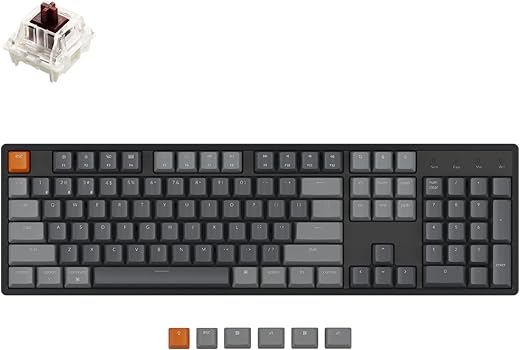
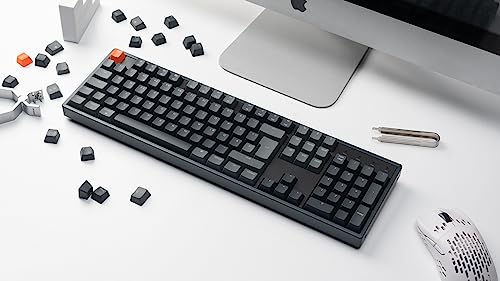
The Keychron K10 Wireless Mechanical Keyboard boasts a sleek aluminum frame and a range of impressive features that cater to both gamers and typists alike. With its ergonomic design and customizable backlighting, this keyboard elevates your typing experience while enhancing your workspace aesthetics. Explore detailed price comparisons, customer reviews, and trending insights on this must-have device!
Main Features of the Keychron K10
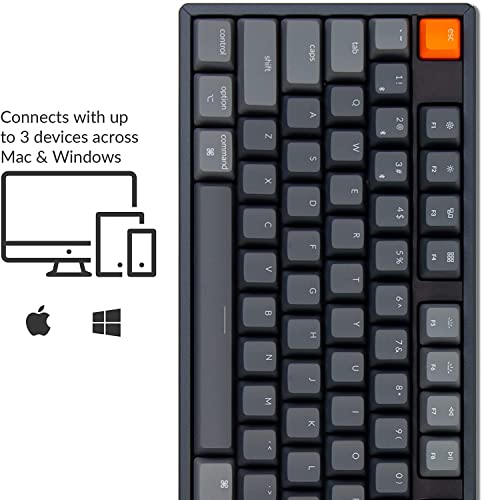
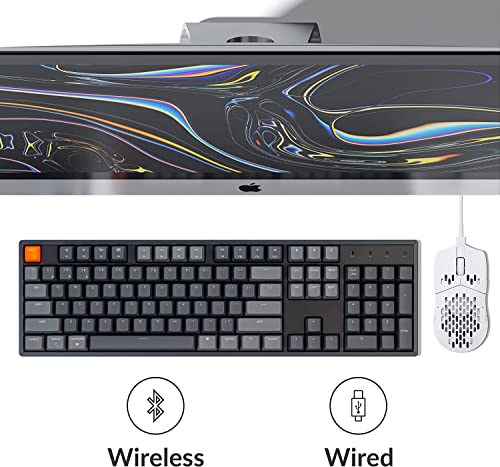
- Wireless Connectivity: Enjoy the freedom of a wireless connection via Bluetooth, allowing seamless switching between multiple devices such as laptops, tablets, and smartphones.
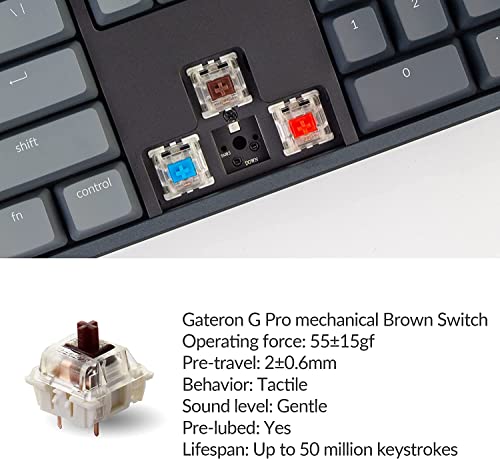
- Hot-Swap Gateron G Pro Brown Switch: Experience tactile feedback with every keystroke, making typing both satisfying and efficient. Easily switch out keys without soldering, offering you customization opportunities.
- RGB Backlighting: Illuminate your keyboard with multiple RGB backlighting options to match your setup or mood. Choose from a variety of colors and effects, making your workspace vibrant.
- Rechargeable Battery: The Keychron K10 is equipped with a lithium polymer battery that provides long-lasting power, ensuring that you can use it for hours without interruption.
- Ergonomic Design: With its aluminum frame and comfortable key layout, the keyboard promotes better posture and enhances your typing comfort, even during extended use.
- Compact Layout: Measuring 17.72”L x 5.51”W x 1.77”H, the K10’s compact design saves desktop space while maintaining a full set of 104 keys.
Price Comparison Across Suppliers
When it comes to Keychron K10 price, this keyboard is competitively priced across various platforms. As of now, prices range from $79.99 to $99.99 depending on the retailer. Notably, price fluctuations during promotional events may present opportunities to grab this keyboard at an even lower cost.
6-Month Price History Insights
The 6-month price history of the Keychron K10 shows a steady demand, with an average price hovering around $89.99. Interestingly, the keyboard experienced a slight peak in price during major sales events, aligning with typical consumer purchasing trends.
Customer Reviews Summary
Users have praised the Keychron K10 for its durable build quality and exceptional performance. A majority of reviews highlight the satisfying tactile feedback and smooth keystrokes fostered by the Gateron switches. Customers appreciate its easy connectivity and impressive battery life. Some noted areas for improvement include its non-water-resistant design, which some consider a drawback for accidental spills.
Positive Highlights
- Excellent build quality
- Customizable RGB lighting
- Responsive keys with great tactile feedback
Constructive Critique
- No water resistance
- Price fluctuations during sales may confuse buyers
Explore Unboxing and Reviews
For those interested in seeing the Keychron K10 review in action, several YouTube creators provide thorough unboxing and gameplay demonstrations. These videos showcase the keyboard’s features live and offer insights into its performance during gaming and typing tasks, helping you make a well-informed purchasing decision.
In summary, the Keychron K10 Wireless Mechanical Keyboard is a formidable option for anyone seeking a reliable, stylish, and functional keyboard. Its hot-swap feature and ergonomic design cater to both gamers and professionals, ensuring comfort during long hours of use. With competitive pricing and rich features, the K10 stands out in the crowded market of mechanical keyboards.
Don’t miss out on this excellent keyboard—compare prices now! Leverage the insights and reviews available to guide your purchase, ensuring that you make the best choice for your typing needs.
Keychron K10 Wireless Mechanical Keyboard Aluminum Frame Specification
Specification: Keychron K10 Wireless Mechanical Keyboard Aluminum Frame
|
Keychron K10 Wireless Mechanical Keyboard Aluminum Frame Reviews (12)
12 reviews for Keychron K10 Wireless Mechanical Keyboard Aluminum Frame
Only logged in customers who have purchased this product may leave a review.






Shelby W. –
Dies ist die erste mechanische Tastatur, die ich nun schon etwas länger einsetze. Mir fehlt also ein wirklicher Vergleich zu anderen Tastaturen, aber ich bin insgesamt sehr angetan. Sie ist sehr robust, funktioniert am Mac wunderbar und sehr zuverlässig. Toll war, dass sie direkt für den Mac konfiguriert kam, alternative Tastenkappen für Windows lagen bei.
YS –
the keys are a dream to type with. I use for coding, not gaming.
Will Powell –
For me this is the perfect mechanical keyboard. I am particular about what I type on so I have tried out multiple in the past few years. I also test out the sample displays any time I go into a physical electronics store. By far this one feels the best. I got the aluminum frame, red switches. The keycaps are a very pleasant color scheme and have a bit of a soft, matte rubber type finish to them which makes the tops feel good. The font is clean and minimalist and the sound that the keys make is satisfying — soft clicking with a satisfying thud when they hit the bottom of their travel.
The wireless pairing works very well — connects quickly and stays connected. I have had others prone to spontaneous disconnects. USB-C is a big plus. The built in lighting patterns look great although that is not something that I use very often. Multiple different colors schemes and movement patterns as well as an all white backlight option if you just want a normal backlight.
I have not had the keyboard for long so I can’t speak to the longevity, but it certainly feels like something that is going to last. I was hesitant to get another keyboard since mine was in fine condition, but I am very happy with this one and plan on keeping it. I don’t think I need to look any further.
Lewis F –
i love it, and my partner is jealous.
Bluetooth connection isnt supppppper far but can’t imagine it being too far away from your pc anyways. Works mostly okay when the PC is against the wall behind the TV and Keyboard is with me on the sofa, sometimes has troubles but mostly okay.
Amazon Customer –
Pretty solid keyboard, I love that I can swap out the switches if one is bad. Feels really nice to type on, in fact made my Corsair mech keyboard feel like cheap garbage.
Lewis F –
Habe längere Zeit gesucht um eine Full Size, DIN-ISO-DE Tastatur mit Hotswap und BT zu finden.
Die Tastatur ist sehr wertig verarbeitet und hat durch das Aluminiumgehäuse und die 4000mAH Batterie ein ziemlich hohes Gewicht. Das ist sehr angenehm, weil die Tastatur dadurch sehr sicher auf dem Schreibtisch steht und sich nicht verschiebt.
Der Anschlag und das Tastgefühl der Brown Keys ist sicherlich Geschmackssache, für mich funktionieren sie sehr gut. Das muss aber jeder für sich selbst entscheiden.
Etwas störend finde ich das die Tastatur nach 10 Minuten in den Energiesparmodus geht. Wenn man die Arbeit dann wieder aufnimmt, werden die ersten zwei oder drei Tastenanschläge nicht übertragen. Diese Energiesparfunktion kann aber abgeschaltet werden, daher ist das kein Minuspunkt.
Für mich ist das die perfekte Tastatur in Verbindung mit dem Laptop im Homeoffice.
J-rad –
The Good: Sturdily built, great action/sound on the brown switches, nice keycaps, pleasing RGB options, attractive.
The Bad: Bluetooth performance is terrible. Keystrokes intermittently lag or repeat. This is particularly true if I have my BT mouse and BT headset all going at the same time. That’s no excuse. It’s very frustrating.
The other complaint I have about Bluetooth is how rapidly it chews through the keyboard’s battery. By default, they keyboard goes to sleep after 10 minutes on BT. This was annoying to me, so I turned off auto-sleep. I then discovered why the default is 10 minutes. The battery will completely deplete in about 48 hours if you leave it on BT the whole time. Even when not in use, BT rapidly drains the batter. In contrast, my BT mouse and Magic Keyboard will last about a month on one charge, even if left on the entire time. I don’t know the technical reasons for this, but I suspect Keychron is using older BT technology.
My last complaint is placement of the USB port for a wired connection/charging. It’s on the side. I would much prefer the port to be back/center. On the side, it throws off placement of other stuff on the desk.
dj mcintosh –
I think this was exactly what I was looking for. It has the perfect keystroke for me, everything is very beefy. It does make that old type of keyboard noise from e keyboards of the past, but that is what I was looking for. I can really fly with this sort of feedback that I am receiving from this unit. It’s heavy, so probably not the best to put on your lap for long periods of time. With most blue tooth items, it tends to shut down when not using. If I’m not paying attention, I will be 50 keystrokes in and then I realize that the keyboard missed the first five strokes. So, when you go back to the keyboard after not using, then you need to make sure it has woken up. The lights options are very subtle and it most certainly won’t keep you awake if you sleep near it! I’m not sure how it might be for gaming as I don’t do that.
pros: great feel, minimal distractions from led lights, low sound, works for mac and windows (I’m using windows, battery has a long charge!
cons: goes to sleep like other blue tooth devices, heavy for long term lap use, heavy
Andreas –
Just received the keyboard, typing my first impressions on it.
TLDR: Keep away!
Pros:
– Good keys and sounds.
– Standard size with no bells and whistles. Almost.
Cons:
– Doesn’t work through USB hub in cable mode.
– Doesn’t have Scroll Lock and Pause/Break keys (!!!!!!!!!!!!!!!!!!)
– Doesn’t provide a way to remap keys it does have instead of those. 3-rd party Utility from manual doesn’t help.
– Potential issues with BT mode (based on other reviews).
Review:
Keys/keycaps and click sound – good. Size – standard, nothing excessive, small bezels.
Turning on in cable mode through USB 3 hub – doesn’t work. Back light works, pressing keys results in nothing. Only fixed when used direct USB port on a laptop.
Turning on in BT mode – seems to work so far. Many reviewers had problems with BT at later stages, so keeping an eye on this one.
“Why only 2 stars?” – I hear you asking. Well, it is called a full-size keyboard, and it kinda is. It does include calculator keys. It is called a 104 keys keyboard, and again – it kinda is. But the 104 keys must be the 104 keys we expect, not just some random 104 keys. A keyboard with 104 “W” keys would not be very useful, would it? Check the attached picture of a keyboard – this keyboard does not have Scroll Lock key and Pause/Break key. There is no way to reprogram that useless trash they replaced them with back to regular keys. And most frustratingly – none of a dozen reviews mentions it! I happen to use these keys quite often in my work. Even on small laptop keyboards they are replaced by key combinations with Fn key, but not here. This is a “full size keyboard” after all. But photos are there on internet, so jokes on me, I guess.
The included “manual” mentions the “remapping” functionality. To do this (I am not kidding you!) we need to use 3-rd party utility. Care to guess how many of the 2 keys I managed to remap with said utility? Correct, 0 (Zero). The manual doesn’t even include the key combination. Just go to the web-site to learn them. Why? It’s not like they are going to change.
P.S. If Keychron “designers” are reading this – there is a reason why 104 key are what they are. If I didn’t need 104 keys – I would not buy a full-size keyboard. But I do need 104 keys. Not 101, not 102, not 103 – all 104! Even if you are incapable of understanding it due to some cognitive limitations of yours – just take my word for it. What you do is not innovation. Give us a tool to reprogram the keys back to what they are supposed to do! This is something even you should be capable of. If not – at the very least put the warning on keyboard’s page on your web-site. Until we get the tool – my rating stays low, and my advice – keep away from it. Buy a real full-size keyboard, not this “innovative approximation”.
RobertB –
I like these so much, I’ve bought 3 of them for the family. After working for years with a number pad, I can’t go without one. All three keyboards have the Gateron G Pro Brown switches. Aluminum chassis and RGB lit keys. Solid super well built keyboards. These keyboards can be used with Windows or Mac, and come with the special keys for both along with a key puller. Theres a little switch on the side to switch it for windows or mac.
They also run wireless or wired. We run them wired with the included usb-c cable. I found running a laptop with monitors connected to a docking station, theres a slight bit of lag displaying on the monitors. Connecting the usb cable solves that. I have not tried wireless using the laptop screen. I’m reasonably certain that would be no problem since the docking station wouldn’t be involved.
Solid super well built keyboards
Highly recommend any of the Keychron keyboards. Go to the Keychron website to see the latest and greatest. New models eventually show up on Amazon
Roxy –
My wife has a red switch low profile Keychron K5 SE. Love the sound and look of it, so I wanted my own. Went with this version as I like standard key caps. Got the brown switch for a little more tactile feel. It’s perfect. Very quiet, with a buttery soft clunk on the keys. I use it in a super quiet office and no one says anything about it. No louder than a mouse clicks, but nicer sound.
Looks so damn cool on my desk. The metal frame is a nice touch and the keyboard is hefty. Easily switched from wired to bluetooth and both work equally well. Lights are soft, but I can’t see them in my bright office so I keep them off. In a dark room, they would look so cool.
Very nice features and fee to this keyboard. Keychron is a little more expensive but you get what you pay for. Makes me want to type everything out rather than copy/paste.
RobertB –
I love how sturdy and responsive this keyboard is. It has taken me some getting used to because I am used to low profile keys, but I find it much easier playing games with this keyboard. The light options are endless too, it seems! Being able to swap out keys is nice. It is pretty clacky so I did get some rings to dull but would absolutely recommend this keyboard.