
 Amazon.com
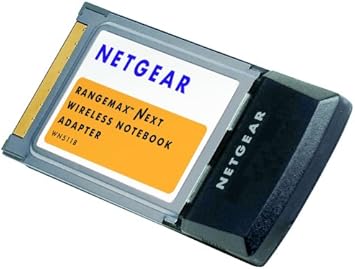
NETGEAR RangeMax Wireless-N Notebook Adapter WN511B Price comparison


- All prices mentioned above are in United States dollar.
- At amazon.com you can purchase NETGEAR WN511B RangeMax Wireless-N Notebook Adapter for only
- The lowest price of NETGEAR WN511B RangeMax Wireless-N Notebook Adapter was obtained on September 24, 2025 03:59.
NETGEAR RangeMax Wireless-N Notebook Adapter WN511B Price History
NETGEAR RangeMax Wireless-N Notebook Adapter WN511B Description
NETGEAR RangeMax Wireless-N Notebook Adapter WN511B: The Ultimate Wireless Solution
Discover the NETGEAR RangeMax Wireless-N Notebook Adapter WN511B, designed for seamless connectivity and high-speed internet access. This adapter provides the perfect solution for users looking to enhance their wireless experience on laptops or notebooks. With robust performance and reliability, the WN511B stands out among its competitors. Read on to learn more about its features, price comparison, and customer reviews.
Key Features of NETGEAR RangeMax Wireless-N Notebook Adapter WN511B
- Wireless-N Technology: Enjoy high-speed internet with a maximum data rate of up to 300 Mbps. This ensures smooth browsing, streaming, and gaming experiences.
- Easy Installation: Set up in minutes with the included installation CD. Connect your adapter to your notebook and start enjoying the internet instantly.
- Wide Range Coverage: Benefit from extended range with RangeMax technology, allowing you to connect from further distances without losing speed.
- Compatibility: The WN511B is compatible with both Windows and Mac operating systems, providing flexibility and convenience for various users.
- Robust Security: Features advanced security measures, such as WPA/WPA2 and WEP encryption, to keep your internet connection secure.
- Sleek Design: Compact dimensions of 9 x 6.5 x 2 inches make it a portable choice, easily fitting into your bag without bulk.
Price Comparison Across Different Suppliers
The current prices for the NETGEAR RangeMax Wireless-N Notebook Adapter WN511B vary among different suppliers. While retailers may offer promotional discounts, it’s essential to compare the prices to ensure you get the best deal. Our price comparison tool allows you to easily see how the prices stack up across various platforms. This transparency helps you make informed purchasing decisions while maximizing savings.
Analyzing the 6-Month Price History Trend
The price history over the past six months has shown some interesting trends. Initially, the WN511B experienced slight fluctuations, but recently, the trend has been a gradual decline in price, making it an excellent time to purchase. This trend indicates increased competition among suppliers, providing consumers with more opportunities for savings on this essential device.
Customer Reviews: Pros and Cons
Customer feedback plays a crucial role in understanding the performance of the NETGEAR RangeMax Wireless-N Notebook Adapter WN511B. Overall, reviews highlight several positive aspects:
- Users are highly satisfied with the adapter’s high-speed performance, especially for streaming and online gaming.
- The easy installation process is frequently appreciated, allowing users to get connected quickly.
- Many customers commend the extended range, noting they can connect to their network from considerable distances.
However, some drawbacks have been reported:
- A few users expressed concerns regarding compatibility issues with certain newer devices.
- There were occasional mentions of connectivity instability in small spaces, although these instances are not common.
Explore Unboxing and Review Videos
For those interested in a more hands-on review, many YouTube channels have featured unboxing videos of the NETGEAR RangeMax Wireless-N Notebook Adapter WN511B. Watching these videos can provide a visual insight into the product’s functionality, installation process, and real-life performance. Get a better sense of the adapter’s capabilities and see it in action before making your purchase!
Why Choose NETGEAR RangeMax Wireless-N Notebook Adapter WN511B?
With its excellent speed capabilities and reliable performance, the NETGEAR RangeMax Wireless-N Notebook Adapter WN511B is an outstanding choice for anyone needing reliable wireless access. Its competitive pricing offers tremendous value, especially given the performance benefits. As consumer demand continues to grow, this adapter remains a top contender in the wireless market.
Final Thoughts on the NETGEAR RangeMax Wireless-N Notebook Adapter WN511B
The NETGEAR RangeMax Wireless-N Notebook Adapter WN511B is built for those who prioritize speed and reliability in their wireless connection. Whether you’re gaming, streaming, or browsing, this adapter is designed to meet and exceed your needs. Don’t miss out on the current pricing trends—
Compare prices now!
NETGEAR RangeMax Wireless-N Notebook Adapter WN511B Specification
Specification: NETGEAR RangeMax Wireless-N Notebook Adapter WN511B
|
NETGEAR RangeMax Wireless-N Notebook Adapter WN511B Reviews (8)
8 reviews for NETGEAR RangeMax Wireless-N Notebook Adapter WN511B
Only logged in customers who have purchased this product may leave a review.






T. K. Lowell –
From the reviews I read, it was supposed to work on Win98, which it does not.
Steven –
If I traveled back in time to 2008 I’d see this exact unit on the shelf at a Best Buy in the same state it’s in now, shrink wrapped and ready to rock.
I bought this to help a failing P2 laptop running Windows XP SP3 get back online to update some ancient software for work. Drivers from the CD worked flawlessly and the card connected to the 2.4Ghz network without a hitch. The speeds were excellent, faster than the poor 4GB drive in this unit could write. Legacy hardware like this normally comes at such a high premium and is usually used of questionable quality, but I feel like I got more value out of it now than I would have when it was first created.
James G. –
This product performs flawlessly. It uses the Broadcom BCM4321 chip. If it is desired to use the WN511B with a 32 bit Linux operating system, the required Linux driver is “Broadcom 802.11 Linux STA wireless driver source – b43 driver – proprietary – Installer version 1.019-2”. Note that for a Linux “newbie”, the this driver is easily available if the operating system chosen is Linux Mint 18 or Slacko Puppy 6.3.2. For other can be Linux operating systems, a bit more proficiency may be required to obtain this driver.
For Slacko Puppy 6.3.2, use “Jeremiah’s Frisbee” to connect.
For Linux Mint 18, it may be best to remove the check mark from the “connect automatically” box initially. The box can be checked again at a later time after the initial connection is made.
William I Russell –
Installed this unit on my “antique” Dell 8100 Inspiron laptop when my old Belkin wireless adapter quit working after I installed a new router. The Netgear adapter installation went smoothly and had things running again quickly. This product installs easily as you wish all computer widgets would do. Highly recommended.
Note: This old Dell laptop mostly collects dust. But it contains a licensed Audi service manual I need from time-to-time. In addition, this Dell has a high definition display and is built like a “tank.” And I can’t toss away something that once cost thousands of dollars .
Andrew Perrin –
Laptop would not detect card : (
Sebastian Leis –
I bought this for my ThinkPad R51 laptop. Now, the laptop already has built-in wireless, but it is only 802.11 G, so it is limited to 54 Mb/s. Seeing how low the price has gotten on this, I decided to buy it since it has 802.11 N, which is much faster and more reliable than G. The laptop’s built in wireless did the job just fine, but this is my laptop for school, and most of our stuff is online now, which makes it a little more important to have fast wireless whenever Ethernet isn’t an option. So far I am very satisfied with the results. While it only seems (at least on my home WiFi) to get up to 170 Mb/s, which is not as fast as the card is capable of, it is certainly faster than the laptop’s internal wireless. My only major complaint with this card (and hence the 4 stars) is that the included NetGear software is not very user-friendly. Either that or it just doesn’t work right. I could not connect to my wireless with the software, it would detect it but nothing would happen after entering the WEP key. I ended up uninstalling the program and, thank goodness, this card comes not just with a software CD, but a second CD that just has the drivers, allowing one to use the standard Windows software to connect. I found this to be much quicker and easier than NetGear’s software.
All in all, I am very happy with this, and was glad to get a significant speed boost in the wireless capabilities of my trusty old ThinkPad.
Amazon Customer –
Great product
Josh –
First up, this is a “Draft-N” card. It cannot connect to the 5.8GHz band. However, it can connect to most modern 2.4GHz hotspots supporting up to WPA2 (the current generation encryption as of this review).
I bought this with the intent to fill a gap in my lineup.
I collect old computers, including a lot of old laptops. Laptops that predate the wireless era.
Most of my newer laptops that don’t have PCMCIA, also have built in WiFi, so problem solved.
However, my newest WiFi PC card could only go to 802.11g with WEP. This is a problem in the modern era.
So I bought this. I read other reviews and determined that it probably wouldn’t work on my Win2k laptops, but it couldn’t hurt to try, especially for the price.
YOU CAN USE THIS CARD ON WINDOWS 2000! You just have to be deliberate in installing it.
First step, insert the “Driver” CD in your laptop. Dismiss autorun. Then, insert the card.
Windows will ask you where you want it to look. Tell it your CD drive.
It’ll find and install the base drivers. But the card won’t work yet, because Win2k doesn’t have a WiFi client.
You need to then insert the “Utilities” CD. You CAN install this from autorun.
This will install the WiFi client so that you can connect to WiFi hotspots and get online.
Windows XP and Vista have built in wifi clients. If needed, you can install just the driver from the first CD.
I do not have any PC-card equipped laptops with any later version of Windows to do testing, but I think the Broadcom BCM4321 chipset inside of this card is supported under Windows update by Win7+.
Under Linux:
If you use Linux, you recognized that chipset I typed. The maligned b43. Fortunately, you are not stranded.
In most popular distros, you can install a meta-package over Ethernet to install your firmware.
If your distro does not have this meta-package, you need to install b43-fwcutter.
You can then either follow the guides online for manually cutting your firmware via an online tarball, or use the Windows driver on the included CD. This is outside of the scope of this review though.