
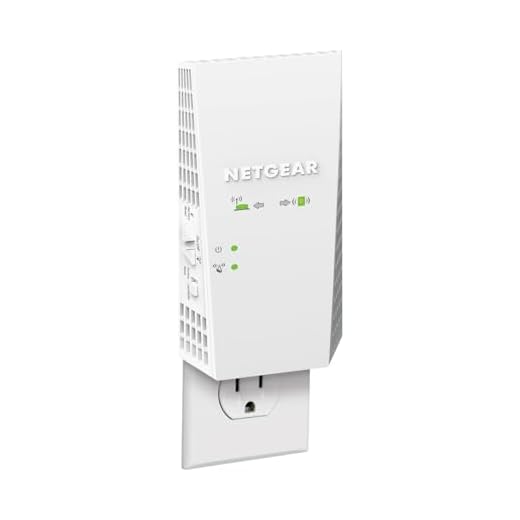
NETGEAR WiFi Mesh Range Extender EX6250


NETGEAR WiFi Mesh Range Extender EX6250 Price comparison

- All prices mentioned above are in United States dollar.
- This product is available at Amazon.com.
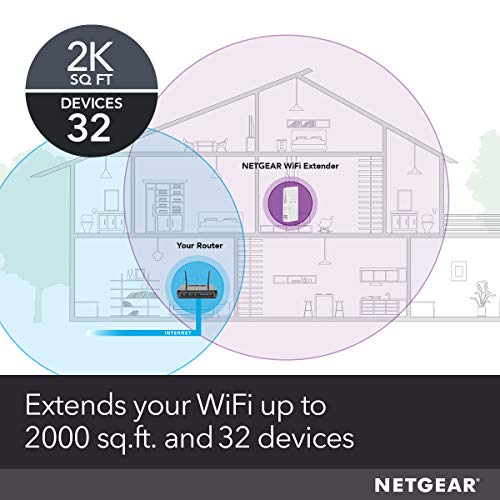
- At amazon.com you can purchase NETGEAR WiFi Mesh Range Extender (EX6250) - Covers up to 2,100 sq.ft. and 35 Devices with AC1750 Dual Band Wireless Signal Booster & Repeater (up to 1750 Mbps Speed), Plus Mesh Smart Roaming for only $109.99
- The lowest price of NETGEAR WiFi Mesh Range Extender (EX6250) - Covers up to 2,100 sq.ft. and 35 Devices with AC1750 Dual Band Wireless Signal Booster & Repeater (up to 1750 Mbps Speed), Plus Mesh Smart Roaming was obtained on September 11, 2026 09:46.
NETGEAR WiFi Mesh Range Extender EX6250 Price History
NETGEAR WiFi Mesh Range Extender EX6250 Description
NETGEAR WiFi Mesh Range Extender EX6250: The Ultimate Solution for Home Connectivity
The NETGEAR WiFi Mesh Range Extender EX6250 is designed to enhance your home network by providing seamless WiFi coverage throughout your space. Whether you’re streaming, gaming, or working from home, this powerful device ensures that you stay connected without any interruptions. In this product review, we will explore its key features, benefits, and how it stacks up against competitors, along with price comparisons and customer feedback.
Key Features and Benefits of the NETGEAR WiFi Mesh Range Extender EX6250
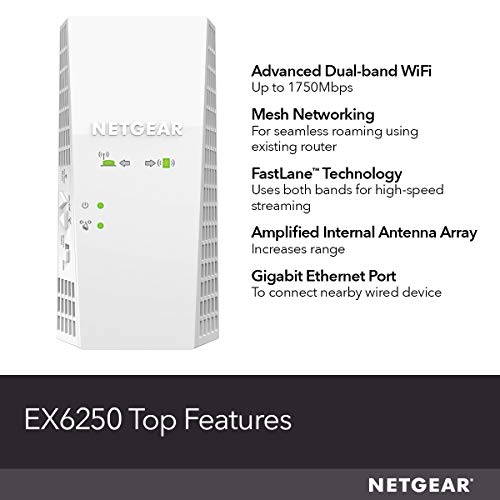
- Dual Band WiFi Speed: Enjoy combined speeds up to 1.2 Gbps with dual-band technology that offers both 2.4 GHz and 5 GHz connectivity. This means faster downloads, streaming, and online gaming without buffering.
- Mesh Technology: The EX6250 utilizes advanced mesh technology for a more reliable connection. This helps eliminate dead zones and provides consistent coverage in larger homes or offices.
- Easy Setup Process: The installation process is user-friendly with the Nighthawk app. Simply plug it in, connect it to your router, and follow the straightforward instructions for a quick setup.
- Smart Roaming: With smart roaming features, your devices will automatically connect to the best available signal, ensuring a more stable and reliable connection as you move throughout your home.
- Four Ethernet Ports: Connect multiple wired devices such as gaming consoles and smart TVs to enhance your online experience. The EX6250’s four Ethernet ports allow for versatile connectivity options.
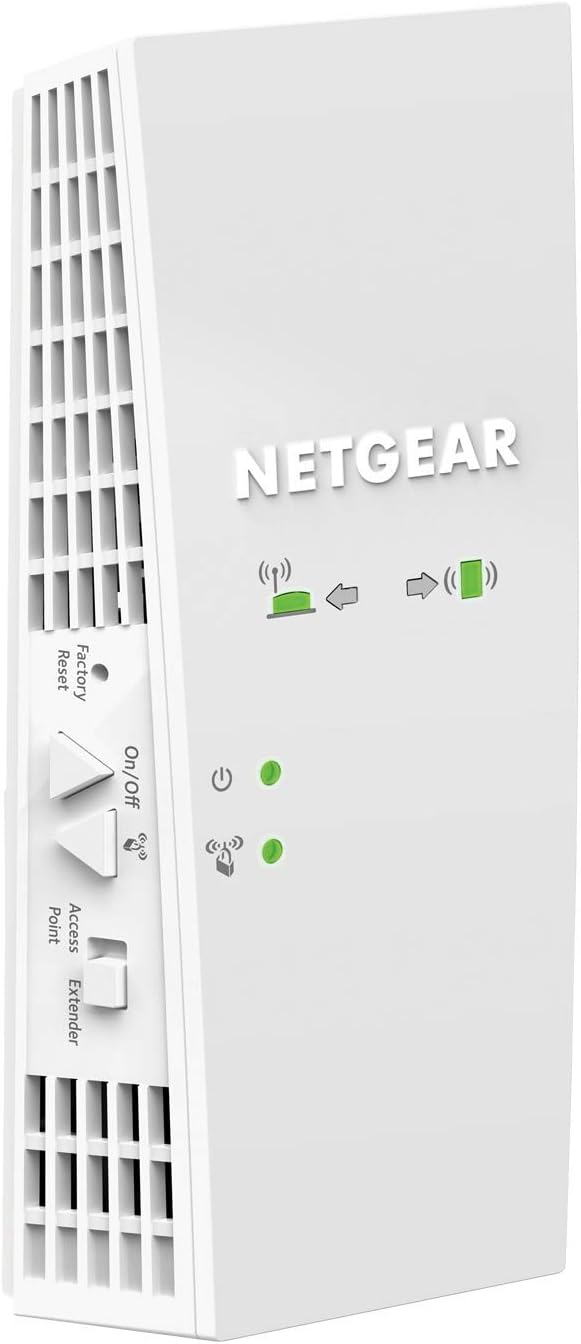
- Compact and Stylish Design: The sleek design of the NETGEAR EX6250 makes it easy to place anywhere in your home without compromising style.
Comparative Price Insights on the NETGEAR EX6250
When comparing prices across various retailers, the NETGEAR WiFi Mesh Range Extender EX6250 price ranges from $89.99 to $119.99. Notable retailers like Amazon often feature competitive prices, while seasonal discounts can offer additional savings. Tracking the price history, our data shows that the price has fluctuated slightly over the last six months, with the average price remaining around $99.99. This makes it a great investment for those looking for reliable home internet solutions.
Key Trends in the 6-Month Price History Chart
The price history indicates that the NETGEAR EX6250 has seen minimal volatility, with peaks occurring during holiday sales. This consistency suggests a stable demand and value retention, making it a wise choice for consumers who want a dependable extender.
Customer Reviews: What Users Are Saying
Customer feedback on the NETGEAR WiFi Mesh Range Extender EX6250 is generally positive, highlighting several strengths and a few areas for improvement:
- Pros: Users rave about the exceptional range and speed improvement compared to their previous extenders. Many applaud the easy setup and the reliable connection in previously weak signal areas, making it a game changer for streaming and gaming.
- Cons: Some customers have noted occasional connectivity issues with devices disconnecting. A few users also mentioned that while the installation was simple, advanced configurations weren’t as intuitive as expected.
Explore Review and Unboxing Videos
For those interested in a thorough evaluation, several YouTube reviews showcase the NETGEAR EX6250 in action. These videos include unboxing experiences, detailed setup guides, and real-world performance tests that illustrate its capabilities. Watching these reviews can help you make an informed decision about whether this product meets your specific needs.
Final Thoughts
The NETGEAR WiFi Mesh Range Extender EX6250 represents an efficient and affordable solution for enhancing your home network. With its advanced features, user-friendly setup, and reliable performance, it’s a top choice in the market for extending WiFi range. So, if you’re looking to boost your network without hassle, don’t hesitate.
Compare prices now! Make sure to find the best deal for your NETGEAR EX6250 and say goodbye to weak signals and dead zones!
NETGEAR WiFi Mesh Range Extender EX6250 Reviews (7)
7 reviews for NETGEAR WiFi Mesh Range Extender EX6250
Only logged in customers who have purchased this product may leave a review.





Chris –
NETGEAR WiFi Mesh Range Extender EX6250
Price as of 11/11/2020
List Price: 119.99
Discount Price I paid: $89.00
_______________________________
2.4Ghz is slower speed wifi but the signal travels farther
5Ghz is faster speed wifi but the signal doesn’t travel as far
_______________________________
My Goal:
Extend my verizon fios router wifi signal for both 2.4Ghz & 5Ghz to my entire NYC apartment.
(Large apartment with many bedrooms, many walls, some of those walls are concrete)
My Verison fios wifi router is on one end of my apartment and i need to boost the signal from that to the other end of the apartment.
_______________________________
Currently:
I have a Linksys wifi extender i bought years ago but it’s too weak to boost both 2.4ghz & 5ghz to the other side of my apartment, it’s not strong enough to penetrate all the walls.
All the walls in my apartment eat up the wifi signal.
_______________________________
New Setup:
With this new Netgear wifi extender, i was able to remove my older wifi extender and i plugged this new Netgear wifi extender into an outlet on the other end of the apartment and now i get FULL BARS for both 2.4Ghz & 5Ghz in the ENTIRE apartment!
_______________________________
The Netgear status shows me the signal strength the extender is picking up:
2.4Ghz signal strength: 162Mbps
5Ghz signal strength: 585Mbps
_______________________________
INSTALLATION (setup):
(It comes with a paper instructions booklet plus the instructions are online)
Google: EX6250
The instructions are on the Netgear website.
Very basic simple instructions.
Connect to the netgear extender using a device that has wifi (i used a windows 10 PC), connect it to the netgear wifi extender and then in your web browser go enter this URL address:
http://192.168.1.250
(You should be able to do this same thing on a mobile phone or tablet)
That will take you to the Netgear admin page where you can follow the steps to configure your device.
_______________________________
Additional options:
There is an ethernet port on the device if you want to hardwire an ethernet cable to the wifi extender to configure the admin settings and as another way to connect the wifi extender to your network.
Fastlane option. From what i read, that will boost your 2.4Ghz or 5Ghz signal. You have to turn this option on and then you need to pick which signal to boost. You can only do one. So have to pick 2.4Ghz or 5Ghz. So if you only need 5Ghz then you can use fastlane on the 5Ghz and the 2.4Ghz will be turned off. And now your 5Ghz will be faster.
NOTE:
I would not use the “fastlane” option because Amazon Alexa smart plugs use 2.4Ghz. They won’t work with 5Ghz unless you can find ones that do.
There is a 1 button quick setup. (WPS) but i don’t use that. That basically lets you configure your home router so that if you press the WPS button on two devices (router and wifi extender). They will quickly sync together (quick setup) but you need to have that WPS option on your home router for it to work and that option needs to be enabled to allow it.
NOTE:
I don’t use that because that will also allow anyone to walk over to your router and connect themselves to your network without needing any passwords. (bad security)
Access point option. I don’t plan to use that option. The wifi extender has a ethernet port on it, for the access point to work you need to use an ethernet cable and connect your router and this wifi extender together. I’m not 100% sure what the access point would be good for because the wifi extender option works really well. It’s all you really need.
I don’t know much about how that access point would work or how you should or could use it so i wont comment much on that.
In the end i ended up using the Ethernet port on the WIFI Extender to connect an ethernet cable from the WIFI Extender to my Roku.
Another good option, buy a small 8 or less port Ethernet Hub. Connect an Ethernet cable from the WIFI extender into the Hub. Now you can connect devices with an Ethernet cable (laptop, ethernet printer, etc), directly to the WIFI extender (assuming you need / want a wired connection)
The only reason to do this? Possibly a more stable internet connection? If all else fails. Try that.
_______________________________
CONCLUSION:
This Netgear wifi extender is POWERFUL while being very compact. No external antennas required. Looks very clean when installed into a wall outlet. If you install at the top outlet, the bottom outlet will NOT be blocked.
I highly recommend buying it. A little pricey but it works well! Now it may be overkill if your apartment is very tiny. But if you have a ton of bedrooms with lots of walls & weak wifi signal. This should easily fix it.
If you have a big home especially with a big backyard and you currently have a weak signal. This might also be useful to cover a huge range and get wifi across your whole home and yard.
BUT check the specs first. The specs show the range it covers. It looks like you can connect two of these wifi extenders together if you need a bigger range but start with only 1 because it works so well you might only need 1.
philzee –
2.4G and 5.6G signals were very weak on patio and deck .. the EX6250 boosted BOTH bands by at least 20dB !
Unit is very easy to setup (as repeater using same SSID as main router) using the Netgear Nighthawk app … BUT … make sure to deactivate any existing extenders that you won’t be using after the install (my first attempt boosted both signal bands, until I unplugged a small TPLink 2.4G unit used as a repeater, which caused problems with connections in that band. Second attempt (after hard resetting EX6250) was successful.
Be patient during the setup .. it takes a few minutes for this extender to figure out your network configuration!
Configuration has EX6250 about 20ft from router (thru 3 walls and highly metal populated utility room) and about 10ft to devices on patio and deck (with the 20dB signal improvement on both bands). Even the 5GHz signal is solid. Usual 2GHz wireless speed is about 80Mbps close to router .. am getting well over 40Mbps thru repeater (the 5GHz band is yielding 350Mbps via repeater!).
While noting that this is an early review by a seasoned EE (time will tell), I see no indications of heat related impacts on circuit reliability (EX6250 surface temp is below 100deg F). Reviews indicating accelerated degradation in performance could be caused by other environmental factors (poor air circulation, electrical line surges and dips, and worst of all .. frequent power on/off events .. electronic devices don’t like to be power cycled).
The only downside .. so far .. is the amount of space this unit takes in a typical electrical outlet (I have it plugged into the upper outlet with barely enough room for a short 3 prong extension cord) . This is a tough design issue, since you need enough room below the unit to support the freestanding device with only the outlet as support (you could always use an extension cord to move the repeater out of the way of the outlet).
One more note .. there’s a lot of arguments made by network experts as to the advisability of using the same SSID as your main router. Be advised that the Nighthawk app sets up this EX6250 extender on the same SSID (this is a WiFi MESH extender) .. and uses the same physical RF channels for both bands. I, personally, prefer this setup to simplify device roaming connections .. and to be able to use common network resources (such as a central network drive used for general storage and video streaming) from anywhere in the house .. different extender SSID assignments will make this more difficult. Operational switchover in areas where the main router and EX6250 extender signal levels are similar is device dependent (some devices will switch over cleanly .. some will “hiccup”) .. this is a function of each devices network chipset .. and the particular device drivers used.
Bottom line .. after a lot of research for a capable extender that keeps my main SSID intact (on both bands) .. and avoids replacing a very nice TPLink router with an expensive mesh network setup … the Netgear EX6250 is a perfect fit for ME!
I used the “EX6250” identifier, repeatedly, throughout this review, since I have noted often confusing Amazon reviews that reference different product models … unfairly impacting the reviews for the product model in question. There may be other WiFi extenders with setup, reliability and performance issues that have “cross-pollinated” with reviews for this device … so take those reviews with a “grain of salt” (good, or bad reviews).
Luis Mauricio Torres Campos –
Es muy compatible con modems o routers
Hector Sanchez Duarte –
No es tan fácil de programar pero funciona y se ve bien.
JESUS R. –
Se desconecta mucho
Richard Carlin –
Great product. Boosted our wifi signal significantly and was able to use the Ethernet port also. Fantastic.
Josh the buyer –
facilidad para configurar