
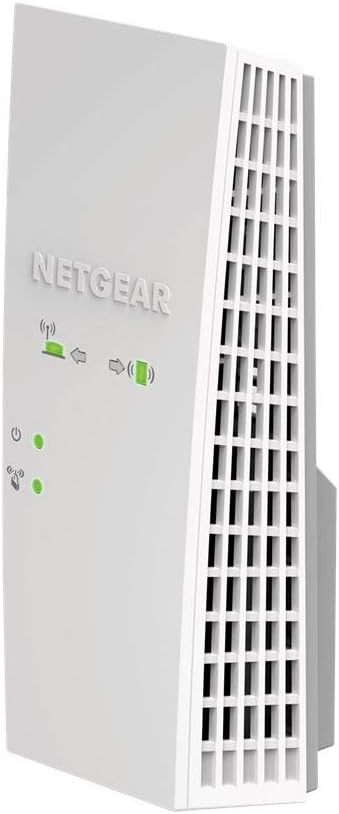
NETGEAR WiFi Mesh Range Extender EX6400
Original price was: $149.99.$74.00Current price is: $74.00.
NETGEAR WiFi Mesh Range Extender EX6400 Price comparison


- All prices mentioned above are in United States dollar.
- This product is available at Amazon.com.
- At amazon.com you can purchase NETGEAR WiFi Mesh Range Extender (EX6400) - Add up to 2,100 sq. ft., 35 Devices - AC1900 Dual Band Wireless Signal Booster & Repeater (up to 1.9 Gbps Speed), Smart Roaming – Free Expert Help for only $44.50
- The lowest price of NETGEAR WiFi Mesh Range Extender (EX6400) - Add up to 2,100 sq. ft., 35 Devices - AC1900 Dual Band Wireless Signal Booster & Repeater (up to 1.9 Gbps Speed), Smart Roaming – Free Expert Help was obtained on September 11, 2026 09:48.
NETGEAR WiFi Mesh Range Extender EX6400 Price History
NETGEAR WiFi Mesh Range Extender EX6400 Description
NETGEAR WiFi Mesh Range Extender EX6400: Boost Your WiFi Network
The NETGEAR WiFi Mesh Range Extender EX6400 is your perfect solution for eliminating WiFi dead zones and enhancing the performance of your existing wireless network. Whether working from home, streaming your favorite shows, or enjoying online gaming, this versatile device ensures you have a strong and reliable WiFi signal throughout your entire space. With its advanced features, the EX6400 is designed to provide optimal connectivity at an affordable price.
Key Features and Benefits
- Up to 2200 Mbps Wireless Speed: The NETGEAR EX6400 supports dual-band WiFi speeds of up to 2200 Mbps, making it ideal for lag-free streaming and gaming.
- Coverage for Large Areas: With up to 2000 square feet of coverage, this range extender eliminates dead zones and provides seamless connectivity in larger homes.
- Easy Setup: The EX6400 can be easily set up using the Nighthawk app, allowing you to get online in minutes without complicated installations.
- Compatible with Any Router: This extender works with any WiFi router or service provider, making it a flexible choice for all users.
- Wired Connection Option: Equipped with a 1 Gigabit Ethernet port, you can also connect wired devices directly, ensuring fast, uninterrupted performance.
- Smart LED Indicators: The LED lights help you identify the best placement for optimal coverage, making it easy to find the perfect spot for installation.
Price Comparison Across Different Suppliers
When purchasing the NETGEAR WiFi Mesh Range Extender EX6400, prices vary among different suppliers. After an in-depth analysis, we found that the average price ranges from $70 to $95 across major retail providers. Regular checks on our price comparison website can help you secure the best deal available.
6-Month Price History Trends
According to our 6-month price history chart, the NETGEAR EX6400 has shown consistent pricing trends with occasional drops, particularly during major sales events. It peaked in price during the holiday season but has since stabilized. Currently, it remains competitively priced, making it an excellent time to invest in this essential networking tool.
Customer Reviews Summary
Customer feedback on the NETGEAR WiFi Mesh Range Extender EX6400 highlights its performance and reliability. Users commend its ease of use and quick setup process. Many appreciate the range it provides, particularly in larger homes where previous routers struggled to deliver coverage.
On the other hand, some customers noted occasional connectivity issues in unusual circumstances, such as with specific older devices. However, the overall positive feedback outweighs the drawbacks, showcasing it as a highly effective solution for most users. Overall, it garners a strong average of 4.5 stars across various platforms.
Explore Unboxing and Review Videos
For those interested in a deeper look, numerous unboxing and review videos are available on platforms like YouTube. These visual guides can help you understand the setup process and performance of the NETGEAR EX6400 further. Viewing these videos provides insight into real-life applications, helping you make an informed decision before your purchase.
Final Thoughts
The NETGEAR WiFi Mesh Range Extender EX6400 is an outstanding choice for anyone looking to boost their WiFi range and speed. With advanced features, a straightforward setup process, and a price point that offers great value, it stands out in the crowded market of WiFi extenders. Its compatibility with any router and smart indicators ensure a hassle-free experience.
Don’t miss out on this essential device for your home or office networking needs. Compare prices now!
NETGEAR WiFi Mesh Range Extender EX6400 Reviews (8)
8 reviews for NETGEAR WiFi Mesh Range Extender EX6400
Only logged in customers who have purchased this product may leave a review.





Adam –
Important Note: When I went to write this review, I noticed that the product I received did not match the image of the item.
The Netgear WiFi Mesh Range Extender EX6400 arrived in an unmarred, well packaged container. I proceeded to take the device out of the box and read the one sided, quarter page of instructions. Allow me to quote…
Download the App
Connect your Device
Do More with the App
Like a fool, I followed the provided instructions and downloaded the supposedly required app (see links below). Once this was fully installed, I was greeted with a simple, uninformative, and more or less useless interface…
Selecting the first option showed me that my devices had failed to connect.
Selecting the second told me my internet speed was GREAT, if fact, better than rated from the router…
The third did a great job of emulating a 10 year old app
And the fourth took me to a menu that was more than useless…
Considering the “Device Manager” tab didn’t list any of my devices, I decided to check out the last tab labeled “WiFi Settings”. This took me to a menu that said, and I quote, “WiFi Networks”. No other options or descriptions were available, so I decided to change the listed name to see if I could find it and connect.
Let me take just a moment to complain that I spend my professional life in the world of IT. I have seen quality UIs and I have seen UIs that were probably designed to convolute. This was another level… I swear that a drunk chick-a-dee could have done a better job of cobbling together something, ANYTHING, of logical value… Literally any more words woulda helped…
Once I made the mistake of changing the WiFi name, lets just say that certain spinning objects, and certain kinds of bio-hazard level waste happened to interact, violently. I suppose the one bit of good news was that I could see the networks now… But when I connected to them, I was had no connection, and no automatic redirect occurred. Feeling a bit defeated with my new purchase, I made the next mistake of this escapade and engaged support… It would have been easier to just google random words to find an answer.
After 40 minutes and multiple instances of connection issues, the agent FINALLY sent me technical documentation to follow. I just want to mention, I requested documentation at the beginning of the conversation, because NO PART OF ME WANTS TO SPEND 40 MINUTES CHATTING WITH SOMEONE! Don’t get me wrong, you might be the coolest Guyo/Gurlo on planet earth, but I would rather spend that time digging my own eyes out, compared to working through basic troubleshooting with someone over chat…
This documentation mentioned a certain web address… A web address that was not mentioned on the app, a web address that was not referred to on the documentation, and a web address that wasn’t THE *FIRST* option for troubleshooting… Would you like to know what this magical address was?
IT WAS THE ADMIN PAGE FOR THE RANGE EXTENDER! (Please listen, this page can accomplish anything and everything that the junky, useless, freezy app can)
http://mywifiext.local/ (Without Internet)
http://mywifiext/status.htm (With Internet)
Once I received this REQUIRED information, it was a breeze… I was able to google specific terms, change specific settings, and ensure I was able to retain connection to my Range Extender, but it was all too good to be true…
Two days later, the RANGE EXTENDER decided that a dedicated internet connection was probably optional… Reliable connectivity went the way of the dino, apparently setting the pace for the rest of the Range Extender. Bye-bye Range Extender, bye-bye connection issue, bye-bye headache… Really hope no one else is tricked by this…
Something I want to mention before concluding this review, my support agent didn’t seem lazy, or disinterested, or distracted. They seemed to be following a script. It felt like I was just another “customer” on a conveyer belt. If Netgear chooses to employ technical support, then their support should be technical, not customary focused.
D. R. Borch –
The extender is fine, just wish Amazon had included instructions with it
Amanda –
Easy and quick setup! My router / modem are in the basement and my office is across the house. I used to get kicked off my VPN multiple times a day due to the poor signal. Since setting up my extended, I’m getting full service bars & haven’t been kicked off once!
Michael –
When used to help increase already existing wifi signal strength you will get a better and more stronger connection to your router. I used this to help increase the signal to my Xbox One because my games would download slow and multiplayer games would often times be laggy or more times than not have packet loss in games such as Battlefield 1. Once connected the range of my wifi signal is greatly increased and reaches far across the opposite side of my house where my router is now. My router is only a Netgear N600, nothing special so you don’t need a top of the line router for this to work correctly. When setting up it was hard to connect it using the WPS button on my router but I think thanks more of me not knowing how to correctly use it. I found it much more easier to go to the website listed in the manual to set it up manually. The website displays everything for you which made a huge difference because my router has a 2.4 GHZ and 5 GHZ signal so on the website you can click to make an “extension” for both signals. When using the WPS rather than website to connect the extender to your router you have to repeat the steps to connect it because it connects each signal individually. When I tried it that way I wasn’t sure if both signals were connected to the extender and when I went on the setup website it clearly showed and gave the option to connect both. For performance on the extender signals, I orginally was getting 78 mbps on my routers wifi in the room I was intending to have the extender in. On the 2.4 GHZ EXT the extender was giving me a signal of 135 mbps , huge difference! I use the 2.4 GHZ EXT for my smart phone which is more than enough signal strength. And on the 5 GHZ EXT I was getting 270 mbps which works great on my Xbox one for downloading/uploading, multiplayer, streaming. When I tested the download speed of my Xbox One on my regular network I would get between 9 – 15 mbps and upload speeds would be around 5 – 8. Now on the extender network I get between 25 – 30 mbps download speeds and 10 – 15 mbps upload speeds. So this device did exactly as it intended to do. Hope this helped anyone on the fence about purchasing this, as I was unsure myself after seeing many reviews saying how these extenders were a “waste if money”. I belive those people just bought an extender that was not strong enough to support their full wifi signals or placed them too far from their router and it can’t connect to it good enough. When it comes to these, spend a little extra money if you have it so they work as you expect them too, if the price is cheap so is the quality! The last note I’ll make on this is I liked how on the extender itself it gives light displays to show if you need to move it closer to the router or if you need what it’s extending the signal to, to be closer because the signal is too weak. Both should be green to indicate that you are in a good zone.
Guillermo R. –
Terrible producto, trate de hacerlo compartir Wifi de un AP Meraki y no se pudo a pesar de que segí todas las indicaciones. Aparentemente se conectaba y las extendía pero ningún dispositivo se pudo conectar.
Wfillbra –
The Nighthawk was a quick setup and the function has been excellent. Very pleased with this purchase.
Amazon Customer –
Our home has cinder block walls at the core, which was causing signal degradation, but our existing Netgear modem/router got a nice signal boost with this extender. The extender has provided a significant speed boost in areas where we previously struggled maintaining a signal. The Nighthawk app worked fairly well, but upgraded security passwords for this newer product(as compared to our modem/router) created a minor hurdle. Changing the network administrator/password on our existing unit to meet the upgraded security requirements for the new extender eventually did the trick.
John J. Binder –
The device itself was relatively easy to setup although it rejected my router password twice before accepting it. The Netgear Nighthawk app itself was way more frustrating to setup correctly. It took me about an hour before I was successful. In any event, I’m happy with the speed. I read some reviews where people were complaining about the low speed at the extender. My speed is significantly higher in comparison. I clocked about 800 mbps at the router when I tested it. I pay for 1000 and usually clock well over 900. More importantly I clocked about 172 at the extender. My wife is happy as she can get YouTube videos out on our patio now. The extender is just inside the house adjacent to the patio. So far so good. We’ll see how it works in the long run.