
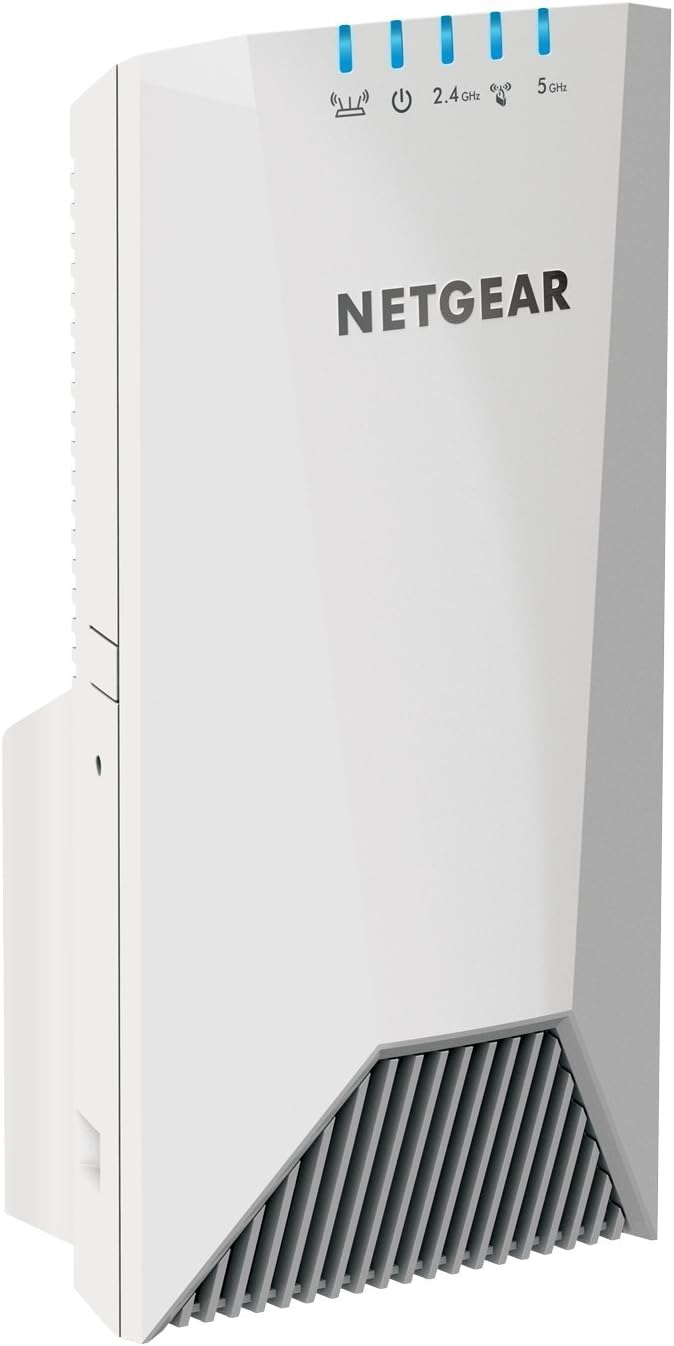
NETGEAR WiFi Mesh Range Extender EX7500
$93.00
NETGEAR WiFi Mesh Range Extender EX7500 Price comparison


- All prices mentioned above are in United States dollar.
- This product is available at Amazon.com.
- At amazon.com you can purchase NETGEAR WiFi Mesh Range Extender EX7500 - Coverage up to 2300 sq.ft. and 45 Devices with AC2200 Tri-Band Wireless Signal Booster & Repeater (up to 2200Mbps Speed), Plus Mesh Smart Roaming for only $144.99
- The lowest price of NETGEAR WiFi Mesh Range Extender EX7500 - Coverage up to 2300 sq.ft. and 45 Devices with AC2200 Tri-Band Wireless Signal Booster & Repeater (up to 2200Mbps Speed), Plus Mesh Smart Roaming was obtained on September 11, 2026 09:50.
NETGEAR WiFi Mesh Range Extender EX7500 Price History
NETGEAR WiFi Mesh Range Extender EX7500 Description
NETGEAR WiFi Mesh Range Extender EX7500: Enhance Your Home Network
If you are looking to boost your home WiFi coverage, the NETGEAR WiFi Mesh Range Extender EX7500 is an excellent solution. Designed to eliminate dead zones and enhance your internet experience, this powerful device provides seamless coverage throughout your home. With its advanced features and user-friendly setup, optimizing your network has never been easier.
Key Features of the NETGEAR WiFi Mesh Range Extender EX7500
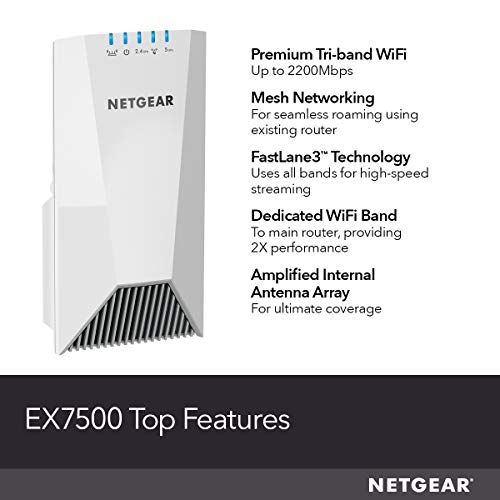
- Dual Band WiFi: Supports both 2.4GHz and 5GHz bands, delivering speeds up to 2200 Mbps.
- Extended Range: Amplifies your existing WiFi signal, reaching up to 2000 square feet and connecting up to 30 devices.
- Smart Roaming: Automatically connects your devices to the strongest WiFi signal, ensuring uninterrupted streaming and gaming.
- Easily Expandable: Compatible with any standard WiFi router, making it a versatile choice for various setups.
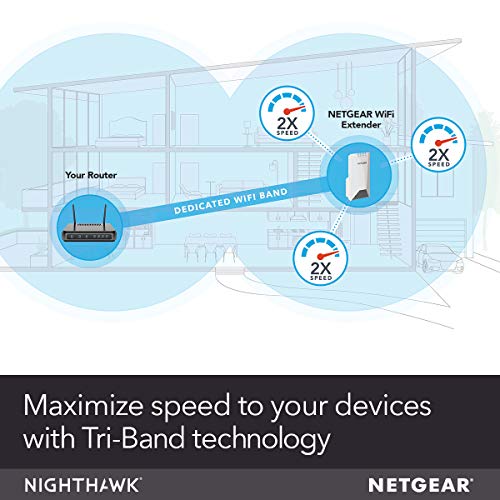
- FastLane Technology: Provides an optimal connection by using both WiFi bands, ideal for high-speed activities like 4K streaming.
Benefits of Using the NETGEAR WiFi Mesh Range Extender EX7500
The NETGEAR WiFi Mesh Range Extender EX7500 brings multiple benefits to enhance your home network:
– **Streamlining Connectivity:** With dual-band functionality, it offers enhanced speed and connectivity options, perfect for demanding users.
– **Improving Overall WiFi Performance:** This extender significantly improves the overall WiFi experience, making it ideal for households with multiple users.
– **Enhancing Mobility:** Users can move freely throughout their homes without losing connection, thanks to smart roaming.
– **User-Friendly Setup:** The setup process is straightforward, designed for all levels of tech familiarity. Simply plug it in, follow the app guidance, and you’re ready to enjoy better coverage.
Price Comparison Across Suppliers
When considering the purchase of the NETGEAR WiFi Mesh Range Extender EX7500, you’ll find varying prices across different suppliers. On average, the price ranges from $120 to $160. Be sure to compare the prices on platforms like Amazon and other large retailers to get the best deal.
Insights from the 6-Month Price History
Examining the 6-month price history chart for the NETGEAR WiFi Mesh Range Extender EX7500, it’s evident that the price fluctuates, often dropping during promotional periods such as Black Friday and back-to-school sales. Typically, customers can expect the price to return to a lower range during such events, making it a strategic time for potential buyers to invest in this device.
Customer Reviews: What Users Are Saying
Customer feedback for the NETGEAR WiFi Mesh Range Extender EX7500 is largely positive. Users appreciate its ability to seamlessly cover large areas without interruptions. Many have highlighted:
– **Strengthened Connections:** Multiple users report that their WiFi coverage has significantly improved, reaching rooms previously considered dead zones.
– **Ease of Installation:** Many reviews praise the quick and efficient installation process, often taking less than 15 minutes.
– **Stable Performance:** Customers frequently mention consistent speeds and performance, especially for streaming and gaming.
However, some users have noted drawbacks, such as:
– **Initial Setup Issues:** A few customers experienced challenges during the initial setup process, particularly with the app.
– **Device Compatibility Concerns:** A minor percentage found issues connecting certain devices, although this is typically attributed to older technology.
Engaging Content: Unboxing and Review Videos
To gain a better understanding of the NETGEAR WiFi Mesh Range Extender EX7500, consider checking out unboxing and review videos. These resources provide visual demonstrations of the setup process, configuration, and real-world performance insights. Many users share their success stories, further endorsing the value of this extender.
Conclusion: Optimize Your Network Today!
In conclusion, the NETGEAR WiFi Mesh Range Extender EX7500 offers an impressive solution for enhancing your internet connectivity. With features designed for modern home usage and user-friendly setups, this extender can significantly improve your WiFi experience.
Don’t wait for your signal issues to persist; take the next step in elevating your home network. Explore the deals today and compare prices now!
NETGEAR WiFi Mesh Range Extender EX7500 Reviews (8)
8 reviews for NETGEAR WiFi Mesh Range Extender EX7500
Only logged in customers who have purchased this product may leave a review.





Rolando Peniche –
Increíble producto, fácil de instalar y quede muy sorprendido con cómo cambia la velocidad del internet y la cobertura, increíble para jugar Xbox live sin lag y reproducir por Chromecast
Enrique G. –
El producto promete un mejor desempeño que los extensores de Wifi económicos y comparándolo con el que tenía funcionando de gama baja, no me da ni mejor cobertura ni mejor velocidad.
James C Young –
I purchased this item as my router is located in our office. Yes it would be better if it were centrally located, but it is what it is. I followed the steps in the instructions and thought I had it working properly. Basically it was took over my router and only allowed one of the Wi-Fi signals to be useable. When I looked at it on my laptop when trying to add the device to my router and give it a static IP address, it appears that the extender is the primary source and my router is secondary. I have the NETGEAR Nighthawk X10 AD7200 router and the NETGEAR Nighthawk S8000 8-Port Gigabit Smart Managed Plus Gaming Switch (GS808E) that basically controls all of the internet connected devices in our den. Both of these items including the NETGEAR CM700 (32×8) DOCSIS 3.0 Gigabit Cable Modem were all purchased in September 2017. They have also played very well with each other without any issues. Basically I have been a huge fan of NETGEAR products and have been using them for years now. After burning up 3 different Motorola Surfboard Modems, I bought the CM700 which was the best one at the time.
I recently purchased my 4th Astell&Kern High Resolution player and it doesn’t have as good of Wi-Fi connection as the previous models I’ve owned. I generally listen to it when I wake up in the morning and I listen to it in my den and usually get a long nap in as well. I purchased this extender basically so that I could plug it in close to the sofa and get a stronger signal. It worked fine, until I realized that the rest of the items that are on a different signal didn’t have Wi-Fi access any longer.
I have struggled with this for a few weeks and I finally have had it with this extender. The really odd thing is that somehow my Wi-Fi names also switched on the router. It basically changed my 5gHz Wi-Fi name to one of my 2.4gHz Wi-Fi ñames which I found very odd. Also I have the NETGEAR App on my iPad Pro and when I checked the App, it switched from the router to the extender! I unplugged it and did a rest and tried again a few days later. It still doesn’t work properly and I am only able to access one of the Wi-Fi signals when using this device. Basically it’s a brick now as it just doesn’t work properly. Luckily I purchased it on sale and paid like $75.00 for this device.
Other than this extender, I have never experienced the problems that others are having with the NETGEAR Nighthawk X10 AD7200 802.11ac/ad Quad-Stream WiFi Router or the NETGEAR Nighthawk S8000 8-Port Gigabit Smart Managed Plus Gaming Switch (GS808E) and they are controlling multiple devices without ever having any of the issues that others are reporting. I don’t know if it’s because I bought these items when they first were released or what, but they work very well and they are controlling about 45 devices in our 3,000 square foot house. I just think that either I’m not setting up the extender correctly or that it just not compatible with my Router.
Codeman00 –
I have a 3200 sq ft / 2 story house and the wireless router is in my office that happens to sit on the side of the house upstairs. I have been battling this full house coverage issue for almost 6 years now.
Placing the router in the center of the house is not ideal for me. The internet coverage from my first wireless router was bad, so I tried (2) traditional repeater/exenders and still had issue getting internet to our master bedroom on the other end of the house on the lower floor. I upgraded to a Netgear Nighthawk 1900AC router and that helped…it’s a strong router. A signal of 80Mbs at the router would still diminish to 5-10 Mbs in the bedroom with constant dropouts. I upgraded internet to 170 Mbs as a bandaid… and that gave me 15-20Mbs in the bedroom but still with random dropped signals and frustration. i again tried repeaters, extenders, etc. I finally ended up hardwiring my Chromecast and smart TVs downstairs because the signal just wasn’t reliable enough. I finally caved in and set up my traditional Netgear Extender as a WAP. Now we had strong wireless in the bedroom but had to transfer back and forth from one SSID to another wish is a pain. There had to be a better way.
I had read about the new Netgear “Mesh” Extender. Its confusing because “Extender” is a negative term after experimenting with them above. Is this “Mesh” or a “traditional Extender”? I had to do a lot of research to make sure that this extender was different and that it truly was Mesh. I even looked at going to a full mesh system and ditching the Nighthawk. After watching several videos, I realized that the Mesh extender might be the real deal….could I really get 1 SSID and full speed in my bedroom??? Well, this dream has finally come to fruition.
I finally bought the Netgear Nighthawk X4S AC2200 Mesh Extender. It was expensive at $178 but I had high hopes. It synced to my Nighthawk router in a matter of minutes by pressing a few buttons. I plugged it in downstairs just outside my bedroom. All I can say is WOW! My ISP gives me about 170-180Mbs at the modem. I was now in my bedroom instantly getting 175Mbs with no lag! In fact, the entire downstairs now is covered easily at 100Mbs+ on the 5Ghz band. One SSID. Easy setup. Seriously! 6 years of frustration finally solved. Thank you Netgear….this Mesh Extender is the real deal!
Dave S. –
Do not buy this product it’s awful actually made my Wi-Fi worse!!
Jasafe –
Ya instale el extensor para usarlo con mi router y me he quitado los problemas que tenía con la falta de seña. Muy buen producto y fácil de instalar, mantiene el mismo nombre de red y password que el router.
Amazon Customer –
i need a solution for weak wifi signal. i alraedy using netgear product, maybe i’m kind a fanboy of netgear. nighthawk ax12 Rax120 for my office, and nighthawk x8 R8500 for my home they are working great.
my home have second floor(almost 1200 square feet both floor) and wifi signal weak there. so i decide buy netgear extender. i nought it on amazon, and i placed it 2nd floor wall outlet. it quite difficult find out best location both 2.4ghz, 5ghz signal on green. and i start first setup with “mywifiext.net” with android phone via google chrome. making admin, password, and looking for exsist wifi, and connect with password. actually this is end for first setup most user. it works, i have strong signal everywhere.
but i have to reconnect to new extender for remain setup. change IP, checking firmware etc..
but it can’t connect ‘mywifiext.net’ anymore. some ‘https://, http://‘ problem with chrome. so i have to find out my extender ip. to this conclusion it takes time for me. (i try to other tablet, other browser) if you know how to login your Router and it’s easy to know your extender ip.
i change ip, update new firmware, ex7500 working great.
need for network improve? go to NETGEAR.
Miguel Rodriguez –
Es de buena calidad; sin embargo, no da el alcance o cobertura que indica en la publicación, ya que después de los 13 mts empieza a fallar la señal, por lo que sólo es un poco mejor que el anterior que tenía y que costaba 50% menos