
 Amazon.com
Plugable 14-in-1 USB C Docking Station Price comparison


- All prices mentioned above are in United States dollar.
- At amazon.com you can purchase Plugable 14-in-1 USB C Docking Station with 4X HDMI, Quad Dock with 100W Charging, 4X HDMI Displays, Compatible with Windows, Thunderbolt, USB-C (4X USB, 1x USB-C, Ethernet, SD Card, Audio) for only
- The lowest price of Plugable 14-in-1 USB C Docking Station with 4X HDMI, Quad Dock with 100W Charging, 4X HDMI Displays, Compatible with Windows, Thunderbolt, USB-C (4X USB, 1x USB-C, Ethernet, SD Card, Audio) was obtained on September 24, 2025 06:54.
Plugable 14-in-1 USB C Docking Station Price History
Plugable 14-in-1 USB C Docking Station Description
Plugable 14-in-1 USB C Docking Station: The Ultimate Connectivity Solution
The Plugable 14-in-1 USB C Docking Station is designed to revolutionize your workspace. This multifunctional docking station seamlessly integrates with various devices, making it the perfect choice for professionals and tech enthusiasts. With a wide range of ports and features, it enables effortless connectivity, enhancing productivity and efficiency. Discover how the Plugable docking station can simplify your life while you explore the best prices available for this trending product.
Main Features and Benefits of the Plugable 14-in-1 USB C Docking Station
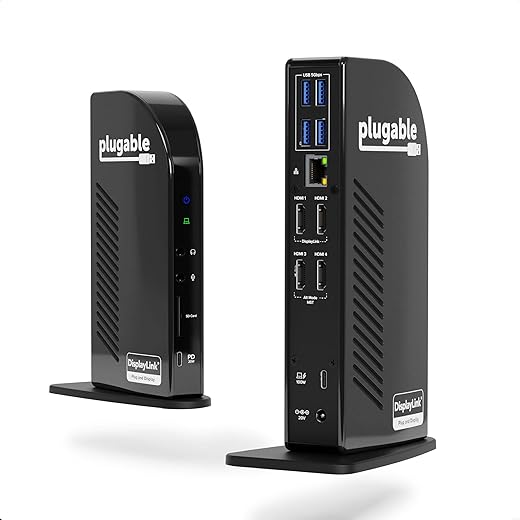
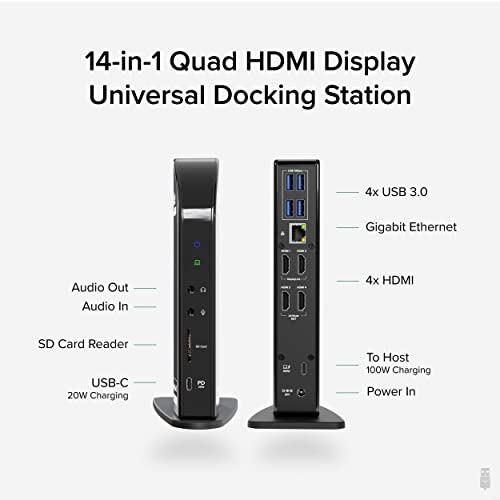
- Comprehensive Connectivity: Featuring 14 ports, it includes dual HDMI, USB-C, Ethernet, and USB-A ports. Whether connecting multiple monitors or peripherals, this dock meets diverse connectivity needs.
- Dual 4K Support: Experience stunning visuals with dual 4K monitor support. Achieve brilliant clarity and detail perfect for design work or multitasking.
- High-Speed Data Transfer: With USB 3.0 ports, transfer files quickly and efficiently. Save time with speeds of up to 5Gbps.
- Stable Ethernet Connection: The integrated Ethernet port provides a reliable wired connection, ensuring stable internet access for streaming or downloading.
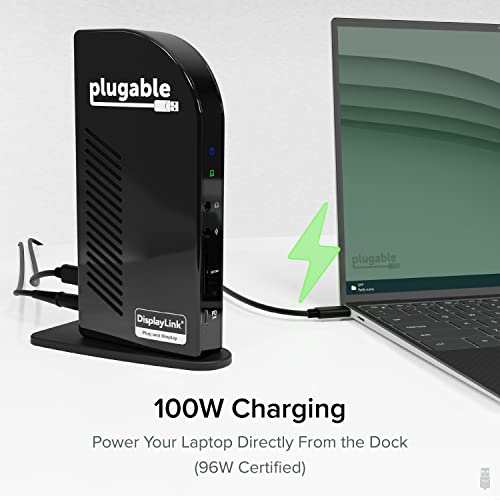
- Power Delivery Capability: Charge your laptop while using the dock. This ensures your devices stay powered, reducing downtime.
- Compact and Sleek Design: The Plugable dock sports a compact design that minimizes desk clutter while maintaining a professional aesthetic, making it suitable for home or office settings.
Price Comparison Across Different Suppliers
When searching for the best price for the Plugable 14-in-1 USB C Docking Station, you’ll find competitive pricing across various platforms. Some retailers offer lower prices during special promotions, which can save you money. Our pricing data allows you to assess the market and identify the best deals, ensuring you get your docking station at the right price!
Price History Trends
Reviewing the 6-month price history for the Plugable docking station reveals notable trends. Prices have fluctuated, with significant drops during holiday sales, providing the perfect opportunity to make a purchase. Keep an eye on our price history chart to track any upcoming discounts.
Customer Reviews Summary
Customers rave about the performance of the Plugable 14-in-1 USB C Docking Station. Many highlight its ability to connect multiple devices without a hitch. Users appreciate the dual 4K display capability, noting enhanced productivity levels and an overall better workflow. The sturdy construction and sleek design are additional selling points that customers love.
However, some users have reported minor drawbacks, such as initial setup issues with certain devices or compatibility concerns with specific operating systems. These reviews underscore the importance of checking compatibility before purchasing.
Explore Unboxing and Review Videos
To get a clearer picture of what to expect from the Plugable docking station, take a look at various unboxing and review videos available online. These user-generated videos offer real-world insights, showcasing setup instructions and practical uses. They can provide valuable tips for maximizing the docking station’s functionality.
Why Choose the Plugable 14-in-1 USB C Docking Station?
The Plugable 14-in-1 USB C Docking Station is ideal for anyone looking to enhance their workstation. With its extensive port selection and interaction capabilities, it’s perfect for both home office setups and professional environments. Its compact design ensures it remains an unobtrusive yet powerful addition to any workspace.
Conclusion and Call to Action
If you’re ready to upgrade your workspace with the Plugable 14-in-1 USB C Docking Station, don’t miss the chance to compare prices now! By leveraging our detailed price comparison and exploring customer feedback, you can make an informed decision that aligns with your budget and needs.
Plugable 14-in-1 USB C Docking Station Reviews (12)
12 reviews for Plugable 14-in-1 USB C Docking Station
Only logged in customers who have purchased this product may leave a review.
Related Products






Len –
6/28/2024 UPDATE::: The company has outstanding response and support. I contacted them with my issue and they immediately sent out a new product. They also have a super employee named Mychal who sent me a very easy to follow detailed email. The issues have been resolved and the defective product sent back. I would absolutely recommend this company and this product. OLD REVIEW STARTS HERE——-I purchased this to be able to plug in all four of my monitors into one unit. Two of them do not work. This is an expensive unit and it sucks it does not all function properly. Now I have two plugged into this unit and two plugged into one of my old units that gets two hot.
VG –
I purchased the Pluggable Docking Station with high hopes of expanding my screen setup for work, but unfortunately, my experience has been far from satisfactory.
As an employee of a screen-making organization, I needed a reliable docking station to connect multiple screens to my MacBook Pro. The Pluggable Docking Station initially showed promise. It worked seamlessly during the first month. The convenience it offered was truly impressive.
However, my optimism was short-lived, as within a month of usage, I encountered a significant issue. Display Link Ports 1 and 2, which I had specifically purchased this docking station for, suddenly stopped working. This was a huge disappointment, as these ports were crucial for my setup otherwise without these ports, it is a basic docking station which should not cost more than 20-30 bucks.
Now, I find myself left with only the ALT ports, which merely duplicate the screen rather than extending it, rendering the Pluggable Docking Station practically useless for my intended purpose.
I had considered recommending this docking station to my organization, but I’m relieved I didn’t, as the station failed to deliver the performance and durability I had expected.
In conclusion, my experience with the Pluggable Docking Station has been a frustrating one.
Michelle Hogle –
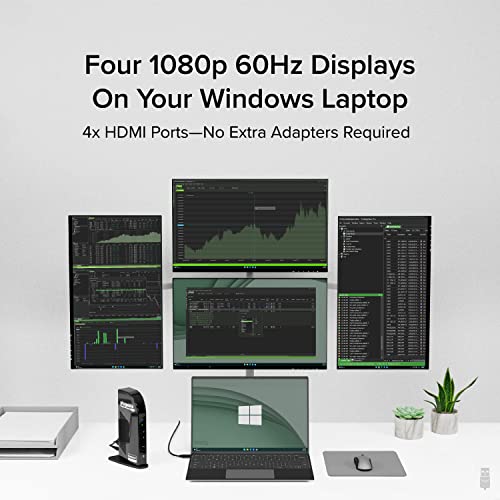
This product was very easy to install (10 mins) and works great for my 4 screens.
Jessamine Manack –
Yes, the price might be steep but the level of tech support is better than any other vendor you will find. Even after the first 30 days if you run into problems they will not hesitate to replace your unit which is fantastic.
Amazon Customer –
Running four monitors like a champ with this thing, plus the laptop screen, for total of five screens. SIMPLE set up. Would recommend to anyone. This is the second Plugable dock I’ve owned. Previous dock was older generation but still awesome too
Jimbo –
This product is alright. I have 4 monitors plus my laptop screen set up. Works pretty well for everyday work except that one screen keeps going black and then turning back on again like it’s turning off and on, or refreshing. I’ve had this issue on 3 different computers, my graphics drivers are up-to-date, as is the driver for the docking station. All the monitors are the same model and I am using the same kind of HDMI cable for all of them (and I’ve swapped them out too). DON’T EVEN THINK about playing games on it. It can’t even handle simple 2D side-scrollers without the game jittering.
jonathan brooks –
highly recommended
Jessamine Manack –
I bought a few others before biting the bullet on this one’s price point and I should have from the jump. Right out the box is works seamlessly with my work laptop, my wife’s, and our personal MacBook. True plug and play for our USB peripherals, like a 2017 plantronics headset with a VOIP adapter, without additional drivers. Zero headaches, no playing around with settings, all I had to do was rearrange the display order in settings and BOOM we have four extended displays.
My only con is that I was under the impression I could have four screens AND my laptop open, but once I set the dock up and thought about it I understand the technical limitation- just maybe specify that somewhere in your product description?
If you’re looking for a 4x HDMI docking station that charges your machine and everything in between, spend the money on this product. It is worth the ease of set up alone!
Cameron A. –
The first unit I purchased died within days. After contacting the manufacturing and trouble shooting for two days they replaced the defective unit. I was smart enough to buy a different brand and put the replacement unit on the shelf for a bit. Decided to fire up the replacement model on a different laptop and monitor…The brand new replacement that I was sent lasted 4 days and has exactly the same problem as the first.
Originally I was using a MAC Book and trying to extend two monitors. The second unit I am using a PC with only one monitor…
Buyer beware…Nothing but headaches with this brand and model…
skm –
This product is considered expensive, but if you want the best, this does everything exceptionally well. I cannot believe how more productive this has made my day. It is worth every cent.
Simply install the driver, and from there it is always plug and play, every time it works flawlessly. The speed of file transfers is frighteningly quick. I have always worked with multiple monitors, and thought with a M1 Mac book Air it was going to be a problem, this dock powers 4 monitors and everything else you can throw at it.
It is fantastic!! – You will not be dissapointed
Carta –
Finally coming around. After a TERRIBLE initial experience some time ago, I just boxed the thing up and tossed it aside.
Well, now, many months later, I tried using it again and, I don’t know if its due to the latest version of DisplayLink, but everything works like expected and there’s absolutely no slowdown.
One star off because of the Unlock with Apple Watch problem still existing, but I’m really glad I decided to give this a try again. Saved be from having to buy a large-size iPad Air to serve as a third display.
Minus another star because the worthless, always on blue light is unnecessary and lights up the room at night, and on an M1 Mac Mini, though plugged in, does not connect when computer is started or restarted. Have to unplug USB cable and plug it back in again. (Works fine when woken from sleep.)
Jason Parker –
I purchased this unit for the quad display function. Recently I upgraded my home system and was looking to have 4 monitors. I ended up using my existing 37″ dual monitors and added a Samsung OLED 49″. I needed a new docking station for the HP Elitebook I also purchased and went with the pluggable instead of the HP. I was having issues with the 37″ monitors freezing and I would have to unplug the power to the docking station. Rather than throwing up my hands and returning it and buying the HP I reached out to tech support with pluggable. It was a little difficult finding their contact but once I found the area to submit a service ticket, it was literally within an hour that I had a response. Now, I wasn’t in a hurry since I was able to get the dock to work but this was still quick in my opinion. Once they responded they sent me a link to download to my computer that would create a zip file with the information they needed to fix the issue. I did as directed and sent it back. Once again, sooner than expected, they returned with additional VERY SPECIFIC instructions of changes to make along with links to download additional items that normally do not show up in the control panel but are there and needed to make the necessary changes. Once these were changed it has worked flawlessly since. Maybe it wasn’t as easy as plugging a new item in and going but even with a small hiccup, the thing that impressed me the most was how easy it was to work with tech support and to fix it without any issues and very VERY quickly! I definitely recommend this product based on a lot of things but most of all on the tech support because when it all comes down to it, if you can’t get it to work easily and with minimal assistance, what’s the point?