
Plugable Docking Station Dual Monitor USB-C/3.0
 Amazon.com
$99.95
Plugable Docking Station Dual Monitor USB-C/3.0 Price comparison


- All prices mentioned above are in United States dollar.
- This product is available at Amazon.com.
- At amazon.com you can purchase Plugable Laptop Docking Station Dual Monitor for USB-C or USB 3.0, Compatible with Windows and Mac, (Dual HDMI, 6X USB Ports, Gigabit Ethernet, Audio) for only $99.95
- The lowest price of Plugable Laptop Docking Station Dual Monitor for USB-C or USB 3.0, Compatible with Windows and Mac, (Dual HDMI, 6X USB Ports, Gigabit Ethernet, Audio) was obtained on September 24, 2025 06:54.
Plugable Docking Station Dual Monitor USB-C/3.0 Price History
Plugable Docking Station Dual Monitor USB-C/3.0 Description
Plugable Docking Station Dual Monitor USB-C/3.0: Enhance Your Workspace
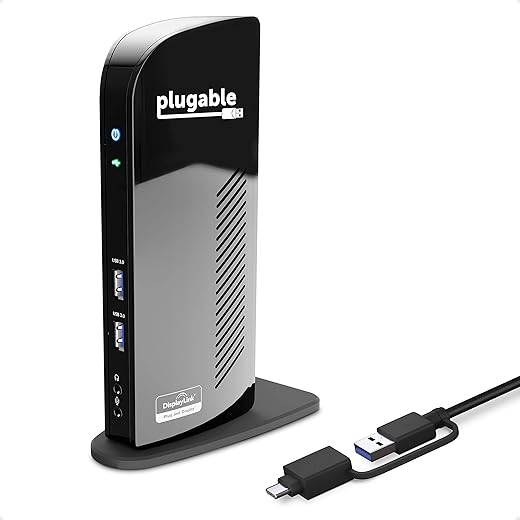
Upgrade your productivity with the Plugable Docking Station Dual Monitor USB-C/3.0. Designed for versatility, this docking station allows users to connect dual monitors and enjoy seamless multitasking. The perfect solution for professionals, gamers, and creatives, it brings advanced connectivity to your workspace while maintaining an elegant design.
Key Features of the Plugable Docking Station
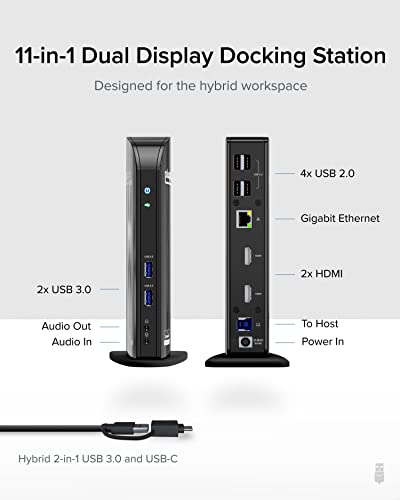
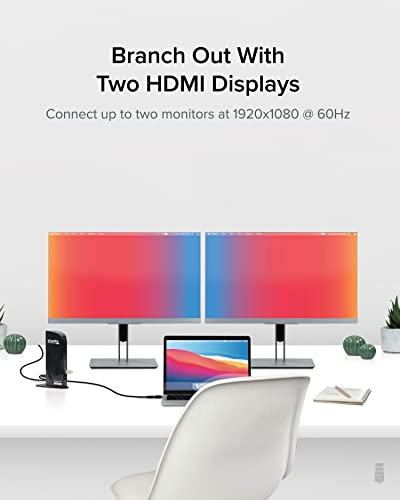
- Dual Monitor Support: Connect two external monitors via HDMI and DisplayPort ports, enhancing your visual workspace. Ideal for multitasking and increased productivity.
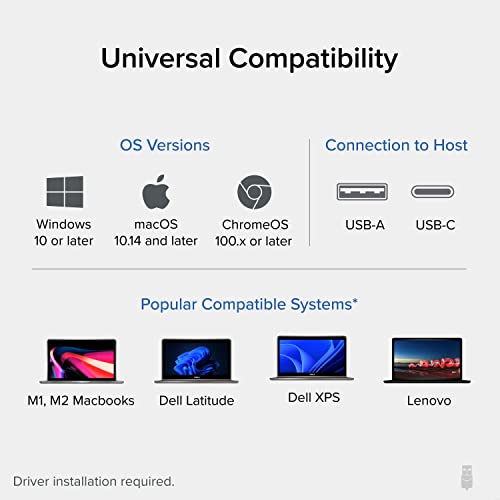
- Wide Compatibility: With USB-C and USB 3.0 interfaces, this docking station works with a variety of devices, ensuring broad compatibility across laptops and desktops.
- Compact Design: Measuring just 4 x 5 x 9 inches and weighing 1.7 pounds, the Plugable Docking Station is portable and easy to integrate into any workspace setup, whether at home or in the office.
- Fast Data Transfer: Equipped with USB 3.0 ports, you can enjoy data transfer speeds of up to 5 Gbps, making file management and backups quick and efficient.
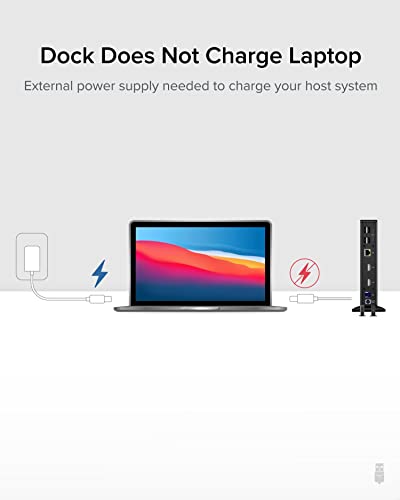
- Power Delivery Support: Connect your laptop with a single USB-C cable for data and power, eliminating the need for multiple chargers at your workstation.
Price Comparison Across Suppliers
The Plugable Docking Station Dual Monitor USB-C/3.0 offers competitive pricing that varies across retailers. In the current market, prices typically range from $100 to $150. At our price comparison tool, you can easily find the best deal available, ensuring you get the most value for your investment.
6-Month Price History Trends
Our 6-month price history chart shows a steady trend with occasional fluctuations. The price remained relatively stable, with notable dips during holiday sales. This stability is beneficial for consumers looking to purchase the docking station at the best possible price. Always check back to find current deals and offers.
User Reviews: What Customers Are Saying
Customer feedback for the Plugable Docking Station Dual Monitor USB-C/3.0 highlights several positive aspects. Users consistently praise its:
- Ease of Use: Many reviews mention a simple setup process, allowing users to connect multiple devices swiftly.
- Stable Performance: Customers appreciate the reliable connections and performance, making it an ideal choice for both casual and professional use.
- Versatile Connectivity: The variety of ports available allows users to connect various peripherals effortlessly.
However, some users reported minor drawbacks, such as:
- No HDMI to VGA support: Some customers require VGA connections for older monitors, which is not supported by this docking station.
- Occasional Compatibility Issues: A few users noted that certain older laptops experienced connectivity issues.
Explore Unboxing and Reviews
To gain a better understanding of the Plugable Docking Station Dual Monitor USB-C/3.0, check out several unboxing and review videos available on YouTube. These videos provide visual demonstrations of the setup process, feature highlights, and user experiences that can help you make an informed decision. Seeing the product in action could alleviate any concerns and highlight its impressive capabilities.
In conclusion, the Plugable Docking Station Dual Monitor USB-C/3.0 is an essential addition to any modern workspace. With its dual monitor support, fast data transfer speeds, and compact design, it empowers professionals to maximize their productivity. Don’t miss out on the opportunity to enhance your computing experience!
Compare prices now!
Plugable Docking Station Dual Monitor USB-C/3.0 Specification
Specification: Plugable Docking Station Dual Monitor USB-C/3.0
|
Plugable Docking Station Dual Monitor USB-C/3.0 Reviews (13)
13 reviews for Plugable Docking Station Dual Monitor USB-C/3.0
Only logged in customers who have purchased this product may leave a review.






Paul Sande –
Very easy to install and fast broadcasting your laptop screen. I connected to w monitors and working perfectly 👌.
Alexandria C –
I bought this for my at home office for my work laptop. It is not useable because it requires a software download that my employer’s IT department will not approve. Returned.
Todd –
This saved me with my new remote job. I have an ultrawide monitor for data analysis and could not get the company laptop to detect monitor. I knew this would work and BINGO right away the monitor was detected with the laptop. I have everything hooked up to this docking station and I am back in business!
Brooke –
What I love about plugable is that they stand behind their products with excellent CX service and if something unfortunate happens. They don’t make you answer 600 questions then do a rain dance to the gods. They help you trouble shoot and if it fails they get you back to work with a quick product sent out. I hope you never have to use their warranty but if you do they won’t let you down.
HDV –
Love the fact it has two HDMI. That’s a huge plus, most hubs don’t offer that. It’s very simple to use and it works instantly.
Great value for the price. I highly recommend it.
Zeina –
I bought this dock because of limited ports on my new laptop. I wanted to connect an external webcam, two 24″ monitors, a separate keyboard, a mouse and an Ethernet cable using my laptop’s USB-C 10 Gbps port. I’ve used it for less than a day. It worked rather well. I saw no impact on network performance; I was aware of the 60 Hz limitation on screen refresh at FHD (1920×1080). Both monitors worked OK. Recording video with the webcam plugged on the dock seemed OK.
However, heavy videoconferencing with Microsoft Teams was too much for this dock. As soon as I began my daily conferences with 8+ persons, I noticed lags in my team members’ videos. After about 20 minutes, my whole computer froze and I had to to reset.
I don’t fault the Plugable dock for this. I have Windows 11 which is rather new, and this dock depends on DisplayLink which requires installing a third-party driver. I’m not convinced that DisplayLink is fit for heavy videoconferencing. So I still give the Plugable dock a 4 star.
I think now that the best would be a dock using DisplayPort alternate mode, when the laptop supports it. However I was not ready for another attempt, and I ordered a plain old USB hub from Plugable. I will continue to plug my monitors in the laptop’s ports.
Dakota273 –
I had trouble with getting dual monitors to work with my laptop with multiple other products that claimed they would be compatible. This was amazingly easy to set up, has so many plugs for all your devices. 10/10 recommend
Paul Sande –
Esta es la única estación que encontré que funciona para poder conectar dos monitores adicionales a una MacBook Air, funciona muy bien y tiene muy buena calidad.
Amazon Customer –
I like to use my laptops – work (MacBook pro M1 chip) and personal (Dell XPS 15) – in three screen mode. That means the laptop display in the middle and an external monitor on either side, in “extend” mode. Getting the Dell laptop to work with the hub was very simple i.e. plug and play (Windows 11). The MBP just needed a driver to be manually installed, and the hub then started worked as expected.
Jessica Weed –
My 16″ M1 Max MacBook Pro could only push out 4 external monitors (so 5 total). With this baby I’m back at 5 external monitors (so 6 in total). Installed the driver the day before it arrived, so I just plugged the two VGA monitors in and didn’t have to do anything. It just worked. Amazing!
Miss T –
Would not work on MAC without the downloadable driver listed in the manual so make sure you download that if you are having issues.
Worked with Windows without the driver.
Unit works great but the included USB cord has a blue plastic in it that is brittle and breaks apart after a few uses. The cord still works but you have to be careful not to bend the pins now.
Alejandro Nava –
Tengo conectados dos monitores y un ventilador para extender los puertos de mi laptop y puedo decir que todo mi setup funciona de maravilla.
Le doy 4 estrellas porque siento que uno de los monitores se relantiza un poco, pero fuera de eso es un producto que recomiendo 100%
Miss T –
This is an awesome investment! I work mainly remote and was trying the cheaper routes to be able to view different displays as needed on all 3 of my screens when working this device came through! It also gives you the ability to plug your wireless keyboard and mouse directly into it, it also works perfect with switching between USB and C port connectors it offers a plug for both!