
 Amazon.com
QGOO 1200Mbps USB 3.0 Wireless Network Dongle Price comparison


- All prices mentioned above are in United States dollar.
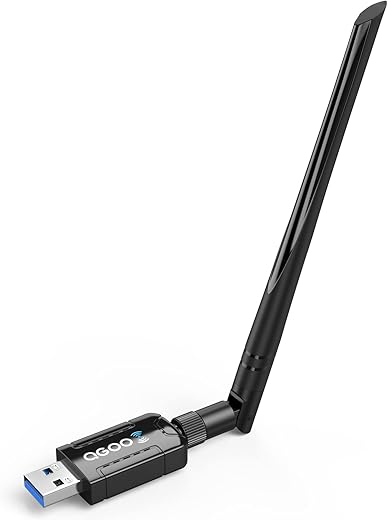
- At amazon.com you can purchase WiFi Adapter for PC, QGOO 1200Mbps USB 3.0 Wireless Network WiFi Dongle with 5dBi Antenna for Desktop/Laptop, Dual Band 2.4G/5G 802.11ac, Support Windows 11/10/8/8.1/7/Vista/XP for only
- The lowest price of WiFi Adapter for PC, QGOO 1200Mbps USB 3.0 Wireless Network WiFi Dongle with 5dBi Antenna for Desktop/Laptop, Dual Band 2.4G/5G 802.11ac, Support Windows 11/10/8/8.1/7/Vista/XP was obtained on September 24, 2025 03:24.
QGOO 1200Mbps USB 3.0 Wireless Network Dongle Price History
QGOO 1200Mbps USB 3.0 Wireless Network Dongle Description
QGOO 1200Mbps USB 3.0 Wireless Network Dongle Review and Price Comparison
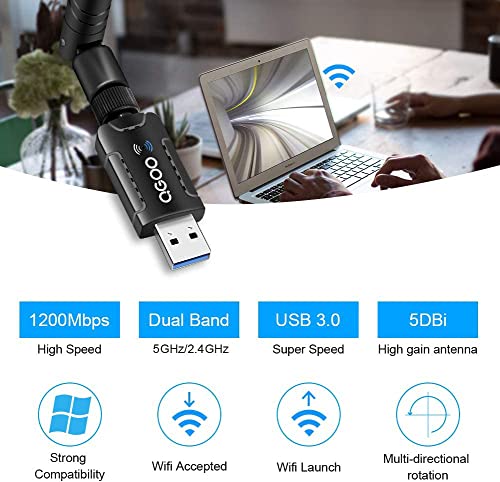
Experience seamless internet connectivity with the QGOO 1200Mbps USB 3.0 Wireless Network Dongle. This powerful wireless USB adapter enhances your PC’s capabilities, delivering fast and reliable internet access. Ideal for home or office use, the QGOO dongle is perfect for streaming videos, online gaming, or browsing the web. With support for a wide range of operating systems, it’s designed to cater to various user needs, making it a top choice for those seeking dependable wireless performance.
Main Features and Benefits
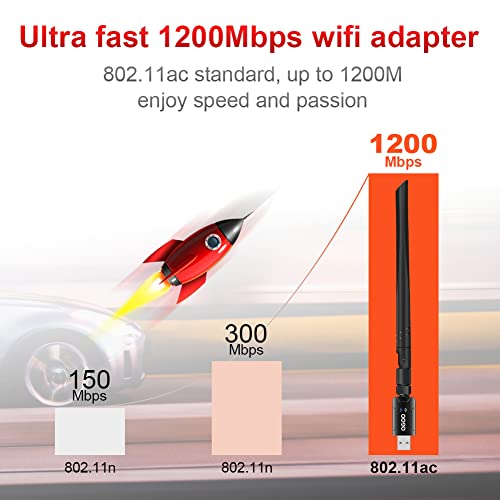
- High-Speed Connectivity: The QGOO adapter delivers speeds of up to 1200Mbps, enabling lag-free streaming and smooth online gaming experiences.
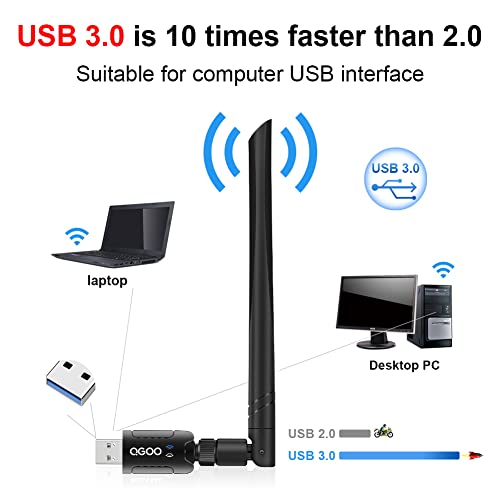
- Versatile Compatibility: This wireless USB WiFi adapter supports a variety of operating systems including Windows 11, 10, 8.1, 8, 7, XP, and Vista. Please note that it is not compatible with Mac OS 11.1 or newer.
- Compact Design: With dimensions of just 2.5 x 1.5 x 0.3 inches and a lightweight design (0.96 ounces), this dongle is highly portable, making it easy to carry around for on-the-go internet access.
- Easy Plug-and-Play Installation: No technical skills are required for installation. Simply plug the dongle into your PC’s USB port, and you’re ready to connect to your Wi-Fi network.
- Reliable Wireless Technology: Utilizes the 802.11 bgn standard, ensuring robust performance with widespread router compatibility.
Price Comparison Across Suppliers
The QGOO 1200Mbps USB 3.0 Wireless Network Dongle is competitively priced across various retailers. Prices can fluctuate, so it’s beneficial to check multiple sources for the best deal. You can find it ranging from $15.99 to $29.99 depending on ongoing promotions and availability. The QGOO dongle provides excellent value for its high-speed capabilities, making it a budget-friendly choice for quality performance.
6-Month Price History Trend
Analyzing the 6-month price history chart, you will notice that the QGOO dongle has shown a stable price point, with minor fluctuations typically aligning with seasonal sales. Over the past few months, the price has fluctuated between $16 and $28, indicating consistent demand. This stability suggests that the product is well-regarded and suggests that promotional deals are worth monitoring as they become available.
Customer Reviews Summary
Customer reviews for the QGOO 1200Mbps USB 3.0 Wireless Network Dongle are overwhelmingly positive. Users appreciate the high-speed connectivity and the ease of use, marking it as a reliable choice for everyday internet needs. Many customers have praised its compact design, making it easy to travel with. Positive feedback often highlights the dongle’s ability to provide stable connections even in environments with multiple devices.
However, some users have reported limitations regarding its compatibility with newer Mac operating systems, specifically Mac OS versions 11.1 and above. A few reviews mention occasional disconnection issues in crowded Wi-Fi environments, but these seem to be the exception rather than the norm. Overall, the feedback positions the QGOO dongle as a solid investment for wireless connectivity.
Explore Unboxing and Review Videos
If you want to see the QGOO 1200Mbps USB 3.0 Wireless Network Dongle in action before making your purchase, there are several unboxing and review videos available on YouTube. These videos provide a closer look at the product, showcasing its performance, installation process, and real-life usage experiences. Watching these reviews can give you deeper insights and help you make an informed decision.
Don’t miss out on the chance to enhance your internet connectivity with the QGOO 1200Mbps USB 3.0 Wireless Network Dongle. Compare prices now and see how this affordable yet powerful device can improve your online experience!
QGOO 1200Mbps USB 3.0 Wireless Network Dongle Specification
Specification: QGOO 1200Mbps USB 3.0 Wireless Network Dongle
|
QGOO 1200Mbps USB 3.0 Wireless Network Dongle Reviews (10)
10 reviews for QGOO 1200Mbps USB 3.0 Wireless Network Dongle
Only logged in customers who have purchased this product may leave a review.





Jessica –
Came quickly. Easy install ( I am not good with electronics and it went super smoothly). Came with either a cd, usb or wesbite for installing the driver. Working great on my daughters windows 10. Great signal! Would definitely purchase again for any other computers.
Darth Vader –
Connected/installed before could even get back to my chair after plugging it in. Value for money is great quality of packaging also great for damage-free transport.
Speed and Connection quality are as expected so that makes me a very satisfied customer.
Thank You QGoo for a great product without surprises 😉
I think I may just buy another for the wife and kids.
Kevin M –
I purchased this by accident for a Raspberry Pi 4. I have an old TP-Link external WiFi adapter but it was only 2.4 GHz. I wanted to make a game/media streaming box for Steam Link and Kodi on the Pi 4, and the old adapter wasn’t cutting it. The built-in WiFi on the boards don’t handle game streaming well and cause periodic stuttering.
I purchased this thinking it was the new version of that old dongle because apparently I can’t read. It wasn’t, and the drivers for it are not included in the current Raspbian Buster image available for download on the Raspberry Pi website. The included drivers on the disk that came with it are also not designed for ARM based Linux and there are no drivers available to download for Linux or the Raspberry Pi on the developer’s website.
However, looking through the disk revealed that it utilizes a version of Realtek drivers, RTL8812AU. Armed with that knowledge it’s possible to find the drivers elsewhere and install them.
Once installed and rebooted, this WiFi adapter is day and night compared to the on-board card. The range is noticeably longer and transfer speeds are much faster. Most of this is likely due to the antenna, but it doesn’t matter. Steam Link network tests up to 100 mbps pass with flying colors despite being on the other side of the house from the router.
I’m not going to rate this based on ease of install, because it wasn’t easy to install but I’m also not using it as intended. If this were a Windows or Mac based machine I’m sure the experience would have been much simpler, although that does depend on the prevalence of optical drives in the wild these days. I still have them, but I know many people that don’t and they would have been out of luck with this product. That being said, I’m extremely pleased with the performance and for the price I haven’t found anything even remotely comparable.
david –
Very simple and clear to install and set up. Really appreciated this. Connection is strong with a full signal. (20 feet away with a wall and a few pieces of furniture in the way.)
Came with small installation manual with 3 instructions made clearly visible and super basic to calm those who are anxiety prone:3 sentences, less than 10 words each. Basically: 1. install software. 2. plug in adapter. 3. scan for available networks to complete setup.
note: I opted to download the software for this device using the provided link rather than install from the cd it came with. The link they provided was actually to a dropbox folder… which might seem odd and low-end -ish if you are expecting a full on website… But this was fine. Just needed to click “DOWNLOAD” at the top right, which zipped up the folder and its contents, downloading to my computer. (there were some unfortunate comments in dropbox from frustrated people who didn’t understand the “download” button. and there were some gracious comments from others telling people what to do, e.g., “click “download,” people, gosh…”)
anyways, got my zip file. unzipped it. went inside the unzipped files. saw windows folder. double clicked the setup.exe file in there. And bam, it was installed ready for the final step.
After the install finished, I plugged the wifi adapter device into my usb3 port. Then checked the manual to see what was next. It said I should see an icon in my system tray to click on – which basically lead to scanning available networks. it was there. The software interface was just as described. I clicked on available networks…Found my router. clicked on it. entered my password. And boom, all done. Straightforward and fast.
It really is easy to install if you aren’t stunned by using your browser and dropbox to download the folder.
I imagine the installation cd is just as easy or easier. I think
Victor Moniz –
It was really easy to install, I don’t recommend using the drivers on the CD you can find more up to date drivers online. The wifi is far faster and has better than the Wireless N included in my Lenovo desktop. Streaming no longer buffers.
Haskell –
This wifi has excellent signal quality with even a long distance. Comes with a CD driver and I guess driver downloadable too, providing a signal strength monitoring. Very easy installation. Super strong signal even in a long distance from my wifi router. Just need keep it not that close from a fan or other electronic devices nearby. Definitely a great buy! Very highly recommended!
Sibtain Akhtar –
This product is very good I have used this for gaming PC. WiFi signal is good. Very easy to install. Excellent value of my money Definitely worth it.
George dugom –
The product is great, works well, and overall can get you the wifi connection you need for whatever system demands it.
The wifi adapter comes with instructions on getting the proper application for it to work and comes with a USB stick with the application pre-installed to make it easier as well.
It’s only drawback would be it’s connection, while it works well and does the job properly, there are times when the product will begin to slow down even down to 0mb/s, which can be back, however this only lasts about a second or two, afterwords it goes back to working normally for a while before repeating this same drop time and time again.
Amazon Customer –
This product is a cheap upgrade for many people if they can’t have a wired connection to the internet. My office is like 60 ft and through a door in my new apartment, so wired connection wasn’t an option. I tried to get a power-line adapter because our apartment was renovated and we are the first occupants, so I assumed (incorrectly) that the wiring would have been updated. I do live in an old building so the electrical wiring was not all on the same breaker as is required by power line adapters. The power-line adapter tripped the circuit twice when I tried to pair it so I had to return it.
Frustrated and out of options to get the most out of the expensive Comcast bill I pay to have 300 mb/s download speed, I stumbled upon this Wifi Adapter. At first I am skeptical because I always had the impression that wireless wifi connection was the equivalent of virtual purgatory, where I would get but a small fraction of the internet speed I pay for but it seems like there isn’t much I can do unless I dropped either a lot of money or run a 100 ft wire through out my apartment where I would never hear the end of how unsightly and unpractical it was.
Once I got this product, it was simple to install, came with a helpful app and clear instructions on pairing. I am getting blazing fast internet speeds that were comparable (albeit slightly less) than what I got from a wired connection. The technology for wireless connections has come a long way, and I’m glad I gave it a try. It was worth twice what I paid and I am a very happy customer.
PAR –
Was worth the price. I needed it for an everyday use item. Setup easily and works as needed.