
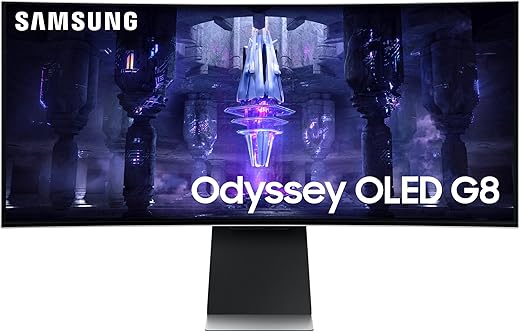
SAMSUNG Odyssey G85SB QD-OLED Gaming Monitor
 Amazon.com
Original price was: $1,199.99.$699.99Current price is: $699.99.
SAMSUNG Odyssey G85SB QD-OLED Gaming Monitor Price comparison


- All prices mentioned above are in United States dollar.
- This product is available at Amazon.com.
- At amazon.com you can purchase SAMSUNG 34" Odyssey G85SB Series QD-OLED Ultra WQHD Curved Gaming Monitor, 175Hz, 0.03ms, DisplayHDR True Black 400, AMD FreeSync Premium Pro, Advanced Game Streaming, LS34BG850SNXZA, 2023 for only $699.99
- The lowest price of SAMSUNG 34" Odyssey G85SB Series QD-OLED Ultra WQHD Curved Gaming Monitor, 175Hz, 0.03ms, DisplayHDR True Black 400, AMD FreeSync Premium Pro, Advanced Game Streaming, LS34BG850SNXZA, 2023 was obtained on September 24, 2025 07:18.
SAMSUNG Odyssey G85SB QD-OLED Gaming Monitor Price History
SAMSUNG Odyssey G85SB QD-OLED Gaming Monitor Description
SAMSUNG Odyssey G85SB QD-OLED Gaming Monitor
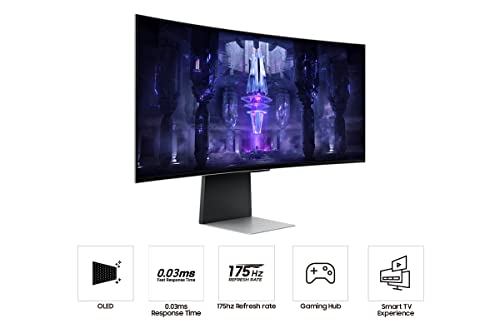
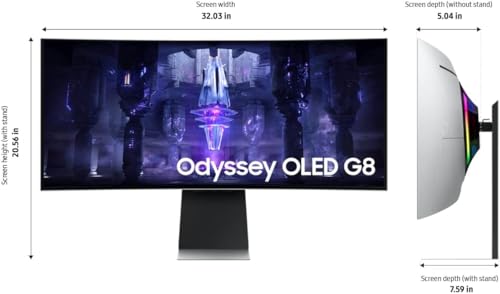
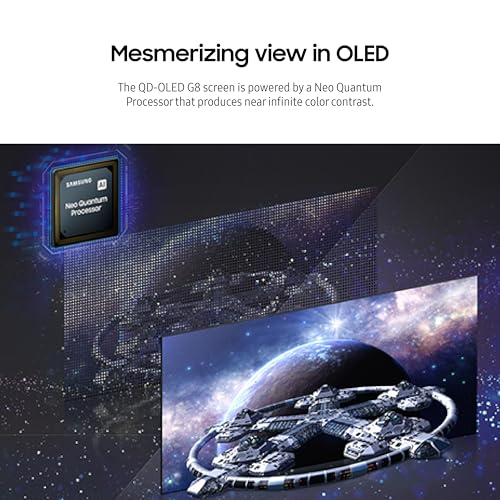
The SAMSUNG Odyssey G85SB QD-OLED Gaming Monitor combines cutting-edge technology with stunning visual performance, making it a must-have for gamers and multimedia enthusiasts alike. With a breathtaking 34-inch screen and a resolution of 3440×1440 pixels, this monitor delivers vibrant colors and sharp details, enhancing your gaming and viewing experiences. Dive into the world of immersive visuals and enjoy high-speed performance that elevates every gaming session.
Key Features and Benefits
- Ultra-Wide Display: The expansive 34-inch screen allows for a more immersive experience, whether you’re gaming or streaming your favorite shows. It’s perfect for multitasking, enabling you to run several applications side by side.
- QD-OLED Technology: Quantum Dot OLED technology offers deep blacks and bright colors, ensuring that you experience every detail as intended. Enjoy realistic visuals that pop, enhancing the gaming graphics and cinematic experiences.
- 3440×1440 Resolution: With this ultra-wide resolution, every image is crisp and clear. Say goodbye to pixelated graphics and hello to stunning clarity during intense gaming sessions.
- High Refresh Rate: Built for speed, the monitor features a high refresh rate which reduces motion blur during fast-paced gameplay, keeping you ahead of your competition.
- Dual USB 3.0 Ports: Connect your peripherals easily with dual USB 3.0 ports. Access your devices quickly for enhanced productivity and convenience.
- Stylish Design: The sleek silver finish and modern aesthetic make the display a stylish addition to any gaming setup or office space.
Price Comparison
Prices for the SAMSUNG Odyssey G85SB QD-OLED Gaming Monitor vary across different suppliers, making it essential to find the best deal. The monitor is available at various retailers, and here’s a quick look at the pricing trends:
- Retailer A: $1,299.99
- Retailer B: $1,249.99
- Retailer C: $1,299.00
By comparing prices, you can save significantly and make a more informed purchase decision. It’s worth noting that prices often fluctuate, so always check multiple sources for the latest deals.
6-Month Price History Trends
Examining the 6-month price history chart, there is a noticeable fluctuation in prices, with peaks around gaming events indicating increased demand. Trends show that prices typically decrease post-holiday seasons, offering great opportunities for savings. If you’re looking for the best time to buy the monitor, consider waiting until the off-peak seasons or major sales events.
Customer Reviews Summary
Customer reviews of the SAMSUNG Odyssey G85SB highlight its remarkable display quality and user-friendly features. Many users praise the vivid color reproduction and the immersive experience provided by the ultra-wide screen. Reviewers commonly mention:
- Excellent contrast and brightness levels.
- Responsive gaming with minimal input lag.
- High compatibility with most gaming consoles.
However, some buyers have noted drawbacks, such as:
- The monitor’s weight, which may require a sturdy stand.
- The need for accurate color calibration for the best output, especially for professional creatives.
Overall, user feedback emphasizes that the SAMSUNG Odyssey G85SB provides exceptional value for its price, especially for avid gamers and creators looking for top-tier performance.
Unboxing and Review Videos
To get an in-depth look at the SAMSUNG Odyssey G85SB, don’t miss out on the unboxing and review videos available on platforms like YouTube. These videos offer a closer view of the monitor’s features and performance, helping you make a more informed decision prior to purchasing. They showcase initial impressions, detailed features, and practical setups that can inspire your own gaming space.
In summary, the SAMSUNG Odyssey G85SB QD-OLED Gaming Monitor is a phenomenal choice for those seeking a larger-than-life viewing experience. Its advanced features, stunning visuals, and excellent performance make it a standout option in the competitive gaming monitor market. With keen price comparisons and patient timing, you can secure it at the best price point. Compare prices now!
SAMSUNG Odyssey G85SB QD-OLED Gaming Monitor Specification
Specification: SAMSUNG Odyssey G85SB QD-OLED Gaming Monitor
|
SAMSUNG Odyssey G85SB QD-OLED Gaming Monitor Reviews (8)
8 reviews for SAMSUNG Odyssey G85SB QD-OLED Gaming Monitor
Only logged in customers who have purchased this product may leave a review.





Ibrahim Allaf –
This review is mainly for people who love to play video games like I do.
I use this monitor with this rig so you can compare yours to mine and calculate what FPS you will be getting from this monitor.
Rig specs:
Processor: Intel(R) Core(TM) i9-14900K (32 CPUs), ~3.2GHz
Memory: 32GB RAM 6000 MHz
GPU: RTX 4090
For a game such as Diablo 4, with everything maxed out in settings, HDR on, and LowFx disabled, you will get around 100+ FPS on world maps with or without people and 100+ FPS inside a dungeon with or without other people in it. For towns, however, you will only be getting 60, sometimes dipping around 50, depending on which town and how many people are in it. if you have a rig close to or better than mine this is a good value for your money. performance-wise and quality-wise. OLED makes everything beautiful for movie watching and cutscenes on games. since the two are 30 FPS lock anyway.
highly recommended that you buy it if you want immersion on games assuming that your computer can keep up on the demands of new titles otherwise you can lower your settings a bit. the LG UltraWide 34” QHD (3440 x 1440) OLED is a contender in this category as well, but it’s more expensive with the same performance.
by the way avoid the resolution pitfall 4k even tho it offers way better quality if sacrifices performance a 2k game with 100+ FPS will look better and feel better than a 4k game with 30 – 40 FPS even for immersion.
Kevin P. Gundran –
The media could not be loaded.
Muchas opciones , en lo personal es conveniente la
Función de SMart TV. Lo conecto a mi lap con usbc y juego en geforcenow en Ultrawide y a 120fps (necesitas una buena conexión a internet)
Tengo una LG c3 y si noto los colores más vivos y su pantalla glossy no refleja tanto como esperaba, aunque tengo la luz controlada. Excelso
Yung Ennix –
Monitor de excelente calidad, con funciones de smart tv y control remoto, si tienes teléfono Samsung puedes controlarlo desde la app de SmartThings al 100% sin necesidad del control. Me gustó para trabajar, por sus dimensiones al ser ultra largo puedo mantener varias ventanas abiertas a la vez. Funciona perfecto con mi Asus Rog Flow Z13, me da la resolución máxima que es 3,440 x 1,440 pero solo 120hz por medio del cable usb-c a usb-c, se carga del mismo cable por medio del monitor, mi hub que usaba para conectar el receptor del mouse y el teclado ahora lo conecto directamente al monitor, también tenia un altavoz, pero ahora no lo ocupo, porque el audio lo obtengo directamente del monitor y tiene buena calidad de sonido, así que ahora todo ya esta conectado al monitor listo para conectar con un solo cable a mi tablet ROG Z13. Mi anterior monitor era el Samsung curvo F390 Series C24F390FH led de 24″ 1080p y 60hz, así que fue un excelente upgrade, la calidad de imagen no se compara, estoy satisfecho por la compra.
Kirk R. –
This monitor’s expansive 49-inch screen, combined with its immersive curved design, provides an unparalleled gaming experience that draws you right into the action. The OLED technology delivers breathtakingly vibrant colors, deep blacks, and stunning contrast, making every game look incredibly realistic.
With a high refresh rate and low response time, this monitor ensures smooth and lag-free gameplay, essential for competitive gaming. The ultra-wide aspect ratio enhances peripheral vision, giving you a strategic advantage in fast-paced games. Additionally, the monitor supports HDR, further elevating the visual experience with richer detail and more dynamic lighting.
The build quality is top-notch, featuring a sleek and futuristic design that complements any gaming setup. The adjustable stand allows for ergonomic customization, ensuring comfort during extended gaming sessions. Connectivity options are plentiful, accommodating a variety of gaming consoles and PC setups.
For those with a mac thinking this might be a good option for productivity I would look elsewhere. The low resolution at 5120 is not very pleasant to look at.
Kirk R. –
First off, this monitor is heavy. The stand which comes with it is very substantial and will support the monitor well. If, like me, you use an arm swivel to hold your monitor so it can be moved around, you will need a heavy-duty arm and mount. Fortunately, mine could handle the weight.
Secondly, the picture is impressive. Just hooking it to my PC and turning it on made it obvious that the OLED is 100% better than my older monitors. I used a three-monitor set before and the panoramic view of this 49″ monster made them instantly obsolete. I can do the same work in multiple windows with only one monitor.
It does take some getting used to but the overall picture quality and 240hz refresh rate means a seamless work surface and an unbeatable gaming workhorse.
So my pros:
It was easily set up and provides a great visual experience.
Working in multiple windows and programs functions well and the seamless movement between them is a great asset.
Gaming is awesome on this monitor with no rips or lags in any of the games I put it through. (BG3, various flight sims, Cyberpunk, Skyrim, et. al.
My cons:
Updates are not intuitive. There is a bit of work involved in getting the hardware updated. I had to download to a thumb drive and the find the specific port to plug into.
The LED lighting on the back is meh. A series in a strip around the monitor would be more eye-catching.
All this being said, I find myself really enjoying this monitor. It is beautiful in the picture and quality, seems robustly well built and allows for easy multitasking through putting up to six windows across the face.
I have not tried the additional device option (splitting the screen in two) or used the built in sound as I have better base sound on the PC itself.
Overall, I would recommend this monitor for anyone who needs a wide screen for multitasking or gaming purposes. It also provides an excellent streaming picture for movies/television. It is a higher price point, but is well worth the price in my opinion.
5 stars!
Francesco C. –
I’ve been using the SAMSUNG 49″ Odyssey G93SC for some time now, and it’s truly an impressive monitor. The ultra-wide display offers incredible immersion, especially for gaming and multitasking. The 240Hz refresh rate and 1ms response time ensure smooth gameplay without any noticeable lag or ghosting. The colors are vibrant, and the contrast is excellent, making both gaming and productivity tasks enjoyable.
However, the size of the monitor requires a large desk space, and some users may find it challenging to adjust initially. The curve is also quite steep, which might take a bit of getting used to. Overall, though, if you have the space and appreciate high-end performance, this monitor is a fantastic choice.
Edwin –
The fact that it is an OLED is a double-edged sword. First of all, OLEDs are known to have shorter lifespan than LCDs and all the other alternatives. This monitor is pretty much like all other OLEDs in a sense that TRUE BLACK will essentially be the main feature. The white light is significantly dimmer than my LCD monitors, even my LCD tablets shine brighter.
This monitor does an amazing job rendering 360 hz refresh rate as an OLED at 1440p. Everything is nice and clear, it performs as they advertised. But the coil of the monitor can sometimes be tediously annoying when the room/place is very quiet. I would recommend that you turn on a fan, aircon, run a speaker or wear a noise-cancelling headphones to keep the coil sound from irritating you literally until you turn off the monitor itself.
Do I like it, yes and no. But I would rather keep it than return it. Why? Because it is significantly better than my old BenQ 240 hz 1080p gaming monitor. I seriously cannot go back to that res and overall specs. This 360 hz 1440p OLED has been an amazing gaming monitor that I can confidently rely on for the next maybe 3-5 years, hopefully maybe longer.
Btw, the monitor will be a good buddy with display ports but for some reason it hates HDMI. I got a Steam Deck and I used the Display port with my Steam Deck Dock and it works just fine but only at 120 hz max. While with my BenQ 240 hz 1080p, it can run up to the full 240 hz. So yeah kinda weird that my 1080p monitor can utilize its full capability with the Steam Deck while this supposedly superior tech released in 2024 cannot run Steam Deck at full 360 hz capability (limited to max of 120 hz only). So if you have a Steam Deck and you intend to use the Steam Dock, you might wanna explore better other options. Back to the HDMI issue, when I used the HDMI, IT DOES NOT WORK for the Steam Deck. (HDMI cable is perfectly normal/active because I used it to the BenQ monitor and it does work.
TLDR; This monitor does as advertised/as described as a gaming OLED monitor. As an OLED monitor, the brightness will be terrible like all other OLED monitors, but you get a true black. The coil sound/noise within the monitor can be a pain in the ass sometimes when the room/place is very quiet. Basically, for this monitor, the display port will work perfectly just fine; however, with the HDMI cable, you may run into some issues.
Bisa –
Superb quality, punchy colors and rich blacks from this OLED monitor and very low response time and high refresh rate making it suitable for gaming and watching movies as well. I use it 80% for work and 20% for gaming/movies, I don’t experience the text fringing that many reviewers out there complain about because I don’t stick my face in the screen trying to look for it, people over exaggerate things really. The speakers are also pretty decent which is a plus as I never had a monitor before that has built in speakers. I mainly bought it as an external monitor to connect my laptop to but having the Smart TV functions in it is an added bonus to watch YouTube, Shahid, Netflix, etc and the remote control makes it a joy to control vs other monitors where you have to fiddle around with some awkwardly positioned joystick under the monitor.
The monitor came with very well protected packaging and had 0 dead pixels and no backlight bleeding (offcourse since it’s an OLED).
One minor complaint is that only it came with a Mini Display Port to Display port cable but my laptop also has a mini display port cable so the provided cable wouldn’t fit since the monitor itself only has a mini display port so I am left with the Display port side of the cable so I ended up buying a UGREEN 8K Micro HDMI to HDMI 2.1 Cable to connect it to my laptop and got the full refresh rate of 175HZ at 3440×1440 resolution.