Apple iPad A16 Review: Is It Still Worth It?
The Apple iPad (A16) remains a capable everyday tablet for school, streaming, browsing, note-taking, casual gaming, and general productivity. Its biggest strengths are straightforward: the A16 chip still feels fast for ordinary tablet use, 128GB is now the starting storage capacity, battery life is strong, and iPadOS gives you access to one of the most mature tablet app ecosystems.
The buying decision is less simple in 2026, though. Apple’s current U.S. price for the 128GB Wi-Fi model is $449, significantly higher than its original $349 launch price. At the same time, the base iPad does not support Apple Intelligence, lacks Apple Pencil Pro support, uses a basic 60Hz display without the laminated and anti-reflective treatment of the iPad Air, and limits USB-C transfers to USB 2.0 speeds.
That doesn’t make the iPad A16 a bad tablet. It means value now depends much more heavily on the price you actually pay. At a strong retailer discount, it remains one of the easiest tablets to recommend for everyday users and students. At Apple’s full current price, the gap to the more capable iPad Air M4 deserves closer attention.
If you are comparing the broader tablet market rather than only Apple’s lineup, our Best Tablets for Work & Entertainment guide covers current Apple, Android, and Windows alternatives.
Quick Verdict: Apple iPad A16
Best For: Students, families, streaming, web browsing, video calls, casual games, and everyday tablet apps.
Main Reason to Buy: Strong everyday performance, 128GB starting storage, good battery life, and access to Apple’s extensive iPad app ecosystem.
Main Limitation: No Apple Intelligence, no Apple Pencil Pro support, a basic reflective 60Hz display, and slow USB 2.0 data transfers.
Value Verdict: Most attractive when discounted below Apple’s current $449 U.S. price. At full price, compare the iPad Air M4 before buying.
Apple iPad A16 at a Glance
| Specification | Apple iPad (A16) |
|---|---|
| Current Apple U.S. price | $449 for 128GB Wi-Fi |
| Processor | Apple A16, 5-core CPU, 4-core GPU |
| Storage | 128GB, 256GB, or 512GB |
| Display | 11-inch class Liquid Retina IPS, 2360 × 1640, 500 nits |
| Refresh rate | 60Hz |
| Rear camera | 12MP Wide |
| Front camera | Landscape 12MP Center Stage |
| Apple Pencil support | Apple Pencil USB-C and 1st generation |
| Keyboard support | Magic Keyboard Folio |
| USB-C speed | USB 2.0, up to 480Mb/s |
| External display | Up to 4K at 60Hz |
| Weight | 1.05 lb / 477g for Wi-Fi model |
| iPadOS 27 | Supported |
| Apple Intelligence | Not supported |

Design and Display
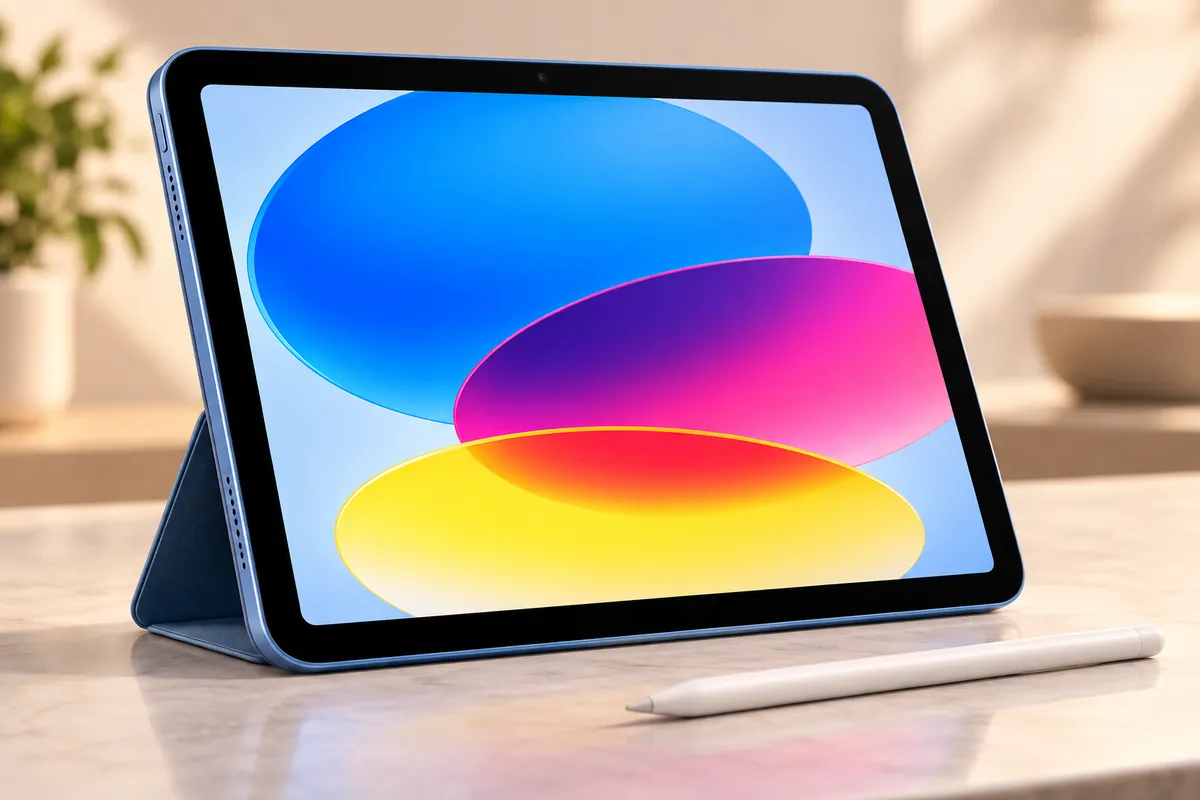
The iPad A16 keeps the flat-sided aluminum design introduced with the previous base iPad generation. It feels modern, relatively light, and easy to carry between classes, meetings, or rooms around the house.
The Wi-Fi model weighs about 1.05 lb, and the front camera sits along the long edge of the device. That landscape camera position is useful for video calls because your face appears more naturally centered when the tablet is attached to a keyboard or placed on a stand.
Touch ID remains integrated into the top button. It is fast and practical for unlocking the device, authorizing purchases, and signing into supported apps.
The 11-inch-class Liquid Retina display has a 2360 × 1640 resolution at 264 pixels per inch and reaches 500 nits of brightness. Text looks sharp, video is pleasant to watch indoors, and the screen is more than adequate for documents, websites, streaming, casual games, and ordinary image editing.
The limitations become more visible when compared with the iPad Air. The base iPad does not offer the Air’s fully laminated panel, P3 wide-color support, or anti-reflective coating. Independent reviewers have also found the display harder to see in bright environments.
The 60Hz refresh rate is another difference. Scrolling and animation remain perfectly usable, but buyers accustomed to 120Hz phones, tablets, or monitors may notice that motion looks less fluid.
For everyday use, the display is good enough. For serious illustration, color-sensitive creative work, or frequent use near bright windows and outdoors, the iPad Air is a more convincing upgrade.
A16 Performance in 2026
The A16 chip remains one of the strongest reasons the standard iPad still works well as an everyday tablet. Apple uses a 5-core CPU, 4-core GPU, and 16-core Neural Engine in this model.
For routine use, the performance ceiling is much higher than basic browsing requires. Apps launch quickly, web pages remain responsive, streaming is effortless, and common productivity apps run comfortably.
Independent testing has also found the iPad A16 capable in casual gaming and multitasking. It can handle photo editing, light video projects, schoolwork, presentations, and creative apps without feeling like a low-end device.
The important distinction is between capable and professional. The A16 does not offer the CPU, GPU, memory architecture, media engines, or accessory ecosystem of Apple’s M-series iPads.
If your workload consists of dozens of layers in illustration apps, large video timelines, advanced effects, 3D projects, or frequent external-display work, the iPad Air M4 gives you much more headroom.
For students, families, streaming, email, note-taking, gaming, web research, and ordinary office tasks, the A16 remains fast enough that raw processor performance is unlikely to be the first limitation you encounter.
iPadOS 27: Good Software, One Big Limitation
The iPad A16 supports iPadOS 27, so it continues to receive Apple’s current tablet interface, security updates, apps, multitasking improvements, and productivity features.
That software support is important because the hardware itself is not obsolete simply because it lacks Apple’s newest AI features.
However, the iPad A16 does not support Apple Intelligence. Apple’s current requirements limit Apple Intelligence on iPad to models using M1 or later, along with the iPad mini using A17 Pro.
That means the A16 iPad misses features that depend on Apple’s newer on-device AI platform, including supported Apple Intelligence tools and Siri AI functionality.
Whether that matters depends on how you use a tablet. If your main activities are streaming, reading, note-taking, browsing, video calling, documents, and games, the absence of Apple Intelligence does not prevent the iPad from performing those tasks well.
If you specifically want Apple’s current AI features and expect them to become an important part of your workflow, the iPad Air M4 is the more future-oriented purchase.
Key distinction: The iPad A16 supports iPadOS 27, but support for the operating system does not mean support for every Apple Intelligence feature available on newer M-series iPads.
Apple Pencil and Note-Taking
The iPad A16 supports two Apple Pencil options: Apple Pencil USB-C and the first-generation Apple Pencil.
For students and casual note-takers, the USB-C Pencil is the simpler option. It supports pixel-precise input, low latency, and tilt sensitivity, making it suitable for handwriting, PDF annotation, diagrams, and light sketching.
Apple currently lists the USB-C Pencil at $79. It attaches magnetically to the side of the iPad for storage but pairs and charges through a USB-C cable rather than charging wirelessly on the tablet.
The major limitation for artists is pressure sensitivity. Apple Pencil USB-C does not support it. That makes the stylus less suitable for illustration workflows where brush thickness or opacity depends on how hard you press.
The older first-generation Apple Pencil does support pressure sensitivity, but pairing and charging it with the USB-C iPad requires Apple’s adapter, creating a less elegant workflow.
The iPad A16 also does not support Apple Pencil Pro. If features such as pressure-sensitive drawing, squeeze controls, barrel roll, hover support, and wireless pairing matter to your creative workflow, the current iPad Air is the stronger choice.
Magic Keyboard Folio and Productivity
The iPad A16 becomes much more laptop-like when paired with the Magic Keyboard Folio. Apple’s accessory includes a detachable keyboard, built-in trackpad, adjustable rear stand, and a 14-key function row.
The problem is cost. Apple currently lists the Magic Keyboard Folio at $249. At Apple’s present prices, combining the 128GB Wi-Fi iPad at $449 with the keyboard brings the package to $698 before tax.
That changes the value equation considerably.
At nearly $700, the iPad is no longer competing only with inexpensive tablets. It begins overlapping with conventional laptops and discounted higher-end tablets that may provide more processing power, more ports, a better display, or fewer software limitations.
The keyboard itself is useful for email, documents, school assignments, messaging, browser work, and basic spreadsheet tasks. The trackpad also improves navigation when you work with the iPad on a desk.
But an accessory does not change iPadOS into macOS or Windows. Before treating the iPad as a primary computer, confirm that the software you rely on has a suitable iPad version and that your workflow does not require desktop-only applications.
For alternative tablet approaches to work and entertainment, our Best Lenovo Tablets for Productivity guide covers several Windows- and Android-oriented options.
Cameras, Speakers, and Video Calls
The rear camera is a 12MP Wide camera capable of recording video up to 4K at 60 frames per second. It is useful for scanning documents, photographing whiteboards, recording short clips, and capturing reference images.
The front camera is also 12MP and uses Center Stage to help keep you framed during compatible video calls. Its landscape placement is especially useful when the iPad is sitting on a desk in keyboard mode.
The device includes landscape stereo speakers. They are suitable for video, casual music, games, and calls, although external headphones or speakers will provide a better experience when audio quality is a priority.
For most buyers, the camera system is better understood as a communication and utility feature than as a replacement for a modern smartphone camera.
Battery Life and Charging
Apple rates the iPad A16 for up to 10 hours of web browsing over Wi-Fi or video playback.
Independent testing has been encouraging. Tom’s Guide measured 11 hours and 25 minutes in its continuous web-browsing battery test, while other reviewers have found the tablet capable of lasting through a normal day depending on workload.
Real battery life varies with brightness, games, video calls, cellular connectivity, background activity, and demanding apps. Rendering video or playing graphics-heavy games will drain the battery much faster than reading documents or watching downloaded video.
For students and general users, battery life is one of the iPad A16’s strongest practical advantages. A full day of mixed classes, browsing, note-taking, and streaming is realistic for many users without carrying a charger constantly.
What We Don’t Like About the iPad A16
The iPad A16 gets the essentials right, but several compromises are increasingly noticeable in 2026.
Pros
✅ Fast enough for most everyday tablet workloads
✅ 128GB starting storage is practical for general users
✅ Strong battery life in independent testing
✅ Large, mature iPad app ecosystem
✅ Landscape front camera works well for calls
Cons
❌ No Apple Intelligence support
❌ 60Hz display lacks lamination and anti-reflective treatment
❌ No Apple Pencil Pro compatibility
❌ USB-C data transfer is limited to USB 2.0 speeds
❌ Current Apple price is less aggressive than the original launch price
iPad A16 vs iPad Air M4
The iPad Air M4 is the most relevant upgrade because it addresses nearly every major limitation of the A16 model without moving into iPad Pro pricing.
| Feature | iPad A16 | iPad Air M4 |
|---|---|---|
| Current Apple U.S. starting price | $449 | $749 |
| Chip | A16 | M4 |
| Apple Intelligence | No | Yes |
| Display lamination | No | Yes |
| Wide color P3 | No | Yes |
| Anti-reflective coating | No | Yes |
| Apple Pencil Pro | No | Yes |
| USB transfer | Up to 480Mb/s | Up to 10Gb/s |
| Best fit | Everyday use and students | Productivity, creatives, heavier apps |
The $300 difference is significant, so the Air is not automatically the better purchase. If you mainly stream video, browse, take notes, attend classes, read, and use everyday apps, the base iPad still does those jobs well.
The Air becomes easier to justify when Apple Intelligence, Apple Pencil Pro, faster external storage, better display quality, or substantially higher performance matter.
If you are also considering Samsung’s current flagship tablet, our iPad Air M4 vs Galaxy Tab S11 comparison covers the differences in display, stylus support, performance, and productivity.
Who Should Buy the iPad A16?
Students: The combination of long battery life, note-taking apps, 128GB starting storage, video-call support, and a large app ecosystem makes the iPad practical for classes and everyday coursework.
Families: It works well as a shared entertainment, browsing, gaming, and communication device without requiring premium hardware.
Streaming and casual gaming users: The A16 has more than enough performance for video services, mobile games, and ordinary entertainment.
Owners of much older iPads: Moving from an older Home-button model can bring a meaningful improvement in performance, storage, USB-C connectivity, screen size, and camera placement.
Buyers who find a strong discount: The A16 becomes substantially more compelling when retailer pricing drops below Apple’s current $449 list price.
Who Should Skip It?
Apple Intelligence users: The A16 does not meet Apple’s hardware requirements for its current AI platform.
Serious digital artists: No Apple Pencil Pro support and the USB-C Pencil’s lack of pressure sensitivity make the Air or Pro more suitable for advanced illustration.
Creative professionals: The M-series iPads offer stronger processors, better display characteristics, faster USB connectivity, and more advanced accessory support.
Heavy external-storage users: USB 2.0 transfer speeds can become frustrating when working with large photo or video libraries.
Buyers trying to build a laptop replacement at full Apple pricing: Once the $249 Magic Keyboard Folio and optional Pencil are added, the total cost can overlap with capable laptops and higher-end tablets.
Frequently Asked Questions
Is the iPad A16 still worth buying in 2026?
Yes for everyday users, students, streaming, casual gaming, and general productivity, especially when discounted. At Apple’s current $449 U.S. price, buyers who care about Apple Intelligence, Pencil Pro, display quality, or heavier productivity should also compare the iPad Air M4.
Does the iPad A16 support Apple Intelligence?
No. The iPad A16 supports iPadOS 27, but Apple’s current Apple Intelligence requirements specify M1 or later for full-size iPads, or the A17 Pro for iPad mini.
Is 128GB enough for an iPad?
128GB is enough for many students and everyday users who mainly stream media, use cloud storage, and keep a moderate number of apps and games. Buyers storing large video libraries, high-end games, or creative projects locally may benefit from 256GB or 512GB.
Which Apple Pencil works with the iPad A16?
The iPad A16 supports Apple Pencil USB-C and the first-generation Apple Pencil. It does not support Apple Pencil Pro. The USB-C Pencil is convenient for notes and annotation but does not include pressure sensitivity.
Can the iPad A16 replace a laptop?
It can replace a laptop for some browser-based work, documents, email, school assignments, video calls, and light creative tasks. It is less suitable when your workflow depends on desktop-only software, extensive file management, large external drives, or specialized professional applications.
Is the iPad A16 good for students?
Yes. Its portability, battery life, note-taking support, 128GB starting storage, landscape camera, and app ecosystem make it well suited to many school and college tasks. Budget separately for a Pencil or keyboard if you need them.
Should I buy the iPad A16 or iPad Air M4?
Choose the iPad A16 for everyday tasks and value, particularly when discounted. Choose the iPad Air M4 if you need Apple Intelligence, Apple Pencil Pro, a laminated anti-reflective P3 display, much faster USB transfers, or substantially more processing headroom.
Final Verdict: Is the Apple iPad A16 Worth It?
The Apple iPad A16 remains a strong everyday tablet in 2026. Its performance is still more than sufficient for school, streaming, browsing, casual gaming, note-taking, video calls, and ordinary productivity. The 128GB starting capacity is also far more practical than the 64GB base storage found on older entry-level iPads.
Its weaknesses are increasingly clear, though. It misses Apple Intelligence, uses a basic 60Hz display without the Air’s lamination and anti-reflective treatment, lacks Apple Pencil Pro support, and limits USB-C transfers to USB 2.0 speeds.
The current $449 Apple Store price is the biggest reason to compare alternatives carefully. At a meaningful discount, the iPad A16 remains one of the easiest Apple tablets to recommend for general use. At full price, the iPad Air M4 becomes more attractive for buyers who intend to keep their tablet for years or use it for increasingly demanding work.
Buy it if: You want a straightforward iPad for school, entertainment, browsing, notes, and everyday apps.
Wait for a deal if: Your main priority is value rather than buying directly from Apple.
Choose iPad Air instead if: Apple Intelligence, Apple Pencil Pro, faster USB, a better display, or heavier creative work matters.
Sources
- Apple — Compare iPad Models
- Apple — iPad (A16) Technical Specifications
- Apple — Buy iPad: U.S. Pricing and Configurations
- Apple Support — Apple Intelligence on iPad and iPadOS 27 Requirements
- Tom’s Guide — iPad 11 Review: Performance, Display and Battery Testing
Product Groups: Apple iPad 11th Gen A16 128GB Wi-Fi