
ASUS AX3000 (Pce-AX58BT) WiFi 6 PCIe Adapter
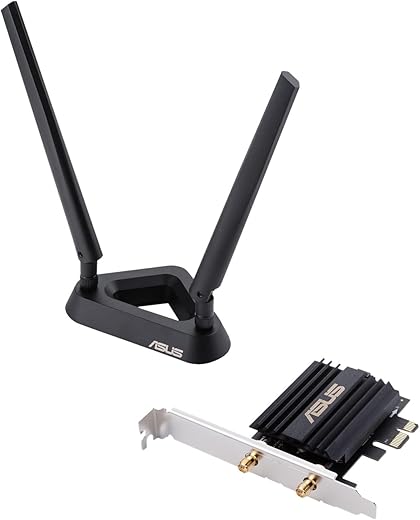
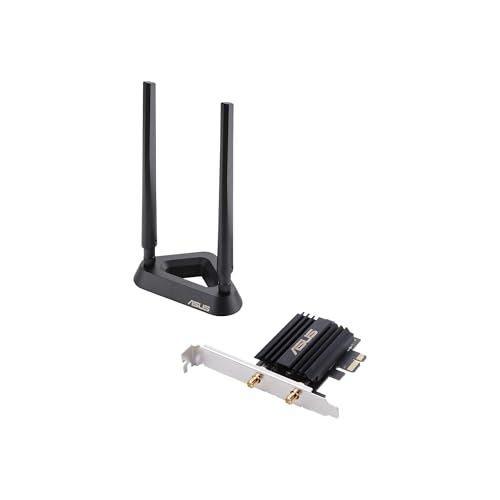
ASUS AX3000 (Pce-AX58BT) WiFi 6 PCIe Adapter Price comparison

- All prices mentioned above are in United States dollar.
- At amazon.com you can purchase Asus AX3000 (Pce-AX58BT) Next-Gen WiFi 6 Dual Band PCIe Wireless Adapter with Bluetooth 5.0 - Ofdma, 2x2 MU-Mimo and Wpa3 Security,Black for only
- The lowest price of Asus AX3000 (Pce-AX58BT) Next-Gen WiFi 6 Dual Band PCIe Wireless Adapter with Bluetooth 5.0 - Ofdma, 2x2 MU-Mimo and Wpa3 Security,Black was obtained on September 24, 2025 03:59.
ASUS AX3000 (Pce-AX58BT) WiFi 6 PCIe Adapter Price History
ASUS AX3000 (Pce-AX58BT) WiFi 6 PCIe Adapter Description
ASUS AX3000 (Pce-AX58BT) WiFi 6 PCIe Adapter: Superior Connectivity for Gamers and Streamers
Upgrade your home network with the ASUS AX3000 (Pce-AX58BT) WiFi 6 PCIe Adapter. Designed for gamers and those who demand high-speed internet, this adapter enhances performance and delivers a seamless connection. With its innovative technology, you can experience faster speeds, improved range, and reliable performance for all your online activities. Let’s dive into the features and benefits that make this WiFi 6 adapter a must-have.
Key Features of the ASUS AX3000 (Pce-AX58BT)
- WiFi 6 Technology: Enjoy cutting-edge WiFi 6 advancements that support faster speeds, enhanced capacity, and reduced latency. This means smoother gaming experiences and buffer-free streaming.
- Dual-Band Connectivity: The AX3000 offers dual-band (2.4GHz and 5GHz) connectivity, allowing you to achieve speeds up to 2402 Mbps on 5GHz and 574 Mbps on 2.4GHz. This versatility helps optimize your network performance.
- Advanced MU-MIMO Support: Multi-user, multiple input, and multiple output (MU-MIMO) technology allows for communication with multiple devices simultaneously. This feature drastically reduces wait times and offers a more efficient connection.
- Bluetooth 5.0 Enabled: Integrated Bluetooth support enhances your connectivity by allowing you to connect a variety of devices, from headphones to gaming peripherals, with ease.
- Easy Installation: The ASUS PCE-AX58BT is user-friendly, making installation a breeze. Simply insert the PCIe adapter into your PC and install the drivers to start enjoying high-speed wireless connectivity.
- Compact Design: With dimensions of 4.74 x 3.47 x 0.95 inches and a lightweight feel of 13.6 ounces, this adapter fits seamlessly into your setup.
Price Comparison Across Different Suppliers
The price of the ASUS AX3000 (PCE-AX58BT) varies significantly across popular online retailers. As of now, it can range between $70 and $100, depending on the supplier and any ongoing promotions. By comparing prices on our site, you can find the best deal available for this high-performance WiFi 6 PCIe adapter.
6-Month Price History Insights
Examining the 6-month price history for the ASUS AX3000 reveals a steady trend. The price has had minor fluctuations, with occasional drops during promotional events. Keeping an eye on these fluctuations can help you make an informed purchasing decision. Our detailed price chart makes it easy to track these changes and secure the best deal.
Customer Reviews: Summary of Insights
Customer feedback for the ASUS AX3000 (PCE-AX58BT) highlights several positive aspects as well as some notable drawbacks:
- Positive Aspects:
- Performance: Many users praise the super-fast speeds and reliable connections, particularly for online gaming and streaming.
- Easy Installation: Customers appreciate the straightforward setup process, allowing quick integration into their systems.
- Range: Reviewers often note the improved range compared to older adapters, enabling stable connections even at greater distances from the router.
- Noted Drawbacks:
- Driver Issues: Some users reported occasional driver compatibility problems, especially with specific software versions.
- Price Sensitivity: A few customers felt that the price was a bit higher than comparable models, especially during sales periods.
Discover Unboxing and Review Videos
For a closer look at the ASUS AX3000 (PCE-AX58BT), explore various unboxing and review videos available on YouTube. These resources provide a hands-on perspective and help potential buyers visualize the performance and capabilities of the adapter. Watching these videos can further inform your purchasing decision, ensuring you know exactly what to expect.
Why Choose the ASUS AX3000 (PCE-AX58BT)?
The ASUS AX3000 (PCE-AX58BT) WiFi 6 PCIe Adapter stands out in its category due to its advanced features, robust performance, and reliable connectivity. Perfect for gamers, streamers, and anyone seeking a high-speed internet solution, this adapter makes an excellent investment in your network’s future.
Whether you’re upgrading your existing Wi-Fi or building a new system, this PCIe adapter is designed to support your needs efficiently. With Bluetooth 5.0 support, dual-band technology, and cutting-edge WiFi 6, limitless possibilities await.
Compare prices now!
ASUS AX3000 (Pce-AX58BT) WiFi 6 PCIe Adapter Specification
Specification: ASUS AX3000 (Pce-AX58BT) WiFi 6 PCIe Adapter
|
ASUS AX3000 (Pce-AX58BT) WiFi 6 PCIe Adapter Reviews (9)
9 reviews for ASUS AX3000 (Pce-AX58BT) WiFi 6 PCIe Adapter
Only logged in customers who have purchased this product may leave a review.






Thejaka –
This was my first WiFi 6 device, and the only one for now, so I’m using it with other compatible non WiFi 6 devices, so that I can’t really comment on the WiFi 6 capabilities, but it looks like a great product, and performs well with non WiFi 6 devices. Both WiFi and Bluetooth drivers can be installed from the Windows 10 catalogs, so the supplied disc is not strictly required. I gave 4 stars for ease of installation because the Bluetooth module requires connecting to an internal USB port via a supplied cable. This may be an advantage or disadvantage depending on your use case. This means if you don’t have a free PCIe port but still have an internal USB port, you can use the device for Bluetooth functionality alone, without the WiFi function. Also, for some reason, the card didn’t align properly with both my motherboard and the casing at the same time, but this could be an issue with either my motherboard or casing, and YMMV. Haven’t truly tested the Bluetooth functionality yet, but the WiFi works great, both managed and ad-hoc, and backward compatible well with WiFi 5/ac at excellent speeds and signal strength/range. Others have noted that the supplied USB cable may not be long enough but was ok for my motherboard/configuration. The indicator LED is absent on this model. Seems like a great product, overall. Will update review once I get more WiFi 6 devices (Within the year, hopefully) to test the true power of this thing.
Adrian –
Left installation for awhile past return. Worked perfect. Went easy. Zero issue. Haven’t used it much since but seems solid. Great price. Bought on sale.
Mannie.Em –
Bought this card to upgrade to built-in wi-fi Intel 200 based card. I also own a ton of other Asus gaming networking gear AX11000 router and mesh hardware) so I decided to give this one a try. Yes this card is a bit more expensive than other Intel based adapters, however build quality and performance are second to none!!! My only other option was to do a complete network upgrade to wi-fi 7… Oh ya, the remote ant enna with magnetic base is another great feature as my PC sits on floor so having repositionable antennas eliminates interference from case and lifts the antennas up to good height for best performance.
kevin enrique –
no me a fallado y esta bien para mi pc ya que no tenia el pci para la conexion de wifi y bluetooth
Scarborough Eddie –
Works perfectly and easy to set up. They even provided mounts to allow for low profile cases.
Rose Stevenson –
Once I figured out where it needed to go inside the computer, (I’m older so I had to ask my kid) it easily attached. The CD with the drivers, wasn’t working that well. So I downloaded what I needed online from another computer and transferred it to the one I installed this part on. Then it worked wonderfully. Very happy with it and very happy that I could install it myself. Terrific range from the opposite end of my home.
Michael A –
Just, wow! I have my main desktop hard wired with cat6 to a ROG Rapture GT-AX11000 (wifi 6 router). I was getting about 750megs down/28 up internet and the 1gig link up/down for network traffic. I got tired of the long wire running along baseboards and visible annoyance in the office. I had experience in the past with wifi cards and usually found it killed my internet speeds, so I took a chance with this since I have a wifi6 router.
Hooking it up was insanely easy, I had a free USB header on my mother board that it plugged into fine. Once installed it was immediately recognized by windows. I added it to my 5ghz dedicated for TV’s band. It immediately recognized the wifi6 signal and connected without issues once I stopped fat fingering my network password.
I went to speedtest site and selected the fastest server in my area (that does matter when doing speed tests). I ran 4 tests and averaged 1gig with a peak of 1.1gigs down (1.3gig xfinity internet service). WOW! Who would have thought the adapter would be faster then my hard wire! For reference I’m about 23′ away from the router which is in a utility room with a lot of electrical including dedicated servers, heating/ac, water heater, etc. My up/down link for network speed is about 1.9/1.9. Double what it was wired.
I have not tested bluetooth or updated to latest drivers etc, will do that soon but this blew me out of the water for the speeds I’m getting with Wifi6. As a note for those getting slow speeds. Distance matters, whats between you and your router matters, and your router plays a HUGE factor. If you don’t have a wifi6 router you’re wasting your money as you won’t get the full potential of this card.
Robert Nelson –
As an IT professional, I’m always in pursuit of cutting-edge technology that enhances connectivity and efficiency. The ASUS AXE5400 (PCE-AXE58BT) WiFi 6E card is a prime example of such innovation. With its support for the 6GHz band, it offers a new realm of wireless freedom with minimal interference and ultra-low latency.
The card’s 160MHz bandwidth capability ensures that you’re getting the fastest possible data rates, which is a boon for both bandwidth-intensive tasks and competitive gaming where every millisecond counts. The inclusion of WPA3 security provides the latest in encryption standards, keeping your network secure from external threats.
OFDMA and MU-MIMO technologies work in tandem to provide efficient data transmission across multiple devices, ensuring that each device’s connectivity needs are met without compromise. The external antenna setup further enhances signal strength and range, providing stable and robust wireless coverage.
Moreover, the Bluetooth 5.2 support is a welcome addition, allowing for seamless connectivity with a wide range of peripherals. The card’s compatibility with Windows 11 and 10 (64bits) only ensures that it’s optimized for the latest operating systems, offering a hassle-free user experience.
In essence, the ASUS AXE5400 (PCE-AXE58BT) WiFi 6E card is an exceptional piece of hardware that I highly recommend for anyone looking to elevate their wireless experience to the next level.
Amazon Customer –
I’ll start by saying this device works really well once set up with proper equipement available.
I had to upgrade my i9 12900K to the 13h gen variant (driver support unavailable for 12th and below). they explain this on this website but not the amazon ad itself.
then you also need a Wifi 7 router or access point. I personally went with a Unify WIFI 7 Pro access point (with UDM PRO and 10G switch and 3Gpbs fiber Internet link)
the you need this adapter of equivalent to take full advantage of Wifi7.
I’m getting 1.5-2.5Gbps downloads from WiFi now which is fantastic. Latency hovers between 3-7ms.