

 Amazon.com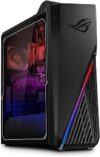
ASUS ROG Strix G15 Gaming Desktop, G15CF-AB766 Price comparison

- All prices mentioned above are in United States dollar.
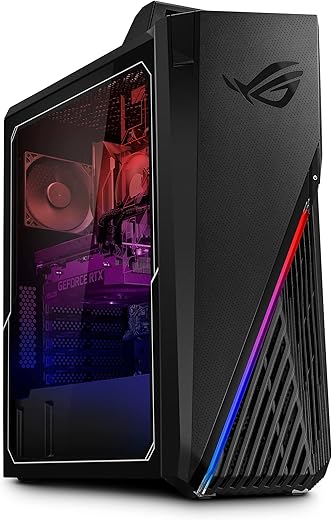
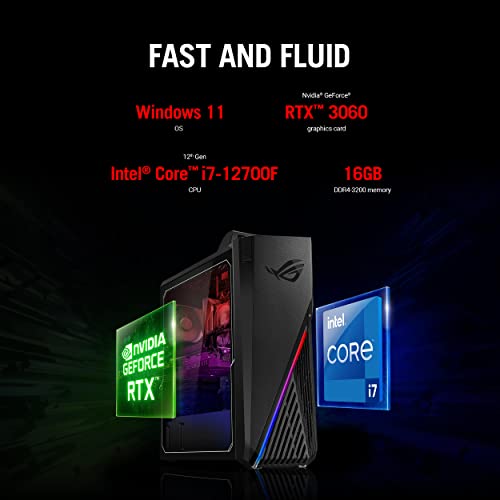
- At amazon.com you can purchase ASUS ROG Strix G15 Gaming Desktop PC, Intel Core i7-12700F, GeForce RTX 3060 12GB, 16GB DDR4 RAM, 1TB PCIe 4.0 SSD, Windows 11 Home, G15CF-AB766 for only
- The lowest price of ASUS ROG Strix G15 Gaming Desktop PC, Intel Core i7-12700F, GeForce RTX 3060 12GB, 16GB DDR4 RAM, 1TB PCIe 4.0 SSD, Windows 11 Home, G15CF-AB766 was obtained on September 24, 2025 11:40.
ASUS ROG Strix G15 Gaming Desktop, G15CF-AB766 Price History
ASUS ROG Strix G15 Gaming Desktop, G15CF-AB766 Description
ASUS ROG Strix G15 Gaming Desktop – Unleash Your Gaming Potential
Experience cutting-edge performance with the ASUS ROG Strix G15 Gaming Desktop G15CF-AB766. Designed for gamers and power users alike, this desktop is equipped with advanced hardware specifications that cater to high-octane gaming and multitasking needs. Discover price comparisons, 6-month pricing trends, customer reviews, and unboxing videos—all in one place!
Key Features of the ASUS ROG Strix G15
- Powerful Intel Core i7 Processor: The 4.9 GHz Intel Core i7 CPU ensures exceptional processing speed, making it adept at handling the most demanding games and applications.
- Stunning Graphics: Comes equipped with the Nvidia GeForce RTX 3060 dedicated graphics card with 12 GB of RAM, delivering impressive visuals and seamless gameplay.
- High-Resolution Display: Enjoy a vibrant 1920 x 1080 screen resolution, which offers crisp and clear graphics for an immersive gaming experience.
- Ample Memory: With 12 GB DDR4 RAM and a lightning-fast 1 TB SSD, you will experience quick load times and enhanced multitasking capabilities.
- Robust Connectivity: Includes a comprehensive set of ports—8 USB 3.0 ports and 2 USB 2.0 ports—allowing for easy connection of peripherals and accessories.
- Advanced Wireless Support: Stay connected with support for the latest Bluetooth and 802.11ax Wi-Fi technology for high-speed internet access.
- Compact and Stylish Design: The sleek black finish and dimensions of 7.28 x 16.57 x 19.61 inches make it a stylish addition to any gaming setup.
Price Comparison Across Multiple Platforms
The price of the ASUS ROG Strix G15 Gaming Desktop varies significantly among different suppliers. From the latest data gathered, prices range approximately from $1,299 to $1,499. This variance allows you to choose the best deal available, ensuring you don’t miss out on savings. Check out our detailed price history chart to track these fluctuations over the past 6 months, enabling informed purchasing decisions.
Trends from 6-Month Price History
Our analysis shows a notable trend where prices dipped around major sale events, such as Black Friday and back-to-school promotions. This pattern suggests that if you are looking to buy the ASUS ROG Strix G15 Gaming Desktop, monitoring these seasonal sales could save you money. You can find the full price history chart on our product page.
Customer Reviews: What Users Are Saying
Overall, the customer feedback for the ASUS ROG Strix G15 Gaming Desktop is overwhelmingly positive. Gamers admire its stunning graphics and speed, often noting that it runs demanding titles with ease. Many users were particularly impressed by:
- The balance between performance and cost
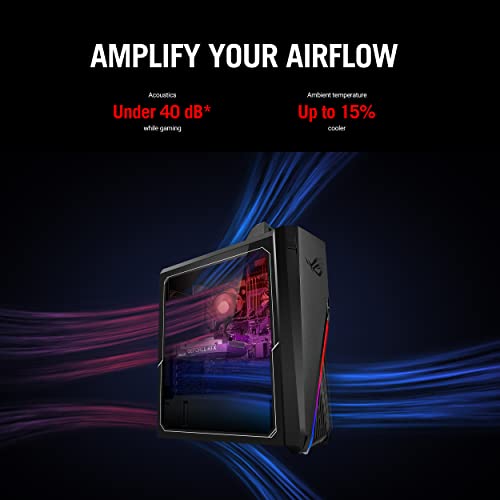
- The efficient cooling system that keeps the desktop running smoothly
- The aesthetic appeal and customizable RGB lighting
However, some customers reported drawbacks, including:
- The weight of 24.2 pounds, which may make mobility a concern
- Limited upgrade capabilities due to the compact design
Despite these minor issues, the majority of users agree that the pros far outweigh the cons, making it an attractive option for serious gamers.
Unboxing and Review Videos
If you’re interested in a more hands-on look at the ASUS ROG Strix G15 Gaming Desktop, we recommend checking out various unboxing and review videos available on YouTube. These resources showcase real-world performances and provide insight into setup and features, enhancing your understanding of its capabilities.
Final Thoughts
The ASUS ROG Strix G15 Gaming Desktop G15CF-AB766 is an exceptional choice for gamers looking for power and performance without overspending. With its top-tier specifications, robust connectivity features, and stylish design, it’s perfectly suited for both casual and hardcore gamers. Don’t miss out on securing the best price! Compare prices now!
ASUS ROG Strix G15 Gaming Desktop, G15CF-AB766 Specification
Specification: ASUS ROG Strix G15 Gaming Desktop, G15CF-AB766
|
ASUS ROG Strix G15 Gaming Desktop, G15CF-AB766 Reviews (10)
10 reviews for ASUS ROG Strix G15 Gaming Desktop, G15CF-AB766
Only logged in customers who have purchased this product may leave a review.





Rob G –
UPDATE 2: Temps started going to 60C when idle… I returned the computer. It lost access to the bios and talked to ASUS. They had me update the bios and drivers, which I’m turn stopped the whole computer from booting. ASUS said the motherboard was most likely defective a most likely a defective fan, and wanted me to send to them.
UPDATE: In about a week, the base idle temp went from low 40C now to mid 50C on average. When gaming it now goes to 90C instead of 70-80 as it previously did. Changed out the loud terrible exhaust fan for a better Noctua fan and it is a lot quieter and moves more heat out too.
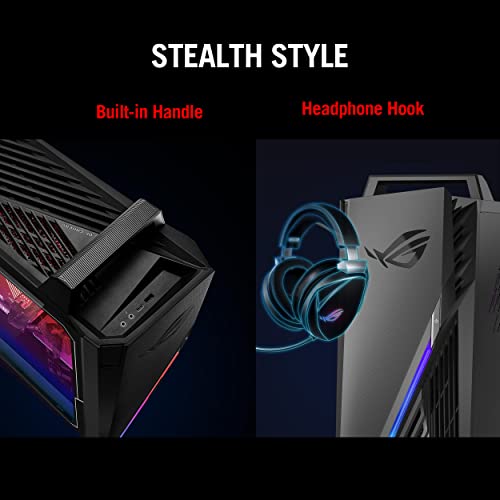
Got this computer on a black friday sale, so prices were lower than usual. First off, on appearance this case is really good looking, with a bonus carry handle, wifi adapter, and headset hook. Not a scratch and very high quality case.
Inside was decently laid out, easy to see parts, easy to access (But doesnt use thumb screws to my avail). However, there is no slots to attach more fans and extra SSDs (So i ended up screwing my other SSD under the power supply shield).
For gaming, this thing is quite good. The DDR4 RAM could have been better, and frequently maxes on gaming. The 3060 inside is secure, good quality, and doesn’t struggle with any games that I have (Used on Darktide, Cyberpunk, UBOAT, and Total War games).
Now onto the bad…. The fan situation. I am aware that the 12700F tends to run hot, around 40-50C baseline and up to 80s during gaming. The computer’s stock CPU Fan is…. pretty trashtastic and the box itself only has *ONE* 80mm exhaust fan. The fans are quite noisy. Doing even simple games makes the fans sound like they are about to reenter the earth’s atmosphere and explode. There is a constant buzzing to the fans, and when talking to tech support from ASUS they only said to update drivers, which does not fix the fan situation. I just purchased 2 more fans and a CPU fan to attach to this.
If you are to buy this, buy a good CPU fan and a better exhaust fan, and probably zip tie another fan to the front intake to help with airflow. Despite the “Good airflow” in the ads, its very poor overall.
Overall, good computer, REALLY bad fan / cooling situation. If fixed, this would be markedly better overall. Solid 6/10. Dropped a star due to failing CPU fan in a week.
Kevin C. –
Here’s a revised version of your review:
—
I bought a refurbished gaming PC three months ago for under $2000, and it’s been great overall. I did notice the CPU temperature jumped to almost 100°C from 60°C and the fan got very loud when Intel Turbo Boost activated. I disabled Turbo Boost in the BIOS, and the issue was resolved. For gaming, the graphics card performance is more important to me than the CPU speed. I understand why Intel enables Turbo Boost by default, but turning it off worked better for my setup.
Ricardo Martínez Merlo –
The media could not be loaded.
Esta computadora la encontré en promoción del Black Friday ya que fue una importación de Estados Unidos. Me llegó 3 días antes de lo estimado y respecto a la PC llevo 3 semanas con uso y cumple con lo que necesito. Normalmente es muy silenciosa, solamente en juegos muy demandantes como RDR2 hay lugares en donde el ventilador entra en acción pero personalmente no lo veo molesto. Además, he tenido productos ASUS ROG y nunca me han fallado.
Ryan Hook –
After a year of use the power button is no longer working properly, it must be pressed hard to function, and I had some issues with the pc not detecting my monitor or USB devices, I don’t exactly know what was wrong or how it got fixed, I unplugged the RAM sticks and the GPU then it started working again after I plugged the monitor in while powered off. Other than those two issues the only other problems I have with this pc is that there aren’t many front USB ports and the lack of any filters.
Adrian Esteban –
Solo hay que cuidar los mm si se quiere adaptar un refrigerante liquido ya que el espacio esta muy reducido para adaptaciones de ese tipo pero de serie funciona muy bien
Silvio Rodriguez –
I had bought a computer with an RTX 4090 and it was worth around $4,000.00, the perf was good but the price was high. I returned it and ordered this one with an RTX 4080 for almost half the price, and the perf is comparable. My monitor is 4K/60fps and I can run NFS Unbound and AC Mirage at stable, smooth 4K/60fps, the perf is amazing. Real good value for the money.
Very silent compared to other machines.
The only con is that the case is a bit large and also the memory is only 3.2GHz, they should have gone with speedier mem, but the processor is top notch.
Overall highly recommended.
Sergio de Jesús Castelán –
Como empiezo?…
Primero la PC tiene excelente Hardware, pero no está mejorada para que su funcionamiento sea lo máximo, es como si te entregaran un lego para que lo continúes mejorando o personalizando a gusto, pero el precio si es muy alto para lo que llega.
1.- El procesador presentaba altas temperaturas llegando en ocasiones a 80c sin forzarla investigando me encontré el detalle que el holding del procesador crea una curvatura que no permite que enfríe de manera correcta y que es necesario comprar un holding que solucione ese problema.
2.- Al comprarle un enfriador líquido por traer AURA adquirí el ARGB y me encontré que la placa base tiene el puerto, pero por alguna razón no cuenta con los pines, por lo que me vi en la necesidad de comprar un hub que hiciera funcionar las luces pero ya de manera manual por asi decirlo sin la sincronización de AURA.
3,- El gabinete no tenía las dimensiones para el disipador y aun así acumulaba mucha temperatura interna la tarjeta de video y el ventilador que trae de fábrica no es suficiente por lo que a comprar un kit de ventiladores para expulsar la gran cantidad de temperatura que crea la GPU.
Al final invertí otros 4mil pesos para que la CPU de 30mil funcionara sin alguna complicación que le quitara tiempo de vida y mejorara la estética del mismo.
Por tal espero les sirva mis recomendaciones y tengan manera de compararla con otros productos en venta que si tenga los pines de ARGB para poder sincronizar las luces y no tengan que invertir en más aditamentos como yo
LUIS García –
La computadora trabaja de maravilla y llegó un día antes de lo esperado.
Lo único que pude detectar como pequeño inconveniente es que se calienta un poco, no es mucho; con un ventilador extra se arregló.
Ricardo Martínez Merlo –
Llevo usándola 3 días, he jugado todos mis juegos en ultra a 144 FPS, con una temperatura de CPU de entre 60 y 70 grados centigrados, nada mal ningún problema.
Las memorias RAM se podría decir que son genéricas pero cambiarlas por unas buenas no le veo necesario.
Habrá que ver como se va comportando el equipo a lo largo del tiempo, por lo pronto le doy 5 estrellas
Potato –
This PC is amazing for starting out, it runs everything I throw at it and handles it amazing. I don’t use Ethernet so I bought a wifi card and it helped a ton. I bought the 3060 i7-12 gen one for $1,000 when it was on sale, great purchase