
 Amazon.com
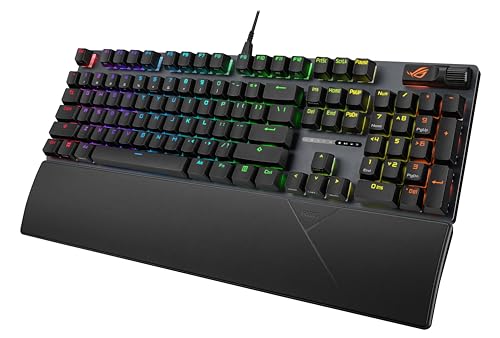
ASUS ROG Strix Scope II Gaming Keyboard Price comparison


- All prices mentioned above are in United States dollar.
- At amazon.com you can purchase ASUS ROG Strix Scope II Gaming Keyboard, pre-lubed ROG NX Snow Linear Mechanical switches, Sound-dampening Foam, PBT doubleshot keycaps, Streaming hotkeys, Multi-Function Controls, Wrist Rest for only
- The lowest price of ASUS ROG Strix Scope II Gaming Keyboard, pre-lubed ROG NX Snow Linear Mechanical switches, Sound-dampening Foam, PBT doubleshot keycaps, Streaming hotkeys, Multi-Function Controls, Wrist Rest was obtained on September 24, 2025 07:46.
ASUS ROG Strix Scope II Gaming Keyboard Price History
ASUS ROG Strix Scope II Gaming Keyboard Description
ASUS ROG Strix Scope II Gaming Keyboard: Unleash Your Gaming Potential
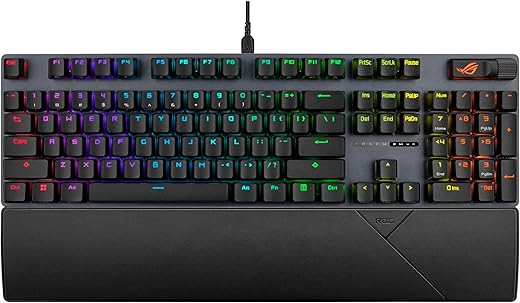
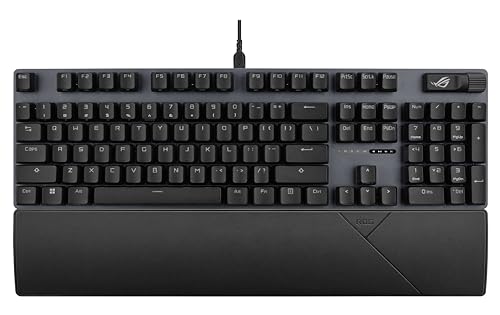
The ASUS ROG Strix Scope II Gaming Keyboard is a cutting-edge gaming accessory designed to enhance your gameplay and provide you with the competitive edge you need. This advanced keyboard from ASUS combines ergonomic design, customizable features, and high-performance technology, making it the perfect addition to your gaming setup.
Key Features and Benefits of the ASUS ROG Strix Scope II
- Responsive Mechanical Switches: The Scope II features industry-leading mechanical switches that provide tactile feedback and rapid actuation, allowing for lightning-fast responses during intense gaming scenarios.
- Durable Design: Crafted to withstand the rigors of gaming, this keyboard is built with high-quality materials and a sturdy frame, ensuring long-lasting performance.
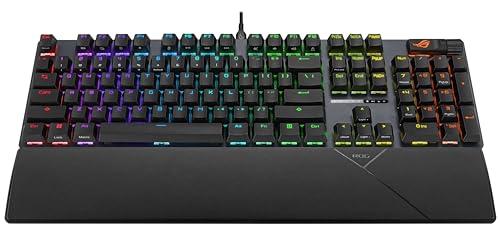
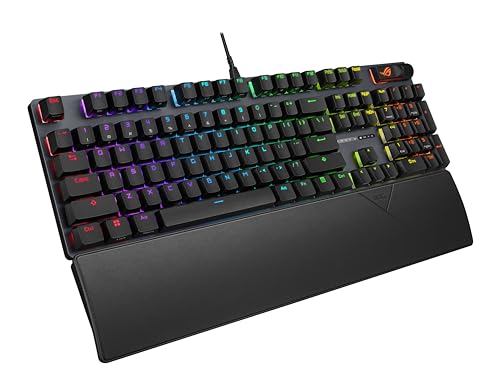
- Customizable RGB Lighting: Immerse yourself in your gaming experience with customizable RGB lighting. Sync your keyboard with other ROG devices for a cohesive aesthetic.
- Single USB 2.0 Port: The built-in USB port allows for easy connectivity. Simply plug it into your PC for instant access without the hassle of complicated setups.
- Windows 10 Compatibility: Designed to work seamlessly with Windows 10, the Scope II ensures a plug-and-play experience for gamers.
- Compact and Lightweight: Weighing only 1.8 pounds and featuring compact dimensions (18.62 x 7.09 x 3.15 inches), it’s easy to transport, making it perfect for LAN parties or gaming tournaments.
- USB Powered: No need for batteries! The ROG Strix Scope II is powered via USB, ensuring consistent performance without the interruptions of changing batteries.
Comparative Pricing Overview
When considering the ASUS ROG Strix Scope II Gaming Keyboard price, it’s essential to note that it varies across different online retailers. Typically, you’ll find prices ranging from $119.99 to $139.99, allowing you a chance to compare and find the best deal. With our comprehensive price comparison tool, you can ensure that you’re securing the lowest price available.
Price History Trends: A 6-Month Snapshot
The price history of the ASUS ROG Strix Scope II shows an interesting trend over the past six months. Initially priced at $139.99, the cost has seen a gradual decrease, with fluctuations around promotional events and sales. Currently, the average price sits around $124.99, making it a great time to invest in this high-quality gaming keyboard.
Customer Reviews: What Users Are Saying
Customer feedback on the ASUS ROG Strix Scope II has been largely positive, reflecting its solid design and performance-enhancing features.
- Positive Aspects: Users rave about the responsive mechanical switches, customizable lighting options, and the overall build quality. Many have highlighted that it significantly improves their gaming experience, especially during fast-paced games.
- Drawbacks: While most reviews are positive, some users mentioned that the keyboard may take some time to get used to, particularly if transitioning from a different keyboard layout.
Explore Unboxing and Review Videos
If you’re still on the fence about the ASUS ROG Strix Scope II, consider watching YouTube review and unboxing videos available for this product. These videos provide a closer look at the capabilities and aesthetics of the keyboard, allowing you to see firsthand how it performs in real-world gaming scenarios.
Conclusion: Level Up Your Gaming Experience
Overall, the ASUS ROG Strix Scope II Gaming Keyboard stands out as a robust and feature-rich choice for gamers of all levels. With its responsive switches, customizable RGB lighting, and solid construction, it is designed to elevate your gaming performance. Don’t miss out on comparing prices across various suppliers to secure the best deal.
Get ready to enhance your gameplay. Compare prices now!
ASUS ROG Strix Scope II Gaming Keyboard Specification
Specification: ASUS ROG Strix Scope II Gaming Keyboard
|
ASUS ROG Strix Scope II Gaming Keyboard Reviews (13)
13 reviews for ASUS ROG Strix Scope II Gaming Keyboard
Only logged in customers who have purchased this product may leave a review.



M. JEFFREY MCMAHON –
NX Snow is smooth, sounds great
Nice gaming keyboard
Joshua S –
This keyboard is wired, has a low cost, and has the brightest rgb ive seen on a keyboard (with no underglow almost) since the Logitech G910 Orion Spark. The shinethrough on the keys is dead center of the key. No shift text is on the shinethrough which looks incredibly clean in the dark. The ROG RX Red switches are better than any switches ive felt. They have more preload (the spring force pushing they keys back up) is far better than any other keyboard ive felt. No key wobble at all. Optical switches have instant response. PBT keycaps have just enough grit and dont feel like sand. Volume wheel has a function key to switch to media keys and other things. Volume wheel is itself a push button. Media keys would have been better but this makes up for it. The only bad thing at all, is the wrist rest, is not plush. They sell a plush one seperatley. Isnt magnetic to this particular keyboard but still works well. Most keyboards feel like your fingers are sinking in quicksand compared to this. Im very suprised this keycap style has not gotten more traction. It’s amazing. Buy it.
I’d like to add that i’ve had no problems with the software, yet. I do know how the software can be for these things but have had no issues.
Amazon customer since inception –
I just got this keyboard, so far so good.
clicking feeling is great, linear, not very heavy, not very light. No classical mechanical keyboard’s click sound, so it is quiet, not totally silent, but will not bother others.
no frame design, i think it is beautiful, but that is up to you. Multiple light modes, you can switch light modes by fn+left/right, adjust light by fn+up/down, or scroll button on the keyboard, if you want to custom your own light mode, you can download software from their office website. But Aura creator does not work for this keyboard, use armoury crate.
oh, one more thing, the pad is magnetic, so it is not stable, but I do not care, since I just put it on my desk.
Amazon Customer –
I use this keyboard for my gaming rig and it serves the purpose very well. I’m actually typing this review on it right now. Noise level is less to about the same as the standard keyboards included with some computers. The linear keys still kind of surprise me sometimes: They don’t need full deflection to register the key-press so when I just rest my hands or pause to think I sometimes find that I’ve pushed a key far enough to register. That said, I really enjoy the feel of typing on this keyboard. All the keys are consistent and the hot-button setup is nice. I would definitely recommend this keyboard to anyone that asks.
Sedatious –
open box, brand new item
Raj –
The keyboard is just amazing because the prelubed keys are like butter.
The software is not only huge and difficult it’s bloated and takes hours to download, install and update. Why would anyone want to spend at least 2 hours to setup a keyboard software. I have done full system wipes and reinstall in less time than setting up the Armoury Crate software and then the Aura Creator. The Aura Creator will not work if Armoury Crate requires an update. If you use Aura Creator to setup the lights the lights can not be dimmed (or I am not able to find the option to do so). Asus, the software is a huge disappointment and takes away from a really great keyboard. Why make things this complicated?
Kindle Customer –
Only one thing I’d change about this keyboard is I’d like it to have a USB pass through for my headset, the USB port on the keyboard is a great place for the wireless headset transmitter. The Logitech keyboard I previously used had a USB pass through & it was pretty handy. Overall, I like how it looks and integrates into the whole ASUS ROG theme. Colors are vibrant and the keys have a real nice feel to them. At this price point, it’s a good choice, and performs very well.
Isaiah –
Keyboard has a nice feeling, quick but solid action, beautiful lighting without being overdone. BUT any of the expanded capabilities and configuration is unavailable as software will not function. ASUS is notoriously terrible with their software and unfortunately that hasn’t changed. I’ve spent 2-days of troubleshooting Armoury installs, crashes, conflicts, etc. and with nothing to show for it but a headache. can’t recommend.
Md Mukit Kaisar –
Nunca había utilizado un teclado mecánico, por lo menos moderno, pero este me ha dejado con un gran sabor de boca. El sonido que hace el click cuando oprimes el teclado por lo menos a mi me gusta. Yo no lo siento molesto. La construcción del telcado y los materiales yo los veo muy premium. El color es fantástico.
Ojalá lo traigan de nuevo a México
Mitthraw Nuruodo –
After the few days of using it, my impressions are way beyond my expectations before I bought it! it’s so well made and typing on it feels so pleasant. It’s sounds kind of muffled and even quiet, like when you close car doors. For me it’s the Rolls-Royce of keyboards, and what surprised me it’s reaction times are so fast, that I can tell and I didn’t even realize that you can notice this with keyboard. I’ve used cherry reds, blacks and my recent one was a kailh brown and in comparison all of them are in my opinion a piece of old tech junk. If it passes the test of time I might even buy myself a backup one. There are some people that complain about the red switches being to soft, but I really like them and I’m glad there’s no bump like with browns, its so much easier for my fingers. I wouldn’t even mind them to be softer but as it is is spot on. In one word this keyboard is perfect in my view. In the beginning I didn’t like the volume scroll wheel as it’s not gripping well enough but I just use it differently, than on my previous keyboard, I’m grabbing with two fingers.
M. JEFFREY MCMAHON –
I’m coming from many years of typing on a heavy tank-like Razer Black Widow with clickety green switches. When the keys went bonkers so that one letter hit produced 4 repeats of the same letter, I replaced the Razer with a Das Keyboard 6 Pro with clickety blue switches. I loved the Das Keyboard because it was big at 18 inches across (though not as heavy and tank-like as my old Razer). However, after 3 years the Das Keyboard showed signs of age with the keys getting too much shine, I decided to take the shiny Das Keyboard to work and for home use get the Asus Rog Strix with Snow Linear switches. There is an audible clicking sound but the medium pressure needed is excellent for long-term typing. I write a lot for my job. Also, the textured keys are of high quality–PBT doubleshot keycaps–so I hope they don’t get worn out with that dreaded shine. The keyboard itself is 17 inches across, a full inch shorter than my 18-inch Das Keyboard. I prefer the larger size. A heavy, large keyboard gives me a commander at the Mothership feel at my computer. But at this price point, this is close enough. Final note: The magnetic wrist attachment isn’t much of a pad. It is a slightly padded block, and I’m not sure if I’m going to stick with it or not. In any event, I could spend more than double on a new Razer Blackwidow V4, and I’m not sure that would benefit me for the money. I’m not a gamer. I’m a writer who likes to feel mechanical typing on a big keyboard tank. This is close enough and has an excellent build quality to earn a high recommendation.
turboburst –
Much better feel for typing on that my old red-keyswitch keyboard. Worth the asking price and then some.
turboburst –
Awesome keyboard. Nice build quality, water and dust proof, lubed keys. Loved the Asus Rog Scroll, very useful and also can be programmable.