
ASUS ZenWiFi AX Hybrid Powerline Mesh System XP4
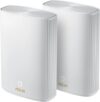
ASUS ZenWiFi AX Hybrid Powerline Mesh System XP4 Price comparison

- All prices mentioned above are in United States dollar.
- At amazon.com you can purchase ASUS ZenWiFi AX Hybrid Powerline Mesh WiFi6 System (XP4) 2PK - Whole Home Coverage up to 5,500 Sq.Ft. & 6+ Rooms for Thick Walls, AiMesh, Free Lifetime Security, Easy Setup, HomePlug AV2 MIMO Standard for only
- The lowest price of ASUS ZenWiFi AX Hybrid Powerline Mesh WiFi6 System (XP4) 2PK - Whole Home Coverage up to 5,500 Sq.Ft. & 6+ Rooms for Thick Walls, AiMesh, Free Lifetime Security, Easy Setup, HomePlug AV2 MIMO Standard was obtained on September 24, 2025 03:24.
ASUS ZenWiFi AX Hybrid Powerline Mesh System XP4 Price History
ASUS ZenWiFi AX Hybrid Powerline Mesh System XP4 Description
ASUS ZenWiFi AX Hybrid Powerline Mesh System XP4: Seamless Connectivity Redefined
The ASUS ZenWiFi AX Hybrid Powerline Mesh System XP4 is designed to provide you with unbeatable internet coverage throughout your home. Combining the efficiency of powerline technology with high-speed mesh WiFi, this system ensures that you stay connected—no matter where you are. Whether you’re streaming, gaming, or working from home, this mesh system stands out as the go-to solution for seamless connectivity.
Key Features and Benefits
- Cutting-Edge Mesh Technology: The XP4 uses advanced mesh technology to create a unified WiFi network. This eliminates dead zones and enhances your connection everywhere in your home.
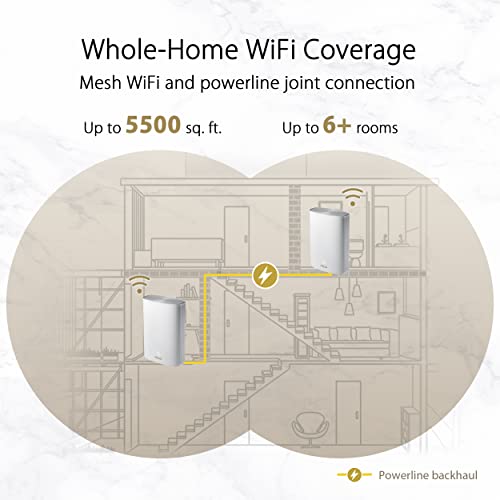
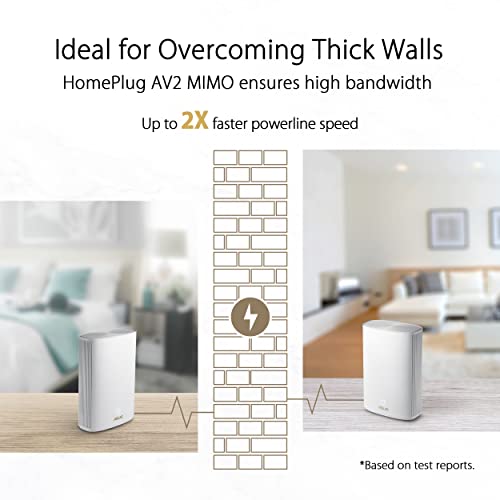
- Hybrid Powerline Integration: By utilizing existing electrical wiring, the powerline feature ensures a strong connection in hard-to-reach areas without sacrificing speed.
- High-Speed Data Transfer: With data transfer rates of up to 1300 Mbps, enjoy lag-free streaming and gaming experiences.
- Multiple Security Protocols: The use of WPA2-Enterprise, WPS, and WPA-Enterprise protocols provides robust security, ensuring your network is protected from unauthorized access.
- App and Web GUI Control: Easily manage your network with the intuitive ASUS app or web interface. Simple setup and control are just a tap away.
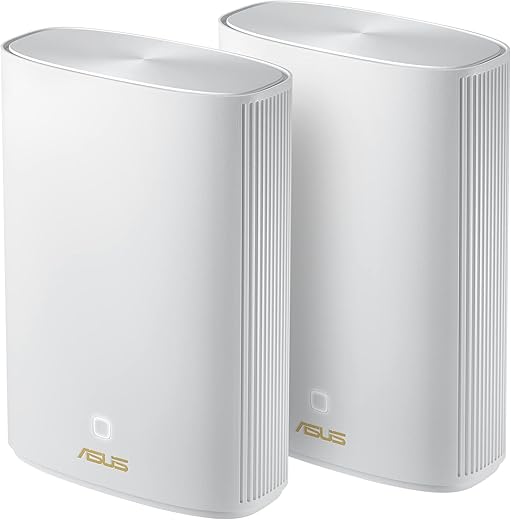
- Compact Design: At only 7.99 x 5.83 x 2.76 inches and weighing 1.5 pounds, the XP4 is designed for convenience without compromising on performance.
- Versatile Compatibility: Compatible with various operating systems including Windows, Mac OS, and Linux, the XP4 is built to adapt to your tech environment.
Price Comparison: Best Deals on ASUS ZenWiFi AX Hybrid
When it comes to the ASUS ZenWiFi AX Hybrid Powerline Mesh System XP4 price, we’ve analyzed current listings from various suppliers to help you get the best deal. As of now, prices vary across platforms, typically ranging from $169.99 to $199.99. With our price comparison feature, you can easily identify where to buy this top-rated system at the best price available. Don’t miss out—compare prices now!
6-Month Price History: Trend Insights
Our 6-month price history chart showcases a consistent trend with slight fluctuations in pricing, notably during promotional events. This information can guide your purchasing decisions. The price dipped significantly around the holiday season, making it an ideal time for potential buyers to grab this product at a lower rate. By staying informed on price trends, you can purchase the ASUS ZenWiFi AX for maximum savings.
Real Customer Reviews: The Good and the Bad
Examining verified customer feedback for the ASUS ZenWiFi AX Hybrid Powerline Mesh System XP4 review, you’ll find that the product receives high marks for its performance and reliability. Here are some key takeaways from real-users:
- Positive Feedback: Customers praise the system for its impressive coverage, particularly in larger homes. Many users highlight the ease of installation and seamless integration with existing devices. The performance, especially during high bandwidth activities like 4K streaming, received excessive accolades.
- Noted Drawbacks: Some users experienced minor issues with the app’s interface and occasional connectivity drops in rare cases. However, technical support from ASUS was noted as responsive in resolving such issues promptly.
Explore Unboxing and Review Videos
For a more comprehensive understanding of the ASUS ZenWiFi AX Hybrid Powerline Mesh System XP4, check out unboxing and review videos available on YouTube. These videos provide real-time demonstrations of the product’s features and functionality. In addition to seeing the product live, you’ll gain insights from reviewers who detail their experiences with the product in various environments.
In conclusion, the ASUS ZenWiFi AX Hybrid Powerline Mesh System XP4 is more than just a router; it’s a solution that combines power and convenience for a superior internet experience. With its mesh capabilities and powerline technology, it addresses connectivity needs in modern households effectively. Don’t wait for lagging connections—take control of your internet today!
Compare prices now and experience the difference with the ASUS ZenWiFi AX!
ASUS ZenWiFi AX Hybrid Powerline Mesh System XP4 Specification
Specification: ASUS ZenWiFi AX Hybrid Powerline Mesh System XP4
|
ASUS ZenWiFi AX Hybrid Powerline Mesh System XP4 Reviews (5)
5 reviews for ASUS ZenWiFi AX Hybrid Powerline Mesh System XP4
Only logged in customers who have purchased this product may leave a review.





Andrea –
This was a bit of a challenge for set up. Very few instructions. Eventually had to call support to assist. Maybe it was “user error” but took a lot more time to set up than I expected. UPDATE 12-30-2022. The system has worked well since the initial set-up!
Lisa V. –
Routers look great with LED color change indication for specific functions, excellent Processors and Memory, Gigibit WAN and LAN, Wifi 6, MIMO ready and backwards compatible with older wifi, supports 20/40/80 MHz bandwidths and WPA3-Personal with WPA2, 4 antennas each unit with Beamforming, the signal strength and coverage is strong and wide it seems. This unit has 3 options for Backhauling data between the 2 routers I find this impressive, the Backhaul Powerline HomePlug AV2 MIMO data connection option is good if you can’t run an ethernet cable between the 2 and have a home with a proper green grounding wire run from the connected power outlet to your circuit breaker box and grounded properly in the circuit breaker box, this way you get data over all 3 wires HomePlug AV2 MIMO in the outlet instead of just 2 so more data bandwidth. The user interface administration software is excellent in Asus routers in my opinion, lots of configuration possibilities if you need to get complex, lots of VPN options and Security options but if you use QOS that data goes through a 3rd party thats really not good IMHO. If your not so experienced it the software has an easy walk through connecting software front end to do so, ASUS configuration software is either from the routers or via phone app to router both are excellent. Has 2 ethernet ports that can be subnetted separately with dual WAN support but no WAN Aggregation, this could easily be used for casual gaming (though these don’t have the extras that Asus gaming routers do) and multimedia streaming, and any home connection utility devices setup all at the same time. 1 USB 3.2 Gen port that has support for many formats and functions even Apple time-machine. One problem I have encountered and it seems one other reviewer has incountered is that there can be disconnect issues with some laptops, now this seems to be the laptops issue not the Asus routers at least in my case, the older dell latitude 2012 E5530 laptops 3 of them I own that have the Broadcom BCM43XX wifi chipset these models have been know to have problems and Dell is at fault, these seem to disconnect once in a while no matter how close to either router they are, they are running windows 10 pro with up to date software and with Dells software drivers too. Other computers I have 2 Apple computers one from 2010 another from 2017 and one Acer windows 10 with Qualcomm Atheros chipset AR58WB222 and 2 iPhones 1 New and 1 4-years old they all stay connected properly, only the Dell E5530’s have issues, whats strange is the older 2010 Apple computer has a Broadcom BCM43xx chipset like the Dells but stays connected.
JT –
The ASUS ZenWiFi AX Hybrid Powerline Mesh WiFi 6 System has transformed my home Wi-Fi experience. With coverage of up to 2,750 square feet and support for thick walls, it eliminates dead zones and provides fast, reliable internet throughout my house. The AiMesh feature ensures seamless connectivity as I move between rooms, and the free lifetime security offers peace of mind. Setup was straightforward, and the HomePlug AV2 MIMO standard ensures a stable connection. I highly recommend this mesh system for anyone looking to upgrade their home Wi-Fi network!
Lisa V. –
THIS PAIR WORKS THRU TWO BRICK HOUSES, MULTIPLE ROOMS (including THRU furnace/AC & hot water heater utility closet) AND FISH TANK!!! I paid $329/pair earlier in June for “ASUS ZenWiFi AX Hybrid Powerline Mesh WiFi6 System (XP4) 2PK – Whole Home Coverage up to 5,500 Sq.Ft. & 6+ Rooms for Thick Walls, AiMesh, Free Lifetime Security, Easy Setup, HomePlug AV2 MIMO Standard” … if you are on the fence, then just buy this set!! I found them originally thru Consumer Reports recommendation. Here on Amazon as you can see from their descriptive title (pasted here in case it changes later) they said “thick walls” and 5,500 sq ft. I have two brick homes and wanted a network to span both including across the dividing lawn. When I saw description here at Amazon, I thought, instead of getting 4 let me get just the original pair ($329 price), and let’s try it out. In full disclosure, I have an AT&T new fiber router that comes into new house center, rides cat 5 (plugged into its 5GB port) thru attic and into bedroom close to other house and I have first router acting as mesh repeater/smart hub there. Then in window of this original home (owned by BF), I have the other router acting as mesh repeater/smart hub. Then crossing this home to far side, thru a 60 gallon saltwater aquarium (I also have a 180 gallon saltwater aquarium off to the side but at least I could get something out of line of sight) and maybe more brick as technically fish room is on backside of home – I have my work home office setup and I’m wirelessly connected. SO FAR SO GOOD!! I even had to transfer a file for work earlier today and had same thru put as I have had for years on this original home’s wireless network. I bought the new-to-us next door home as my mom is disabled and legally blind, so I’m going ‘Smart Home’ configuration. Because of that, I have just purchased another pair of these to just boost up the upcoming number of everything that is (hopefully) going to work together to enable my mom to just verbally unlock doors, change TV channels, brighten/dim lights (she has some vision left) and MORE… If I had done more file transfers for work then maybe I wouldn’t feel a need for these other two, but with upcoming streaming TV (Spectrum (known for cable) doesn’t do cable anymore?! who knew!!) potentially competing with my work-from-home file transfer potential, I feel another pair is just insurance. Setup for these is EASY but LITERAL. Use the QR code and included setup guide. The included ethernet cat 7 cable is short so I have purchased a 15 foot cat 7 cable to get that new house router/hub closer to new house window (so even thru brick is going well!). Definitely glad I bought these! Also, its VERY NICE to have every device using same SSID (new AT&T router) no matter which mesh router/smarthub or router is closer! Here in original house we’ve two routers and each has different SSID for 5 vs older 2.4 and its always a decision… pick this or that… I’ve picked just my main SSID I assigned on AT&T new fiber router (which says performance degrades if two names) and I can take my personal laptop or IPad next door or here to the farthest point (fish room) and it is all the same name and always fast! I’ve just included a photo taken after a year of the one box sitting in the window and there has been no yellowing of the plastic, still white and still looks like new. At night through the window, the router in the window has a glow that seems to the uninformed like perhaps it is security related (not), but I consider that a good bonus on top of FAST networking. Love when something works BETTER than expected!!
J. Crawford –
I got this system for my in-laws’ house which has an outbuilding with an office. This system uses the power line to carry the wifi signal and it worked fine in the outbuilding with virtually no loss of bandwidth. The setup is fairly easy with the app (it could be more intuitive), but it took a relatively long time (10+ minutes) for the system to recognize the satellite unit, so be patient. Unlike some other systems, the same unit is used for base and satellite functions. The app provides needed functions to monitor the system.