
Baseus Docking Station 6-in-1 69627 USB C



Baseus Docking Station 6-in-1 69627 USB C Price comparison
Baseus Docking Station 6-in-1 69627 USB C Price History
Baseus Docking Station 6-in-1 69627 USB C Description
Baseus Docking Station 6-in-1 69627 USB C: Your Ultimate Connectivity Solution
The Baseus Docking Station 6-in-1 69627 USB C emerges as a game-changer for tech enthusiasts and professionals looking to enhance their workspace. This versatile accessory combines functionality and convenience, providing a clutter-free experience. Designed to cater to various devices, it seamlessly meets the demands of modern connectivity.
Main Features of the Baseus Docking Station
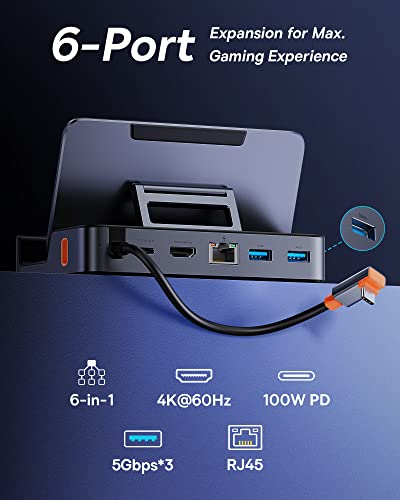
- 6 Ports for Ultimate Versatility: Equipped with a USB-C port, HDMI output, USB 3.0, and more, this docking station connects multiple devices effortlessly, ideal for multitasking.
- High-Speed Data Transfer: With USB 3.0 technology, enjoy data transfer speeds up to 5 Gbps, making file transfers swift and efficient.
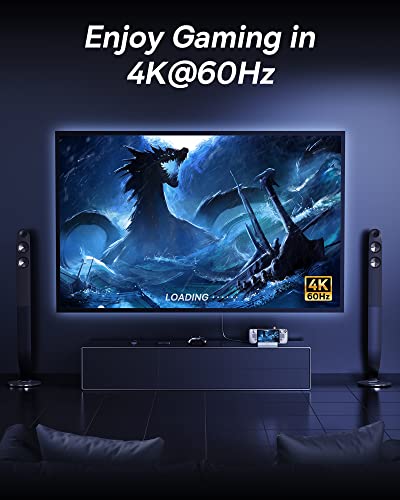
- 4K HDMI Output: Connect to high-definition monitors and enjoy stunning visuals, perfect for presentations or movie nights.
- Compact and Lightweight: With dimensions measuring 6.81 x 5.51 x 1.65 inches and a weight of just 13.7 ounces, it’s easily portable, making it ideal for travel.
- Plug and Play: No need for extra drivers or software simply connect and start using it right away. Enjoy hassle-free connectivity.
- Durable Construction: Manufactured by Baseus, this docking station is made with high-quality materials ensuring durability and longevity.
Competitive Pricing and Value
When it comes to the Baseus Docking Station 6-in-1 69627 USB C price, comparison is key. Across various suppliers, prices may fluctuate, but we’ve analyzed the data, ensuring you find the best deals available. Typically, prices range from competitive to premium, reflecting both the quality and demand of the product. With a comprehensive price comparison feature integrated into our platform, you’ll discover the best option that fits your budget.
Price Trends Over the Last 6 Months
The price history chart for the Baseus Docking Station indicates a stable pricing trend, with occasional discounts during peak shopping seasons. Observing these trends can help you find the right time to purchase. Whether it’s back-to-school sales or holiday deals, staying updated allows you to maximize savings.
Customer Reviews: What Users Are Saying
Customer feedback plays an essential role in evaluating the Baseus Docking Station. Users frequently praise its multifunctionality and compact design. Many reviews highlight the speed of data transfer and the quality of the HDMI output, enhancing both work and entertainment experiences. Users appreciate how easy it is to connect multiple devices without compromising performance.
However, there are certain drawbacks noted by some users. A few customers reported occasional connectivity issues with certain devices or found the cable length limiting when used in larger setups. Still, most reviewers commend Baseus for their customer support and responsiveness to such concerns.
Explore Unboxing and Reviews
If you’re looking for real-life insights, several YouTube review and unboxing videos are available, showcasing the Baseus Docking Station in action. These videos not only provide a visual representation of the product features but also offer tips and tricks on maximizing its utility. They also give you the opportunity to see the product from different perspectives, assisting in your decision-making process.
Why Choose the Baseus Docking Station?
In conclusion, the Baseus Docking Station 6-in-1 69627 USB C stands out as a reliable and efficient device for enhancing connectivity. Its combination of various ports and rapid data transfer makes it suitable for individuals working from home or on-the-go. Compatible with numerous devices, it is designed with user convenience in mind and built to last.
Don’t miss out on the chance to elevate your work and entertainment setup. Whether you’re looking to connect to a projector for a presentation or need extra USB ports for your peripherals, this docking station has got you covered. Explore the price comparisons now and see why the Baseus Docking Station is a must-have tech accessory!
Compare prices now!
Baseus Docking Station 6-in-1 69627 USB C Specification
Specification: Baseus Docking Station 6-in-1 69627 USB C
|
Baseus Docking Station 6-in-1 69627 USB C Videos

Baseus Docking Station 6-in-1 69627 USB C Reviews (11)
11 reviews for Baseus Docking Station 6-in-1 69627 USB C
Only logged in customers who have purchased this product may leave a review.






Glenn Pedreira –
Chemical Oder ruined my nose
magis123 –
So to say I’ve tried a few docks and hubs with my Steam Deck is putting it mildly … I have:
-Baseus 6-1 Dock
-JSAUX HB0603 Dock
-JSAUX HB0702 Dock
-UGREEN 6-1 Dock
-ChampSun Portable Dock
-CalDigit
-ALogic 10-1 Hub
-INVISI 9-1 Hub
-Genki USB-C Hub
-Caldigit USB-Soho Hub
-Multiple Anker Hubs
What I can say about docks is the first thing, make sure your power supply is clean and preferably delivering more than the Steam Deck needs, personally I prefer at least a 100W PD unit. Then make sure you are using a high quality USB-C PD cable. Then connect the dock or hub to your Steam Deck and make sure if you are going out to your TV/Monitor that you use a quality HDMI cable, I prefer using an HDMI 2.1 Cable (right now I have 3 from JSAUX) but you do not need that high, a 2.0 HDMI cable would be just fine.
So that sets things up … all the docks and hubs are going to be HDMI 2.0 and going to for the most part either output up to 4K-60 or 4K-30. I honestly wouldn’t recommend pushing the Steam Deck at 4K but that’s on you, I’d rather run it at a 1080p setting up use upscaling to get the better frame rate. But it works.
So let’s compare this dock to probably the two biggest competitors in my list (UGREEN, JSAUX) …
JSAUX – HDMI 2.0 (4K-60), 3xUSB 3.0 Ports (all deliver full USB 3.0 speeds even when all occupied), Gig LAN, 100W PD – $50.00
UGREEN – HDMI 2.0 (4K-60), 2xUSB 3.0 Ports (but 1 seems to run at USB 2.0 speeds), Gig LAN, 100W PD – $45.00
Baseus – HDMI 2.0 (4K-60), 3xUSB 3.0 Ports (again weirdly one runs REALLY slow at USB 2.0 speeds), Gig LAN, 100W PD – $50.00
So looking at the specs, they all seem evenly matched. What I’ve found so far in testing is the JSAUX is more consistent on the USB ports, the UGREEN has a clearer HDMI output and works well with my Lytmi background colors better, and the Baseus worked better docked at my desk with my monitors. So they all had positives and negatives.
Let’s talk price though looking above: all are within a few dollars of each other. Good lord then what makes one choose one over the other … first I’d say, don’t buy a cheap Chinese knock off one, you will regret it; spend a little bit and buy one of these three.
My winner is going to be this one – the Baseus Dock – (golf clap) – why did it win if all things are so equal? Because it has an adjustable angle for viewing AND it lies flatter for portability … but in reality you won’t go wrong with any of them. Follow me for more tech reviews on Amazon!
Bean –
Sadly it only fits with no case or with keyboard folio but not magic keyboard 🙁
magis123 –
This is a Nice Versatile Dock. It is Well Built, Solid Construction. It will work with any USB-C Device and can add HDMI out to it while Providing up to 100W of Power with additional Power Supply. 3 USB-A Ports give extra Add-on Options (Keyboard, Mouse, Ext. HDD, Etc..) I use it with my MacBook Air for Connecting to an External Monitor and adding Keyboard & Mouse. Works Flawlessly. I can even adjust the stand to hold my iPhone on my Desk. I connected my iPad Pro to it to add an extra screen and Keyboard & Mouse options and it works great. I don’t have a Portable Console at the moment to use with it as it is intended but that shows the Versatility of it. The only issue I had with this product was the Rubber had a bad chemical smell that eventually faded away. This is a Great USB-C Dock that has many uses and I would Highly Recommend it.
***Update***
I recently purchased the Asus ROG Ally and it works perfectly with this dock.
Amazon Customer –
It works decently enough with my ROG Ally, except for the promised 100W of power delivery which was the reason I bought it, so there’s that. Tried it both with a 65w power brick and a 100w power brick, both trigger the “not enough energy” message so I’d probably not use this for anything requiring more power than a Steam Deck.
Edit: Got to hand it to them, their customer support was on point and one of the best experiences I’ve ever had, to the point where I think they deserve a star back, I can see myself buying their next dock once they’ve had time to work on an Ally variant (please add front USB ports).
Glenn Pedreira –
I wish this was better than it is. It fits very well and concept is great, but it has major issues. I needed it primarily for a 3.5 mm jack for headphones and microphone. Unfortunately I am getting a lot of background static sound, and when I squeeze or move the unit a little I actually get some crackling sounds. I think there is a short or poor connection inside. I just ordered another adapter yesterday and had to spend $20 more.. this is now pretty much worthless to me.
Update 4/13/20
I would like to add some clarity to my review:
1. The 3.5mm headphone jack is designed for your typical headphones/headset. This is not designed to be used with a dedicated microphone. That was my assumption that it would work, and I should have validated that first. That being said, I cannot fault the product for working as it was designed.
2. The design and fit of this product is excellent. It fits perfectly with the Apple Smart Keyboard. If you use another brand of case however it may not fit as well.
3. The memory card reader works great and I have used it for that several times.
4. The crackling sounds when I squeeze or move the product while listening to audio still persist. I don’t know why that is the case but if you don’t touch it then it seems to work decently. The audio quality is not perfect but it does work satisfactorily. For this I am updating my review for 4 stars.
5. Lastly, customer service is excellent and I appreciate their helpfulness!
Luigi –
No existe un mejor accesorio para tu iPad pro! Este cumple con todas las necesidades de conectividad y productividad.
Tiene puertos y ranuras suficientes para lograr usar tu iPad lo más cercano a una laptop y sacar el mejor de los provechos a tu dispositivo.
100% recomendable
Emerson Costa –
Gerne möchte hier einmal meine Erfahrung mit dem Produkt niederschreiben.
Ich habe es getestet mit einem iPad Pro 12.7“.
Die Bauform und Haptik ist schon mal recht gut,
vor allem gefallen mir die beiden großflächigen, gummierten Auflagen.
Hier gibt es jedoch einen kleinen Mangelpunkt, zumindest bei meinem Testgerät.
Ein iPad 12.9“ ist nunmal groß und schwer, und genau in letzterem liegt die Problematik.
Die Größe kann das Produkt gut aufnehmen, kein Problem… Aber das Gewicht …
Nun ja, sagen wir es einmal so… Schließt man eine Maus und Tastatur an, kein Problem.
Hat man aber nur eine Tastatur kommt das Problem des Gewichtes ins Spiel.
Wenn man nämlich ohne Maus auf den Bildschirm mit dem Finger tippen muss,
kommt das Konstrukt ins Schwanken/Wackeln und kippt nach hinten wenn man den oberen 20% des Schirmes antippt. Es ist wohl eher auf Handys und normal große Tabletts ausgelegt. Mehr Grundgewicht wäre gut.
Der LAN Anschluss funktioniert ohne Probleme mit 1Gbit. A uch die USB Ports verrichten gut ihren Dienst und meine angeschlossenen Geräte wurden erkannt und konnten benutzt werden.
Der HDMI Anschluss funktionierte im SDR Modus ohne Mucken und lieferte ein gutes Bild
Eine HDR Auflösung bekam ich nicht auf den Monitor.
Aber ich denke die SDR tut es auch locker, man muss ja auch den Preis des Produktes bedenken. Das es nicht 100% gegen hochpreisige Dockingstations bestehen kann, sollte klar sein.
Das Plastik Gehäuse sollte gegen ein Metall getauscht werden. Das würde die Haptik verbessern, und auch das nach hinten kippen (da es dann nunmal schwerer wäre) würde besser werden. Metall wäre auch gut gegen die Kratzer, 2x „Blind“ hinten das Kabel eingesteckt und schon sind sichtbare Kratzer im Gehäuse. Nicht so schön.
Und wenn wir schon am Gehäuse sind…..
Das Kabel ist recht „starr“ und nur mit einer Plastikummantelung versehen.
Ich denke das wird im Laufe der Zeit noch starrer werden und irgendwann Brüche aufzeigen.
Ein flexibleres Kabel mit Stoffummantelung wäre ebenso eine gute Sache.
Dies ist aber nur eine Vermutung, aus langjähriger Erfahrung mit diesen dicken/starren Kabeln, muss hier nicht so kommen.
Fazit… Durchaus zu empfehlen und macht was es machen soll zu einem guten/fairen Preis.
Gabriel S. –
Mi aspettavo qualcosa si qualità ma devo dire di essere rimasto esterrefatto.. comprerò prodotti solo di questo brand d’ora in poi. Utilizzato su steamdeck e rog ally e viaggia che una meraviglia
Andrew Tran –
I had just received my Baseus 6-in-1 Aluminum iPad Pro Dongle USB Type-C Adapter and attempted to put it on my new Apple iPad Pro12.9 2020 version with my Apple Smart Keyboard Folio for iPad Pro 12.9-inch (4th Generation) attached, and it did not fit. I could not believe that I did not factor in the keyboard/cover. I attempted to try to somewhat “gently” force it on but it did not fit. Then I went to Youtube and looked up the item and wanted to see if there was a solution, AND THERE WAS. If you look at the adapter, it has a hard rubber “magnetic gasket” on it. All you have to do is lift it up/off and the unit fits perfectly with the Apple iPad Pro 2020. It is a “strong” magnet, which may make you feel that it won’t come off, but it will. I really enjoy being able to attach additional media to my iPad.
Kaysee –
Funciona perfeitamente