
 Amazon.com
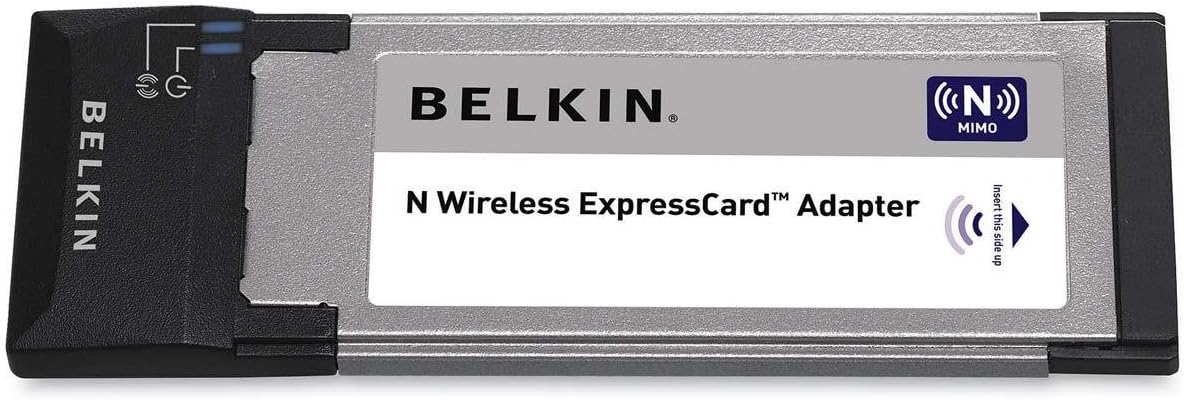
Belkin N Wireless ExpressCard Adapter F5D8073 Price comparison

- All prices mentioned above are in United States dollar.
- At amazon.com you can purchase Belkin F5D8073 N Wireless ExpressCard Adapter for only
- The lowest price of Belkin F5D8073 N Wireless ExpressCard Adapter was obtained on September 24, 2025 03:24.
Belkin N Wireless ExpressCard Adapter F5D8073 Price History
Belkin N Wireless ExpressCard Adapter F5D8073 Description
Belkin N Wireless ExpressCard Adapter F5D8073: Enhance Your Connectivity
The Belkin N Wireless ExpressCard Adapter F5D8073 is the perfect solution for boosting your laptop’s wireless connectivity. Designed for optimal performance, this adapter supports high-speed wireless networks, making it an essential tool for anyone needing reliable internet access on the go. In this description, we’ll explore its key features, benefits, and more, so you can make an informed decision.
Key Features of the Belkin N Wireless ExpressCard Adapter F5D8073
- High-Speed Wireless Connectivity: Experience speeds up to 300 Mbps, allowing you to stream, download, and browse without interruption.
- Easy Installation: The ExpressCard design ensures a simple setup process for users of all experience levels.
- Compact Design: With dimensions of 8.7 x 5.9 x 2.4 inches and weighing only 8 ounces, you can easily carry it with your laptop.
- Broad Compatibility: Compatible with various operating systems, ensuring versatility for different users.
- Secure Connectivity: Equipped with advanced security protocols to keep your network safe from unauthorized access.
Benefits of Using the Belkin N Wireless ExpressCard Adapter
The Belkin N Wireless ExpressCard Adapter provides a seamless internet experience for both personal and professional use. Here are some key benefits:
- Improved Performance: The N technology enhances wireless range and speed, making it ideal for high-bandwidth activities like gaming and HD streaming.
- Convenient Portability: Its lightweight design makes it easy to take on business trips or casual outings.
- Network Flexibility: Works with various routers, ensuring you can connect to a wireless network without hassle.
Comparative Pricing Across Suppliers
When considering the Belkin N Wireless ExpressCard Adapter F5D8073 price, it’s important to compare options. This product is available across multiple retailers. Prices typically range from $25 to $45, depending on the seller and any ongoing promotions. By keeping an eye on pricing trends, you can find the best deal.
Price History Insights
Examining the 6-month price history chart reveals insightful trends. Over the last few months, prices have fluctuated slightly, with occasional drops during sales events. This variability suggests a good opportunity to purchase during promotional periods for maximum savings.
Customer Reviews Summary
The Belkin N Wireless ExpressCard Adapter has garnered numerous positive reviews online. Customers often praise its:
- Reliable Performance: Users report consistent connectivity without frequent drops.
- Easy Installation: Many customers appreciate the straightforward installation, which does not require extensive technical knowledge.
However, some reviewers mention drawbacks, including:
- Limited Range: A few users have experienced connectivity issues at the edge of the advertised range.
- Compatibility Issues: While generally versatile, a minority have reported issues with specific operating systems.
Explore Unboxing and Review Videos
If you’re curious about how the Belkin N Wireless ExpressCard Adapter F5D8073 performs in real-life scenarios, check out various YouTube unboxing and review videos. These visual insights can help demystify the setup process and give you a feel for its functionality.
Conclusion: Make the Right Choice
The Belkin N Wireless ExpressCard Adapter F5D8073 efficiently bridges the gap between your laptop and fast wireless networks. With its reliable performance, ease of use, and valuable benefits, this adapter is a smart investment for anyone seeking dependable connectivity.
Take note of the pricing trends and customer feedback to choose the best purchase option for you. Don’t forget to watch the unboxing videos for a first-hand look at this impressive device.
Compare prices now!
Belkin N Wireless ExpressCard Adapter F5D8073 Specification
Specification: Belkin N Wireless ExpressCard Adapter F5D8073
|
Belkin N Wireless ExpressCard Adapter F5D8073 Reviews (6)
6 reviews for Belkin N Wireless ExpressCard Adapter F5D8073
Only logged in customers who have purchased this product may leave a review.






An Chen –
After my laptop’s built-in adapter became unreliable, I bought this as a replacement. From what I gathered online, ExpressCard adapters are faster than USB adapters. From what I’ve seen so far, it doesn’t seem much faster or slower than my built-in adapter when it was still new. So, it does the job it’s supposed to.
You don’t need to buy the 34mm to 54mm adapters if you want to plug it into a 54mm slot, even if it’s recommended and a lot of people bought one. It sits just fine by itself. The StarTech adapter that I bought since it was frequently bought together didn’t even fit with this one.
Lou –
It’s always tough buying a product that has mixed reviews but this network card was cheap enough that it was worth the risk.
The built-in wireless NIC on my Toshiba laptop stopped working. Actually, I shouldn’t blame the NIC because it still wouldn’t work after I swapped out the mini-PCIe card with a known good one. The slot somehow went dead. This card fit into the ExpressCard slot and worked right away. I followed the directions from the box by installed the Belkin drivers first. I then plugged in the card and the config tool came up. I manually entered my SSID and related network info and everything just worked. This is under Windows XP/32bit.
One downside to this item is that it sticks out the side of the laptop more than I would like. And because it’s a narrow card, there’s a little play on the card. I do have to be careful and not hit the card as it could conceivably come loose. Luckily this laptop normally sits on a table so it shouldn’t be a problem.
saturnotaku –
Despite the negative reviews surrounding this product, I went ahead and purchased it anyway. My wife has an HP DV6100 laptop running 32-bit Vista Basic. The system’s integrated wireless failed due to a known motherboard defect. As her system was well out of warranty when the failure occurred, I was willing to take a chance on this product. There aren’t very many ExpressCard wireless adapters on the market, and the DV6100 only has 2 USB ports. This was much less expensive than purchasing a whole new notebook.
The key to making this product work is to neither use the included installation CD nor install drivers provided by Belkin. Instead, use the reference drivers from this card’s chipset maker, Ralink. Go to Ralink’s web site and navigate to the support section. For Windows users, select that section, and download the software for part number RT2860. The package includes drivers for XP and Vista.
Before you insert the card into your notebook, install the drivers you downloaded from Ralink. During setup, it will give you an option to install only the drivers or the drivers plus Ralink connection software. Choose the former, and let setup complete. Now plug the card into your computer, and Windows should automatically detect it. Once the hardware installation wizard completes, you should be able to use Windows’ built-in wireless configuration utility to connect to your network.
This procedure worked flawlessly on my wife’s system, and she’s back online, connected at full speed to our wireless-g network. As long as the hardware holds up, and you follow the above instructions for setting it up, I have no qualms about recommending this adapter to anyone.
airfirehorse –
This card was a quick install in my HP Media Center PC with a PCI-to-ExpressCard adapter. I wanted my PC to have built-in N wireless and thought it would be more flexible to have an ExpressCard adapter instead of just a wireless PCI card.
At first I really liked this card. When it was connected it had a fast connection and the signal strength was fine. After a while, it seemed to run hot, but I figured as long as it was still connecting to my Belkin router it didn’t matter. About a month or so after I bought it I noticed I would lose my Internet or home network connection quite often. When I held the cursor over the wireless network icon in the task bar, it would say the speed was 24.0 Mbps or 12.0 Mbps or even 0.0 Mbps. Normally, I would be getting G speed of 54.0 Mbps since my old router did not have N speed (up to 300Mbps).
It began to seem as if the card was slowly shutting down even when I was active on the PC itself. I will say it rarely dropped to 0 while I was actively cruising the Internet, but I could never find any settings to ensure the card didn’t go into “sleep” mode. Of course, this may have been a result of the heat generated, but I didn’t think it was worth calling tech support to investigate a seventy-dollar card so I sold this card and plan to buy a USB wireless N adapter instead. Maybe this card would work better in a laptop’s ExpressCard slot?
D. Fox –
This device works under Ubuntu Linux 12.04, but the support is spotty – it doens’t seem to resume from suspend, and it consumes a lot of power at all times (about 4 watts.)
Kim Taylor –
I bought this Belkin F5D8073 N Wireless ExpressCard adapter to replace the internal wireless N adapter that came with my laptop. In spite of the fact that the internal adapter was also a wireless N adapter, it would never connect at anywhere near the speed that I am paying Comcast for. This Belkin connects at speeds twice as fast as the internal wireless adapter ever connected. I almost bought this ExpressCard adapter a year ago but didn’t. Now I wish I had after using it and seeing how much faster it is.
Update 03/19/16: After using this Belkin F5D8073 N Wireless ExpressCard for a little over two months, I have to report that I am not happy with it at all. It is now giving me problems. At least once a day now, it simply stops working. When it stops working, it freezes up and will not even allow me to disable it so I can enable the internal wireless adapter. It also freezes up my laptop. When the the Belkin F5D8073 N Wireless ExpressCard stops working, the only way to unfreeze my laptop is to do a hard restart using the laptop power switch. Therefore, I am reducing my rating from 5 stars to one star. I cannot recommend this product, which is sad because Belkin was once a great manufacturer.