
D-Link AC1200 Wi-Fi Range Extender DAP-1620
$59.99
D-Link AC1200 Wi-Fi Range Extender DAP-1620 Price comparison


- All prices mentioned above are in United States dollar.
- This product is available at Amazon.com.
- At amazon.com you can purchase D-Link AC1200 Wi-Fi Range Extender (DAP-1620) for only $52.99
- The lowest price of D-Link AC1200 Wi-Fi Range Extender (DAP-1620) was obtained on September 11, 2026 09:14.
D-Link AC1200 Wi-Fi Range Extender DAP-1620 Price History
D-Link AC1200 Wi-Fi Range Extender DAP-1620 Description
D-Link AC1200 Wi-Fi Range Extender DAP-1620 – Enhance Your Wi-Fi Experience
Boost your home or office Wi-Fi coverage with the D-Link AC1200 Wi-Fi Range Extender DAP-1620. This powerful device helps eliminate dead zones and extends the Wi-Fi signal, allowing you to enjoy seamless streaming, gaming, and browsing throughout your space. Let’s explore its features and benefits in detail.
Key Features of the D-Link AC1200 Wi-Fi Range Extender DAP-1620
- Dual-Band Wi-Fi: Provides both 2.4GHz and 5GHz bands to deliver high-speed internet access. Ideal for activities that require significant bandwidth, like video streaming and online gaming.
- AC1200 Speed: Enjoy wireless speeds up to 1200 Mbps, making it perfect for multiple devices to connect simultaneously without lag.
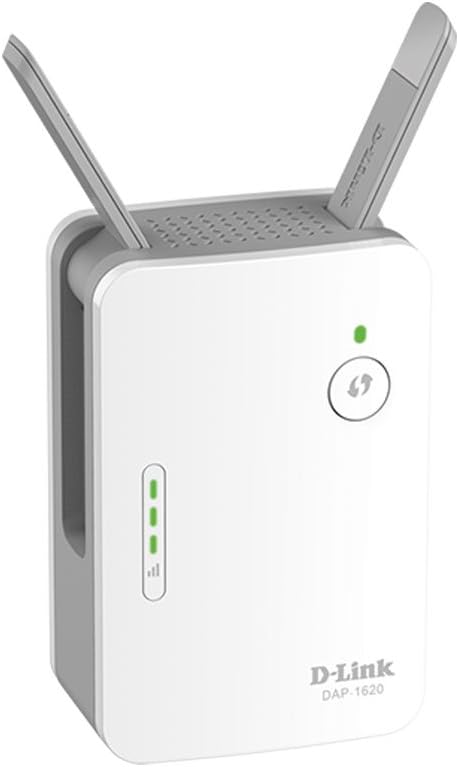
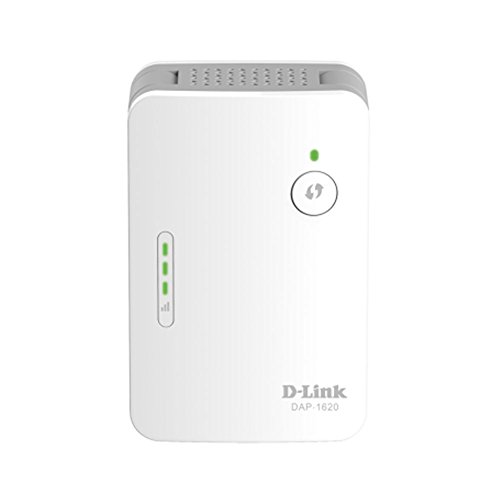
- Smart Signal Indicator: An integrated LED indicator helps you find the best location for optimal performance, ensuring you can place the extender for maximum coverage.
- Easy Setup: The installation process is simple, with intuitive WPS support. Connect with the push of a button and enjoy enhanced Wi-Fi coverage in minutes.
- Compact Design: The DAP-1620 features a compact form factor, allowing for discreet placement in any outlet without obstructing other sockets.
Benefits of Using the D-Link AC1200 Wi-Fi Range Extender DAP-1620
- Improved Coverage: Say goodbye to Wi-Fi dead zones. This range extender ensures reliable wireless access throughout large homes or offices.
- Enhanced Connectivity: With its dual-band capability, you can connect various devices, including smartphones, laptops, smart TVs, and gaming consoles, all at optimal speeds.
- Seamless Streaming: Enjoy smooth, buffer-free streaming and gaming experiences, crucial for today’s high-demand internet requirements.
Price Comparison and Trends
The D-Link AC1200 Wi-Fi Range Extender DAP-1620 is competitively priced across different suppliers. On average, you can find this product ranging from $49.99 to $59.99. Over the past six months, the price has remained stable, with minor fluctuations primarily during seasonal sales and promotions. By monitoring the pricing trends, you can effectively time your purchase to get the best deal possible.
Customer Reviews Summary
Users are praising the D-Link AC1200 Wi-Fi Range Extender DAP-1620 for its performance and reliability. Many reviews highlight the device’s ability to significantly enhance Wi-Fi coverage compared to other extenders in the same price range. Customers enjoyed an almost immediate improvement in connectivity, especially in areas of their homes that previously experienced slow or sporadic service.
On the downside, some users mentioned challenges during setup, but these are often attributed to individual network configurations rather than the device itself. Overall, the DAP-1620 has garnered a positive reception, making it a trusted choice for anyone looking to enhance their Wi-Fi experience.
Unboxing and Review Videos
If you’re looking to see the D-Link AC1200 Wi-Fi Range Extender DAP-1620 in action, many unboxing and review videos on YouTube showcase its features and setup process. These visual guides provide step-by-step instructions that can make the installation simpler and give you insights into maximizing the extender’s performance.
The D-Link AC1200 Wi-Fi Range Extender DAP-1620 is a smart investment for ensuring you have reliable internet access throughout your living or working space. With easy setup, extensive features, and robust performance, it’s time to upgrade your Wi-Fi experience.
Compare Prices Now!
D-Link AC1200 Wi-Fi Range Extender DAP-1620 Reviews (13)
13 reviews for D-Link AC1200 Wi-Fi Range Extender DAP-1620
Only logged in customers who have purchased this product may leave a review.






rtk11226 –
I had such high hopes for this extender after having such good success with other D-Link products (DIR-890L, DCS-5030L and other cameras) so why not extend my network??? On my first purchase I did the easy install and used the WPS button to make my connection. It went flawlessly and I could see the additional SSIDs within minutes. Unfortunately, after about 20 minutes the SSIDs would flash in and out of existence, so much so that you could not sustain a connection to the internet. I returned it. The second one came in a week later, this time I decided to configure everything manually. I connected to the web interface, updated the firmware and it seemed to be working fine. After working with it for sometime I noticed that even though the signal strength was showing 3 bars, I would lose connection to the internet on either of the new SSIDs. I moved the extender to within 30 feet of my wireless router and it continued to provided the same poor results. I decided to try it as a Wireless Access Point in a room in my house that is hardwired to my router. The very same problem occurred. I’d get a fantastic signal but at random times during the day no internet access from either of the new SSIDs, when I switched back to my router Wifi… no problems… at least my iPads, iPhones and Roku box don’t show any signs of interruptions when connected directly to my router’s Wifi signal. I’m open to suggestions on what I might have done wrong, but the device is so easy to configure, whether you go the WPS button route or the manual configuration, there’s really not a lot of room to mess up. I’m returning this unit for a refund today. I hope others out there that have had similar results will share their solutions, I’m still in the market for an extender, but the way Amazon has organized the reviews it makes it a bit tricky (or impossible) to tell which review pertains to the device you are about to purchase…. that’s why I’ve put the full description in the title. How about some help Amazon??
M Fischer –
We have a huge house that was hardwired with Network cabling in nearly every room, but because it was so big, the wifi signal was none existent at the other end of the house or on the other floor. We plugged this into the network at that end of the house on the other floor and it worked awesome. No more wifi dead spots in the house. It was also extremely easy to get set up. Never had to call tech support because the setup was exactly like the instructions said.
Bau Bau –
Amazing product quality.. Serves the purpose well.. Able to provide 40mbps speed from 70 Mbps source
Tracy Broyles –
This product doesn’t work and the company only gives you a month to return it otherwise you are out of luck.
Fabiano_1346 –
I’ll be frank, it’s a great product, it does help, and does the job that it states, but I believe it’s limited. Where I have it is connected to the wall, and it has a Ethernet cable running to the Apple TV. At first it was perfect connection, strong and no problem, but now owning the product for two weeks and at random, it just loses connection and I can’t use the Apple TV. My internet app shows that it’s perfect signal, and the D-Link is connected; even Apple TV shows that it’s getting full juice from Ethernet cable, but loading YouTube, or Apple Music, and even HBO Max, and I get the loading circle. I restart the d-link and takes awhile (approx 2min to regain connection) and Apple TV is working again and all the apps. But when I disconnect the Ethernet cable, Apple TV works like a charm, I’m not sure where’s the fault here, if it’s the Ethernet cable or if it’s the D-Link. The signal bar on the Dlink shows full bar and at green. Just wish I’d know what was the actual problem; Other then that, this product has helped give better signal to our bedroom where at times without it, was a dead spot.
Ludovico –
Il ripetitore WiFi si riavvia da solo ogni poche ore, senza alcun motivo, influenzando la connessione.
The WiFi repeater restarts itself every few hours, for no reason, affecting the connection.
WorldView –
I use this as an ethernet bridge for my desktop computer, and have not really tested the repeater functions. It works well generally, with good speeds. There are, however, two issues I have come across. The first is that you can not turn off the repeater function if you use it as a bridge. The second is that it reboots itself about once a week, and is offline for about a minute. Overall, not bad for the price.
HouseofCash –
The device is easy to setup. However, I am attempting to return it, because of the WiFi signal. I tried multiple locations in the house. 2 green bars, it didn’t provide any better signal than the router. 3 green bars and it’s like where my router signal is low, the AC1200 provided good signal, but I did not get extended coverage, like I was hoping for. From my experience, I would say that if walls are your issue, they may still be and if you’re looking to buy the D-Link AC1200 to project your signal, don’t get it. If you are looking to get better signal to the other half of your room/house, it will probably work for you. And to note, the last firmware update was in 2015.
Bryan F –
I have a D-Link DIR-820L Router that I got on Amazon about 1 year ago. I live in a 1BR condo with plaster/lathe walls and get terrible Wi-Fi reception when I am more than 1 wall away from my router, until I plugged this Range Extender in. I bought a D-Link AC1200 Wi-Fi Range Extender, took it out of the box, plugged it in, and pushed the WPS button on my D-Link router and push the WPS button on the D-Link range extender. That was all I had to do, other than enter my password for my 2 channels (1) 2.4 GHz & (2) 5 GHz. I now cannot find any spot in my condo that doesn’t get a excellent signal. In fact, when my tablet is connected to the range extender on 2.4 or 5 GHz, I get better reception than I ever did with the router, even when I am closer to the router than the range extender.
RW –
Fastest peripheral I ever installed. Took 2 minutes. Plugged it in to the wall outlet, pressed the button on this unit and my wifi router and DONE. Bars on my laptop went from 1 bar to 5 which is maximum. Works perfect. No drop outs or dead zones, Rapid delivery added to it. Highly recommended.
Natarajan –
Works great, I can now get superfast NBN speeds even in the very back of my garden. Product was very easy to set up. I would highly recommend this product.
Jhonnie –
LO BUENO:
-Calidad de fabricación.
-Fluidez sin cortes como repetidor.
LO MALO:
-Falta de potencia.
-NO repite a dual band, sólo repite a 2,4GHZ. Es imposible que sirva de repetidor a 5GHZ.
-Te muestra dos redes de conexión a dos velocidades pero sólo va a la más lenta. PÉSIMO.
-No sirve para Gamers.
-Máxima tasa de repetidor 27 mbps (en una fibra de 300 Mb.) Absolutamente desastroso.
-Deja de funcionar (se resetea) y no da señal, cuando le viene en gana.
-Sólo dos antenas.
Jhonnie –
Ho acquistato questo AP perché il segnale in mansarda non arrivava con la dovuta potenza. L’ho collegato ad uno switch tramite il cavo ethernet e l’ho impostato in modalità AP.
Buono il fatto che ha una porta ethernet gigabit.
Il lato negativo è che le sue funzionalità sono ridotte veramente al minimo. Dall’interfaccia web è possibile configurare giusto l’indispensabile. Per esempio non si può neanche regolare l’intensità del segnale WIFI.
Per questo do 4 stelle. Un access point / network extenders economico consigliato a chi vuole estendere la propria rete WIFI senza troppe pretese.