
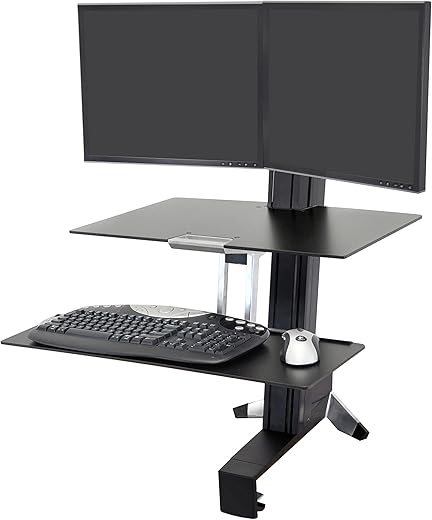
Ergotron Dual Monitor Standing Desk Converter, Black
Ergotron Dual Monitor Standing Desk Converter, Black Price comparison

- All prices mentioned above are in United States dollar.
- At amazon.com you can purchase Ergotron – WorkFit-S Dual Monitor Standing Desk Converter, Sit Stand Workstation for Tabletops – With Worksurface, Black for only
- The lowest price of Ergotron – WorkFit-S Dual Monitor Standing Desk Converter, Sit Stand Workstation for Tabletops – With Worksurface, Black was obtained on September 24, 2025 06:51.
Ergotron Dual Monitor Standing Desk Converter, Black Price History
Ergotron Dual Monitor Standing Desk Converter, Black Description
Transform Your Workspace with the Ergotron Dual Monitor Standing Desk Converter
Upgrade your productivity levels with the Ergotron Dual Monitor Standing Desk Converter. This innovative workspace solution is designed to enhance your working environment, promoting a healthier and more efficient way of working. Perfect for remote workers, gamers, or anyone looking to maximize their desk space, this standing desk converter accommodates two monitors, making multitasking easier than ever. Explore how this ergonomic accessory can optimize your workspace effectively.
Main Features and Benefits
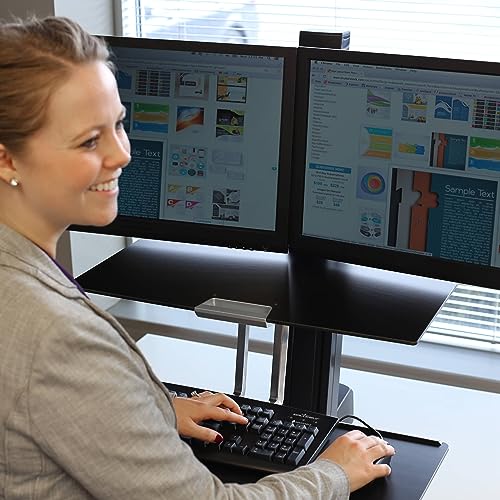
- Ergonomic Design: The Ergotron converter promotes a healthier posture. It reduces neck and back strain by allowing you to adjust your monitors to eye level.
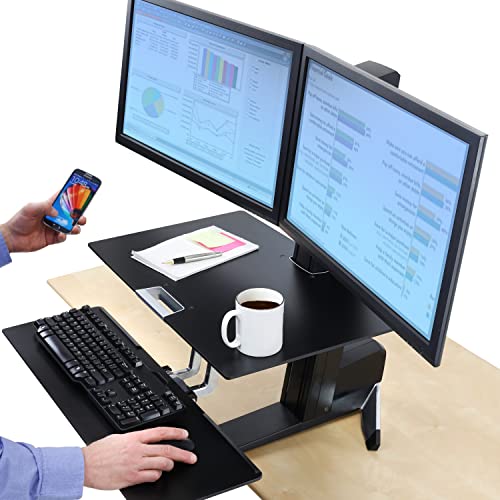
- Dual Monitor Capability: With space for two screens, this desk converter is ideal for professionals who require multiple displays for enhanced productivity.
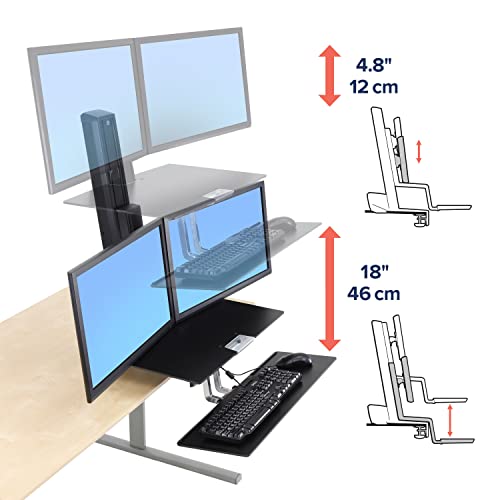
- Easy Adjustment: Effortlessly change your desk height with simple lever adjustments. Transitioning from sitting to standing has never been easier.
- Sturdy Construction: Made with high-quality materials, this standing desk converter ensures stability for up to 50 lbs of equipment.
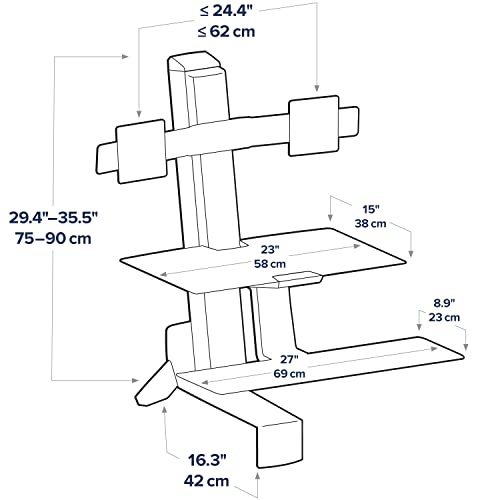
- Compact Footprint: Designed to fit on most desks without taking up much space, allowing for additional workspace configuration.
- Stylish Black Finish: The modern design and black color integrate seamlessly with any office decor.
Price Comparison Across Different Suppliers
The price of the Ergotron Dual Monitor Standing Desk Converter varies across different retailers, allowing for flexible options. Most retailers offer competitive pricing, with current listings ranging from $279.99 to $299.99. This means you have the chance to save when comparing prices between suppliers. Be sure to check out different platforms to find the best deal!
Notable Trends from the 6-Month Price History Chart
Over the past six months, the pricing for the Ergotron Dual Monitor Converter has been relatively stable, with slight fluctuations seen around the holiday season. The chart indicates occasional discounts during promotional periods, making specific times ideal for purchasing. Comparing prices now could lead to significant savings, especially during these promotional phases.
Customer Reviews Summary
The Ergotron Dual Monitor Standing Desk Converter has received numerous positive reviews. Customers frequently mention the following aspects:
- Stability: Users appreciate the sturdy construction, allowing them to use two monitors without wobbling.
- User-Friendly: Many find the height adjustment feature easy to operate, promoting seamless transitions when switching between sitting and standing.
- Improved Ergonomics: Numerous reviews highlight the benefits of an ergonomic workspace, helping users maintain better posture throughout their workday.
However, customers have noted a few drawbacks:
- Price: Some find the converter a bit costly compared to other standing desk solutions.
- Initial Assembly: A few users mentioned that assembly required careful attention to the instruction manual.
Explore Unboxing and Review Videos
For a closer look at how the Ergotron Dual Monitor Standing Desk Converter functions in real life, be sure to check out various unboxing and review videos on YouTube. These videos provide valuable insights on setup, features, and user experiences, helping you make an informed decision about your purchase.
Overall, the Ergotron Dual Monitor Standing Desk Converter is an excellent investment for anyone looking to enhance their workspace ergonomics while boosting productivity. Don’t miss out on comparing prices to get the best deal on this trending product!
Ready to Optimize Your Workspace?
Compare prices now and take the first step towards a healthier and more efficient work environment with the Ergotron Dual Monitor Standing Desk Converter!
Ergotron Dual Monitor Standing Desk Converter, Black Specification
Specification: Ergotron Dual Monitor Standing Desk Converter, Black
|
Ergotron Dual Monitor Standing Desk Converter, Black Reviews (9)
9 reviews for Ergotron Dual Monitor Standing Desk Converter, Black
Only logged in customers who have purchased this product may leave a review.





Greek Monkey –
I would love to have purchased a complete standing desk for two or three times the price, but this ended up being a great choice for me.
Though not quite as solid as I wish it was (they keyboard bounces gently as I type this, and the load-bearing capabilities of the shelf are questionable), it has performed well for the last few months.
It raises and lowers easily enough that I don’t mind constantly changing its height, and the monitors are held in a good position relative to my work-space. And the shelf really is a great touch, since I can keep small items in reach at all times and have a place handy for signing papers and setting reference materials.
Construction went fine–though there was some difficulty with adjusting the tension to the right level, and I have had no real problems with its use.
I’d absolutely recommend it to people who can’t afford a full-priced adjustable desk.
Chris M –
I have been using this desk for several weeks now and love it. The unit is solid and great quality with a smooth operation. One thing I worried about prior to receiving was if the worksurface could be written on without the unit lowering or too much shaking, it works great and is solid. You cannot lean on the desk or it will lower but writing/typing/mouse do not affect it. I also recommend the bow hing like other users, sharing the monitor during an office meeting is invaluable.
I was also concerned about the monitors shaking during use. They do move slightly about a millimeter or 2, but it is not at all distracting as I thought it would be.
I am 6 ft tall, with my dress shoes and a standing mat I am 6′ 3 inches, and I use the tall users kit and it fits even better than before (no I am not an Ergotron salesman). I disagree with the ergo recommendations that say the top of the monitor should be two inches above eye level, I think that is true for sitting, but when standing you will want that sweet spot between where your head rolls forward and rolls back when relaxed. To attain this spot, you will want the center of the monitor at eye level or 2 inches above eye level. I am not a doctor so take this with a grain of salt but I have had standing desks for a year now and found this to be the most comfortable. To attain this height, I think even <6 ft tall users might want the tall users kit.
The keyboard max height is the only restriction I have come across, at my height, my hands come down slightly from my elbows to the keyboard which is not recommended. I can angle the keyboard tray but it feels awkward. The keyboard has two preset angles and neither of them fit perfectly, it would have been helpful if the keyboard could raise just a little bit more or fully adjustable keyboard tray. The restriction is really based on the height of the desk you attach to, so if you can raise that desk, you could reach any height you want.
Another useful piece of info I could not find anywhere else, you can use the tall users kit on the bow hinge. Also make sure you get a standing mat or your feet will hurt. I had a kitchen version the first time and it flattened out within a few months. I recommend getting one for industrial use.
Dfabbric –
Works great, but not compatible with many new monitors. I already had 2 new monitors before I even new this existed. Neither were compatible. Someone said extreme wall mounting tape, dont do it. Now I only have 1 new monitor. I bought this one because it had the little table under the monitors (compared to cheaper version without table), ended up having to remove it because monitor stand only partially came off and wouldnt fit above the table. Things you dont think of before you buy. Moves up and down smoothly and mouse and keyboard fit. Wires are akward and had to move my computer from the floor to on top of my desk. Wireless keyboard and mouse work best.
Mtlbound –
Not all parts were included…this package had been previously opened, so we couldn’t use it.
Erika C. –
I absolutely love this sit-to-stand station! It is worth every penny … and in fact was less expensive and better designed than the original station I had seen online last year. Having the shelf for papers, drinks, cell phones or anything you can think of above the keyboard / mouse tray is brilliant! The clamp in the bottom to affix it to my work desk is also very smart as the whole station doesn’t move around on me. I love being able to adjust the monitor height independently from the height of the station itself, as I find I want it lower when I’m sitting and higher when I’m standing.
This is very easy to use; the convenient handle grip on the front of the upper shelf makes it easy to raise and lower … and I love that now even sitting at my desk is more ergonomic as I can have the keyboard right at the level I want it, not at whatever level the desk happens to be.
And as I work in a call center environment doing transport repair stuff, we are constantly being moved around to different desks (personally I think the only reason they keep reassigning teams to different areas of the floor is to make sure the desks get a good cleaning every 3-6 months! lol), so being able to just up and take this with me to another desk is very efficient. Many companies will install an ‘ergonomic’ adjustable shelf for your keyboard (with a doctors’ note), but they have to be drilled in to the desk, so when moving you have to wait for the installation guy to remove it from your old desk and re-install it at your new. Not very efficient time-wise.
There are no ‘locks’ or ‘cranks’ to work on this station. It really is as easy as push/pull to the level you desire. I am literally the envy of everyone at my job, and many are already saving their pennies to get one of their own. My employer also offers benefits related to improving one’s health; they reimbursed me for almost half as it falls under the exercise equipment category in our Wellness Program!
Pros:
easy to use
the ability to stand and stretch and wiggle and dance (if you feel like) while at your desk
the ability to back to sitting at any time without complicated adjustments to make
having your notepad, pen, coffee and whatever else you like right in front of you-no lost desktop space!
being able to easily move it from desk to desk
eligible for company’s wellness program, so I was reimbursed nearly half the cost!
Cons:
I don’t really see any ‘cons’, but I will say that putting this together, while not difficult, will be MUCH easier, faster and done better if you do so AT the desk you intend to put it on. I made the mistake of trying to put it together at home before bringing it in and found that since I didn’t have a surface I could clamp it to at home (it’s not light, as it’s what 40 lbs?), I didn’t have the leverage needed to install the screws, so my keyboard tray is a little bit shifty … and as I’d installed the shelf above the tray also while at home I found that once I got in to the office and had it clamped down I didn’t have the room anymore to reach the screws on the keyboard tray to tighten them up.
I am not bothered by the slight shiftiness of the tray, but I’m sure it would bug others … so put it all together while it’s clamped to something!
Modern –
I’m loving this standing desk. I’ve had it about 3 weeks now. Even on the first day I using it I would sit down to type and think “I’d rather be standing.”
Setup was simple, the motion on the transition is smooth, and the little work surface is perfect.
Half the people in my office think I’m crazy, and the other half is jealous. Though some of those who think I’m crazy admit I might live longer.
There’s really not much else to say. If you are looking for a standing desk this one works well and the quality of the product is very high.
Dan D. –
Pros: This product was easy to assemble and it works great. It is very well built and seems very solid. I love that I could set this up in my cubicle.
Cons: I wish you could customize the monitor positions a little more, it kind of sucks that they are fixed. I also wish the keyboard tray had more options as well and was a little bigger. I have a Microsoft ergonomic keyboard and it doesn’t quite fit on the tray but it’s close enough that I can make it work.
Lacombe C. –
We have 3 of them in our school. Easy to install and/or reposition on desk. Very stable and has unlimited working positions for different height people.
Carolina regular –
It makes me sad to do a review that’s so bad. Lots of issues. The worst one is one that I might have figured out from the pictures, although they do not show it in an L-Shaped desk configuration with a typing table that adjoins a primary desk. That’s what I have. The keyboard protrudes 14 inches from the typing desk, which makes it impossible to sit in the center knee space for the primary desk.
My installation was being done by our IT professional and he was also unable to set a vertical adjustment that fixed it for sitting or standing in a way that it would stay in place. We spent a lot on the installation before concluding that it will not work. I have returned my order. Sadly, the product needs more design work.