
 Amazon.com
HP Envy 6155e Wireless Color Inkjet Printer (714L5A) Price comparison


- All prices mentioned above are in United States dollar.
- At amazon.com you can purchase HP Envy 6155e Wireless All-in-One Color Inkjet Printer, Portobello, Print, scan, Copy, Duplex Printing Best-for-Home, 3 Months of Ink Included (714L5A) for only
- The lowest price of HP Envy 6155e Wireless All-in-One Color Inkjet Printer, Portobello, Print, scan, Copy, Duplex Printing Best-for-Home, 3 Months of Ink Included (714L5A) was obtained on September 24, 2025 06:41.
HP Envy 6155e Wireless Color Inkjet Printer (714L5A) Price History
HP Envy 6155e Wireless Color Inkjet Printer (714L5A) Description
HP Envy 6155e Wireless Color Inkjet Printer Review
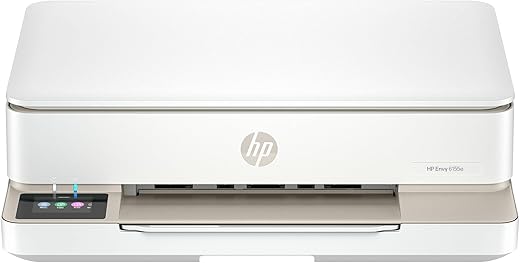
The HP Envy 6155e Wireless Color Inkjet Printer is a versatile and efficient all-in-one printing solution perfect for home or small office use. Combining advanced technology with user-friendly features, this printer is designed to deliver high-quality prints while enhancing productivity. In this detailed product description, we will explore its key features, benefits, and price comparisons to help you make an informed decision.
Key Features of HP Envy 6155e
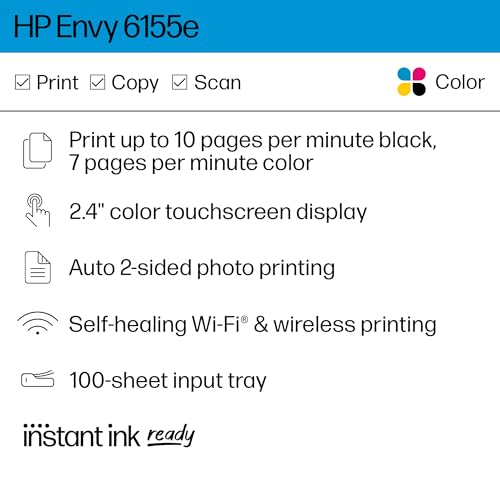
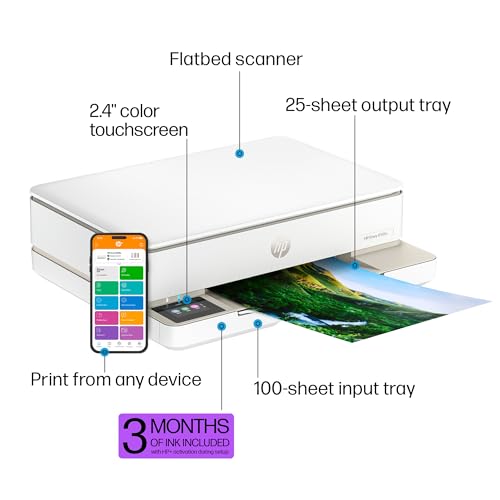
- Wireless Printing: Easily connect to your home Wi-Fi. Print from any smartphone, tablet, or computer without the need for cables.
- Versatile Media Handling: Print, scan, and copy documents with ease. Supports various paper sizes, including letter, legal, and photo sizes.
- High-Quality Output: Enjoy vibrant colors and sharp text with 4800 x 1200 optimized dpi, ensuring professional-looking documents and photos.
- HP Smart App: Manage your printing tasks from your smartphone. The app enables easy setup, monitoring ink levels, and troubleshooting from anywhere.
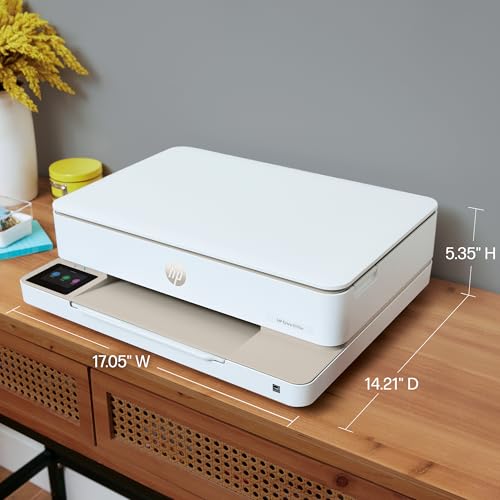
- Compact Design: With a sleek and modern appearance, the HP Envy 6155e fits seamlessly into any workspace without taking up much room.
- Automatic Two-Sided Printing: Save paper and reduce waste by printing on both sides of the page effortlessly.
Benefits of Using HP Envy 6155e
- Convenience: The ability to print wirelessly allows for maximum flexibility. You can print documents from any room in your house, or even from outside.
- Enhanced Productivity: With its multifunctional capabilities, you can complete tasks quickly—scanning and copying directly from the printer saves you time.
- Great Value: The HP Envy 6155e offers high-quality prints at a competitive price, making it a cost-effective choice for household printing needs.
- User-Friendly: The intuitive mobile app and straightforward control panel make the printer easy to operate, even for those not tech-savvy.
Price Comparison Across Different Suppliers
The HP Envy 6155e Wireless Color Inkjet Printer price varies across various suppliers. On average, you can find this model priced anywhere from $99 to $129. Always check for deals and discounts, as prices fluctuate regularly. With our price comparison tool, you can quickly identify the best available price for this printer.
6-Month Price History Trends
Analyzing the 6-month price history of the HP Envy 6155e reveals some interesting trends. Over the past six months, prices have mostly stabilized, with occasional dips during promotional events. This indicates that while it is generally a consistent investment, keeping an eye on pricing can lead to potential savings.
HP Envy 6155e Customer Reviews
Feedback from users highlights several positive aspects of the HP Envy 6155e. Many customers appreciate its wireless convenience and high-quality color printing, particularly for photos. The automatic two-sided printing feature has also received positive mentions for its efficiency.
However, some reviews note a few drawbacks, including the need for regular ink replacements and occasional connectivity issues when setting up the Wi-Fi. Overall, user ratings average around 4.5 out of 5 stars, making it a well-received choice in the market.
Explore Unboxing and Review Videos
If you’re interested in seeing the HP Envy 6155e in action, several unboxing and review videos are available on YouTube. These videos provide a closer look at its features and setup process, helping you visualize how this printer would integrate into your daily routine.
The HP Envy 6155e Wireless Color Inkjet Printer is an excellent choice for anyone seeking reliability, quality, and convenience. This printer not only meets the demands of modern printing but also supports environmental sustainability with its duplex printing feature.
Compare prices now! Make sure to explore the various options available, check out customer reviews, and see how the HP Envy 6155e can cater to your printing needs with ease and efficiency.
HP Envy 6155e Wireless Color Inkjet Printer (714L5A) Reviews (7)
7 reviews for HP Envy 6155e Wireless Color Inkjet Printer (714L5A)
Only logged in customers who have purchased this product may leave a review.
Christian –
This HP’s had no issues so far. I was reluctant to get another HP after the last one I had a couple years ago, which had a really clunky and frustrating software package, combined with poor print quality. But then I replaced that with a Canon that couldn’t get though five print jobs without jamming, and finally an Epson that had even worse print quality. After the Epson locked up because I dared to use non-Epson ink cartridges, I decided to give HP another chance. Glad I did.
So far, I love this printer. It was fairly easy to set up, but did take some figuring to do it without installing all of HP’s software, which was my primary issue with the last HP I had. I eventually found HP’s EasyStart installer on their website, and from there it was easy to select the options and software I wanted to use. I went with a very basic install and haven’t had any problems with the software other than having to delete a few random new desktop icons.
After setup, it was like…having a normal printer! Refreshing. No jams, no stripy print jobs, no weird apps with a bunch of essentially useless features popping up when you just want to print something. I haven’t had a printer that worked to an acceptable basic standard in years. The first thing I printed with it was a shipping label and was like “Whoa, a normal printout!” The second thing I printed was some instructions, and the text is comparable to a laser printer. It’s also fast.
There are a couple other features that I like, starting with the icy-blue output tray light. It’s calming and makes me feel like this printer’s got it handled. Between that and the pleasant sound effects it makes for various functions, it feels like getting a little something extra. It doesn’t have a touchscreen, but it does have a lighted icon-pad, which in my opinion is all a printer really needs. Lastly, though the printer has a wider footprint, the paper tray is contained and concealed; you pull it out from the output tray deck, insert paper, and push it back in. No awkward paper tray extensions or paper sticking out of the top.
Patty –
I am not a computer person. I am a retired senior who finds this sort of thing to be extremely frustrating. Although I try, I have to go somewhere else to have somebody else put it together for me. Life is just too short to live with that level of frustration.
I was able to put together this printer together on my own, which is shocking! It was so easy. It came with a very easy to read booklet of instructions that tell you exactly what to do. This booklet also show you what the codes mean when it’s having an issue. That way you don’t have to guess, which in my mind is a really good thing. What I was most surprised about, was the way that it is put together. It’s built unlike any other printer I’ve ever seen, but it seems to work really well. Ie, the paper is fed from a drawer inside of the printer. You basically have to lift up the whole printer itself to get at the paper or envelope drawer. It’s curious, but it works amazingly well! I also didn’t realize that it hasn’t extra bit of warranty which is a treat as well! Extra bonus! I have only had it for a few days and have not had an opportunity to try out it’s other features but for me, given the cost, this HP printer is one of the best.
Loving Father (Hank) –
The app didnt fully complete this printers setup, but somehow the printer is connected to my wifi so it works. You dont need the useless app to print from your phone. The printer just needs to be connected to your wifi, and your phone to your wifi, and itll print. No bluetooth no location. I uninstalled the app. I like it for that reason very seamless. Looks nice on table very minimal cool lighting
C. Ingalls –
I finally had to buy a new printer because my trusty old HP printer (over 11 years of use!) finally started having issues. After much research and wading through several bad reviews on every printer I looked at, I decided to go with this one and crossed my fingers that it would be a good experience.
Everything started out fine, going through the process, but when it reached the step to connect to my wifi, it just would not, no matter what I tried, no matter what device I tried it on. I’m not new to technology and this type of thing should have been an easy process for me. Instead it was 6 hours of nothing working and complete frustration! Finally, I decided to just connect it with USB (USB cord doesn’t come with the printer btw), grabbed the USB cord from my old printer and gave it a go. After another hour of downloading the driver from HP’s website, and going through the lengthy installation, and it was connected via USB. Yay, time to print right? THINK AGAIN.
When I put the ink cartridges in, I instantly got an error message stating that the color cartridge was not communicating with the printer and no matter what I did, it would not work. I read page after page of other similar issues (many of those to be found with this printer!!) and finally realized that my brand new cartridge or the cartridge compartment in the brand new printer was defective. Seriously!? So I ordered another ink cartridge from HP for $25 to see if it would work in the ink compartment.
With time constraints on needing a working printer ASAP, I then decided to just send the defective printer back and have it replaced with the same model replacement. I was actually still hopeful I could make it work. Thankfully, I read the reviews on the actual ink cartridges for this printer and found out that they run out after 30 to 40 pages, though stating they will print 100 pages (still too low anyway). Since I can’t connect to the subscription program through HP, and receive ink monthly, and would need to order my cartridges on an as needed basis, this was the straw that broke the camel’s back.
I ordered a completely different printer that hopefully will suit my printing needs better and will not arrive defective and unable to connect wirelessly!
Would NEVER recommend this printer. Its too costly on ink and not user friendly at all. Don’t bother, trust me. Horrible experience.
Robert Zsiga –
Firstly, I love the look of it. All of the funky different coloured lights are so cool. It’s nice and slim and not bulky. I couldn’t believe how easy it was to set up to my WiFi and to my iPhone. It didn’t need my router password or anything. Super easy to install the paper and ink. It’s really quiet and prints fast with great quality printouts. The instant ink feature is great and so convenient. It has many other wonderful features! Great app and support. Amazing printer especially for the price. I had a Canon Pixma before this one and it was an absolute piece of junk! I got so frustrated with it that I just recycled it. I think HP printers are the best. I’m so glad I chose this printer.
Thaurialiel –
Facile à installer! Prends peu d’espace, scannage facile à utiliser.
Nous devons télécharger l’app hp printer pour l’utiliser, permet la facilité la connexion wifi personel (iphone, imac) et bluetooth (imac) !
Nous avons l’option de choisir creer un compte ou non. Avec le compte, l’option de la pre-commande des cartouches d’encre que l’imprimante identifie presque vide est un bonus.
T. Thompson –
Just a few buyer beware tips before you buy this (and probably any HP printer) printer. If you are just in need of the occasional label, document, or picture printing, you might want to skip this brand.
First off even though Amazon (and possibly the seller)encourages you to buy the off brand (and much more affordable ink) don’t. Only HP ink works. Also, the major selling point, for me anyway, that even if one cartridge runs out, you can still print. Nope. And lastly, unless you’re using enough ink to warrant the monthly subscription fee for their service, which automatically sends out ink you definitely want to skip this printer.
I bought it, along with the recommended off brand ink that was 3x more printing at a savings. Unfortunately a month after sample in runs out I pop in my off brand, but the ink wouldn’t work the printer just kept saying not HP, buy more ink. Then wanted my cc information for the subscription ink. Long conversation with tech support. They turned off the subscription request and assured me that as long as I buy real HP ink no problem. Fast forward 13 months, I get low/no ink warning and it won’t print a label even though the black shows nearly full and color shows at least half. After waiting a few days for yet more ink to arrive still won’t print and keep getting call to renew subscription. After a good couple of weeks of me, my kid, a friend all running through set up rebooting whatever you can think of it won’t accept the new HP ink I’m guessing because the subscription hasn’t been renewed.
I’m done. Over Christmas I’ve ordered a new Canon printer, it might have issues who knows, but I’ll take my chances. At least their ink is inexpensive, available everywhere not just Amazon (oh yeah I should add no where locally to buy the ink, Amazon or the subscription are the *only* options). I. Will. Never. Buy. Another. HP. Product. Again. We’ve had their desktops, laptops, and printers for decades, but never again.