
 Amazon.com
$29.99
LIONWEI USB C Docking Station Dual HDMI Price comparison


- All prices mentioned above are in United States dollar.
- This product is available at Amazon.com.
- At amazon.com you can purchase USB C Docking Station Dual HDMI Adapter, LIONWEI Laptop Docking Station Dual Monitor with Dual 4K HDMI, VGA, Fast Charging Port, 3 USB, USB C Hub Multiport Adapter for Dell, Lenovo, HP, Surface for only $29.99
- The lowest price of USB C Docking Station Dual HDMI Adapter, LIONWEI Laptop Docking Station Dual Monitor with Dual 4K HDMI, VGA, Fast Charging Port, 3 USB, USB C Hub Multiport Adapter for Dell, Lenovo, HP, Surface was obtained on September 24, 2025 12:50.
LIONWEI USB C Docking Station Dual HDMI Price History
LIONWEI USB C Docking Station Dual HDMI Description
LIONWEI USB C Docking Station Dual HDMI: The Ultimate Connectivity Solution
Introducing the LIONWEI USB C Docking Station Dual HDMI, a game-changer for anyone seeking to expand their device connectivity effortlessly. This sleek and compact docking station is designed to enhance your workspace with multiple connectivity options while complementing your modern tech aesthetics. Explore why this innovative product is capturing the attention of tech enthusiasts and professionals alike.
Key Features and Benefits of the LIONWEI USB C Docking Station
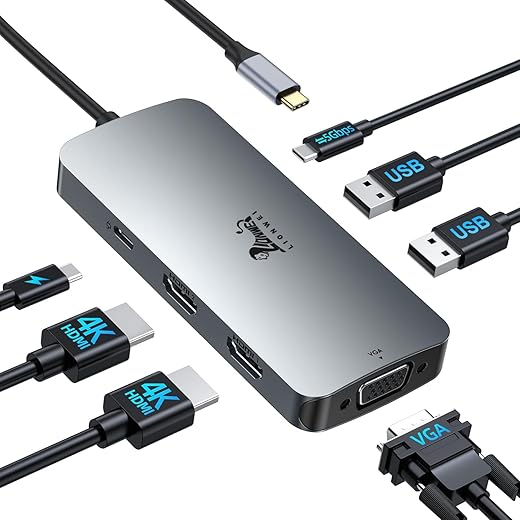
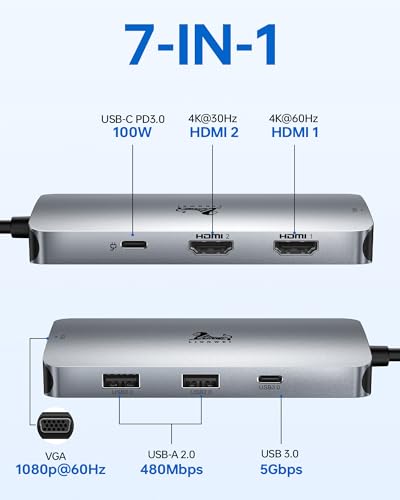
- Dual HDMI Outputs: Experience stunning 4K UHD video output with two HDMI ports. Connect multiple monitors simultaneously for seamless multitasking, whether you’re working, gaming, or streaming.
- Ample Connectivity: With a total of 7 versatile ports, including 3 USB ports, you can connect almost any device. Transfer files rapidly, charge your devices, and connect peripherals without any hassle.
- Compact and Portable: Measuring just 7.8 x 2.32 x 0.75 inches and weighing only 3.52 ounces, the LIONWEI Docking Station is perfect for travel. Take your connectivity on the go without the bulk.
- Superior Build Quality: Crafted from durable aluminum, this docking station is designed to withstand daily wear and tear while maintaining a sleek appearance that perfectly matches modern devices.
- Wide Compatibility: Fully compatible with operating systems such as Mac OS 9, Windows 7, and Windows 10, this docking station is a versatile solution for different setups, ensuring everyone can benefit from its features.
Price Comparison Across Suppliers
Pricing trends for the LIONWEI USB C Docking Station Dual HDMI vary across platforms. Currently, major retailers offer prices that are competitive, allowing you to choose the best deal for your needs. By comparing prices, you can save on this essential addition to your tech arsenal. Be sure to check the price variations when considering your purchase, optimizing your investment in quality technology.
Insights from the 6-Month Price History
Our 6-month price history chart indicates a steady pricing trend for the LIONWEI USB C Docking Station. Typically, the prices have remained stable with slight fluctuations during promotional periods. Users can benefit from checking back regularly for potential discounts, particularly around major shopping events.
Customer Reviews: What Users Are Saying
According to customer feedback, the LIONWEI USB C Docking Station Dual HDMI has received positive reviews from users who praised its ease of use, excellent video quality, and sleek design. Users appreciate the speed of the USB ports and the seamless connectivity it provides.
However, some reviews noted that while the docking station works excellently with many devices, a few users experienced compatibility issues with older laptops. Overall, the feedback highlights that this product is a great fit for most modern devices and setups.
Explore Unboxing and Review Videos
To get a better sense of what you can expect from the LIONWEI USB C Docking Station, we recommend watching available unboxing and review videos on platforms like YouTube. These videos showcase the product in action, offering insights into its functionality, features, and real-world performance. Observing how others incorporate it into their setups can help you envision its place in your tech toolkit.
Why Choose the LIONWEI USB C Docking Station Dual HDMI?
The LIONWEI USB C Docking Station Dual HDMI not only provides a reliable means of connectivity but does so with style and ease. Its extensive functionality, compact design, and robust build quality make it a top choice for tech enthusiasts, professionals, or anyone needing more from their workspace.
Whether you’re looking for a docking station that increases productivity, enhances your gaming experience, or simply simplifies your tech life, look no further! With its competitive price point, you can enjoy the full benefits of modern connectivity without breaking the bank.
Ready to elevate your workspace? Compare prices now!
LIONWEI USB C Docking Station Dual HDMI Specification
Specification: LIONWEI USB C Docking Station Dual HDMI
|
LIONWEI USB C Docking Station Dual HDMI Reviews (13)
13 reviews for LIONWEI USB C Docking Station Dual HDMI
Only logged in customers who have purchased this product may leave a review.





Jonathan Sommer –
I got this to try to make it easier to unplug my laptop on the occasions that I need to. It sits under a monitor stand, generally closed. Right now I’ve got my HDMI cable and my USB for my headset plugged into this docking station. My one complaint is probably wishing it had a slightly longer cable itself (the USB-C connection), or that it came with an option to mount it to the wall or to the underside of the desk. I can do this with tape or velcro, of course, but it would be a nice addition.
That being said, all I had to do was plug it in, plug the two items in, and turn on the laptop, and everything worked. So that was nice. And it does give me a couple more ports that aren’t stuck under my monitor riser.
ParentalSupervision –
It was a plug and play experience. Highly recommended
Amazon Customer –
It is fully compatible with all my devices. The connector cable is a little small for my liking but it works
Hammy –
LIONWEI USB C Docking Station,7 in 1 USB C to 2HDMI +VGA Laptop Docking Station
I use it to connect my windows laptop to a mouse, a keyboard and two external monitors, one through a VGA port and the other one through an HDMI port, they both work great at the same time as the main display of my laptop.
The construction feels solid, it looks great and it’s compact and not too heavy.
The USB type C cable on this HUB to connect to your device feels strong and flexible, so I think that’s a good sign.
ParentalSupervision –
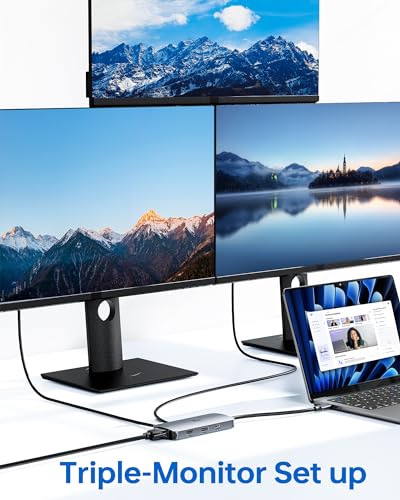
Here we have the Lionwei usb-c multi port adapter up for review. I got this for work so that I could have 3 monitors. The docking station was easy to set up. I just plugged in all my wires fired it up and the 3 displays worked. I just had to go in the settings and arrange them in order to my preference but that was it. The material is made up of feels like a very smooth plastic. It doesn’t feel fragile which I’m happy about and hope it lasts me years. It has 2 hdmi on one side and 2 usb type A on the other side. I’m using this on ChromeOS. I like having the 2 extra usb A ports. Overall I’m happy with the product and my work station has never been better.
Hammy –
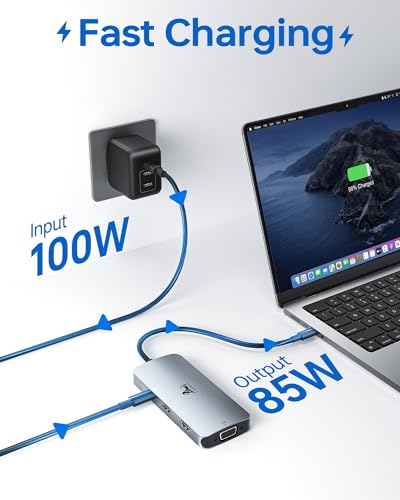
The hub easily connects up to 3 external monitors, with excellent resolution options – 4K@60Hz on HDMI 1 and 1080p on VGA. It’s super straightforward to use, no drivers needed. Data transfer speeds are fast with the 5Gbps USB-C and USB-A ports. Plus, the 100W PD charging is a nice touch, though it leaves 87W for laptop charging after accounting for the hub’s own power use. Overall, it’s a solid choice for enhancing productivity at home or in the office.
Rasheedah Z. Williams –
Quite a versatile adapter, especially with multiple USB-A ports and dual-monitor support. Having VGA out capability is the main reason I got this adapter, and I’m happy to report that it works as well as expected.
Word of warning, VGA out with Apple Silicon Macs doesn’t need appear to exceed a refresh rate of 60Hz, which is unfortunate, but appears to be a limitation I’ve experienced only with Apple Silicon machines. My Intel Macs were able to output VGA signals up to the refresh rate of my DEC CRT monitor, which is 75Hz.
The adapter body is made of metal, and feels like a high quality item in the hand. There are a million different USB-C dock/adapters on Amazon, and this one is good.
Wolfgang Hendrix –
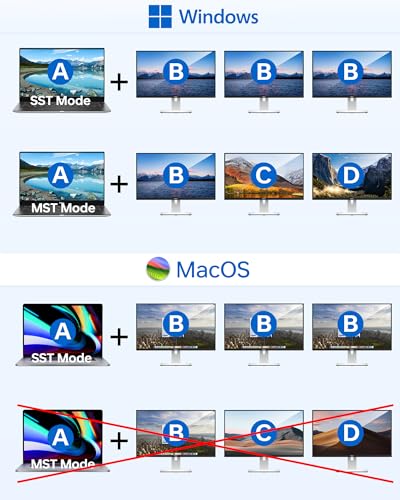
I am always on the look out for slim docks for my computers – but it seems that only the Dell computers have the right drivers or hardware built in to them to take advantage of the dual screen capability.
My son has an Asus laptop and a newer Dell laptop that just can’t seem to take advantage of the dual laptop functionality, but when I bring the dock down to my old XPS 15 the dual monitor functionality works just fine.
That’s what I found with this dock as well. All the other ports work just fine. A single monitor port works no matter what laptop we plug it into, but if we want 2 screens outside of the laptop screen we can only do that from my XPS 15.
So there’s that.
For the price of admission though, you really can’t ask for more – this isn’t bad. normally you pay a lot for a dock. Can’t complain. It’s a glorified port expander.
Rolando Ramirez –
From the photos and description, I initially thought it came with an AC plug for power, but I found out that’s not the case. It’s powered directly through the USB-C connection, which was a bit of a surprise.
Despite that, it does the job it’s supposed to do. The docking station offers a lot of functionality with its 7-in-1 design. It includes dual 4K HDMI ports, a VGA port, and a variety of USB connections, which has been great for expanding my laptop’s capabilities. I’ve used it to connect multiple monitors, and the video output has been clear and crisp, which is a plus.
One thing I was hoping for was the ability to charge my laptop simultaneously while using the docking station. Unfortunately, it doesn’t seem to charge my laptop as I’d hoped, which was a bit of a letdown. It works fine for connecting peripherals and displays, but it doesn’t provide the additional charging feature I was looking for.
Overall, it’s a functional docking station and meets most of my needs for expanding connectivity. Just keep in mind that it doesn’t come with an AC plug and won’t charge your laptop, so you’ll need to manage power separately. If those aspects aren’t a deal-breaker for you, it’s a solid choice for adding ports and connectivity options.
Amazon Customer –
I’ve had it for 3 months and have no complaints. I can connect 2 monitors, keyboard and mouse. Reasonable price.
Jaemi K –
Bought this for the 2 HDMI ports to connect 2 monitors to my laptop via the USB-C port that this plugs in with, but the PC doesn’t even know the 2 monitors are available when it’s all connected and powered up.
Wingmn –
Bought this to plug my S21 phone, Razer USB keyboard, and generic USB mouse into my monitor using HDMI for easier use. No problems at all with doing this. The phone prompted for the external devices and after tapping allow, I was able to do all I wanted while using my 32″ monitor to view it.
My phone is Samsung and wanted to use DEX, so it wasn’t the exact experience as I expected. I read I could mirror my display but couldn’t find the option in the 3 minutes I spent trying. It’s not a fault of this device however. Did not try and my monitor is 1440p only, so I could not see how the 4k output looks. Overall happy with the device for my personal use..
macr2d2 –
I like how thin this one is in comparison to the other one I had. At the end of the day it covers all the plugs I need so i don’t have to daisy chain them or add a whole bunch of extra plugs for my other devices. This is the way.