
LIONWEI USB C to Dual DisplayPort Docking Station Adapter


 Amazon.com
$45.99
LIONWEI USB C to Dual DisplayPort Docking Station Adapter Price comparison

- All prices mentioned above are in United States dollar.
- This product is available at Amazon.com.
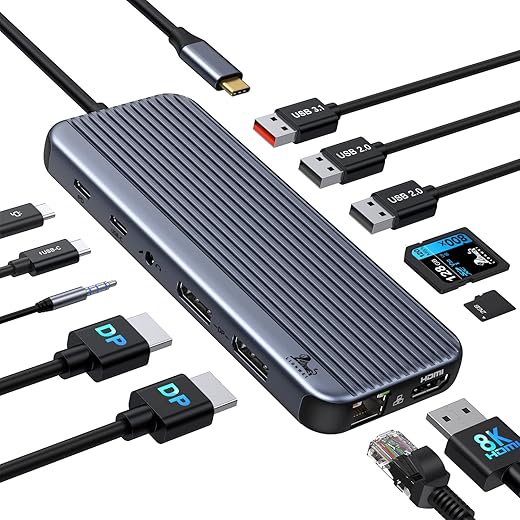
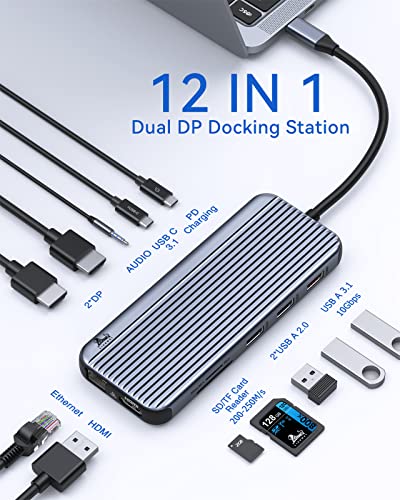
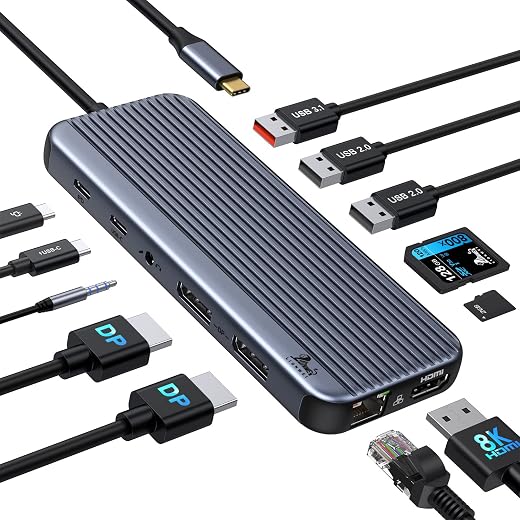
- At amazon.com you can purchase USB C to Dual DisplayPort 4K Docking Station Adapter, 12-in-1 LIONWEI 10Gbps USB C Hub Dock with 2 DP, HDMI, USB 3.1, Ethernet Port, Audio, SD/TF 4.0 Slot for Thunderbolt Laptop for only $45.99
- The lowest price of USB C to Dual DisplayPort 4K Docking Station Adapter, 12-in-1 LIONWEI 10Gbps USB C Hub Dock with 2 DP, HDMI, USB 3.1, Ethernet Port, Audio, SD/TF 4.0 Slot for Thunderbolt Laptop was obtained on September 24, 2025 12:50.
LIONWEI USB C to Dual DisplayPort Docking Station Adapter Price History
LIONWEI USB C to Dual DisplayPort Docking Station Adapter Description
LIONWEI USB C to Dual DisplayPort Docking Station Adapter
The LIONWEI USB C to Dual DisplayPort Docking Station Adapter is an essential tool for those seeking seamless connectivity and enhanced productivity. Perfect for setups that demand multiple displays, this docking station supports dual DisplayPort connections, allowing you to extend or mirror your screen for an optimized workspace. Whether you’re a professional or a dedicated gamer, this adapter is designed to elevate your experience. Discover the ultimate way to manage your devices and connections while keeping your workspace clutter-free.
Key Features and Benefits of LIONWEI USB C to Dual DisplayPort Docking Station
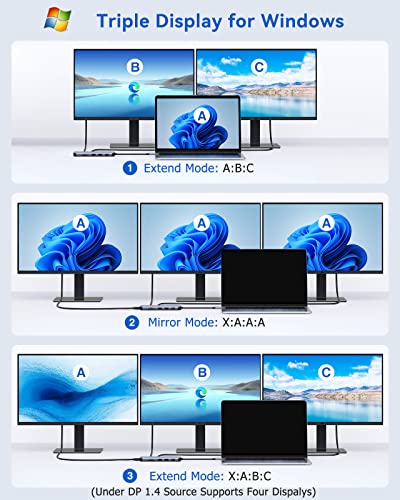
- Dual Display Support: Connect two DisplayPort monitors effortlessly. Enjoy a stunning 4K resolution and immerse yourself in high-definition graphics, ideal for gaming, video editing, and multitasking.
- Multiple USB Ports: With a total of 12 ports, including 6 USB ports, you can connect all your peripherals. This docking station enhances productivity by allowing simultaneous connections for keyboards, mice, and external drives.
- Fast Data Transfer Rates: Experience data transfer speeds of up to 10 Gigabits per second. Quickly transfer large files, and save time when working on demanding projects.
- Lightweight and Portable: Weighing just 4.8 ounces and featuring compact dimensions, this docking station is perfect for on-the-go professionals. Easily slip it into your laptop case without added bulk.
- Compatible Operating System: The LIONWEI adapter is designed for macOS 10.14 Mojave and later versions, ensuring wide compatibility with modern devices.
Price Comparison Across Suppliers
When searching for the LIONWEI USB C to Dual DisplayPort Docking Station Adapter, it’s vital to compare prices across various suppliers. Pricing can fluctuate based on promotions and availability, so our detailed price comparison feature helps you find the best deal, ensuring you save money without compromising on quality. Check out our prices from trusted retailers and discover where to score the best deal for this must-have adapter.
Trends from the 6-Month Price History Chart
Over the past six months, the price trajectory of the LIONWEI USB C to Dual DisplayPort Docking Station Adapter has shown stability with minor fluctuations. The average price has decreased slightly, indicating potential for further savings. Our price history chart allows you to track these changes, helping you decide when to make your purchase for the best value.
Customer Reviews: What Users Are Saying
Users have praised the LIONWEI USB C to Dual DisplayPort Docking Station for its reliable performance and expansive connectivity options. Customers often highlight:
- High Performance: Many reviews commend the crisp visual output when using dual displays, making it a favorite among creatives and gamers alike.
- Versatile Connectivity: Customers appreciate the variety of ports, enabling connections with multiple devices without hassle.
However, some users noted minor issues with compatibility on older operating systems, emphasizing the importance of ensuring compatibility before purchase. Overall, customer feedback remains overwhelmingly positive, reinforcing the quality and efficiency of this docking station.
YouTube Reviews and Unboxing Videos
For those interested in seeing the LIONWEI USB C to Dual DisplayPort Docking Station in action, several YouTube reviews and unboxing videos are available. These resources provide first-hand insight into setup processes, performance tests, and user experiences. Watching these videos can greatly assist you in understanding the product features, benefits, and any potential concerns before making a purchase decision.
In conclusion, the LIONWEI USB C to Dual DisplayPort Docking Station Adapter stands out as a high-performance, versatile accessory for anyone needing enhanced connectivity and multi-monitor support. With its thoughtful design, multiple ports, and fast data transfer rates, it meets the demands of modern users. Whether you’re expanding your workstation or elevating your gaming experience, this adapter is a reliable choice.
Don’t miss out on the opportunity to improve your productivity and connectivity. Compare prices now!
LIONWEI USB C to Dual DisplayPort Docking Station Adapter Specification
Specification: LIONWEI USB C to Dual DisplayPort Docking Station Adapter
|
LIONWEI USB C to Dual DisplayPort Docking Station Adapter Reviews (8)
8 reviews for LIONWEI USB C to Dual DisplayPort Docking Station Adapter
Only logged in customers who have purchased this product may leave a review.





PJ –
Had to return as the DisplayPort functionality did not work with my 2017 MacBook Pro or 3rd gen iPad Pro. All of the other ports worked great, but I really needed the DisplayPort for monitor setup. Otherwise a great product.
Jeremy R. King –
This amazon listing shows a Windows computer with DP1.4 being able to use three external monitors – 2x DP plus 1x HDMI. I found this to be untrue. I have a 2023 model Lenovo Legion 5i Pro with a USC-C port that supports Thunderbolt 4 / DP 1.4. Using this hub, I can get good results connecting two DP monitors at once, even with the laptop screen on (so three screens including laptop). However, my need is to connect one HDMI external monitor and one DP external monitor. If I only connect the HDMI monitor, everything works great. As soon as I add the DP monitor, the HDMI monitor resolution changes to crazy-low resolution (don’t remember the numbers, but less than 800×600 and 50 Hz). The DP monitor is at correct resolution. I have tried this with several high-end cables and the result is always the same – with one DP and one HDMI monitor connected, the HDMI monitor has unusable resolution. I also tried using a DP to HDMI adapter and connecting to both DP ports on the dock, but the HDMI monitor connected to the DP to HDMI adapter goes to sleep and will not display. This listing does say that the dock will not work with any adapters, and they’re apparently right.
Ultimately I want to connect one HDMI monitor @ 2K, 75 Hz and one DP monitor @ FHD, 60 Hz. A dock claiming to support two 4K monitors should have no problem with this. But it just did not work using the HDMI port and one DP port. I even ordered a replacement unit because I thought the first one might be faulty, but the second unit behaves the same way.
If you have 2 DP monitors OR one HDMI monitor that you want to run from this dock, then it should be excellent. The USB and Ethernet ports work as expected at the advertised speeds. And the build quality appears to be very good. Unfortunately it just does not work for my use case.
Philip –
Just set this up today, display works, mouse and keyboard works and the ethernet connection all works.
I must comment on the initial question and the follow up from LIONWEI, as they were attentive and wanted to make sure the product performed as expected.
Thank you.
NA –
Updated:
Their customer service is surprisingly good. The listing will be updated regarding the power supply.
I cannot speak for the longevity as my purchased was defected out of the box. It happens.
This rating reflects their customer service efforts.
–
The listing doesn’t clearly specify that it does not come with power.
Only the HDMI and Ethernet port worked and this was with a Dell 65W USB C Powe supply.
Check the other reviews it doesn’t last for long.
Luke –
Everything works fine out of the box on Windows 10 and Windows 11. On Linux most of it works but the displays don’t. Would give it five stars if it worked the same on Linux. I’ll try a few other machines and distributions. If I figure out the magic combination I’ll post an update. Otherwise, stick to Windows with this or find another one that works better with Linux (assuming any of these kinds of products work with Linux).
Update after 9 months of use. The Ethernet port failed completely. I can’t recommend this anymore.
mr. just right –
This overall is a very well-made design product other than 2 minor flaws. I can run my vr on it very smoothly on really high settings, add more splitters, and every port works well.
Now here’s the 2 minor flaws that give it 4 instead of 5 stars:
– Cable should be twice as long and more flexible for it’s hard to find the best position for it due to it being fairly rigid. At least more flexible, can make it thicker to keep it’s durability with a more flexible material.
– Why waste the 3rd usb-b port for a power only port, it’s almost useless. Only came “in use” twice yet it was still a waste since still could have plugged a device through the usb plug through on fan plug. Which couldn’t due to it being power only port.
So if 2 usb-b port is enough get it for it. And even if it’s not, just buy a usb-b splitter that adds more usb-b devices. That way and it’ll still be cheaper than all the other good options with similar ports and maybe 1or 2 more usb-b ports.
Damian Toyou –
This product looks and feels like good quality. This device has allowed me to connect two external screens to my thinkpad. My plan was to use two display port cables, however I misplaced one. This wasn’t a problem because I used one display port cable and one vga cable with an hdmi adapter that allowed me to connect the second screen via the hdmi port. It works flawless. It has a port to plug in the laptops charger. It all works flawless.
EthernetIP –
So I have about 3 other usb C hubs, they are all a bit smaller and some have 2 some 1 hdmi ports. With all of them I was able to get away with using same power 65w in my case power supplies. Here comes this newer version with better video specs, but it is 10w power draw (as shown via bios diagnostics).
So you 65w, even factory power supply, will be 55w. First windows 10/11 will complain about slow charge, but will also put a yellow exclamation sign on your battery status icon.
In short get a 100w power supply, if yoy plan to use this and not get annoyed…
Otherwise have no issues, solid device works as advertised so far.