
Matatalab VinciBot Coding Robot for Kids 8-12
 Amazon.com
  eBay
eBay 
$99.99
Matatalab VinciBot Coding Robot for Kids 8-12 Price comparison



- All prices mentioned above are in United States dollar.
- This product is available at Amazon.com.
- At amazon.com you can purchase Matatalab VinciBot Coding Robot for Kids 8-12, STEM Educational Toy, Scratch & Python Programming Robot with Remote Controller, AI Smart Robot Gift for Boys & Girls, Ages 8+ for only $99.99
- The lowest price of Matatalab VinciBot Coding Robot for Kids 8-12, STEM Educational Toy, Scratch & Python Programming Robot with Remote Controller, AI Smart Robot Gift for Boys & Girls, Ages 8+ was obtained on September 23, 2025 07:51.
Matatalab VinciBot Coding Robot for Kids 8-12 Price History
Matatalab VinciBot Coding Robot for Kids 8-12 Description
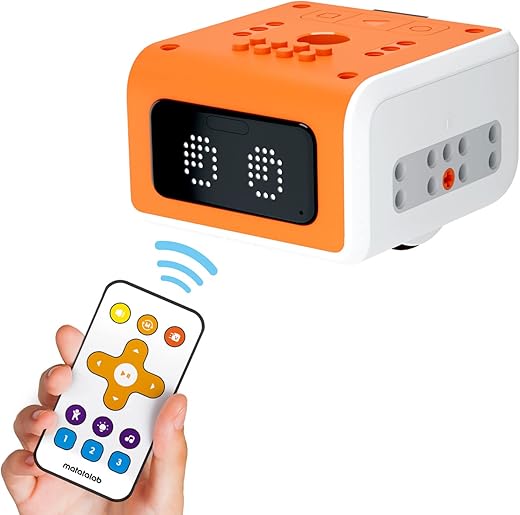
Introducing the Matatalab VinciBot Coding Robot for Kids 8-12
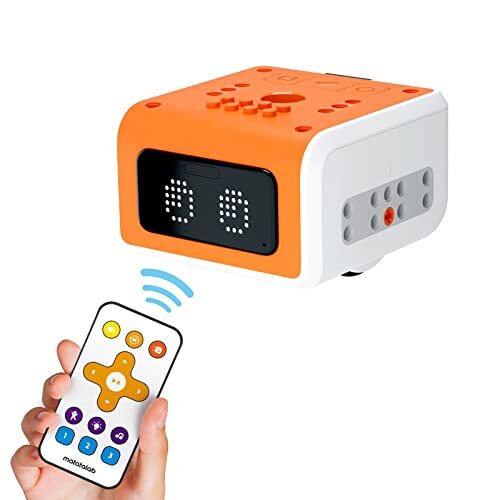
Discover the world of programming and robotics with the Matatalab VinciBot Coding Robot for Kids 8-12. Designed specifically for children ages 8 to 12, this innovative educational gadget helps ignite an interest in coding through fun and interactive play. Perfectly sized at 7.28 x 2.95 x 8.54 inches and weighing just 8.4 ounces, the VinciBot is lightweight and easy for kids to handle. With its engaging features and capabilities, this coding robot is a must-have for any curious young mind!
Key Features and Benefits of VinciBot
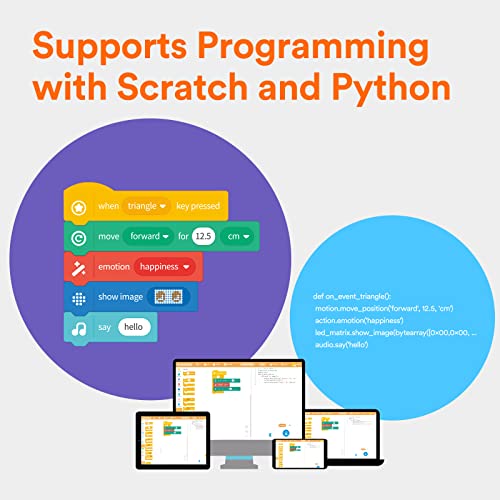
- Interactive Coding Experience: Through simple block-based programming, children can easy grasp coding fundamentals while playing.
- Engaging Learning Tools: The VinciBot comes with a variety of fun activities and challenges that keep kids entertained while they learn.
- Creative Play: Children can program VinciBot to navigate mazes, complete tasks, and even interact with its environment, promoting creativity and problem-solving skills.
- Compatible with Multiple Devices: The VinciBot easily connects to tablets and smartphones, offering flexibility and enhancing accessibility for kids.
- Safe and Durable Design: Made with non-toxic materials, VinciBot is safe for children and built to withstand everyday play.
- Fast Setup: The coding robot requires just 1 Lithium Polymer battery (included), ensuring a quick and hassle-free setup.
Price Comparison Across Different Retailers
The Matatalab VinciBot Coding Robot ranks competitively against various retailers, with prices typically ranging around $79.99 to $99.99. Be sure to check the 6-month price history chart we offer for insights into the best times to purchase. Notably, the price has shown some fluctuations, indicating periodic discounts and promotional events from major online vendors.
6-Month Price History Trend
Our 6-month price history chart highlights interesting trends. Prices spiked during seasonal sales and dropped significantly during back-to-school sales. This trend suggests that waiting for specific promotional periods may yield substantial savings on the VinciBot. We encourage parents and kids alike to keep an eye on these trends to grab the best price!
Customer Reviews: What Do Buyers Think?
Customer feedback for the Matatalab VinciBot Coding Robot reveals a mix of enthusiastic praise and some minor drawbacks. Parents appreciate the robot’s ability to engage their children in learning coding in a fun and interactive way. Positive reviews often highlight:
- The robot’s versatility and adaptability.
- Ease of use, even for parents who are not technically savvy.
- The range of educational activities that cater to different skill levels.
Conversely, some users noted that the initial setup could be daunting for complete beginners, especially without prior experience in coding. However, many found that once they got past the setup, the educational benefits outweighed any initial hurdles.
Explore Unboxing and Review Videos
For those interested in a closer look at the VinciBot Coding Robot, we recommend checking out various unboxing and hands-on review videos available on YouTube. These videos provide insightful demonstrations of how the robot works and showcase its engaging features, enhancing your purchasing decision.
Conclusion
In summary, the Matatalab VinciBot Coding Robot for Kids 8-12 stands out as an excellent educational tool that bridges the gap between fun and learning. Its interactive design, easy-to-learn coding interface, and compatibility with devices make it an exciting option for budding programmers. Don’t forget to compare prices now to find the best deal and embark on an enriching coding journey with your child!
Matatalab VinciBot Coding Robot for Kids 8-12 Specification
Specification: Matatalab VinciBot Coding Robot for Kids 8-12
|
Matatalab VinciBot Coding Robot for Kids 8-12 Reviews (13)
13 reviews for Matatalab VinciBot Coding Robot for Kids 8-12
Only logged in customers who have purchased this product may leave a review.
Related Products
A. Nunez –
Day 1 out of the box I would have given this 5 stars. It looks like it does a lot, but it also seems buggy, but that was before I upgraded the firmware. The main problem is that out of the box, everything worked pretty well. The actions after coding were a bit sketchy, and the remote worked fine. I gave the battery a charge and we tried it again today. It absolutely does not respond to the remote.
The website is not user friendly, and after sending an email through their website, it said it was sent but it also wasn’t sent. I don’t know what the Amazon help or return policy is on Christmas gifts, but I may need to look into it. My kid might be on the cusp of understanding the programming, but the remote really offers a lot of fun – when it works.
CJ –
My 11 year old loved this. It writes, dances, talks, and the best part is it’s programmable, so they can be creative and interactive. Great for a little engineer or a kid who likes to figure things out.
InspecteurGadget –
The media could not be loaded.
Ce petit robot est vraiment génial si vous souhaitez faire découvrir la programmation a vos enfants de façon ludique.
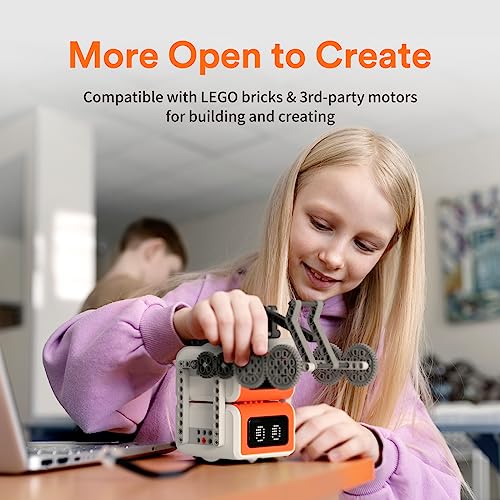
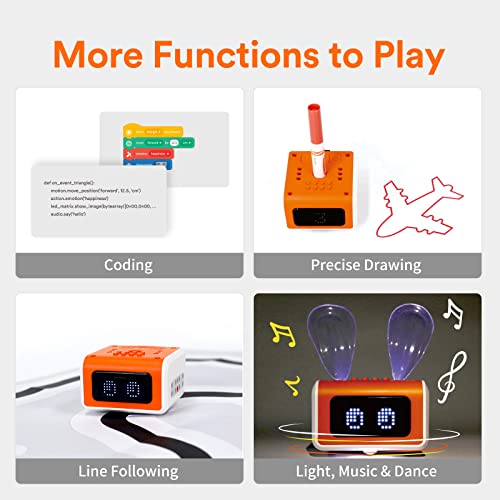
Ce que je trouve génial c’est ses possibilités. Si au début, on s’amusera à faire bouger le robot, en lui donnant des ordres simples, on peut évoluer avec le traçage (il est super précis !) de figures au stylo qui est fourni avec, où au suivi / détection de lignes et pour finir, on peut monter des briques et des mécaniques Lego dessus, ce qui rends les montages quasi-infinis.
Si votre enfant a de l’imagination à revendre, il va sans doute beaucoup s’amuser avec ce robot.
Le code se fait très facilement avec une interface drag & drop mais en cliquant sur le bouton “code” on obtient le code en Python. C’est génial.
Point négatif tout de même je n’ai testé que la version PC depuis le site Internet et l’ensemble des éléments de code est en Anglais… Ceci peut être un frein si votre enfant est très jeune ou qu’il ne sais pas lire l’anglais facilement. C’est aussi un excellent moyen de lui apprendre les mots essentiels, Move = Bouger, Turn = Tourner, etc.
A part la langue, je n’ai eu aucun soucis pour utiliser le robot et le connecter. Pourtant, étant donné que je n’ai utilisé que le site Internet, j’avais un peu peur que ça soit compliquer de connecter le robot au site.
Le site demande à installer un plugin (Scratch Link) qui après vérification est sans danger. Le reste se fait tout seul.
Vraiment très content de ce robot, les expressions de visage sont très sympa et vraiment, le coup de la compatibilité Lego m’a conquis ! Je vous le recommande !
ObsidianFlow –
This is actually really fun, My kids love to program the robot to run around the room. They are learning some basic coding information too! Setup was pretty easy, just get the app and connect to the device, took 5 min.
InspecteurGadget –
Easy to use a good present for boy or girl t this age
Michelle J. –
Unfortunately, we had trouble from the first day we unboxed this guy. It didn’t want to sync and only works with our MacBook Pro or iMac. It’s not compatible with any iPads. It later required an update which made it malfunction. We’ve only used it twice. In spite of trying to get in touch with matatalab with regards to this issue, we’ve had no response in over a month. Very expensive item that turned out to be useless. We also were unable to locate any of the cool add ons it was supposed to support.
Raymond –
This little guy is great for teaching kids to code. I got this for my kids and they love it. I find that the kids want to use it more when you challenge them. Give them a challenge to complete and watch them get to work.
It’s a good day! –
This was a lot better quality than I was expecting. The parts are well-built. The metal chassis is sturdy, and the holes are all aligned properly. The way the motors are attached isn’t perfect, and they will likely come loose after a while, but it will be easy to tighten them back up.
My seven-year-old and I assembled the kit in about an hour, with him doing most of the work. The instructions were pretty simple, but the pics showing where to put the screws were a little tricky for my seven-year-old to interpret. Not a big deal, and he figured it out with some help. Older kids may find it easier if they have experience following printed directions. Only a few small parts make this kit better than others for younger kids.
We just started playing with the programming, and it is pretty simple and works well. My daughter is excited to try designing new programs for his robot.
Jasmin S. –
This little robot is quite impressive to say the least. It dances, follows lines, and draws. As a kid I would’ve loved to have a toy this unique. The eyes show a small bit of expression, and it’s easy to change modes and steer with the remote. This would make quite a wonderful gift for the price.
terpfan1980 –
There are a few grandkids in my family and this Robot offered an opportunity for the grandkids to be able to play while learning. They get to use it as a toy but have to go through the process of actually programming the robot to do what they want it to do. Sneaky learning, yay!
I also have a now former co-worker that has a couple of home schooled youngsters. I loaned him this Robot to use for a while (between visits by the grandkids at my home). He was really interested in checking this robot out and was very happy to see the various programming choices that can be used with it. His kids are in the perfect age range and are tech inspired enough to really find something like this as very useful. He will likely wind up buying his own for his kids soon as it has shown it’s value to him quite quickly.
4 very solid stars from this reviewer (and my former co-worker too).
Graham Spencer –
Santa ordered this device to help my 9-year old daughter practise her coding skills. In addition, Santa also sent the Creator Kit add-on, which contains some Lego-style bricks, a USB-C to Lego Brick interface and a compatible Lego motor.
The device moves and plays music satisfactarily, however there are two usb connectors to find (the one you can easily see is for charging only – there is a second one beneath a rubber cover). Pick the wrong one and the additional motor will not function. You need to scour the website for technical support, but they were brilliant, once I found a way to contact them.
S. Pf. –
Den Kindern gefällt der Roboter ziemlich gut und die Familie hat viel Spaß damit. Die fertigen Aufgabenstellungen sind perfekt aufgebaut und animieren dazu, spielerisch und in sinnvollen Lernschritten immer komplexere Programme zu schreiben. Insbes die einfache Anwendung ohne viel Zubehör und die Möglichkeiten mit Sensoren zu spielen und Bilder zu malen hat die Kinder immer wieder begeistert.
maggiecardiff –
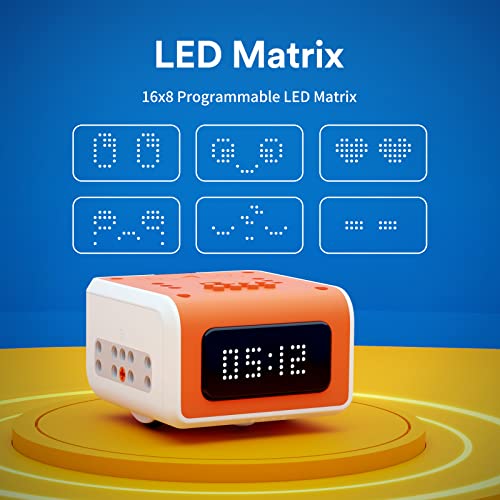
Der VinciBot wird mit allem geliefert, was Sie brauchen, um den Kindern ein ansprechendes Lernerlebnis zu bieten. Es gibt ein Herausforderungsheft mit 18 Herausforderungen, die die Kinder erkunden können. Der VinciBot ist mit interaktiven Sound-, Licht- und Bewegungseffekten ausgestattet und verfügt über 8 Sensoren. Es gibt 21 Musikinstrumentenklänge, eine LED-Matrix und eine LED-RGB-Lichtstruktur. Die Infrarot- und Ultraschallsensoren ermöglichen ihm die Navigation in seiner Umgebung und die Interaktion mit der Umgebung. Kinder können VinciBot so programmieren, dass er eine Vielzahl von Aktionen ausführt, darunter Tanzen, und ihn sogar so programmieren, dass er „Happy Birthday!“
Das Codierungsprogramm ist in mehreren Sprachen verfügbar, wodurch es einem breiteren Publikum zugänglicher wird. Dadurch können Kinder aus unterschiedlichen Ländern und mit unterschiedlichem Hintergrund lernen, in ihrer Muttersprache zu programmieren. Darüber hinaus sind die Programmierblöcke so konzipiert, dass sie von kleinen Kindern unabhängig von ihrer Lese- und Schreibkompetenz oder ihren kognitiven Fähigkeiten leicht verstanden werden können, wodurch Inklusivität und Zugänglichkeit für alle gefördert werden.
Kinder können die Sprache zum Codieren auswählen, wodurch sie für alle Kinder zugänglicher wird, während sie gemeinsam Sprachkenntnisse und Programmierkenntnisse aufbauen.
Einer der Hauptvorteile von VinciBot besteht darin, dass es so konzipiert ist, dass es mit dem Kinder wächst. Mit zunehmender Programmierkompetenz können die Kinder fortgeschrittenere Programmiersprachen verwenden, um VinciBot zu steuern und immer komplexere Programme zu entwickeln. Dies bedeutet, dass VinciBot Kindern jeden Alters über Jahre hinweg pädagogischen Wert bieten kann.
Der VinciBot ist auch mit LEGO-Steinen und anderen Produkten kompatibel, sodass es sogar möglich ist, Roboter für ein größeres Projekt oder einen Robotik-Wettbewerb miteinander zu kombinieren.
Einfach perfekt.