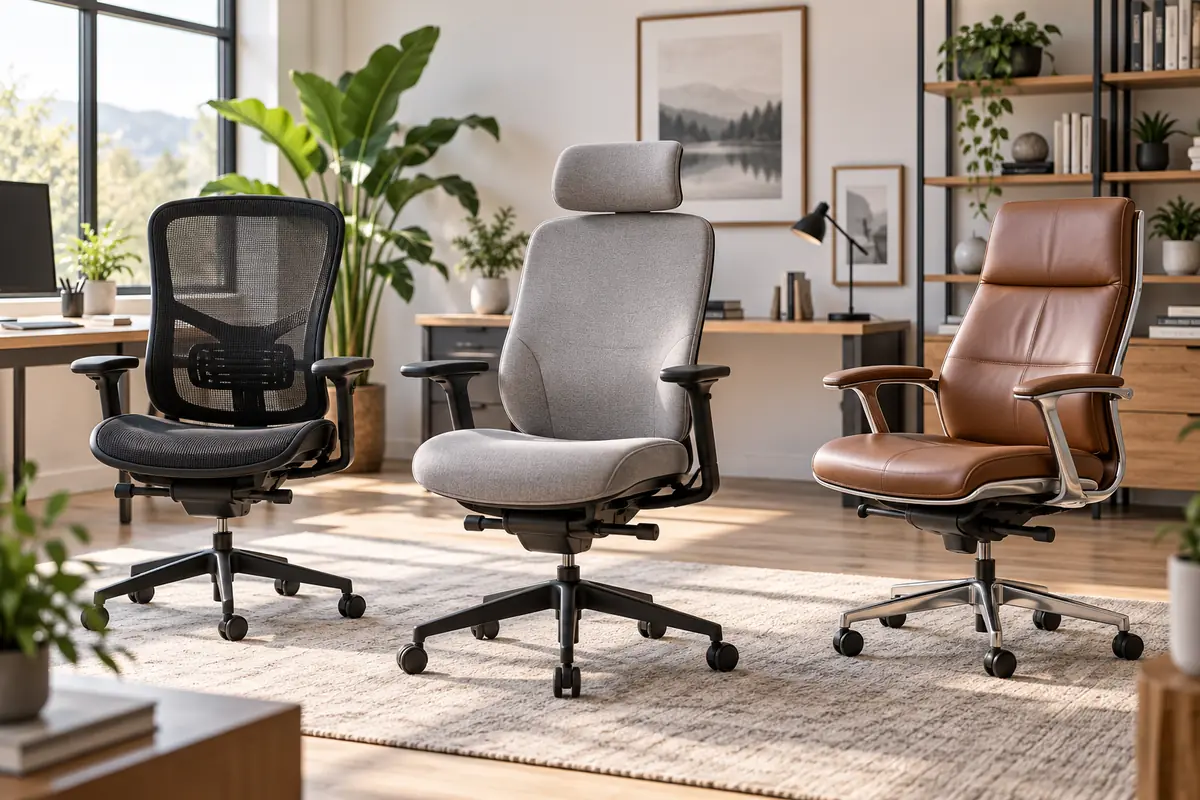
Most Popular Ergonomic Office Chairs 2026
The Branch Ergonomic Chair Pro is the best ergonomic office chair for most home-office users in this guide. It combines adjustable seat depth, two-way lumbar support, 5D armrests, forward tilt and a relatively approachable price compared with flagship chairs from Steelcase and Herman Miller.
But no ergonomic chair fits every body equally well. The Steelcase Leap offers even more refined adjustment, the Herman Miller Aeron is the premium mesh choice with three distinct frame sizes, HON Ignition 2.0 delivers strong value when you choose the correct configuration, and IKEA MARKUS is the affordable high-back option for buyers who need fewer adjustments.
The phrase “most popular” in this guide does not mean audited worldwide unit sales. These are widely recognized, currently available office chairs selected using adjustability, body fit, manufacturer specifications and current independent testing. The best choice is ultimately the chair you can adjust to your body and workstation.
Quick Answer: Best Ergonomic Office Chairs
Best Overall: Branch Ergonomic Chair Pro — 14 adjustment points, 5D armrests, adjustable seat depth and two-way lumbar support at a midrange price.
Best for Adjustability: Steelcase Leap Office Chair — adjustable seat depth, lumbar height and firmness, recline controls and highly configurable armrests.
Best Premium Mesh Chair: Herman Miller Aeron Chair — breathable 8Z Pellicle suspension, three frame sizes and a 12-year warranty.
Best Value: HON Ignition 2.0 Task Chair — a configurable office chair with useful seat, arm, tilt and lumbar options without moving into flagship pricing.
Best Affordable High-Back Chair: IKEA MARKUS Office Chair — mesh-backed, tall and relatively affordable, with a 10-year warranty.
What Makes an Office Chair Ergonomic?
Adjustability matters more than the word “ergonomic” printed on the product page. OSHA recommends choosing a chair whose backrest supports the natural curve of the spine, whose seat fits the user’s thighs without pressing behind the knees, and whose armrests can support the forearms without forcing the shoulders upward.
Seat depth is especially important. A seat that is too deep can prevent a shorter user from sitting fully against the lumbar support, while a seat that is too shallow may leave too much of a taller user’s thighs unsupported. Adjustable seat depth therefore gives one chair a better chance of fitting different body proportions.
Armrests should also help rather than interfere. They should allow the shoulders to remain relaxed and the elbows to stay reasonably close to the body, while still allowing the chair to move close enough to the desk.
A five-leg base, appropriate casters, adjustable height and a supportive backrest are other useful design features. Even a highly adjustable chair still needs to work with the desk, keyboard and monitor rather than being treated as an isolated purchase.
Ergonomic Office Chairs Compared
| Chair | Best For | Seat Depth | Lumbar Support | Armrests | Capacity | Warranty | Main Tradeoff |
|---|---|---|---|---|---|---|---|
| Branch Ergonomic Chair Pro | Best Overall | Adjustable | Height + depth adjustable | 5D | 275 lb | 7 years | Lower weight limit than premium alternatives |
| Steelcase Leap | Maximum Adjustability | 15.75–18.75 in. | Height + firmness adjustment | Up to height/depth/width/pivot adjustable | 400 lb | 12 years | High purchase price |
| Herman Miller Aeron | Premium Mesh | Size-specific, not slider-adjustable | Optional PostureFit SL | Several configurations | Up to 400 lb depending size | 12 years | Correct A/B/C size must be chosen |
| HON Ignition 2.0 | Best Value | Seat glide on selected configurations | Adjustable on selected configurations | Varies by SKU | 300 lb | Check exact configuration | Specifications vary significantly by SKU |
| IKEA MARKUS | Affordable High-Back | Fixed within chosen size | Built-in | Limited compared with premium picks | 276 lb tested | 10 years | Much less adjustable |
Compare Current Ergonomic Office Chair Prices
Chair pricing varies by upholstery, frame finish, arm configuration, lumbar options and retailer promotions. Premium models such as Leap and Aeron can become substantially more expensive when upgraded, while HON Ignition 2.0 listings may appear similar despite containing different ergonomic features.
Compare the live offers after deciding which adjustments you actually need. A cheaper chair that cannot fit your leg length, desk height or arm position can be worse value than spending more on the right configuration.

1. Branch Ergonomic Chair Pro — Best Overall
Best For: Home-office users who want extensive adjustability without immediately jumping to premium Steelcase or Herman Miller pricing.
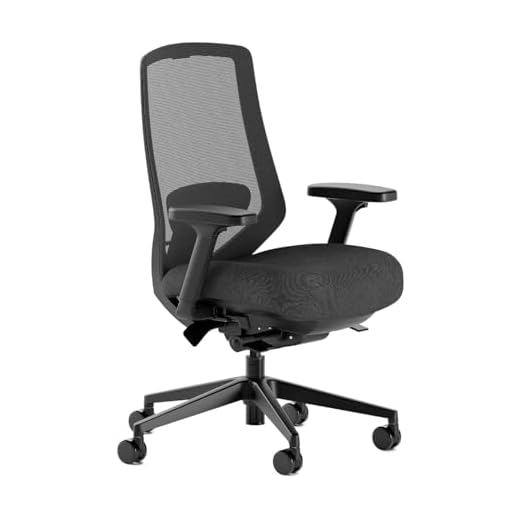
The Branch Ergonomic Chair Pro is our best overall ergonomic office chair because it includes most of the adjustments that materially affect fit. Branch lists 14 adjustment points, including seat height and depth, tilt tension, recline, forward tilt and a two-way lumbar support system.
The armrests are particularly flexible. Branch calls them 5D because you can adjust arm width and height plus pad width, depth and pivot. That gives you more ways to keep your forearms supported while positioning the chair close to different desks.
The lumbar cushion can be moved vertically and in depth, or removed entirely if you prefer less pronounced lower-back support. This is important because aggressive lumbar support is not automatically better. The useful setting is the one that follows your body comfortably without pushing you into an unnatural position.
Seat depth adjustment also makes the Pro more adaptable than many mid-price chairs. Shorter users can reduce the effective depth so the seat edge does not crowd the back of the knees, while taller users can extend support under more of the thighs.
Branch rates the chair for up to 275 pounds and says it meets BIFMA standards for commercial-grade use. An optional taller cylinder and optional two-axis headrest are available, and the standard warranty is seven years.
Independent testing reinforces its value positioning. Forbes Vetted selected the Ergonomic Chair Pro as its overall runner-up in its July 2026 test of 17 chairs, praising its adjustability, support and construction relative to its midrange price.
Pros
✅ 14 adjustment points
✅ Adjustable seat depth
✅ 5D armrests offer unusually broad positioning
✅ Height- and depth-adjustable lumbar support
✅ Strong balance of features and price
Cons
❌ 275-lb capacity is lower than Leap, Aeron C and HON Ignition
❌ Headrest costs extra
❌ Assembly is required
Who should skip it: Users who need a chair rated substantially above 275 pounds should consider Steelcase Leap or an appropriately sized Aeron instead.
Alternative: Steelcase Leap when maximum fine-tuning, higher capacity and a longer warranty matter more than price.
Upgrade your workspace with the Branch Ergonomic Pro Mesh Office Chair. With 14 points of adjustment, a two-way lumbar cushion, 5D armrests, smooth tilt, and high-density foam, it delivers personalized, all-day comfort and better posture. Ready to sit smarter? Order now and experience the difference in focus and comfort.
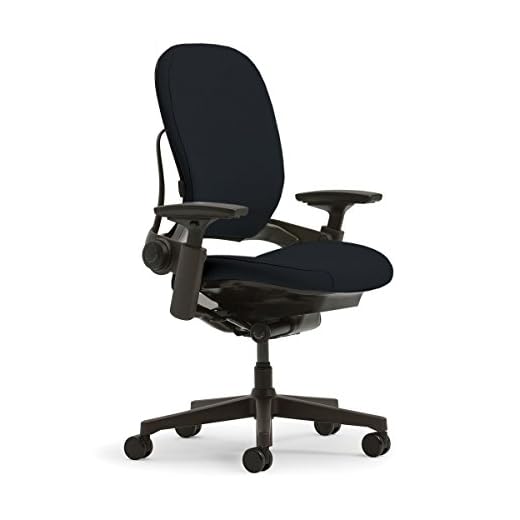
2. Steelcase Leap Office Chair — Best for Adjustability
Best For: Buyers who want extensive manual adjustment, a wide supported weight range and a chair designed to adapt closely to individual body proportions.
Steelcase Leap remains one of the strongest ergonomic office chairs for adjustment because the seat, back and arm systems can all be fine-tuned rather than relying on one predefined posture.
The standard work chair offers approximately 15.75 to 18.75 inches of functional seat-depth adjustment. That three-inch range is especially valuable for leg-length differences and closely matches OSHA’s recommendation that seat depth should support the thighs without pressing behind the knees.
Leap’s LiveBack design is intended to change shape as you move, while the lumbar support can be repositioned vertically. Lower-back firmness is also adjustable, allowing you to change how strongly the chair supports that region rather than simply moving a fixed lumbar pad higher or lower.
Depending on configuration, Leap armrests can adjust in height, depth, width and pivot. Steelcase also includes recline control with multiple back-stop positions, letting users decide how far the chair should recline.
The standard Leap work chair is rated for users up to 400 pounds. Steelcase backs the chair with a 12-year multi-shift warranty covering parts and labor under its stated warranty terms.
Forbes Vetted named Leap its Best Upgrade office chair in its July 2026 testing, highlighting both adjustability and build quality.
The largest downside is price. Many buyers do not need every available adjustment, and Leap generally costs much more than Branch Pro or HON Ignition. Its upholstered design is also less airy than the full mesh used by Aeron.
Pros
✅ Three inches of seat-depth adjustment
✅ Adjustable lumbar height and lower-back firmness
✅ Highly configurable armrests
✅ 400-lb standard-chair capacity
✅ 12-year multi-shift warranty
Cons
❌ Premium pricing
❌ Fabric or upholstered designs retain more warmth than full mesh
❌ Large configuration menu can increase cost quickly
Who should skip it: If you need only basic seat-height, lumbar and tilt adjustment, a lower-priced chair can provide enough ergonomic flexibility.
Alternative: Branch Ergonomic Chair Pro for many of the same practical adjustment categories at a lower price.
Upgrade your seating with the Steelcase Leap V2 Black Fabric Chair — engineered for full-back support, fully adjustable pivot armrests, lower-back firmness control, and lumbar height adjustment. This open-box find delivers premium ergonomic performance at a smart price — limited quantities available. Order now to lock in comfort and reclaim your workday.
3. Herman Miller Aeron Chair — Best Premium Mesh Chair
Best For: Buyers who prefer breathable mesh, premium construction and a chair selected around body size rather than relying on one universal frame.
Aeron approaches ergonomic fit differently from Branch Pro and Steelcase Leap. Instead of giving one frame a sliding seat-depth control, Herman Miller makes the Aeron in three sizes: A, B and C.
That means choosing the correct size is fundamental. Herman Miller’s current 2026 size-fit guide uses height and weight to help select the appropriate frame. Current U.S. specifications rate Size A up to 300 pounds, Size B up to 350 pounds and Size C up to 400 pounds.
The chair uses Herman Miller’s 8Z Pellicle suspension material across the seat and back rather than a conventional foam cushion. This provides considerable airflow and distributes pressure differently from an upholstered seat.
Back-support configuration matters too. Aeron can be ordered with different support systems, including PostureFit SL, while arm options range from simpler configurations to fully adjustable arms. Harmonic Tilt controls the recline motion.
Herman Miller provides a 12-year warranty, and the chair arrives assembled. Tom’s Guide revisited the Aeron in September 2026 and continued to rate it as a leading premium office chair after the current refresh, while noting its substantial price.
Aeron is not automatically better than Leap merely because it is iconic. Seat depth does not slide independently within each size, so getting the frame size right matters more. Buyers who strongly prefer a soft padded seat may also find Leap or Branch more familiar.
Pros
✅ Three separate frame sizes improve body-size matching
✅ Breathable full-mesh suspension
✅ Up to 400-lb capacity with current Size C specification
✅ Multiple lumbar, arm and tilt configurations
✅ 12-year warranty
Cons
❌ Very expensive when highly configured
❌ Seat depth is tied to frame size rather than a sliding adjustment
❌ Mesh feel is not ideal for everyone
Who should skip it: Buyers who cannot test or confidently choose between Aeron sizes should pay particular attention to Herman Miller’s size chart before ordering.
Alternative: Steelcase Leap if you prefer one frame with adjustable seat depth and upholstered seating.
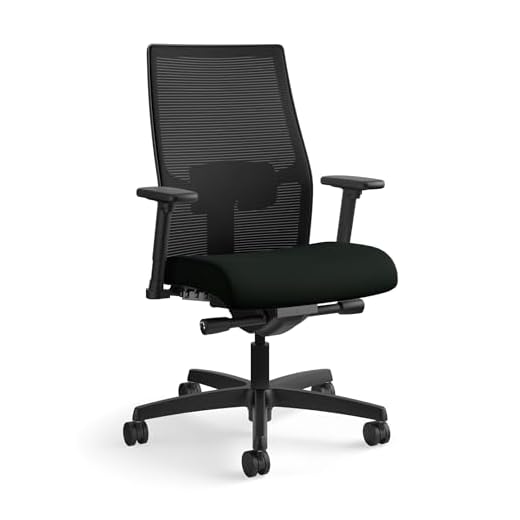
4. HON Ignition 2.0 Task Chair — Best Value
Best For: Buyers who want commercial-office-style adjustability and a 300-lb capacity without paying flagship-chair prices.
HON Ignition 2.0 can be an excellent value, but there is one important rule: check the exact SKU before buying. Ignition is a configurable chair family, and retailer listings do not all include the same arms, lumbar support, upholstery or seat-depth controls.
HON’s current functionality documentation shows available features including seat glide, adjustable lumbar support, arm-width adjustment, arm-height adjustment, seat-height adjustment, tilt tension and tilt lock. The company explicitly warns that individual chairs may not include every feature.
That makes the exact configuration more important than the product-family name. For this recommendation, we would target a version with the seat glide and adjustable lumbar system, because those features materially improve body fit.
The seat glide moves the cushion forward or backward to accommodate different upper-leg lengths. HON’s adjustable lumbar element can move vertically, while selected arm configurations allow changes in both height and width.
Current HON Ignition 2.0 task-chair documentation rates the chair for users up to 300 pounds. Forbes Vetted also includes Ignition 2.0 among its current 2026 recommendations, identifying it as a strong office-chair option available through mainstream retail channels.
The main downside is shopping complexity. Two Ignition 2.0 listings may look almost identical in photographs while offering different ergonomic capabilities.
Pros
✅ Seat glide available for leg-length adjustment
✅ Adjustable lumbar available on appropriate configurations
✅ Height- and width-adjustable arm options
✅ 300-lb capacity
✅ Strong feature set below flagship premium pricing
Cons
❌ Features vary significantly across SKUs
❌ Some retailer listings make configuration differences hard to understand
❌ Less premium in materials and refinement than Leap or Aeron
Who should skip it: Avoid an Ignition listing if you cannot confirm the adjustment features included with that exact model number.
Alternative: Branch Ergonomic Chair Pro if you want a more standardized configuration with a clearly documented 14-point adjustment package.

Experience breathable mesh, adjustable arms, and targeted lumbar support built for long sessions and reliable daily use. With a 300 lb capacity and HON Full Warranty, it’s the dependable chair for home or office productivity. Add the HON Ignition 2.0 to your cart now and start working more comfortably today.
5. IKEA MARKUS Office Chair — Best Affordable High-Back Chair
Best For: Buyers who want a tall mesh-backed office chair, head support and a long warranty without paying midrange or premium-chair prices.
IKEA MARKUS has remained popular because it provides a high back, mesh airflow and straightforward controls in a price range far below Leap or Aeron.
The current U.S. lineup includes Medium and Large versions. The Medium MARKUS has a seat approximately 20 7/8 inches wide and 18 1/2 inches deep, with seat height adjustable from roughly 18 1/8 to 22 1/2 inches. IKEA also offers a larger version with a wider 22 1/2-inch seat and slightly greater seat depth.
MARKUS includes built-in lumbar support, adjustable seat height, manual tilt tension, synchronized tilt and a three-position tilt lock. The mesh back provides more airflow than a fully upholstered backrest.
IKEA rates current MARKUS models for 276 pounds, gives them a 10-year limited warranty and states that they meet ANSI/BIFMA X5.1 durability and stability requirements for office use.
Where MARKUS falls behind the other chairs is fine adjustment. Seat depth is fixed within each size, lumbar support is not as configurable as Branch or Leap, and the armrest system is comparatively basic.
For some users, that simplicity is completely adequate. For others, especially people who struggle to fit standard chairs comfortably, spending more for adjustable seat depth and more flexible armrests can be worthwhile.
Pros
✅ Affordable compared with premium ergonomic chairs
✅ Tall mesh back
✅ Medium and Large sizes are currently available
✅ Three-position tilt lock
✅ 10-year limited warranty
Cons
❌ No sliding seat-depth adjustment
❌ Lumbar adjustment is limited compared with premium chairs
❌ Armrest flexibility is more basic
Who should skip it: Users who already know they need precise seat-depth, lumbar or armrest adjustment should move up to Branch Pro, HON Ignition or Steelcase Leap.
Alternative: HON Ignition 2.0 for a more adjustable value-oriented task chair, provided you verify the exact configuration.
Upgrade your workspace with breathable mesh comfort, built‑in lumbar support and adjustable height/tilt for all‑day productivity. Tested for durability and stability (EN 1335, ANSI/BIFMA x5.1) and equipped with safety castors, it’s made to last. Add the MARKUS to your cart now and sit smarter today.
How to Choose the Correct Office-Chair Seat Depth
The seat should support most of your thighs while leaving clearance behind your knees. OSHA warns against a seat pan that is so deep that the user cannot sit against the backrest or so short that too much of the thigh is unsupported.
Sit fully against the chair’s backrest, then check the front edge of the seat. You should not feel the seat pressing aggressively into the back of your knees or lower legs.
This is one reason adjustable seat depth is so valuable. Branch Pro, Steelcase Leap and selected HON Ignition configurations let you move the seat forward or backward instead of forcing every person to accept one fixed distance.
Aeron solves the problem differently by offering three frame sizes. MARKUS now also has multiple sizes, but its seat depth does not slide once you choose one.
How High Should Your Office Chair Be?
Set chair height around the entire workstation rather than targeting one universal seat-height number. Your feet should be supported, your thighs should remain comfortable and your keyboard and mouse should be positioned so the shoulders can stay relaxed.
If raising your chair to match the desk causes your feet to hang, use a footrest rather than lowering the chair until the keyboard becomes too high.
The desk matters just as much as the chair. Our best home office desks guide explains desk height, surface depth and monitor placement as part of the same workstation.
Adjustable Lumbar vs Fixed Lumbar Support
Lumbar support should follow the lower back comfortably rather than forcing one exaggerated posture. Being able to reposition it helps because people differ in torso length and preferred sitting position.
Branch Pro allows lumbar height and depth adjustment. Leap adds lumbar-height adjustment plus a separate lower-back firmness control. Selected HON Ignition configurations also include a vertically adjustable lumbar system.
Aeron uses optional PostureFit SL or other back-support configurations, while MARKUS provides a much simpler integrated lumbar shape.
More aggressive support is not automatically better. Start with a moderate setting and change it based on comfort rather than assuming the strongest possible lumbar setting is the most ergonomic.
Mesh vs Fabric Office Chairs
Mesh tends to provide more airflow, while padded fabric can feel softer and more familiar. Neither material is automatically more ergonomic.
Aeron is the clearest mesh-focused example in this guide, with suspension material across both the back and seat. MARKUS and many HON configurations combine a mesh back with a padded seat.
Branch Pro is available in multiple upholstery options, while Leap is generally selected with upholstered seating and can also be configured with different back materials.
Buy based on your comfort preferences and climate. People who run warm during long work sessions often appreciate airflow, while others prefer the pressure feel of a padded seat.
Are Adjustable Armrests Important?
They are important when armrests are part of your working posture. OSHA recommends that armrests support the lower arms while allowing the shoulders to remain relaxed and the upper arms to stay reasonably close to the torso.
Armrests can become a problem when they are too high, too wide or prevent the chair from moving close enough to the desk.
This is where Branch Pro’s 5D system and Leap’s configurable armrests provide real value. They let you reposition the supports around the desk rather than forcing the workstation around fixed arms.
If an armrest cannot be adjusted into a useful position and interferes with the desk, OSHA notes that removing or not using it may be preferable to working around a poor position.
What Is the Best Office Chair for Back Pain?
No office chair should be treated as a treatment for back pain. A properly adjusted chair can support a more neutral sitting position and reduce workstation-related strain, but persistent or severe back pain can have many causes and may require professional assessment.
If lower-back discomfort is part of why you are shopping, prioritize fit rather than a marketing phrase such as “orthopedic lumbar.” Look for adjustable seat depth, appropriately positioned lumbar support, stable recline and a height range that works with your desk.
Steelcase Leap provides the most detailed lumbar and seat adjustment in this shortlist, while Branch Pro offers a strong balance for less money. Aeron can also fit very well when the correct frame size and support configuration are selected.
What Is the Best Ergonomic Chair for Long Workdays?
The best chair for long work sessions is one you can fit properly and move in—not a chair that makes sitting motionless for eight hours desirable.
OSHA emphasizes that even a good working posture should not remain static for prolonged periods. Change position periodically, stand, walk and adjust your posture throughout the day.
Recline can be useful because it allows the backrest to share more of the upper-body load. Forward tilt can help some tasks. Sitting upright may work better for others. A good chair gives you options rather than forcing one posture.
For a broader workstation setup, our upcoming home office essentials guide covers accessories beyond the chair and desk.
Should You Buy a Used Aeron or Steelcase Leap?
Used premium office chairs can represent excellent value because commercial furniture is often built for long service lives. But condition matters more than the model name.
Check the gas cylinder, casters, arm pads, upholstery or mesh, tilt controls and adjustment levers. Make sure the exact chair size and configuration work for your body rather than buying solely because the listing says Aeron or Leap.
Also investigate warranty coverage before relying on it. A manufacturer’s original warranty may depend on the seller, purchase channel, original purchaser or other terms. A third-party refurbished chair should not automatically be described as carrying the same warranty as a new chair purchased through an authorized channel.
For Aeron in particular, identify whether the chair is Size A, B or C. Buying the wrong size cheaply can still leave you with an expensive chair that does not fit.
How to Adjust an Ergonomic Office Chair
1. Seat height: Adjust the chair so your feet are supported and the workstation can be reached with relaxed shoulders.
2. Seat depth: Support most of the thighs without pressing the seat edge into the backs of the knees.
3. Lumbar support: Position the support so it follows your lower back comfortably.
4. Recline and tension: Set enough resistance to support smooth movement rather than fighting the backrest.
5. Armrests: Support the forearms without lifting the shoulders or blocking the chair from approaching the desk.
6. Recheck the workstation: Adjust the desk, keyboard, mouse and monitor around your final seated position.
A comfortable chair does not fix an unsuitable desk height or poor monitor placement. Ergonomics works as a system rather than as a single product purchase.
Best Ergonomic Office Chair by Use Case
| Use Case | Best Pick | Why |
|---|---|---|
| Most home-office users | Branch Ergonomic Chair Pro | Broad adjustability at a midrange price |
| Maximum adjustment | Steelcase Leap | Seat depth, lumbar firmness and extensive arm controls |
| Premium mesh seating | Herman Miller Aeron | Three sizes and breathable suspension |
| Value-focused adjustable chair | HON Ignition 2.0 | Useful commercial-style adjustments when configured correctly |
| Affordable high-back chair | IKEA MARKUS | High back, mesh airflow and 10-year warranty |
If your workstation also doubles as a gaming setup, chair fit remains important, but computer hardware becomes a separate buying decision. Our budget gaming laptops guide compares current affordable gaming systems without mixing laptop performance into chair recommendations.
For connected lighting, plugs and automation around the workspace, our upcoming smart home devices for beginners guide covers those products separately.
Frequently Asked Questions
What is the best ergonomic office chair overall?
Branch Ergonomic Chair Pro is our best overall choice because its adjustable seat depth, 5D armrests, two-way lumbar support and multiple tilt controls provide strong body-fit flexibility without moving into the highest premium price tier.
Is an ergonomic chair worth the money?
It can be if the chair’s adjustments help you fit the workstation correctly and you spend substantial time seated. Paying more is less useful when premium features do not improve fit for your body or work setup.
Is mesh better than fabric for an office chair?
Mesh usually provides more airflow, while upholstered foam can feel softer and more familiar. Neither material is automatically more ergonomic; seat shape, pressure distribution and adjustability matter more.
What seat depth should an office chair have?
There is no ideal depth for everyone. The seat should support most of your thighs while leaving clearance behind your knees and allowing your back to remain against the backrest. Adjustable seat depth makes fitting different leg lengths easier.
What office chair is best for long hours?
Choose a chair that fits your body and allows posture changes. Branch Ergonomic Chair Pro and Steelcase Leap provide especially broad adjustment, but no chair makes sitting continuously for an entire workday ideal. Take regular movement breaks.
Can an ergonomic chair help with back discomfort?
A properly fitted chair can support a more neutral sitting position and reduce some workstation-related strain, but an office chair is not a medical treatment. Persistent, severe or unexplained back pain may require professional evaluation.
Is Herman Miller Aeron worth it?
Aeron can be worth the premium if you value full-mesh suspension, long warranty coverage and the ability to choose among three frame sizes. It offers much less value if you choose the wrong size or simply prefer a padded chair.
Is Steelcase Leap better than Herman Miller Aeron?
Leap is better when you prioritize adjustable seat depth, lumbar firmness and upholstered seating. Aeron is better when you prioritize mesh ventilation and a frame selected around body size. Neither is universally better.
Is IKEA MARKUS an ergonomic chair?
MARKUS includes useful ergonomic features such as adjustable seat height, lumbar support, synchronized tilt and a high mesh back. It is substantially less adjustable than Branch Pro, Steelcase Leap or a well-configured HON Ignition, so body fit should be checked carefully.
Final Verdict: Which Ergonomic Office Chair Should You Buy?
Branch Ergonomic Chair Pro is the strongest all-around choice for most buyers in this comparison. Seat-depth adjustment, two-way lumbar support and highly adjustable armrests address the fit variables that matter most while keeping the price below flagship premium chairs.
Choose Steelcase Leap if maximum adjustment and a 400-lb capacity justify the higher cost. Choose Herman Miller Aeron if you prefer full-mesh seating and are willing to select the correct A, B or C frame size before ordering.
HON Ignition 2.0 can be one of the best values here, but only when the exact SKU includes the adjustments you expect. IKEA MARKUS is the simpler budget-friendly high-back choice for buyers who do not need extensive seat-depth or lumbar tuning.
The chair alone is not the workstation. Match its height and arms to your desk, position the keyboard and monitor correctly, and change posture regularly rather than expecting any chair to make prolonged static sitting ideal.
Bottom line: Buy Branch Ergonomic Chair Pro for the best overall balance, Steelcase Leap for maximum adjustability, Herman Miller Aeron for premium mesh and size-specific fit, HON Ignition 2.0 for value when correctly configured, or IKEA MARKUS for a straightforward affordable high-back chair.
Sources
- U.S. Occupational Safety and Health Administration — Computer Workstations: Chairs and Purchasing Guide
- Branch — Ergonomic Chair Pro Specifications
- Steelcase — Leap Office Chair and Seating Specification Guide
- Herman Miller — Aeron Chair and 2026 Size-Fit Reference
- Forbes Vetted — Best Office Chairs 2026: Tested and Reviewed
Product Groups: Branch Ergonomic Chair Pro, Steelcase Leap Office Chair, Herman Miller Aeron Chair, HON Ignition 2.0 Task Chair, IKEA MARKUS Office Chair