
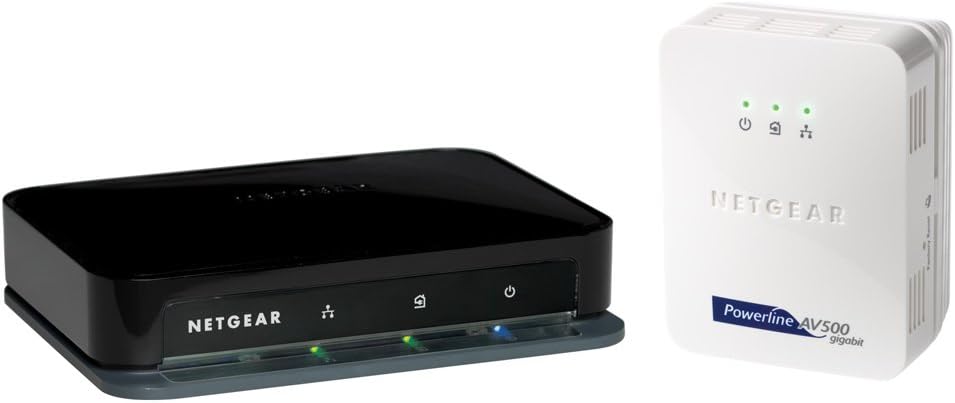
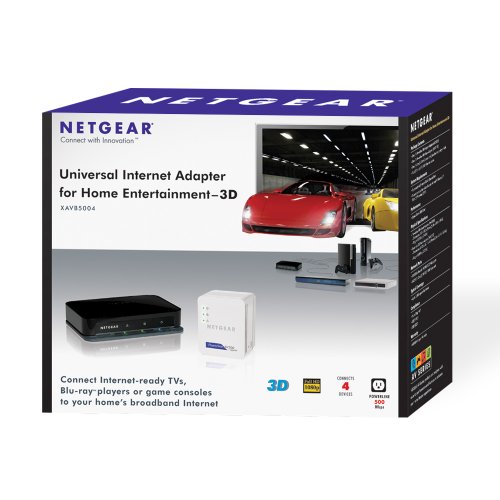
NETGEAR Powerline 500 Mbps 4-Port Adapter Kit XAVB5004
 Amazon.com
$312.45
NETGEAR Powerline 500 Mbps 4-Port Adapter Kit XAVB5004 Price comparison


- All prices mentioned above are in United States dollar.
- This product is available at Amazon.com.
- At amazon.com you can purchase NETGEAR Powerline 500 Mbps 4-port Network Adapter Kit (XAVB5004) for only $312.45
- The lowest price of NETGEAR Powerline 500 Mbps 4-port Network Adapter Kit (XAVB5004) was obtained on September 24, 2025 03:58.
NETGEAR Powerline 500 Mbps 4-Port Adapter Kit XAVB5004 Price History
NETGEAR Powerline 500 Mbps 4-Port Adapter Kit XAVB5004 Description
NETGEAR Powerline 500 Mbps 4-Port Adapter Kit XAVB5004: Powerful Networking Solution
The NETGEAR Powerline 500 Mbps 4-Port Adapter Kit XAVB5004 is an essential tool for anyone looking to enhance their home or office network. With its impressive data transfer rates and multiple ports, this powerline adapter offers an effortless way to extend your network beyond typical Wi-Fi range. Whether you’re streaming HD videos, gaming, or working from home, the XAVB5004 ensures a stable, high-speed internet connection. Read on to discover how this product can transform your internet experience.
Key Features of the NETGEAR Powerline 500 Mbps
- High-Speed Data Transfer: Capable of delivering speeds up to 500 Mbps, this adapter is designed to handle multiple devices and applications simultaneously.
- Four Ethernet Ports: Connect up to four devices directly, including game consoles, smart TVs, and computers, providing flexibility for your networking needs.
- Easy Setup: Plug-and-play design allows users to set up their network without any complex installation procedures.
- Compatible with Various Operating Systems: Works seamlessly with Windows 8, making it versatile for different setups.
- Compact Design: Its dimensions of 8.4 x 6.8 x 3.3 inches mean it won’t take up excessive space on your desk or entertainment unit.
- Energy Efficient: The device is designed to use less power without compromising performance, saving you on your energy bills.
Price Comparison for the XAVB5004
When comparing prices for the NETGEAR Powerline 500 Mbps 4-Port Adapter Kit XAVB5004, consumers will find that it is competitively priced across various suppliers. Prices typically range, allowing shoppers to find deals that suit their budget. By analyzing the price history, you can see the trends, with prices often lower during major sales events, making it a perfect time to buy.
Insights from the 6-Month Price History
Examining the 6-month price history chart for the NETGEAR XAVB5004 reveals some interesting trends. Over this period, prices have fluctuated, with notable dips during holiday sales like Black Friday and Cyber Monday. This provides an excellent opportunity for potential buyers to secure the best price for this product.
Customer Reviews: Strengths and Weaknesses
Customer feedback for the NETGEAR Powerline 500 Mbps 4-Port Adapter has been largely positive. Users praise its reliable performance and ease of use. Many appreciate the enhanced internet speeds, especially for gaming and multimedia streaming. However, some customers have noted connectivity issues when multiple devices are in use or when located far from the adapter’s power outlet.
Here’s a summary of what customers are saying:
- Pros:
- Fast and reliable internet connection.
- Simple installation process.
- Ideal for connecting multiple devices.
- Cons:
- Potential connectivity issues at greater distances.
- Some users experienced drops in connections when bandwidth is strained with multiple users.
Explore Review and Unboxing Videos
For a deeper understanding of the NETGEAR Powerline 500 Mbps 4-Port Adapter Kit XAVB5004, check out related unboxing and review videos on platforms like YouTube. These videos showcase real-life usage, hands-on installation demonstrations, and performance comparisons, painting a clearer picture of its capabilities and limitations.
Why Choose the NETGEAR Powerline 500 Mbps?
Choosing the NETGEAR Powerline 500 Mbps 4-Port Adapter Kit XAVB5004 means opting for reliability, speed, and convenience. Whether you’re an avid gamer, a binge-watcher, or someone who needs to stay productive at home, this powerline kit delivers the performance you need. The combination of high speeds, multiple ports, and easy setup makes it a smart choice for extending your network seamlessly.
In conclusion, if you’re searching for a versatile solution to improve your internet connection, the NETGEAR Powerline 500 Mbps 4-Port Adapter Kit XAVB5004 is a commendable choice. Don’t miss out on competitive pricing; compare prices now!
NETGEAR Powerline 500 Mbps 4-Port Adapter Kit XAVB5004 Specification
Specification: NETGEAR Powerline 500 Mbps 4-Port Adapter Kit XAVB5004
|
NETGEAR Powerline 500 Mbps 4-Port Adapter Kit XAVB5004 Reviews (5)
5 reviews for NETGEAR Powerline 500 Mbps 4-Port Adapter Kit XAVB5004
Only logged in customers who have purchased this product may leave a review.






Wayne H. –
I purchased a Smart TV and other components that are Internet ready for our living room. Like others, I found the spot that is the most comfortable for viewing is not very good for in-house wifi. I was either waiting forever it seemed for access or finding big pauses in advancing through web sites. I saw that many people have had success with this Powerline product and thought it would be worth trying.
After the install that takes about 15 minutes, I was up and running. The XAV5001 plugs into the electrical outlet and a ethernet cable plugs it into an available port on your router. The XAV5004 plugs into the wall near your equipment with 4 ports available for hookup. I have a green light on the Powerline LED which indicates greater than 80 Mbps. I found that response times were very good and the only thing slowing me down was getting used to my Smart TV’s interface.
I also have a number of devices that have internet connections for various apps and for updating firmware. I currently have a Samsung TV, Apple TV, Roku, Blu-Ray player, Wii and AV receiver. The Samsung TV, Apple TV and Roku are used to stream video and they occupy ports 1, 2 and 3 of the XAV5004. I connected the last port (4) of the XAV5004 to a Netgear GS105 Switch, which has 5 ports, 1 connected to the XAV5004 and the other 4 are open for use. I am using 3 of these ports connected to the Blu-Ray, AV Receiver and Wii.
I have used the switch for firmware updates, which works great. I feel alot more secure with a wired connection for firmware updates. I also moved my Roku box to the switch to test streaming Netfix videos and that worked great too.
The GS105 switch basically has zero install time, I just plugged the power cord in and an ethernet cable from the XAV5004 to the GS105 and it started working.
All and all the Powerline made my media area seem like I was hooked to my router. The switch gave me extra flexibility for connections. My house has mid-1970’s wiring. My XAV5001 adapter hooked to my router is on a separate circuit from the XAV5004 hooked to the living room equipment. For me, this is definitely 5 stars.
Red –
I bought this for our home theater system to serve an HTPC & Xbox 360 in our living room. Much better connection than the previous wireless-N. I can stream in HD and there’s no lag or buffer issues. Backing up the HTPC to my NAS is much faster as well. Installation was a breeze including the firmware update. I would certainly recommend this, especially for those suffering from wireless lag, weak signal, etc. Only con I can think of is the price…
Pat L –
I tested this product with various configurations and it outperformed the simpler version. My problem was maybe because of the aging home wiring, so I never saw the high bandwidth. Pretty much limited to 64mb/s on this one, versus 45 mb/s with the simpler setup. I returned the product and I am going full wireless.
Supermuncher –
If you have a standby generator beware of which circuits are connected to that panel. I wanted to consolidate some of my gear and thought hey lets remove some of the routers and run straight from the line coming into the house to the routers. Well turns out the line coming in to the basement was not on the generators switch panel. Meaning I got about 1Mbps, internet speed instead of the 50Mbps I was supposed to get. Was this my oversight? Yes absolutely. Does it work great on the same panel? Yes! However that wasn’t the intended function I bought this for, leaving me once again with slow N speed wifi as the only option instead of running cat5/6 all over the house. Since I do a lot of streaming (bluray among other things) N-speed really wasn’t doing it. To put into perspective wifi N I get ~5Mbit to 2.5Mbit if more than one device streaming. Powerline did provide ~50-60Mbit with overheads, so about 10x the performance of N-wifi.
Of course the parts of the house where I wanted to connect with powerline are not the generator circuits so essentially this thing will be sitting in a box till I either move, or find another use for it. Works great on the few circuits I have on the generator switchbox, but not on the ones that are not on it. Ah well maybe AC wireless will provide me with the speeds I want, now just need an AppleTV that supports AC.
H. Prathap –
I think its a great product but here is the issue I had. I have Comcast Xfinity highspeed and the modem is DOCSIS SB6121 and the router is Netgear WNDR4500. Whenever I connect this powerline network adapter – XAVB5004, I loose internet connection. I had been struggling with Comcast, then with Netgear and finally one technician from Comcast was patient enough to pull-out wire-by-wire from the modem and finally figured it out that the Powerline network adapter is the culprit which was causing the problem of the modem getting reset often!!
I guess this model being a gigabit network adapter, the adapter is trying to pull or push data from the router and the router is trying to pull/push high volume of data (maybe Gigabits) but then the router gets disconnected when it pings into its some comcast server. Maybe this could be controlled through Netgear Genie….I dont know or who knows what will happen if there is power cyle restart and what is the guarantee the problem will not surface up again if it resets? Well again, If I need a powerline network adapter maybe use a lower version like netgear XAVB5201 but then there are a lot of other products cheaper than this and works very well.
Anyway I have givenup, not worth my time spending to crack fixing this. I had to return this back to Amazon!
Well! Netgear is that there is a free technical customer service is available for about 60 days but then if you want tech support beyond 60 days for any reason… you have to pay 100 bucks or more for a 2 year contract. Hello… Netgear! your router for example WNDR4500 is less than the service contract fee! why do I have to pay hundred and 120 or so for the tech support beyond 60 days? Simply I would buy a new one if it breaks isnt it?
Glad for some of them its working but if you change your router or modem, it may cause issues.